MCK / ALONG / 01
Scratch for kids
Stories and games from coloured blocks, from age 6.
Open the syllabusPeru · Ages 7 to 12 · MakeCode in Minecraft, live in English
A child who has spent a whole afternoon placing blocks one by one is ready for the idea behind all programming: tell the computer once, and let it do the work a thousand times. Minecraft is a good place to meet that idea, because the result appears in a world the child already loves. This page explains which Minecraft is used for coding, how to find out whether your child already has access through school, what the lessons cover, and how a short logic puzzle about a lamp teaches careful thinking.
Live teaching since 2020 · 4.9 from about 547 Google reviews · the child drags every block and explains it
What families in Peru need to know
Minecraft coding classes for kids in Peru, ages 7 to 12, are taught by Modern Age Coders live and online in English. Children use Minecraft Education with its built-in MakeCode editor: they snap code blocks together, command the Agent robot to build, write loops and conditions, and finish with a small mini-game of their own design. A mentor based in India watches the shared screen and asks questions rather than giving answers. Lessons run in a group of fifteen to twenty or one to one, at any hour that suits your family in Peru, and the first one is free.
Where to begin
The Minecraft course comes first. The other two suit a child who wants several game worlds, or who needs logic and step-by-step thinking before any game at all.
MCK / 01
Ages 7 to 12, about four months. First commands and the Agent, loops for big builds, variables, decisions and events, an auto-farm, then mini-games with score and timers, and a closing look at the same code in JavaScript.
Open the syllabus →
MCK / 02
Ages 8 to 12. Scratch, Roblox and Minecraft in one course, for a child who enjoys all three and has not chosen a favourite.
Open the syllabus →
MCK / 03
For younger or less confident children: breaking a task into steps, spotting patterns and testing every case, the habits the lamp puzzle on this page depends on.
Open the syllabus →Which Minecraft
Usually not. The game most children have at home is ordinary Minecraft. Coding lessons use Minecraft Education, a separate edition with a coding tool built in. Microsoft sets out the differences on its page for parents.
| Minecraft (the home game) | Minecraft Education | |
|---|---|---|
| Purpose | Entertainment, creativity and exploration in open-ended worlds | Learning, with a content library for school subjects including maths, science, history and coding |
| Licence | A one-time game licence or a subscription on a personal account | A Microsoft 365 education licence, deployed on school-managed devices |
| Classroom tools | None built in | Classroom management, assessment, Immersive Reader, a lesson library and Code Builder for coding in MakeCode |
| Who you play with | Public or private servers, often run independently | Classmates on school-managed devices, not public servers |
Source: Minecraft Education, "Resources for parents and families", FAQ "Minecraft vs. Minecraft Education: What's the difference?", education.minecraft.net, read on 9 November 2026. Summarised row by row; the comparison is Microsoft's.
The line that matters is the last cell of the third row: Code Builder. It opens MakeCode inside the game, so a child writes code in one window and watches it run in the world beside it. MakeCode describes itself as "a code editor to build fun mods and programs for Minecraft".
The home game has no such tool, which is why a child can play for years without ever writing code. The two editions look alike on screen, so it is worth checking which one your child is opening.
Minecraft Education keeps players with classmates rather than on public servers, according to the same page. In our lessons the child works in their own world, with the mentor watching the shared screen, and no outsider joins.
There is nothing to buy inside it during our course. The home game's licence terms (the EULA) say in-game currency may be bought with real money only by someone who has reached "the age of "majority" where you live", which is another reason children code in the education edition.
Access through school
Possibly. Microsoft tells parents that a child "may already have access through their school account", and suggests checking with the school before buying anything.
Ask the school's technology coordinator one plain question: "Does my child's school Microsoft account include Minecraft Education?" If it does, your child signs in with that school account and can use it for our classes too, subject to the school's own rules.
If the answer is no, Microsoft says "Anyone with a Microsoft 365 account can purchase and use Minecraft Education", and that homeschools, families and other organisations can buy it through its commercial offer. We help every family set it up before the first class; we do not sell licences ourselves.
Minecraft Education is "Available for Windows, Mac, Chromebook, iPad, Android, and iOS". For our lessons a computer or an iPad works; a phone screen is too small to see the code and the world at the same time.
Microsoft also reports "Millions of educators and students use Minecraft Education in 115 countries", and it offers "over 600 standards-aligned lessons". Those lessons are written for classrooms; our course takes a different, more personal route through the same tool.
Code Builder and the Agent
They give instructions to the Agent, a small robot that lives in their world. MakeCode puts it simply: "The agent is your assistant who helps you do things in Minecraft." The child plans, the Agent carries out the plan, and any mistake in the plan shows up at once as a crooked wall or a hole in the floor.
Every instruction is a coloured block: move forward, turn left, place, repeat. Children drag and snap them together, so a seven year old who reads short sentences can start on day one.
A loop of four "move forward, place" blocks builds a wall faster than any player. Change one number and the wall is ten blocks long instead of four. That is the first moment a child sees code save effort.
MakeCode can show the same program as JavaScript or Python. Near the end of our course children peek at the JavaScript behind their blocks and find that they already understand most of it.
MakeCode's own CS Intro course explains conditions to children with sentences from home life: "IF this, THEN that". We use the same approach, and then push it one step further with logic: what if two things are both true, or neither, or exactly one? The lesson below is built on that question.
A logic lesson
By making a child test every case instead of the first one that comes to mind. Here is a lesson from our decisions week. A corridor has a lamp and a lever at each end; flipping either lever should change the lamp, the way a staircase light works at home.
Almost every child says: the lamp is on if lever A is on or lever B is on. In MakeCode that is one "or" block. They test it by flipping A: the lamp lights. They flip B instead: it lights. It seems finished.
The mentor then asks a question rather than pointing out the problem: "Walk in at one end, flip A to light the corridor. Walk to the other end and flip B to turn it off. What happens?" The lamp stays on.
MakeCode's own reference explains it, if you read carefully: "A or B evaluates to true if either A is true or B is true, or if both A and B are true". With both levers up, "or" still says true. The child tested two cases and forgot the third.
So we stop guessing and list every case. Two levers, each up or down, make four combinations. We rebuild the circuit in Python, where a few lines print all four rows at once.
from itertools import product


def first_try(a, b):
    return a or b


def two_way(a, b):
    return (a or b) and not (a and b)


print("lever A  lever B  first_try  two_way")
for a, b in product([False, True], repeat=2):
print(f"{a!s:<8} {b!s:<8} {first_try(a, b)!s:<10} {two_way(a, b)}")lever A lever B first_try two_way False False False False False True True True True False True True True True True False
Exact output of our run with Python 3. The two columns agree on three rows and differ on the last one, where both levers are on.
The fix reads almost like English: the lamp is on if A or B is on, and not both. MakeCode has exactly these three blocks, and, or and not, and its reference defines "not A" as "the opposite (negation) of A". Older children then let the computer check their work for them.
rows = list(product([False, True], repeat=2))
wrong = [(a, b) for a, b in rows if first_try(a, b) != two_way(a, b)]
print("rows where first_try is wrong:", wrong)
print("two_way equals a != b on every row:",
all(two_way(a, b) == (a != b) for a, b in rows))rows where first_try is wrong: [(True, True)] two_way equals a != b on every row: True
Exact output of our run. Only the row with both levers on was wrong, and the fixed rule turns out to be the same as asking whether the two levers are different.
The sentence we want children to keep is this: a rule is only proved when every row of the table agrees. Two levers give four rows; three levers give eight. A child who learns to count the cases before trusting a rule has learnt something that matters far beyond Minecraft, in maths, in science and in any program they write later.
Four months
Our Minecraft course takes about four months in two halves: code that builds, then code that plays. Each half ends with a project week.
First commands and meeting the Agent, then loops for building at speed and big structures. In the second month: variables that remember a number, decisions that check something before acting, and events that react when a player does something.
The project week is an auto-farm: the Agent plants, waits and harvests on its own, which means the child has to plan the whole cycle before running any of it.
Randomness, keeping score and timers turn builds into games, and the project week is a small arena game. In the final month children name their own functions, take the JavaScript peek, and spend two sessions building and polishing a capstone.
The course ends with a short showcase in English, to the mentor and the family: what the game does, how it was built and one bug that took the longest to find.
Peru's national curriculum, the CNEB, includes in its science and technology area the competency "Diseña y construye soluciones tecnológicas para resolver problemas" (designs and builds technological solutions to solve problems). Our course is not part of any school programme, but the habit it practises, planning a solution and testing it until it works, is the one that competency describes.
Age and next steps
Seven is a good start, provided the child reads short sentences. Our course runs to twelve. MINEDU places a child of 7 in 2nd grade of primaria and a child of 11 in 6th grade, by their age on 31 March.
At 7 and 8, blocks and the Agent are enough: the child plans a build, drags the blocks and watches the result. At 9 and 10 the logic lessons and score-keeping games come into their own. At 11 and 12 a child is often ready to read the JavaScript and start typing short programs.
INEI's 2026 household survey found that 68.2% of Peruvian children aged 6 to 11 used the internet in the second quarter of the year. Many of them play Minecraft; far fewer have ever opened the code behind a world.
Most children move on to typed Python, where the logic from this course carries straight over. Our Python for kids in Peru page describes the first year. Others go to Roblox Studio for bigger games, or to Scratch first if they are still very young.
For a younger sibling, the Spanish-language page on coding at 8, in 3rd grade of primaria compares Scratch, Roblox and robotics for that age.
Thinking, not copying
Think. Tutorials show one path through a problem; our mentors ask the child to plan the path, predict what the Agent will do and explain any difference.
Before a big build the child sketches it and counts the blocks. The lamp puzzle starts the same way, with a table drawn by hand.
Microsoft offers AI-themed worlds and a CyberSafe series about using "AI tools responsibly". Children here learn how AI behaves, never through adult chatbot accounts: Claude requires users to be 18, and ChatGPT needs a parent's permission under 18.
A child in Lima, Chiclayo or Cajamarca has the same mentors and the same course. Only the time on the clock changes.
English is part of the thinking too. Each block in MakeCode is a short English phrase, and children are asked to read their program aloud as a sentence. "Repeat four times: move forward, place" is a plan, a piece of code and a piece of English all at once.
Peru time
At an hour you choose. Peru keeps UTC minus 5 all year and India UTC plus 5:30, so India is always ten and a half hours ahead. These rows convert a few Peru hours; they are examples, not a timetable.
| Peru time | India time | A moment that suits some families |
|---|---|---|
| 08:00 | 18:30 | A holiday morning in January or February |
| 10:30 | 21:00 | Saturday mid-morning |
| 14:30 | 01:00, next day | After lunch on a school day |
| 17:00 | 03:30, next day | Once homework is finished |
| 20:30 | 07:00, next day | Later evening for older children |
Time rules: IANA time zone database (America/Lima, UTC minus 5, no summer time; Asia/Kolkata, UTC plus 5:30). Conversions calculated by us.
Neither country moves its clocks, so a Tuesday class at 17:00 in Arequipa stays at 17:00 in every month. Read how to judge any live class on online coding classes for kids in Peru, or browse every Peru guide from the coding and AI classes in Peru hub.
Progress
Ask them to show and explain. These are our own stages, used to place children and to plan the next lesson.
| Stage | What they can make | What they can say |
|---|---|---|
| 1. Commands | Make the Agent move, turn and place a block | "The Agent goes forward three, then turns." |
| 2. Loops | Build a wall or tower with a repeat block | "I changed 4 to 10 and the wall got longer." |
| 3. Memory | Use a variable to count blocks or score | "The variable remembers how many it placed." |
| 4. Decisions | Make code check something before it acts | "If there is a block in front, it turns." |
| 5. Logic | Combine and, or and not, and test every case | "Both levers on was the case I forgot." |
| 6. Games | Design and finish a mini-game with score and a timer | "This is my game, and this is how I tested it." |
Ask your child which case they forgot last time. A child who can answer is learning to test, not just to build.
Stage 5 is the lamp lesson. It tends to make children check their own work without being asked.
Before you run your code, say out loud what the Agent will do. Then watch whether you were right.
If something works once, try it a different way. The bug is often hiding in the case you did not try.
More to explore
Every course is live, in English, with one mentor throughout, in a group or one to one.
MCK / ALONG / 01
Stories and games from coloured blocks, from age 6.
Open the syllabusMCK / ALONG / 02
A long block path through games, apps and a little AI.
Open the syllabusMCK / ALONG / 03
Puzzles and patterns that prepare for logic like the lamp.
Open the syllabusMCK / NEXT / 01
Typed scripts in Roblox Studio and a published game.
Open the syllabusMCK / NEXT / 02
A free game engine and its own scripting language.
Open the syllabusMCK / NEXT / 03
Phone-style apps designed and built by the child.
Open the syllabusMCK / CODE / 01
The same logic, now typed in Python, with child-safe AI.
Open the syllabusMCK / CODE / 02
How AI decides, and why it sometimes gets it wrong.
Open the syllabusMCK / CODE / 03
Tables, patterns and proofs explored in Python from 10.
Open the syllabusHow it works
Any day, any time, flexible: choose a batch, or for a very personalised plan choose 1-on-1 at the hour that suits your family.
Term time
Afternoons in Peru, after school and homework, are the most common request.
Summer break
January to March frees up mornings; tell us the hour and we match a mentor to it.
Private lessons
One child, one mentor, at a time fixed around the family.
The child shares Minecraft and Code Builder; the mentor sees both.
The same teacher every week, who remembers last week's build.
Short instructions, each block named aloud as it is used.
Something new stands in the world before the lesson ends.
A few lines after class on what was made and what was tricky.
A group of fifteen to twenty, or private lessons.
Student work
Children who stay with coding move on to Python, apps and AI projects as teenagers. A few are shown here; the student labs page has many more.
AI and ML
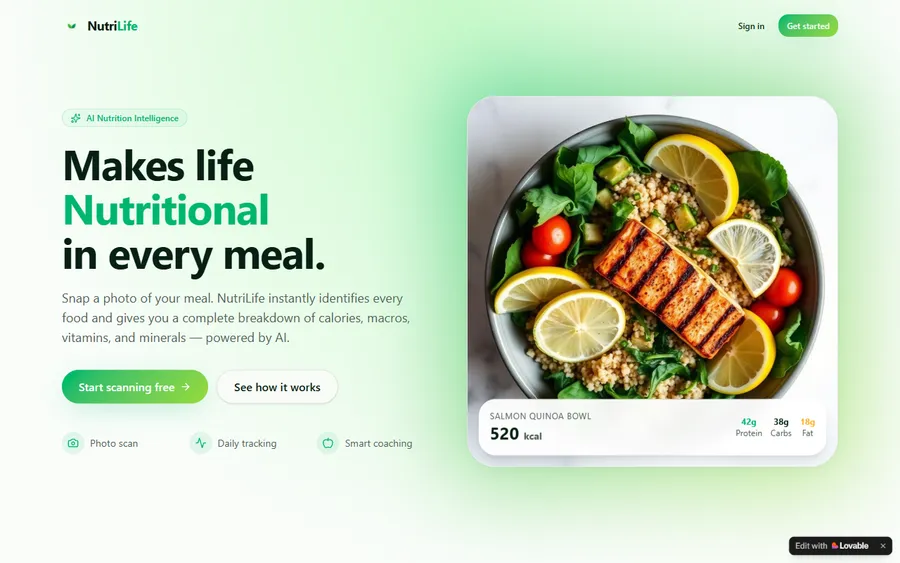
An AI nutrition coach that reads what you eat and works you toward a target.
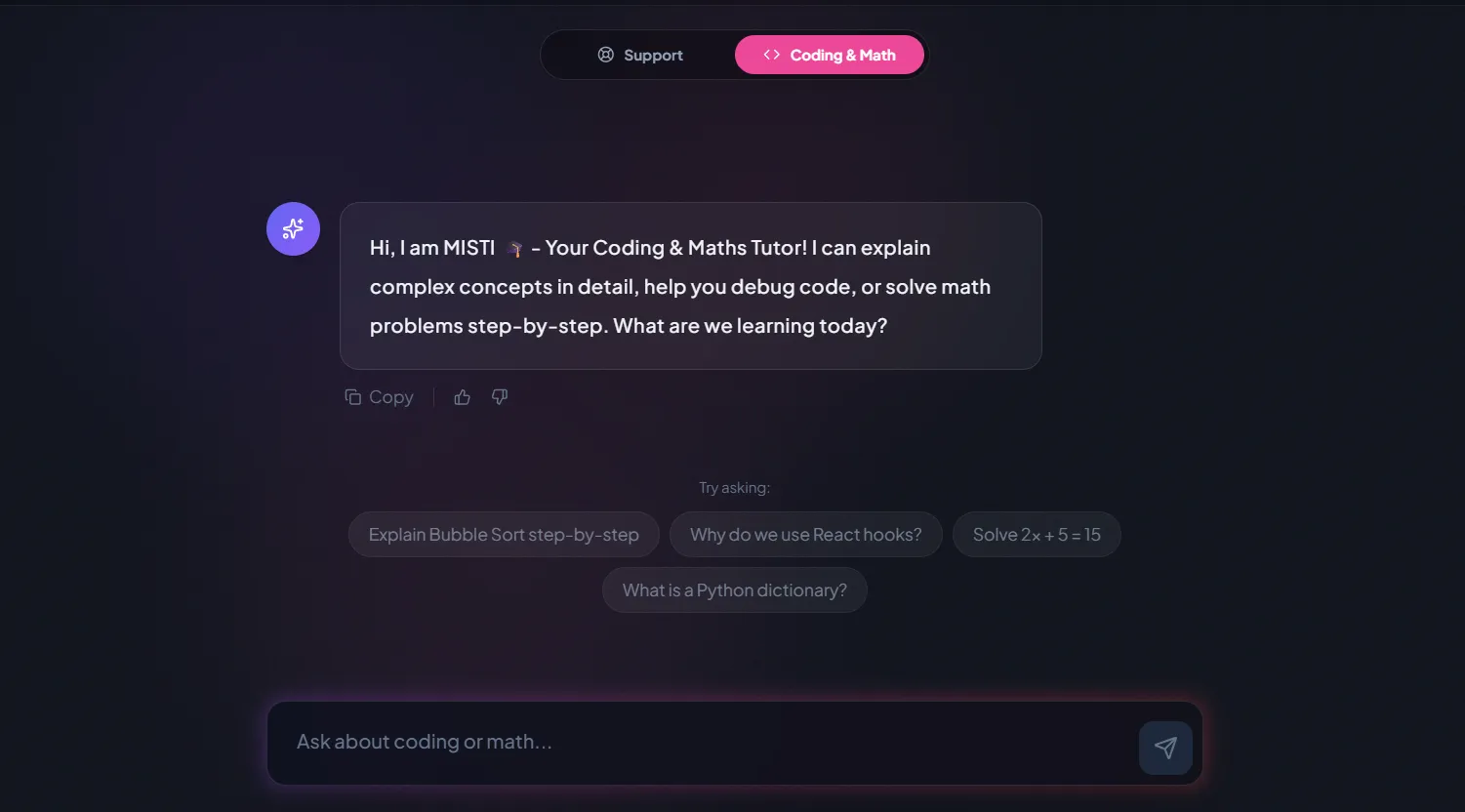
AI and ML
A chatbot that answers mathematics and programming questions, built and deployed by a student.
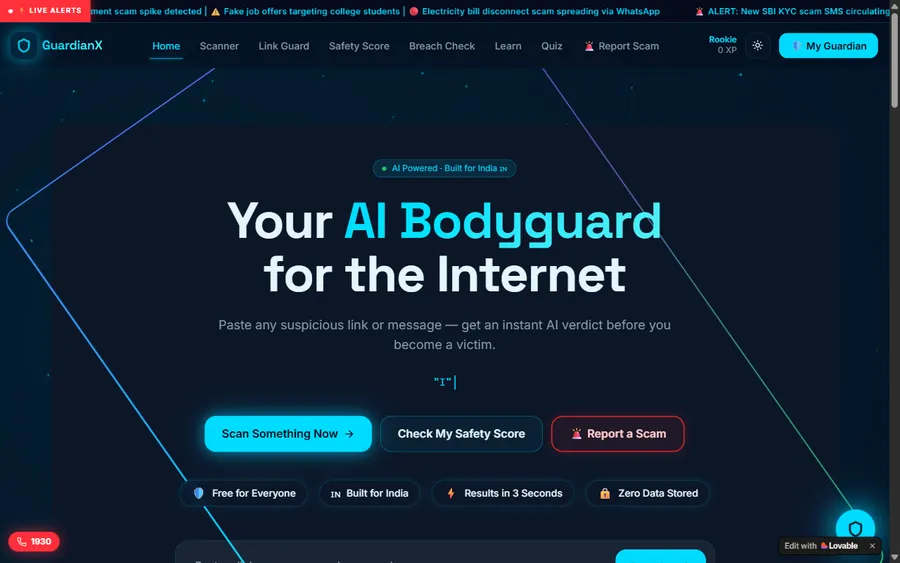
AI and ML
An assistant that helps a young person recognise unsafe situations online.
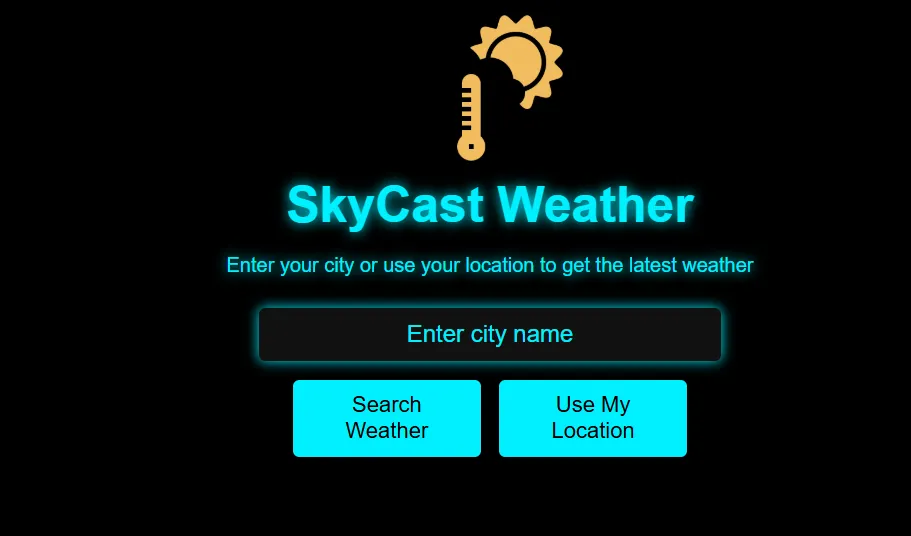
Web app
A weather forecasting site with live conditions for any location.
Fees
Fees are set in US dollars and taken by card each month. The soles amount depends on your bank's exchange rate when it processes the payment, so it may vary slightly.
Free first class
Free
no card required
Group batch
$100 USD
a month, eight live classes
One to one
$150 USD
a month, eight live classes
What families say
Parents and students on Google, in their own words.
★★★★★
"The one step solution for my son. Modern Age Coders make learning coding so simple that kids love it. The teachers explain complex concepts clearly with practical exercises and interactive content."
Ria Mukherjee
Parent
★★★★★
"Modern Age Coders has been a game-changer for me. I struggled to grasp IT concepts and coding before joining, but their classes transformed everything. I can now confidently write complex programs with ease."
Samriddha Mondal
Student
★★★★★
"One of the most wonderful education centres out there. Education is not limited to school syllabus but focuses on skill development."
Vansh Agarwal
Student
★★★★★
"My child Dhairya is really enjoying the Modern Age Coders classes. This is his first online class and he eagerly looks forward to it. I can already see his improvement, and the teachers are very cooperative."
Sonam Oswal
Parent of Dhairya
★★★★★
"Modern Age Coders have wonderful teachers who teach in a clear, easy and practical way. The teacher boosts students' confidence and inspires them to learn without hesitation."
Sonu Goyal
Parent
★★★★★
"I highly recommend this computer coding class! The teachers are incredibly knowledgeable and passionate about coding."
Ritu Kedia
Parent
Questions from Peru
No. Our classes are live, online and in English only. The mentor speaks clearly and at your child's pace, adapts to their accent, and names each MakeCode block aloud while pointing to it, so a child still building their English can follow. Some of our Peru pages are written in Spanish for parents, but teaching is always in English.
Check with your child's school first. Microsoft says a child may already have access through a school Microsoft account. If not, Microsoft states that anyone with a Microsoft 365 account can purchase and use it, and families and homeschools can buy it through its commercial offer. We help set it up but do not sell licences.
Not for our course. The home game has no built-in coding tool. Minecraft Education includes Code Builder, which opens the MakeCode editor inside the game, and that is what the lessons use.
Our course is for ages 7 to 12. A seven year old who reads short sentences can drag blocks and command the Agent. Older children in the course also read and change the JavaScript behind their blocks.
A computer or an iPad. Microsoft lists Minecraft Education for Windows, Mac, Chromebook, iPad, Android and iOS, but a phone screen is too small to see the code and the world together. A headset with a microphone makes the class much easier to hear.
Yes. Loops, variables, conditions, logic, events and functions are the same ideas used in Python or JavaScript. MakeCode can show a child's blocks as JavaScript or Python, and near the end of the course children read the JavaScript of their own programs.
Any day, any time, flexible: choose a batch, or for a very personalised plan choose 1-on-1 at the hour that suits your family. India runs ten and a half hours ahead of Peru all year, so 17:00 in Peru is 03:30 the next morning in India.
A group of fifteen to twenty children of similar age is lively and lets children borrow ideas from one another. One to one suits a child who is shy, younger than the group, very new to English or racing ahead. Families can switch after a month.
No. In our lessons the child works in their own world, with only the mentor watching the shared screen. Microsoft describes Minecraft Education as played with classmates on school-managed devices rather than public servers.
No. Modern Age Coders is an independent online school with no tie to Microsoft, Mojang, MINEDU or any Peruvian school. We award no Peruvian grades; children who finish receive a completion certificate issued by us.
Read next
Useful next pages.
Our main Minecraft course page.
How older children go further with mods.
Another block-based start for younger children.
The youngest age each AI tool allows.
Why we ask before we tell.
One live lesson described in full.
Part of the guide: Every Peru page
More guides: Coding and AI classes in Peru · En español: clases de programación en inglés · Start here: English-medium coding in Lima · By age and stage: AI and coding for professionals · Exams, olympiads and school holidays: IB computer science tutor · Guides to choosing: An English-taught option to Crack The Code · Regions of Peru: Amazonas region · Cities: Arequipa: coding for every age · Lima and Callao districts: Programación para niños en Ancón
Start here
In the trial lesson your child opens Code Builder with a mentor, sends the Agent on its first short journey and builds a small wall with a loop. Watching that, the mentor gets a feel for how your child plans and how much spoken English they follow, and then suggests a course, a group or private lessons, and a time.
Prefer to read first? Each week of the Minecraft coding course is listed on its page, and this description of our lessons shows a class from beginning to end.
WhatsApp us · +91 91233 66161 · connect@modernagecoders.com
All teaching is live video from India, and only in English. A WhatsApp message in English gets the quickest reply.
A priority demo is a full class of about 45 to 60 minutes. After the class the mentor sends a written skill report and a personal learning roadmap on WhatsApp. If you enrol, the demo fee is adjusted against your first month's fee. Share your demo Order ID with us on WhatsApp and we take it off.
Book a priority demo