PE / TEEN / 01
Python for teens
Programming from zero in Python, the language of MINEDU's pilot.
Open the syllabusPeru · Ages 13 to 17 · Live online, in English
Teenagers in Peru use apps all day; very few have been shown how one is made. This page is for secundaria students who want to build their own, and for the parents who will be asked to sign the account forms. It covers what a teenager can build in each school year, why the number 14 keeps appearing in Peru's rules, which AI tools fit which age, and a lesson where a teenager writes the age check that their own app will need.
Live classes since 2020 · 10,000+ learners in many countries · teen groups kept separate from adults
The short answer
Modern Age Coders runs app development classes for teenagers in Peru aged 13 to 17, live, online and in English, and every class has a real mentor on video. Teens start from zero with JavaScript, then build phone apps in React Native with Expo and Firebase, finishing a working app of their own. Groups of fifteen to twenty are for teenagers only, or a teen can learn one to one, at any hour the family chooses. We teach them to think through each feature, not to paste code from a chatbot, and we keep to the age rules of every tool.
Start here
One complete app course, and two that build the foundations it rests on. All three are for ages 13 to 18 and start from nothing.
PE / TEEN APP / 01
For 13 to 18 year olds with no experience, running for roughly a year (10 to 12 months). JavaScript, React and React Native with Expo and Firebase, ending with a launched capstone app.
Open the syllabus →
PE / TEEN APP / 02
Ages 13 to 18, six months. The language React Native is written in, learned through browser games, for teens who want a gentler first step.
Open the syllabus →
PE / TEEN APP / 03
Ages 13 to 18, 9 to 11 months. Components and state in React, the same ideas a React Native app is built from.
Open the syllabus →School and apps
Not as a subject. The national curriculum treats digital skills as something every area should use, and the secundaria timetable has no computing course. App building happens outside school, in a pilot, or at home.
MINEDU's national curriculum, the CNEB, lists competency 28, about working in virtual environments created by technology, among the competencies that cross all areas rather than belonging to one. A regular-day secundaria timetable fills 35 hours a week with Matemática, Comunicación, Inglés, sciences and Educación para el Trabajo; no slot in it is called computing or programming.
So a student can finish 5° de secundaria having used many apps for schoolwork without once seeing how one is put together.
A thousand students in the last two years of secundaria in Lima Norte are learning Python in the Fábrica de Programadores, a MINEDU pilot that ends with the PCEP certification exam. And the OPI, the Peruvian computing olympiad run by UTEC, costs nothing to enter for any secundaria student.
Both are good signs, and both are about programming in general. Neither teaches a teenager how to design screens, store a user's data or publish to a phone, which is the gap an app course fills.
Our Spanish-language page for the same teenagers, crear apps: curso para adolescentes, looks at how Peruvian teens actually go online and teaches a sign-up form lesson. Here we look at something parents ask us about just as often: the age rules.
Year by year
A route of our own, set against the school year MINEDU expects at each age. A student who joins in 4° does not start where a 1° student starts; the mentor places each teen after the free class.
| School year | Normative age at 31 March | Where we usually start | A project at the end of the year |
|---|---|---|---|
| 1° de secundaria | 12 | JavaScript through browser games | A quiz game that keeps a score |
| 2° de secundaria | 13 | JavaScript, then first React screens | A to-do list that remembers its items |
| 3° de secundaria | 14 | React Native with Expo | A phone app with two screens and navigation |
| 4° de secundaria | 15 | Firebase sign-in and a database | A club or class app with accounts |
| 5° de secundaria | 16 | A capstone app, tested and documented | A finished app for a portfolio |
Normative ages: MINEDU, Edades normativas (age reached by 31 March of the school year). The route and projects are ours. Our teen courses take learners from 13, so a 12 year old in 1° de secundaria usually begins in our coding courses for children and moves across.
Short projects with fast results: a game, a timer, a list. The aim is to make JavaScript feel familiar and to show that a program can be fixed by reasoning, not only by trial and error.
The first real phone app, running on their own handset through Expo. This is where state, screens and data arrive, and where the age lessons on this page start to matter.
A capstone the student designs. Many pick something for their school or family: a revision planner, a football league table, an order list for a relative's shop.
The age-14 line
In Peru the number that matters is usually 14, not 13. Google sets 14 for Peru, and Peru's data protection regulation lets young people from that age give consent for their own data in some cases. Here are the lines, from each organisation's own page.
| Who sets it | The line | In their words, summarised |
|---|---|---|
| Peru: 14+ | Minimum age to manage your own Google Account in Peru; parents can create and manage an account for younger children with Family Link | |
| 13 elsewhere | Thirteen for every country not on Google's list | |
| Apple | Under 13 | Parents or guardians create the Apple Account for children under 13; ages vary by country or region |
| DS 016-2024-JUS, art. 22.2 | Over 14 and under 18 | May consent to the use of their own personal data, according to their capacity, if the information is in language they understand |
| DS 016-2024-JUS, art. 25.3 | Under 14 | A digital service aimed at them requires consent from a parent or guardian |
Sources: Google Account Help, "Age requirements on Google Accounts"; Apple Support, "Create an Apple Account for your child"; Decreto Supremo N.° 016-2024-JUS, articles 22 and 25 (official copy on gob.pe). Read on 9 November 2026. A teaching summary, not legal advice.
Our teen app course uses Firebase for sign-in and storage, and Firebase works with a Google account. In Peru, a 13 year old is below Google's line for managing an account alone, so a parent sets it up through Family Link or creates a project the teen works inside. We explain this at the free class rather than in week six.
It also matters for the apps teenagers build. If a 16 year old writes an app for classmates in 2° de secundaria, those users are under 14, and Peru's regulation expects a parent's consent for a digital service aimed at them.
Teenagers learn to design an app that asks for as little as possible: a nickname instead of a full name, no phone number, no photo unless the feature truly needs one. When an app must know a user's age, they learn to compute it correctly, which is the lesson further down this page.
Parents of under-14s give consent for their child to join our classes, and we never ask a child to type in their parents' work or money details, which the regulation also protects.
AI tools by age
Fewer than most adults assume. Each vendor sets its own minimum age in its terms, and several are 18. On an under-18 course we only use tools whose terms allow the learner's age.
| Tool | Vendor's minimum age | What we do with teens |
|---|---|---|
| GitHub Copilot | 13 | Used from 13, with a mentor reviewing every suggestion |
| ChatGPT | 13, with a parent's permission under 18 | Only with a parent's permission, and never to write the answer for them |
| Google Gemini | 13, or the applicable age in your country | Treated with care in Peru, where Google's own account line is 14 |
| Glide Apps | 13, with a parent accepting the terms | Possible for no-code prototypes, with a parent's acceptance |
| Claude | 18 | Not used in teen classes |
| Replit | An adult | Not used in teen classes |
Source: our AI tool age audit, which quotes each vendor's terms (audited 15 July 2026); the AI tools age guide lists the quotes. Terms change, so we recheck before each course module that uses a tool.
The age rule is the minimum, not the method. Even where a tool is allowed, we teach teenagers to write the feature themselves first, then ask the assistant to review it, not the other way round. The Peruvian computing olympiad makes the same point in its own way: UTEC's 2025 rules banned generative AI for solving the problems. A teen who can only build with a chatbot open cannot build when it is closed, and contests, exams and interviews close it.
A lesson teens enjoy
Most first attempts subtract the birth year from this year. That is wrong for about half the year. Here is the lesson, with three invented users and a date of 9 November 2026.
An app for teenagers in Peru must decide whether a new user may sign in alone, at 14 or over, or needs a parent first. Three users try on 9 November 2026: Lucía, born 9 November 2012; Mateo, born 25 December 2012; and Valeria, born 29 February 2012.
Before running anything, the mentor asks the class for the right answers. Lucía turns 14 today. Mateo will not be 14 until Christmas. Valeria has a birthday that only exists in leap years.
With the age-14 line from the table above, a wrong age is not a small bug. It decides whether a parent is asked for consent at all.
It is also a classic test of whether a student checks their own code. Version 1 looks correct, runs without errors and gives three plausible answers. One of them is wrong.
from datetime import date

def age(born, today):
    return today.year - born.year

today = date(2026, 11, 9)
for name, born in [("Lucía", date(2012, 11, 9)),
                   ("Mateo", date(2012, 12, 25)),
                   ("Valeria", date(2012, 2, 29))]:
    years = age(born, today)
    print(name, years, "signs in alone" if years >= 14 else "needs a parent")
It prints Lucía 14 signs in alone, Mateo 14 signs in alone and Valeria 14 signs in alone. Mateo is 13, and he has just been let in without a parent.
The fix is one comparison. If this year's birthday has not happened yet, the person is one year younger than the subtraction says. Python compares pairs of numbers element by element, so (today.month, today.day) < (born.month, born.day) asks exactly "is today earlier in the year than the birthday?".
from datetime import date

def age(born, today):
    years = today.year - born.year
    if (today.month, today.day) < (born.month, born.day):
        years -= 1          # birthday not reached yet this year
    return years

today = date(2026, 11, 9)
for name, born in [("Lucía", date(2012, 11, 9)),
                   ("Mateo", date(2012, 12, 25)),
                   ("Valeria", date(2012, 2, 29))]:
    years = age(born, today)
    print(name, years, "signs in alone" if years >= 14 else "needs a parent")

print("Mateo on 24 Dec 2026:", age(date(2012, 12, 25), date(2026, 12, 24)))
print("Mateo on 25 Dec 2026:", age(date(2012, 12, 25), date(2026, 12, 25)))
print("Valeria on 28 Feb 2026:", age(date(2012, 2, 29), date(2026, 2, 28)))
print("Valeria on 1 Mar 2026:", age(date(2012, 2, 29), date(2026, 3, 1)))
It prints Lucía 14 signs in alone, Mateo 13 needs a parent, Valeria 14 signs in alone, then Mateo on 24 Dec 2026: 13, Mateo on 25 Dec 2026: 14, Valeria on 28 Feb 2026: 13 and Valeria on 1 Mar 2026: 14.
The last two lines start the liveliest discussion of the lesson. In 2026 there is no 29 February, so when does Valeria turn 14? Version 2 says 1 March, because 28 February comes before 29 February in the comparison. Some systems choose 28 February instead. Neither is a bug; it is a decision, and good code makes the decision visible with a test, so nobody changes it by accident.
We wrote the code, the three users, the dates and the printed output for this page; it ran under Python 3 on 9 November 2026. The threshold of 14 follows the line Google publishes for Peru.
Language of the classes
No. English is the one teaching language in all our live online classes, and our mentors in India are used to teenagers who are still growing into it.
Mentors speak slowly, repeat instructions in other words, and give a student time to answer. A teen who replies half in Spanish is understood and given the English phrase. After a few weeks most stop noticing, because the class is mainly about the code on the screen.
App development is a good subject to learn in English: JavaScript keywords, error messages, React Native documentation and nearly every tutorial are in English already.
EF's English Proficiency Index 2025 scores Lima 555, in its high band. The same edition scores Peruvians aged 18 to 20 at 469, in the low band, which suggests many young people leave school before their English is comfortable.
An hour of app building in English twice a week is extra listening and speaking practice that a teenager does not experience as a lesson. Parents tell us this is half the reason they chose it.
If you are not sure whether your teenager's English is ready, the free class answers that. The mentor checks how comfortably they follow, and tells you honestly. For a broader look at teen coding in Peru, our page on clases de programación para adolescentes covers games, competitions and AI too.
Class times
At whatever hour fits around colegio, homework and sport. Peru and India both keep the same clock all year.
| Peru time | India time | A typical fit for a teen |
|---|---|---|
| 07:30 | 18:00 | Before school, on days with a late start |
| 15:30 | 02:00, next day | After school |
| 17:00 | 03:30, next day | Before homework |
| 10:00 | 20:30 | Weekends and the summer break |
Peru sits at UTC minus 5 with no summer time (tz database, America/Lima), India at UTC plus 5:30, so the difference is a steady 10 hours 30 minutes in every month.
Many teens begin during the summer holidays that open the Peruvian year, then keep the same slot once colegio is back in March. Booking happens in your own Peru clock, and the system converts it for the mentor.
Progress
Our own stages. Each one ends with something the teen can show on a phone and explain in their own words.
| Stage | The teen can | What they show you |
|---|---|---|
| 1. Logic | Write JavaScript with conditions, loops and functions | A browser game they can explain line by line |
| 2. Screens | Build screens from components and pass data between them | Two screens that share a score or a list |
| 3. Phone | Run their app on their own handset through Expo | The app on the family phone |
| 4. Accounts | Add sign-in and saved data, asking for as little as possible | A sign-in screen and what it stores, and why |
| 5. Release | Test, document and prepare an app for others to use | A short demo and a page describing the app |
Stage 4 is where the age lessons on this page become real, because the teen is now handling other people's data.
You receive short updates on what was built and what was difficult, never a count of hours on a screen.
If your code says Mateo is 14, it is not lying. It is doing exactly what you wrote. Find the line.
A working app you can explain beats a beautiful app you cannot.
More for teenagers
Grouped by what a teenager wants next. Every course is for ages 13 to 18 unless it says otherwise, live and in English.
PE / TEEN / 01
Programming from zero in Python, the language of MINEDU's pilot.
Open the syllabusPE / TEEN / 02
Saving and sharing code properly, in twenty-four classes.
Open the syllabusPE / TEEN / 03
HTML, CSS and JavaScript for screens that look right.
Open the syllabusPE / TEEN / 04
Node, APIs and databases: the server an app talks to.
Open the syllabusPE / TEEN / 05
SQL from a first query to the data behind real apps.
Open the syllabusPE / TEEN / 06
For teens whose app idea is really a game.
Open the syllabusPE / TEEN / 07
Logic, data structures and algorithms, useful for the OPI.
Open the syllabusPE / TEEN / 08
Defensive security: how apps are attacked and protected.
Open the syllabusPE / TEEN / 09
Twelve weeks of building in teams, ages 13 to 17.
Open the syllabusHow it works
Any day, any time, flexible: choose a batch, or for a very personalised plan choose 1-on-1 at the hour that suits your family.
After colegio
Late afternoon in Peru is the small hours in India, and our mentors teach then.
Mornings
Peru mornings meet the Indian evening, handy on weekends and in summer.
1-on-1
A slot of your own, built around exams and sport.
No adults and no young children in the group.
The mentor asks and guides; the keyboard stays with the student.
One person who learns how your teen thinks.
Unhurried, repeated when needed, answers in their own words.
Only tools whose terms allow the learner's age.
The week's build, the sticking point, the next step.
Student work
A handful of finished pieces appear below, and the student labs collect the rest.
AI and ML
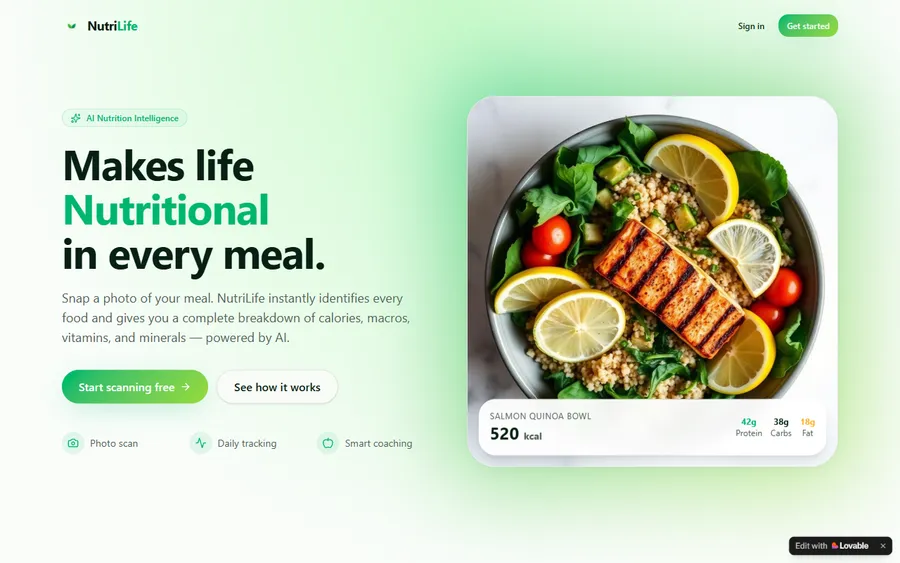
An AI nutrition coach that reads what you eat and works you toward a target.
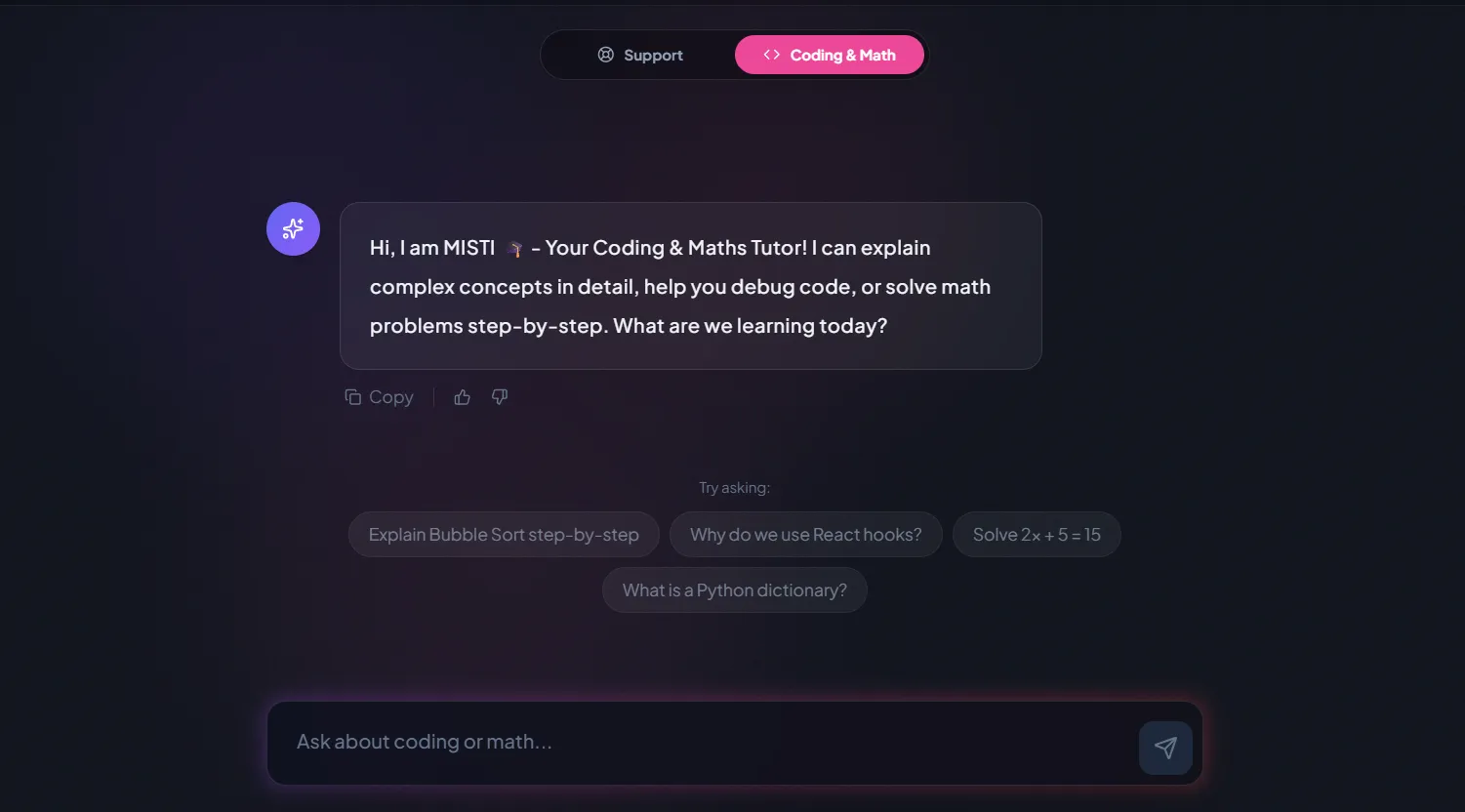
AI and ML
A chatbot that answers mathematics and programming questions, built and deployed by a student.
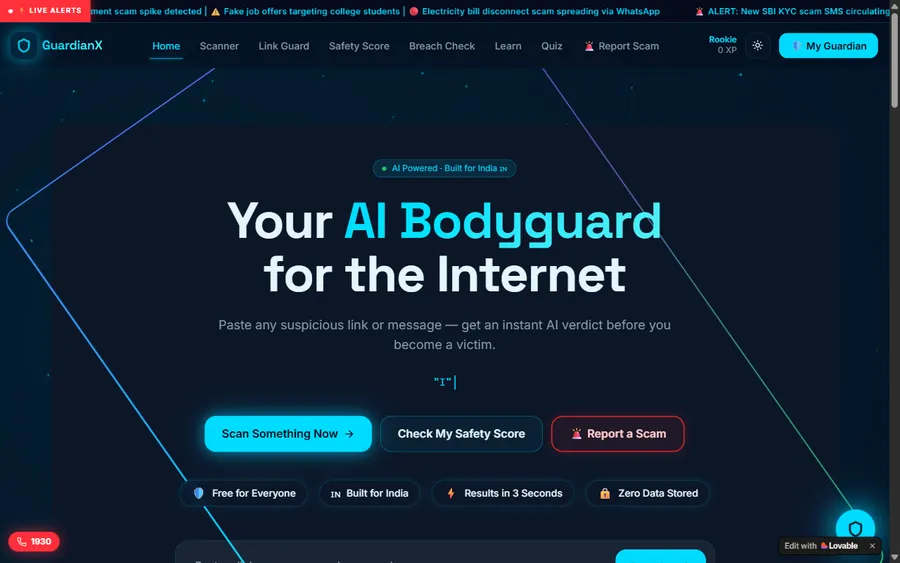
AI and ML
An assistant that helps a young person recognise unsafe situations online.
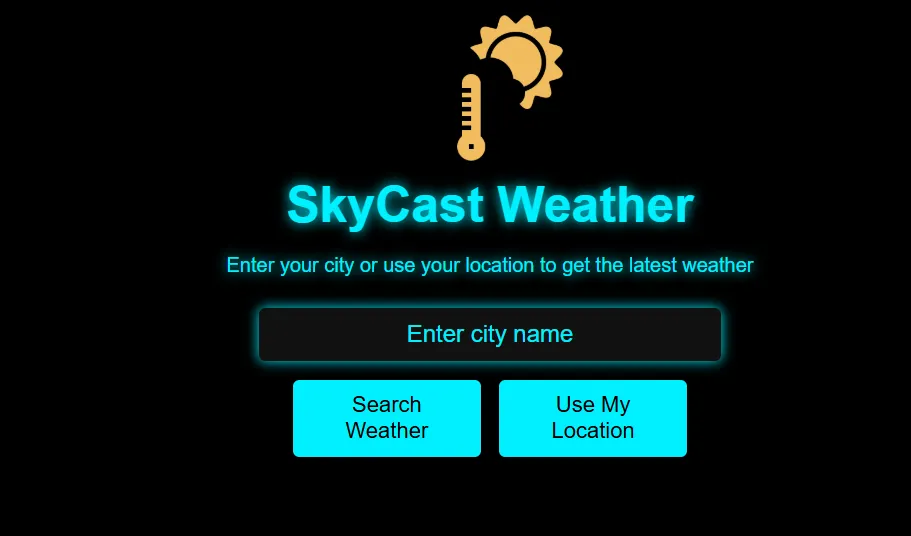
Web app
A weather forecasting site with live conditions for any location.
Fees
Monthly, with no long contract. We price in US dollars and charge the card in dollars; your bank applies its own exchange rate into soles, which is why a statement can differ by a little.
Free first class
Free
no card required
Group batch
$100 USD
a month, eight live classes
One to one
$150 USD
a month, eight live classes
What families say
Reviews from parents and students on Google, as written.
★★★★★
"The one step solution for my son. Modern Age Coders make learning coding so simple that kids love it. The teachers explain complex concepts clearly with practical exercises and interactive content."
Ria Mukherjee
Parent
★★★★★
"Modern Age Coders has been a game-changer for me. I struggled to grasp IT concepts and coding before joining, but their classes transformed everything. I can now confidently write complex programs with ease."
Samriddha Mondal
Student
★★★★★
"One of the most wonderful education centres out there. Education is not limited to school syllabus but focuses on skill development."
Vansh Agarwal
Student
★★★★★
"My child Dhairya is really enjoying the Modern Age Coders classes. This is his first online class and he eagerly looks forward to it. I can already see his improvement, and the teachers are very cooperative."
Sonam Oswal
Parent of Dhairya
★★★★★
"Modern Age Coders have wonderful teachers who teach in a clear, easy and practical way. The teacher boosts students' confidence and inspires them to learn without hesitation."
Sonu Goyal
Parent
★★★★★
"I highly recommend this computer coding class! The teachers are incredibly knowledgeable and passionate about coding."
Ritu Kedia
Parent
Parents and teens ask
No. English is the only teaching language in every live online class. Mentors keep a calm pace, rephrase when a teen looks unsure and soon get used to each accent; if a student answers partly in Spanish, the mentor replies with the English word. JavaScript and its error messages are in English in any case.
Our teen app course starts at 13. A younger child, or a 12 year old in 1° de secundaria, usually starts with our coding courses for children and moves across later.
No. The teen app course starts from zero. If they already know some JavaScript or Python, the mentor moves faster through the early weeks.
Google lists 14 as the minimum age in Peru to manage your own Google Account. For a 13 year old, a parent creates and manages one with Family Link, or sets up the project the teen works in. We explain it at the free class.
Only tools whose terms allow their age, such as GitHub Copilot from 13 with a mentor reviewing, or ChatGPT with a parent's permission. We do not use tools set at 18, such as Claude or Replit, in teen classes.
No. They write each feature themselves first and use an assistant, where allowed, to review it afterwards. Mentors ask them to explain every line they hand in.
Any day, any time, flexible: choose a batch, or for a very personalised plan choose 1-on-1 at the hour that suits your family. India runs 10 hours 30 minutes ahead of Peru in every season, so a 17:00 class in Peru is 03:30 the following day for the mentor.
Either works. With Expo, teens test their app on whatever phone the family has. A computer is needed to write the code; a phone alone is not enough.
Fees appear here in US dollars and the card is charged in dollars, which your bank changes into soles. Opened from India, the page shows rupees instead. No card is needed for the free first class.
It sits alongside school, not inside it: secundaria has no computing course, and we award no Peruvian grade. What it builds is logical thinking, English and a project portfolio, useful for university applications and contests like the OPI.
Passing the final exam earns a certificate of completion that we issue ourselves. MINEDU and schools have no part in it, so treat it as a record of the course; the app your teenager built is the better proof.
Read next
For Peruvian teenagers and their parents.
The Spanish page on teen app building, with a sign-up form lesson.
Games, competitions, AI and certification for secundaria.
Building AI, not just using it, inside the age rules.
The Peru index: ages, subjects, cities.
Each vendor's minimum age, quoted from its terms.
A live class, step by step.
Part of the guide: Every Peru page
More guides: Coding and AI classes in Peru · En español: clases de programación en inglés · Start here: English-medium coding in Lima · By age and stage: AI and coding for professionals · Exams, olympiads and school holidays: IB computer science tutor · Guides to choosing: An English-taught option to Crack The Code · Regions of Peru: Amazonas region · Cities: Arequipa: coding for every age · Lima and Callao districts: Programación para niños en Ancón
Start here
The free class is a short coding puzzle and a conversation about the app your teen would like to make. From it the mentor learns how your teen reasons and how much of the English lands, and recommends a starting course.
Rather read before booking? See how we teach for a class in detail, or browse all our courses.
WhatsApp us · +91 91233 66161 · connect@modernagecoders.com
All classes are live online with mentors in India, taught in English only. WhatsApp is the fastest way to reach us, in English.
A priority demo is a full class of about 45 to 60 minutes. After the class the mentor sends a written skill report and a personal learning roadmap on WhatsApp. If you enrol, the demo fee is adjusted against your first month's fee. Share your demo Order ID with us on WhatsApp and we take it off.
Book a priority demo