Table of Contents
- All 30 Python project ideas at a glance
- How to pick (and think through) your first project
- Level 1: simple Python projects for your first week
- Level 2: Python mini project ideas with lists and dictionaries
- Level 3: projects that save to files
- Level 4: add one library
- Python project ideas by topic
- Python projects for kids
- Python project ideas for students and your resume
- How to actually finish a project
- How we teach it
- Frequently asked questions
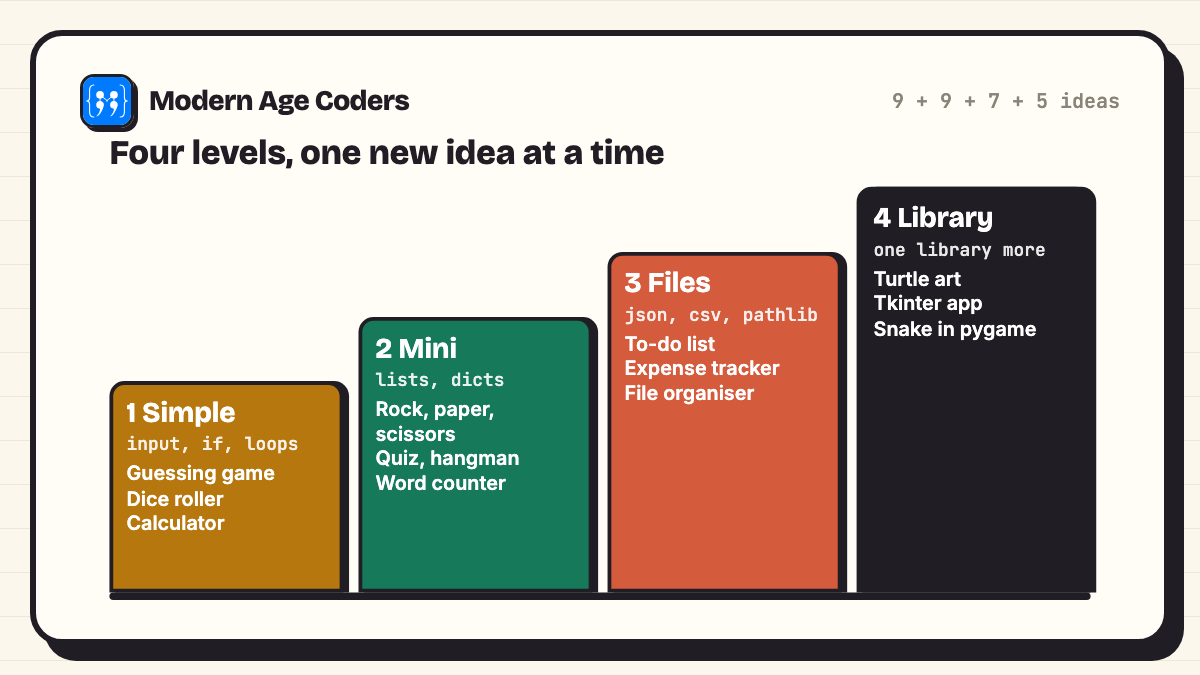
The best Python project ideas for beginners are small programs you can finish in one sitting: a number guessing game, a dice roller, a tip calculator, a quiz, hangman and a to-do list that saves to a file. Start with projects that only need input(), if and loops, then move up to lists, dictionaries and files, and only then add a library such as turtle or tkinter. Below are 30 Python project ideas in four levels, and 13 of them come with working starter code that we ran ourselves, with the output pasted exactly as it appeared.
A starter is deliberately short. It is the smallest version of the project that works, so you can run it in five minutes and then make it yours. Every starter is followed by one stretch goal, because the stretch goal is where the real learning happens. If you want longer, finished programs instead, our 15 Python mini projects with full source code are the next step up, and if you are still on single programs (sums, patterns, primes), start with 35 simple Python programs with output.
How these were tested
Every starter below was saved as a file and run with Python 3.14 using python3 -I, with nothing installed beyond the standard library. Where a program asks a question, the output box shows the screen exactly as it looked, including what we typed. Programs that use random will give you different numbers, which is the point.
All 30 Python project ideas at a glance
Use this as your checklist. Print it (Ctrl+P, then Save as PDF gives you a printable list) and tick each project once it runs. The level tells you what you need to know first.
| No. | Project | Level | What it teaches | Starter code |
|---|---|---|---|---|
| 1 | Number guessing game | 1 Simple | while loops, comparisons | Yes |
| 2 | Dice roller | 1 Simple | random, list comprehension | Yes |
| 3 | Mad Libs story | 1 Simple | input, f-strings | Yes |
| 4 | Tip and bill splitter | 1 Simple | float maths, formatting | Yes |
| 5 | Temperature converter | 1 Simple | functions, if/elif | Yes |
| 6 | Simple calculator | 1 Simple | functions, split() | Yes |
| 7 | Countdown timer | 1 Simple | time.sleep, divmod | Yes |
| 8 | Times table quiz | 1 Simple | for loops, scoring | Idea |
| 9 | Leap year and age checker | 1 Simple | modulo, conditions | Idea |
| 10 | Rock, paper, scissors | 2 Mini | dictionaries, random.choice | Yes |
| 11 | Quiz game | 2 Mini | lists of tuples, scoring | Yes |
| 12 | Hangman | 2 Mini | sets, while/else | Yes |
| 13 | Password generator | 2 Mini | secrets, string module | Yes |
| 14 | Word counter | 2 Mini | split, Counter | Yes |
| 15 | Palindrome and anagram checker | 2 Mini | slicing, sorted() | Idea |
| 16 | Flashcards | 2 Mini | dictionaries, shuffle | Idea |
| 17 | Random story generator | 2 Mini | random.choice on lists | Idea |
| 18 | Grade calculator | 2 Mini | lists, averages | Idea |
| 19 | To-do list saved to a file | 3 Files | json, os.path | Yes |
| 20 | Expense tracker | 3 Files | csv, totals by category | Idea |
| 21 | Contact book | 3 Files | dict of dicts, json | Idea |
| 22 | Daily journal | 3 Files | datetime, appending to a file | Idea |
| 23 | Typing speed test | 3 Files | time.perf_counter, strings | Idea |
| 24 | File organiser | 3 Files | pathlib, moving files | Idea |
| 25 | Secret message (Caesar cipher) | 3 Files | ord, chr, modulo | Idea |
| 26 | Turtle spirograph | 4 Library | turtle (built in) | Idea |
| 27 | Desktop calculator app | 4 Library | tkinter (built in) | Idea |
| 28 | Weather app | 4 Library | requests, a JSON API | Idea |
| 29 | Snake game | 4 Library | pygame, the game loop | Idea |
| 30 | Headline collector | 4 Library | requests, BeautifulSoup | Idea |
How to pick (and think through) your first project
Most beginners stall because they pick a project that is too big, not because Python is hard. A good first project passes three checks:
- You can say it in one sentence. "The computer picks a number and tells me higher or lower until I get it." If it takes a paragraph, it is two projects.
- You already know every building block, or all but one. One new idea per project is the sweet spot. Two new ideas at once is how people get stuck for a week.
- It works in the terminal first. Windows, buttons and graphics come later. A text version that works beats a beautiful version that does not.
Then break it down before you type. Every program in this list is input, process, output in a loop. For the tip and bill splitter that is: input the bill, the tip percent and the number of people; process tip = bill times percent over 100, total = bill plus tip, share = total over people; output three neat lines. Write those three lines as comments, then turn each comment into code. That habit, plan in plain words first and translate second, is the single most useful thing a beginner can learn, and it matters even more now that AI tools can write code for you: you still have to know what to ask for and check that the answer is right.
Using AI tools while you learn
Try the project yourself first and use an AI assistant to explain an error message, not to write the whole program. If it suggests code, read every line and predict the output before you run it. Check the tool's age rules too: several popular assistants are for adults only, and ChatGPT asks under-18s to have a parent's permission.
Level 1: simple Python projects for your first week
These need only variables, input(), if, loops and maybe one import. Each one fits on a single screen.
1. Number guessing game
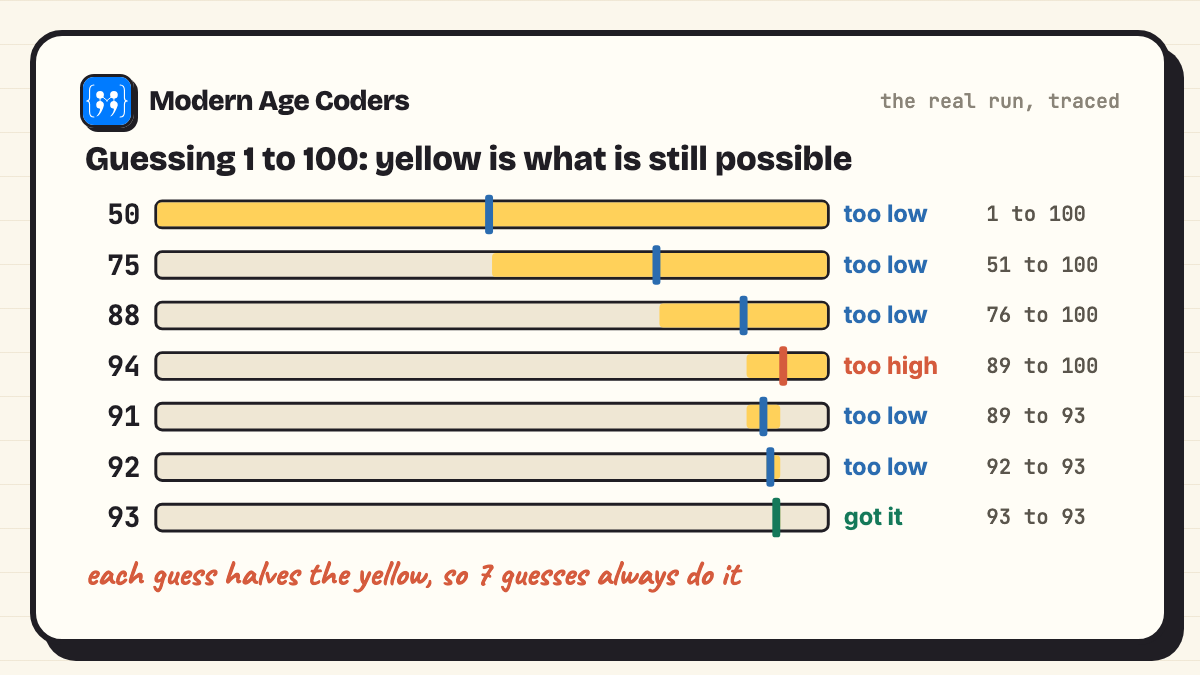
The computer picks a number from 1 to 100 and answers "too low" or "too high" until you find it. It teaches a while True loop with a break, comparisons and a counter.
import random

secret = random.randint(1, 100)
tries = 0

print("I am thinking of a number from 1 to 100.")
while True:
    guess = int(input("Your guess: "))
    tries += 1
    if guess < secret:
        print("Too low.")
    elif guess > secret:
        print("Too high.")
    else:
        print("Got it in", tries, "tries!")
breakI am thinking of a number from 1 to 100.
Your guess: 50
Too low.
Your guess: 75
Too low.
Your guess: 88
Too low.
Your guess: 94
Too high.
Your guess: 91
Too low.
Your guess: 92
Too low.
Your guess: 93
Got it in 7 tries!Think about it: look at the guesses. 50, 75, 88, 94, 91, 92, 93 is the halving strategy, and it never needs more than 7 guesses for 1 to 100, because 2 to the power 7 is 128. Stretch goal: let the player choose the range, and print the best possible number of tries for that range.
2. Dice roller
Ask how many dice to roll, draw each face in text, and add them up. It practises random.randint, a list comprehension and a dictionary that maps numbers to pictures.
import random

FACES = {1: "[ . ]", 2: "[ : ]", 3: "[.:.]", 4: "[: :]", 5: "[:.:]", 6: "[:::]"}

while True:
    count = int(input("How many dice? (0 to stop): "))
    if count == 0:
        print("Bye!")
        break
    rolls = [random.randint(1, 6) for _ in range(count)]
    print(" ".join(FACES[r] for r in rolls))
print("Total:", sum(rolls))How many dice? (0 to stop): 3
[ . ] [.:.] [ : ]
Total: 6
How many dice? (0 to stop): 2
[.:.] [ . ]
Total: 4
How many dice? (0 to stop): 0
Bye!Stretch goal: roll two dice 10,000 times and count how often each total appears. You will see 7 come up most often, and you can work out why on paper.
3. Mad Libs story
Collect a few words from the player and drop them into a story. It is the friendliest way to learn f-strings, and younger learners love it.
noun = input("A noun: ")
verb = input("A verb ending in -ing: ")
adjective = input("An adjective: ")
place = input("A place: ")

story = (
    f"Yesterday a {adjective} {noun} walked into {place}.\n"
    f"Everyone stopped {verb} and stared.\n"
    f"The {noun} just shrugged and ordered a sandwich."
)
print()
print(story)A noun: penguin
A verb ending in -ing: dancing
An adjective: sleepy
A place: the library
Yesterday a sleepy penguin walked into the library.
Everyone stopped dancing and stared.
The penguin just shrugged and ordered a sandwich.Stretch goal: keep three story templates in a list and pick one at random.
4. Tip and bill splitter
The worked example from above, in code. It teaches float(), arithmetic and lining up numbers with format codes such as :8.2f.
bill = float(input("Bill amount: "))
tip_percent = float(input("Tip percent: "))
people = int(input("Number of people: "))

tip = bill * tip_percent / 100
total = bill + tip
each = total / people

print(f"Tip:        {tip:8.2f}")
print(f"Total:      {total:8.2f}")
print(f"Each pays: {each:8.2f}")Bill amount: 1840
Tip percent: 10
Number of people: 4
Tip: 184.00
Total: 2024.00
Each pays: 506.00Stretch goal: refuse a zero or negative number of people with a friendly message instead of crashing.
5. Temperature converter
Your first program with your own functions. Each formula lives in a function with a clear name, and the main part only asks questions and prints.
def c_to_f(c):
    return c * 9 / 5 + 32

def f_to_c(f):
    return (f - 32) * 5 / 9

choice = input("Convert (1) C to F or (2) F to C? ")
value = float(input("Temperature: "))

if choice == "1":
    print(f"{value} C = {c_to_f(value):.1f} F")
elif choice == "2":
    print(f"{value} F = {f_to_c(value):.1f} C")
else:
print("Please type 1 or 2.")Convert (1) C to F or (2) F to C? 1
Temperature: 37
37.0 C = 98.6 FStretch goal: add kilometres to miles and kilograms to pounds, chosen from a menu.
6. Simple calculator
Type a sum like 12 * 4 and get the answer. split() breaks the line into three parts, and one function handles every operator, including dividing by zero.
def calculate(a, op, b):
    if op == "+":
        return a + b
    if op == "-":
        return a - b
    if op == "*":
        return a * b
    if op == "/":
        if b == 0:
            return "cannot divide by zero"
        return a / b
    return "unknown operator"

while True:
    line = input("Sum like 12 * 4 (or q): ")
    if line == "q":
        break
    a, op, b = line.split()
print(" =", calculate(float(a), op, float(b)))Sum like 12 * 4 (or q): 12 * 4
= 48.0
Sum like 12 * 4 (or q): 7 / 2
= 3.5
Sum like 12 * 4 (or q): 5 / 0
= cannot divide by zero
Sum like 12 * 4 (or q): qStretch goal: the program crashes if you type 12*4 without spaces. Find out why, then fix it.
7. Countdown timer
A timer that prints minutes and seconds and waits one real second between lines. divmod gives minutes and seconds in one step.
import time

seconds = int(input("Count down from how many seconds? "))
while seconds > 0:
    mins, secs = divmod(seconds, 60)
    print(f"{mins:02d}:{secs:02d}")
    time.sleep(1)
    seconds -= 1
print("Time's up!")Count down from how many seconds? 5
00:05
00:04
00:03
00:02
00:01
Time's up!Stretch goal: turn it into a study timer: 25 minutes of work, 5 of rest, repeated four times.
8. Times table quiz (idea)
Ask ten random multiplication questions, keep score and time the whole round. It reuses the loop from the guessing game and the scoring from the quiz below.
9. Leap year and age checker (idea)
Ask for a birth year and say how old the person turns this year and whether that year was a leap year. The leap year rule (divisible by 4, except centuries, unless divisible by 400) is a classic test of and, or and %. Our leap year program in Python walks through it.
Level 2: Python mini project ideas with lists and dictionaries
Now the programs remember things: a list of questions, a dictionary of rules, a set of guessed letters. This is where Python starts to feel powerful.
10. Rock, paper, scissors
The rules sit in a dictionary: each move maps to the move it beats. That turns a pile of if statements into one line, BEATS[you] == computer.
import random

BEATS = {"rock": "scissors", "paper": "rock", "scissors": "paper"}
score = {"you": 0, "computer": 0}

for round_no in range(1, 4):
    you = input(f"Round {round_no}. rock, paper or scissors? ").lower()
    if you not in BEATS:
        print("Not a move. Round skipped.")
        continue
    computer = random.choice(list(BEATS))
    print("Computer chose", computer)
    if you == computer:
        print("Draw.")
    elif BEATS[you] == computer:
        print("You win the round.")
        score["you"] += 1
    else:
        print("Computer wins the round.")
        score["computer"] += 1

print("Final score:", score)Round 1. rock, paper or scissors? rock
Computer chose paper
Computer wins the round.
Round 2. rock, paper or scissors? paper
Computer chose rock
You win the round.
Round 3. rock, paper or scissors? Scissors
Computer chose scissors
Draw.
Final score: {'you': 1, 'computer': 1}Stretch goal: add lizard and Spock. With the dictionary approach that is a data change, not a logic change.
11. Quiz game
Questions and answers live in a list of pairs, so adding a question never touches the loop. .strip().lower() makes "Mercury" and "mercury " both count.
QUESTIONS = [
    ("What is 7 x 8?", "56"),
    ("Which planet is closest to the Sun?", "mercury"),
    ("How many sides does a hexagon have?", "6"),
    ("What does CPU stand for? (central ... unit)", "processing"),
]

score = 0
for question, answer in QUESTIONS:
    reply = input(question + " ").strip().lower()
    if reply == answer:
        print("  Correct!")
        score += 1
    else:
        print("  Not quite. The answer is", answer)

print(f"You scored {score} out of {len(QUESTIONS)}.")What is 7 x 8? 56
Correct!
Which planet is closest to the Sun? Mercury
Correct!
How many sides does a hexagon have? 8
Not quite. The answer is 6
What does CPU stand for? (central ... unit) processing
Correct!
You scored 3 out of 4.Stretch goal: load the questions from a text file so a friend can write a quiz for you.
12. Hangman
A set remembers which letters you have tried, and a while ... else runs the losing message only when the lives run out. In this run we guessed letters in order of how common they are in English, and still lost, which is a good argument for thinking harder about the word.
import random

WORDS = ["python", "loop", "variable", "function", "keyboard"]
word = random.choice(WORDS)
guessed = set()
lives = 6

while lives > 0:
    shown = " ".join(ch if ch in guessed else "_" for ch in word)
    print(shown, f"  (lives: {lives})")
    if "_" not in shown:
        print("You win!")
        break
    letter = input("Guess a letter: ").lower()
    if letter in guessed:
        print("Already tried that.")
    elif letter in word:
        guessed.add(letter)
    else:
        guessed.add(letter)
        lives -= 1
else:
print("Out of lives. The word was", word)_ _ _ _ _ _ _ _ (lives: 6)
Guess a letter: e
_ e _ _ _ _ _ _ (lives: 6)
Guess a letter: a
_ e _ _ _ a _ _ (lives: 6)
Guess a letter: o
_ e _ _ o a _ _ (lives: 6)
Guess a letter: i
_ e _ _ o a _ _ (lives: 5)
Guess a letter: n
_ e _ _ o a _ _ (lives: 4)
Guess a letter: l
_ e _ _ o a _ _ (lives: 3)
Guess a letter: r
_ e _ _ o a r _ (lives: 3)
Guess a letter: t
_ e _ _ o a r _ (lives: 2)
Guess a letter: s
_ e _ _ o a r _ (lives: 1)
Guess a letter: u
Out of lives. The word was keyboardStretch goal: draw the gallows with a list of ASCII pictures, one per life lost.
13. Password generator
Uses the secrets module, which is made for passwords, rather than random, which is made for games. It guarantees at least one lowercase letter, capital, digit and symbol, then shuffles.
import secrets
import string

def make_password(length=12):
    pools = [string.ascii_lowercase, string.ascii_uppercase, string.digits, "!@#$%&*?"]
    # one character from every pool, so each kind is guaranteed
    chars = [secrets.choice(pool) for pool in pools]
    everything = "".join(pools)
    chars += [secrets.choice(everything) for _ in range(length - len(pools))]
    secrets.SystemRandom().shuffle(chars)
    return "".join(chars)

length = int(input("Password length (8 or more): "))
for _ in range(3):
print(make_password(length))Password length (8 or more): 16
DRT8jxNwrG5K#r2B
$jyieGL*7Ig$0gpw
PsGcc11EJB?U8SVTStretch goal: add a strength checker. Our mini projects post has a full one with tips.
14. Word counter
Paste a paragraph and get characters, words, unique words and the three most common words. collections.Counter does the counting in one line.
from collections import Counter

text = input("Paste a sentence or paragraph:\n")
words = [w.strip(".,!?;:\"'").lower() for w in text.split()]
words = [w for w in words if w]

print("Characters:", len(text))
print("Words:", len(words))
print("Unique words:", len(set(words)))
print("Most common:")
for word, count in Counter(words).most_common(3):
print(f" {word}: {count}")Paste a sentence or paragraph:
The cat sat on the mat. The cat was happy, and the mat was warm.
Characters: 64
Words: 15
Unique words: 9
Most common:
the: 4
cat: 2
mat: 2Stretch goal: ignore little words such as "the" and "and" so the top three tell you what the text is about.
15 to 18. Four more mini project ideas
- Palindrome and anagram checker:
word == word[::-1]checks a palindrome;sorted(a) == sorted(b)checks an anagram. Make both ignore spaces and capitals. - Flashcards: a dictionary of word to meaning, shuffled, with the cards you got wrong asked again at the end.
- Random story generator: lists of characters, places and problems, one picked from each with
random.choice. - Grade calculator: enter marks, get the average, highest, lowest and a grade from a table of cut-offs.
Level 3: projects that save to files
A program that forgets everything when it closes is a toy. Saving to a file is the moment it becomes a tool you would actually use.
19. To-do list saved to a file
The tasks are a list of dictionaries, saved as JSON when you quit and loaded again when you start. After the run below, the file todo.json held exactly the three tasks, with the second one marked done.
import json
import os

FILE = "todo.json"

def load():
    if os.path.exists(FILE):
        with open(FILE) as f:
            return json.load(f)
    return []

def save(tasks):
    with open(FILE, "w") as f:
        json.dump(tasks, f)

tasks = load()
while True:
    cmd = input("add / done / list / quit: ").strip().lower()
    if cmd == "add":
        tasks.append({"task": input("  Task: "), "done": False})
    elif cmd == "done":
        number = int(input("  Task number: "))
        tasks[number - 1]["done"] = True
    elif cmd == "list":
        for i, t in enumerate(tasks, start=1):
            mark = "x" if t["done"] else " "
            print(f"  {i}. [{mark}] {t['task']}")
    elif cmd == "quit":
        save(tasks)
        print("Saved", len(tasks), "tasks.")
breakadd / done / list / quit: add
Task: Finish maths homework
add / done / list / quit: add
Task: Practise Python for 20 minutes
add / done / list / quit: add
Task: Call Grandma
add / done / list / quit: done
Task number: 2
add / done / list / quit: list
1. [ ] Finish maths homework
2. [x] Practise Python for 20 minutes
3. [ ] Call Grandma
add / done / list / quit: quit
Saved 3 tasks.Stretch goal: add a delete command, and handle someone typing a task number that does not exist.
20 to 25. Six more file and module projects
- Expense tracker: log date, category and amount to a CSV file, then total by category and by month.
- Contact book: a dictionary of name to phone and email, saved as JSON, with search by part of a name.
- Daily journal: append today's date from
datetimeand one line of text to a file, then print the last seven entries. - Typing speed test: show a sentence, time the typing with
time.perf_counter(), and report words per minute and mistakes. - File organiser: sort a messy Downloads folder into Images, Documents and Code by file extension with
pathlib. Test it on a copy first. - Secret message (Caesar cipher): shift every letter by a key, then write a function that cracks a message without the key by trying all 25 shifts.
Full, tested source code for the expense tracker, file organiser, Caesar cipher and nine more is in our Python mini projects with source code post.
Level 4: add one library
Once the first three levels feel comfortable, add exactly one library to a project you already understand. Turtle and tkinter come with Python. The others install with pip. We have not pasted output here, because windows and web pages do not fit in an output box, so treat these as ideas to build rather than code to copy.
- 26. Turtle spirograph: draw a square, then repeat it 36 times turning 10 degrees each time. A lovely first graphics project for younger learners.
- 27. Desktop calculator app: rebuild project 6 with tkinter buttons. The maths function stays the same; only the input and output change, which is the lesson.
- 28. Weather app: ask for a city, call a free weather API with
requests, and print today's temperature. Your first taste of JSON from the internet. - 29. Snake game: pygame and the game loop: read keys, move, check collisions, draw, repeat. Our Python games guide builds a full pygame game step by step.
- 30. Headline collector: download a news page with
requestsand pull out the headlines with BeautifulSoup. Read the site's terms and robots.txt first, and keep requests slow and few.
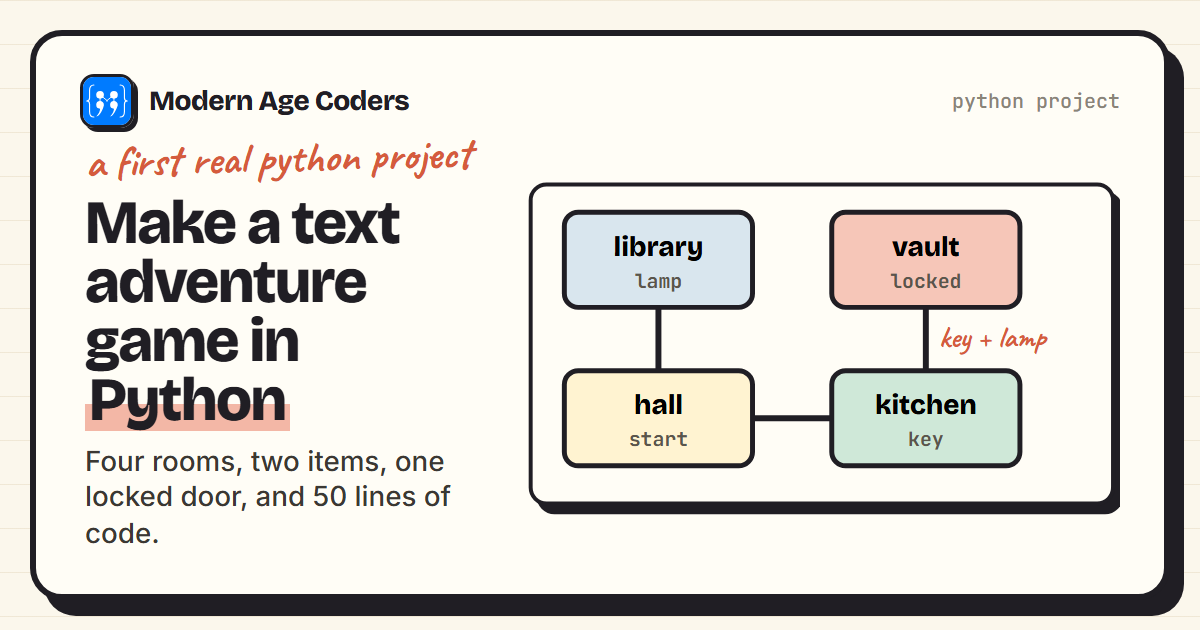
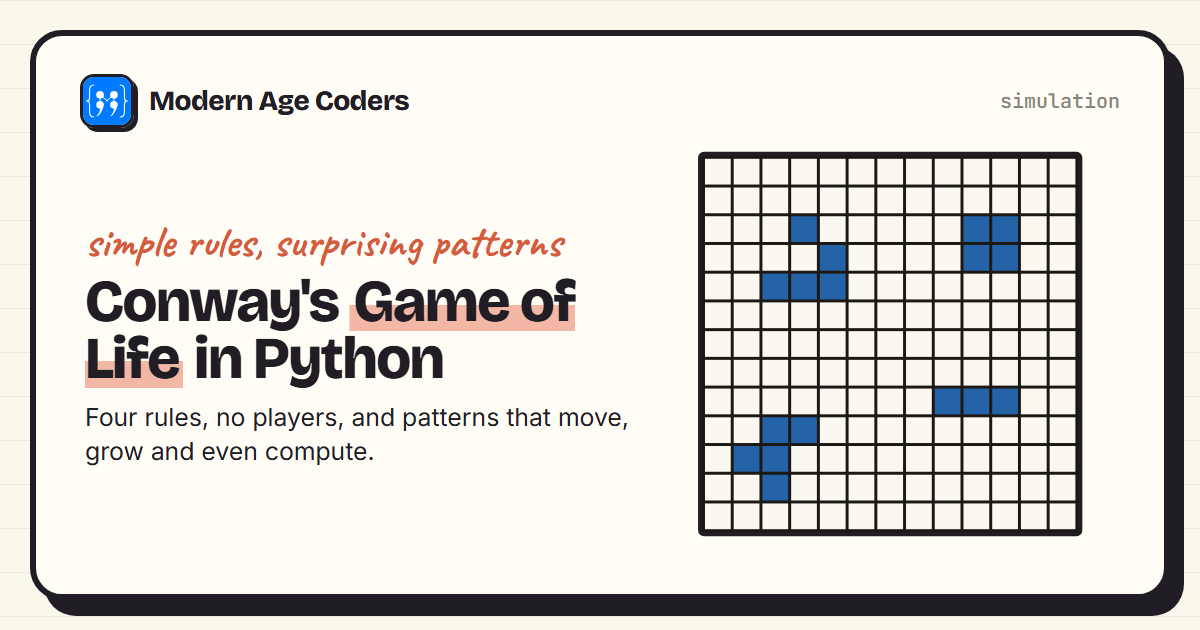
Two longer projects we have written up in full also fit here: a text adventure game and Conway's Game of Life.
Python project ideas by topic
Learning a particular topic this week? Pick the project that exercises it.
| Topic you are learning | Projects that practise it |
|---|---|
| Input and variables | Mad Libs, tip and bill splitter |
| if / elif / else | Temperature converter, calculator, leap year checker |
| while loops | Number guessing game, countdown timer, hangman |
| for loops | Times table quiz, dice roller, quiz game |
| Functions | Temperature converter, calculator, password generator |
| Lists | Quiz game, dice roller, random story generator, grade calculator |
| Dictionaries | Rock, paper, scissors, flashcards, contact book |
| Strings | Word counter, palindrome checker, Caesar cipher |
| Files and JSON or CSV | To-do list, expense tracker, daily journal |
| Modules | random (games), secrets (passwords), time (timers), pathlib (file organiser) |
Python projects for kids
Children from about 8 can build most of Level 1 and Level 2, especially Mad Libs, the dice roller, the guessing game and rock, paper, scissors, because the result is instant and a bit silly. Turtle drawing (idea 26) is the best first visual project. For a list built around children, with ages and finish times, see our Python projects for kids page.
Python project ideas for students and your resume
For school and college students, the projects that impress are the ones that solve a problem you have and that you can explain line by line: a to-do list with saving, an expense tracker with a monthly summary, a file organiser. Put each one on GitHub with a short README that says what it does, how to run it and what you would add next. When you are ready for something bigger, the mini projects post includes a Sudoku solver, a maze solver and an unbeatable tic-tac-toe.
How to actually finish a project
- Shrink it. Write the one-sentence version and build only that.
- Make it work ugly. No colours, no menus, no error handling yet. Just the core loop.
- Run it after every few lines. A bug you made two minutes ago is easy to find. A bug from an hour ago is not.
- Add one feature at a time, from the stretch goal, and run it again.
- Show someone. Explaining your program out loud is the fastest way to find what you do not yet understand.
How we teach it
Our how we teach page describes the method we use with projects like these: students explain their thinking out loud, trace a loop line by line before running it, derive the rule themselves before they see it written down, and solve the same problem three ways. Mistakes are data, not failures, so the hangman game we lost above is a lesson, not an embarrassment. Teens can follow this path in our Python for teens course, younger learners in Python and AI for kids, and adults and college students in the Python masterclass. The first class is free: book a free demo class.
Frequently asked questions
Start with a number guessing game, a dice roller, Mad Libs, a tip calculator, a temperature converter and a simple calculator. They need only input, if statements and loops. Next try rock, paper, scissors, a quiz, hangman, a password generator and a word counter, then a to-do list that saves to a file.
Mad Libs. It needs only input() and one f-string, and it works the first time. The number guessing game is the best second project because it adds a loop and a decision.
Rock, paper, scissors, a quiz game, hangman, a password generator and a word counter are mini projects of 15 to 25 lines each. For longer mini projects with complete source code, see our list of 15 Python mini projects.
This page has tested starter code for 13 projects with their real output. Our Python mini projects with source code post has 15 complete programs, each run with its output pasted, using only the standard library so they run on any computer with Python 3.
A Level 1 project takes 30 to 60 minutes including the stretch goal. Level 2 projects take an evening. Projects that save to files can take two or three sessions, mostly spent on handling mistakes the user might make.
Yes. Everything in Levels 1 to 3 uses only the standard library that comes with Python, including random, secrets, time, json, csv and pathlib. Turtle and tkinter are built in too. Only the weather app, snake game and headline collector need pip installs.
A quiz, a grade calculator, a to-do list and a word counter cover the topics most school courses test: loops, lists, dictionaries, strings and files. A project you can explain line by line is worth more than a bigger one you copied.
Use it as a tutor, not a ghostwriter. Plan the program in plain words, write it yourself, and ask an AI tool to explain errors. Check the tool's age rules: several are for adults only, and ChatGPT asks under-18s to get a parent's permission.