Table of Contents
- What the 2026-27 syllabus asks for
- All 51 programs at a glance (printable list)
- Input, output and decisions
- Everyday calculations (the IP list)
- Patterns with nested loops
- Series and number programs
- String programs
- List and tuple programs
- Dictionary programs
- Modules: math, random, statistics and NumPy
- Class 11 Python project ideas with starter code
- How to write these in your practical file
- How we teach it
- Frequently asked questions
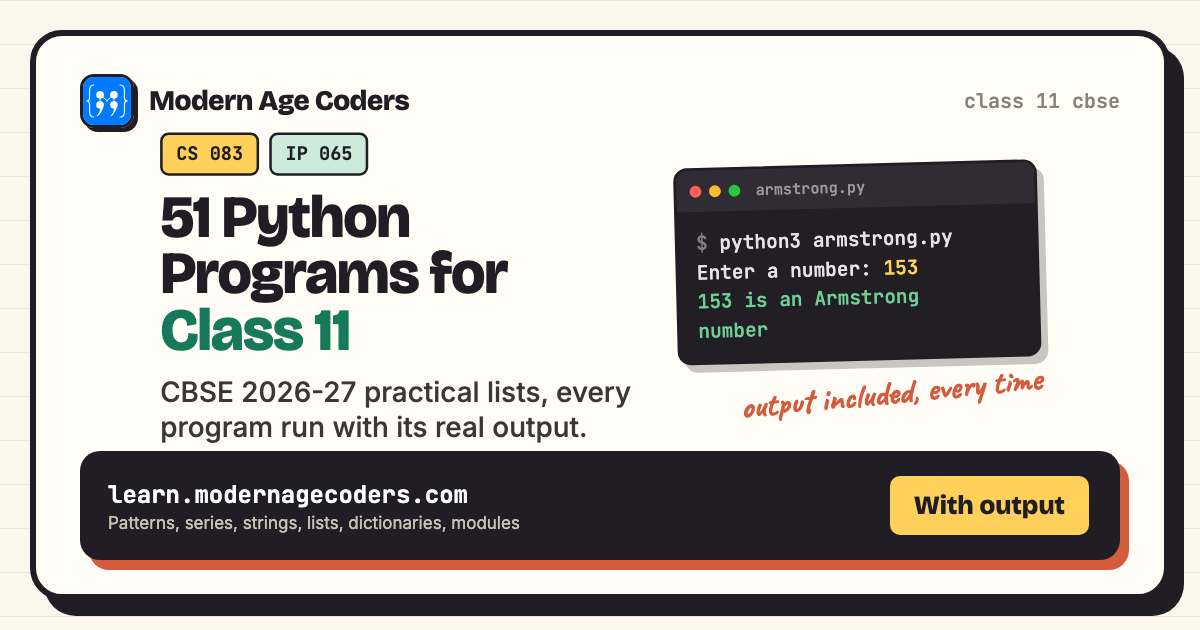
Here are 51 Python programs for Class 11, written for the CBSE 2026-27 syllabus of both Computer Science (083) and Informatics Practices (065). Every program on the official suggested practical lists is here, each with its code and the exact output it printed when we ran it, including the values typed in. CS students need at least 20 programs in their report file and IP students at least 14 in their practical file, so this page covers both with room to spare.
The programs are grouped the way the syllabus teaches them: input and decisions, everyday calculations, patterns, series and number checks, strings, lists and tuples, dictionaries, and modules. Each one is tagged with the list it comes from, so you can pick exactly the ones your subject needs.
How these were tested
Every program below was saved as a file and run with Python 3.14 in a terminal. Where a program asks for input, the output box shows the full screen exactly as it appeared, with the values we typed. Nothing in an output box was typed by hand.
What the 2026-27 syllabus asks for
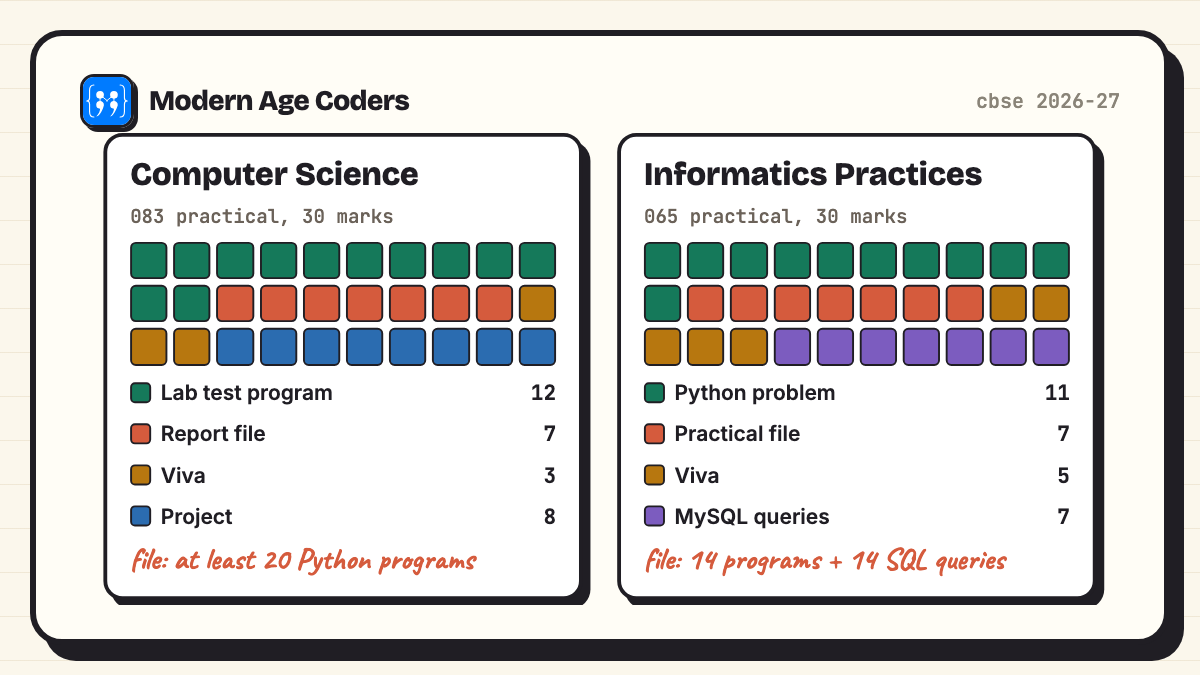
Both subjects share the same Python basics in Class 11, but they weigh them differently. Computer Science (083) puts 45 of its 70 theory marks on "Computational Thinking and Programming" and goes further into strings, tuples and modules. Informatics Practices (065) gives Python 25 marks and spends more time on databases and SQL. The practical exam is 30 marks in both, and this is where a well-made program file pays off.
| Practical component | Computer Science (083) | Informatics Practices (065) |
|---|---|---|
| Live program in the lab test | 12 marks (60% logic, 20% documentation, 20% code quality) | 11 marks (problem solving using Python) |
| Practical or report file | 7 marks: minimum 20 Python programs | 7 marks: minimum 14 Python programs and 14 SQL queries |
| Viva voce | 3 marks | 5 marks |
| Project / SQL | Project: 8 marks | Creating a MySQL database and queries: 7 marks |
Source: the CBSE Class XI 2026-27 curriculum documents for Computer Science and Informatics Practices on cbseacademic.nic.in. The CS document lists the practical file as "Report file: Minimum 20 Python programs"; the IP document says "Practical file (minimum of 14 python programs, and 14 SQL queries)".
Which programs should I put in my file?
CS students: pick at least 20, and make sure you include every program tagged "CS list" (30 of them here). IP students: the 17 programs tagged "IP list" match the IP suggested list almost one to one; add your 14 SQL queries separately. Programs tagged "Syllabus topic" are not on either list but test topics the theory paper asks about.
All 51 programs at a glance (printable list)
Use this table as your checklist or as the index page of your file. Tick each program once you can write it without looking.
| No. | Program | From |
|---|---|---|
| 1 | Input a welcome message and display it | CS list |
| 2 | Larger and smaller of two numbers | CS list |
| 3 | Largest and smallest of three numbers | CS list |
| 4 | Absolute value of a number | CS list |
| 5 | Sort three numbers in ascending order | CS list |
| 6 | Check divisibility of a number | CS list |
| 7 | Average and grade for given marks | IP list |
| 8 | Sale price after a discount | IP list |
| 9 | Perimeter and area of common shapes | IP list |
| 10 | Simple and compound interest | IP list |
| 11 | Profit or loss | IP list |
| 12 | EMI for a loan | IP list |
| 13 | GST on a bill | IP list |
| 14 | Sum of squares of the first 100 natural numbers | IP list |
| 15 | First n multiples of a number | IP list |
| 16 | Pattern 1: star triangle | CS list |
| 17 | Pattern 2: shrinking number rows | CS list |
| 18 | Pattern 3: alphabet triangle | CS list |
| 19 | Series: 1 + x + x² + ... + xn | CS list |
| 20 | Series: 1 − x + x² − x³ + ... | CS list |
| 21 | Series: x + x²/2 + x³/3 + ... + xn/n | CS list |
| 22 | Series: x + x²/2! + x³/3! + ... + xn/n! | CS list |
| 23 | Perfect number | CS list |
| 24 | Armstrong number | CS list |
| 25 | Palindrome number | CS list |
| 26 | Prime or composite | CS list |
| 27 | Fibonacci series | CS list |
| 28 | GCD and LCM of two numbers | CS list |
| 29 | Factorial of a positive number | CS list |
| 30 | Count vowels, consonants, uppercase and lowercase characters | CS and IP lists |
| 31 | String palindrome and case conversion | CS list |
| 32 | Words starting with a given letter | IP list |
| 33 | Occurrences of a letter in each string | IP list |
| 34 | String methods in one program | Syllabus topic |
| 35 | Largest, smallest and mean of a list | CS and IP lists |
| 36 | Third largest and third smallest number in a list | IP list |
| 37 | Swap elements at even and odd positions | CS list |
| 38 | Linear search in a list | CS list |
| 39 | Search, minimum, maximum and mean of a tuple | CS list |
| 40 | Frequency of elements in a list | CS list |
| 41 | List methods in one program | Syllabus topic |
| 42 | Students who scored above 75 | CS list |
| 43 | States and their capitals | IP list |
| 44 | Student marks in five subjects | IP list |
| 45 | Highest and lowest values in a dictionary | IP list |
| 46 | Count each character with a dictionary | CS list |
| 47 | Employee names and salaries | CS list |
| 48 | The math module | Syllabus topic |
| 49 | The random module: a dice and a lucky draw | Syllabus topic |
| 50 | The statistics module: mean, median and mode | Syllabus topic |
| 51 | NumPy arrays from a list | IP syllabus topic |
Python programs for Class 11 as a PDF
Many students search for a PDF of these programs. The simplest honest answer: open this page, press Ctrl+P (Cmd+P on a Mac) and choose "Save as PDF". You get every program with its output, in order, ready to print. Better still, type each program yourself and save your own output: the examiner checks that the file is your work, and typing the code is how it sticks.
Input, output and decisions
The first block on both suggested lists: read values, make one decision, print a clean answer. These also cover the "simple programs" the CS syllabus names under conditional statements: absolute value, sorting three numbers and divisibility.
1. Input a welcome message and display it
Question: Input a welcome message from the user and display it. (CS list)
message = input("Enter a welcome message: ")
print("Here is your message:")
print(message)Enter a welcome message: Welcome to Class 11 Computer Science!
Here is your message:
Welcome to Class 11 Computer Science!input() always returns a string, so no conversion is needed here.
2. Larger and smaller of two numbers
Question: Input two numbers and display the larger and the smaller number. (CS list)
a = float(input("Enter first number: "))
b = float(input("Enter second number: "))
if a > b:
    print("Larger:", a, " Smaller:", b)
elif b > a:
    print("Larger:", b, " Smaller:", a)
else:
print("Both numbers are equal:", a)Enter first number: 42
Enter second number: 17.5
Larger: 42.0 Smaller: 17.5Using float() lets the program accept decimals too, which is why 42 prints as 42.0.
3. Largest and smallest of three numbers
Question: Input three numbers and display the largest and the smallest. (CS list)
a = int(input("Enter first number: "))
b = int(input("Enter second number: "))
c = int(input("Enter third number: "))

largest = a
if b > largest:
    largest = b
if c > largest:
    largest = c

smallest = a
if b < smallest:
    smallest = b
if c < smallest:
    smallest = c

print("Largest:", largest)
print("Smallest:", smallest)Enter first number: 23
Enter second number: 91
Enter third number: 7
Largest: 91
Smallest: 7Assume the first number is the answer, then let the others challenge it. The same idea scales to a list later.
4. Absolute value of a number
Question: Input a number and print its absolute value without using abs(). (CS list)
n = float(input("Enter a number: "))
if n < 0:
    n = -n
print("Absolute value:", n)Enter a number: -14.5
Absolute value: 14.55. Sort three numbers in ascending order
Question: Input three numbers and print them in ascending order using only if statements. (CS list)
a = int(input("Enter a: "))
b = int(input("Enter b: "))
c = int(input("Enter c: "))

if a > b:
    a, b = b, a
if b > c:
    b, c = c, b
if a > b:
    a, b = b, a

print("Ascending order:", a, b, c)Enter a: 30
Enter b: 10
Enter c: 20
Ascending order: 10 20 30Three compare-and-swap steps are enough for three numbers. Python's tuple assignment a, b = b, a swaps without a temporary variable.
6. Check divisibility of a number
Question: Input two numbers and check whether the first is divisible by the second. (CS list)
n = int(input("Enter the number: "))
d = int(input("Enter the divisor: "))
if d == 0:
    print("Cannot divide by zero")
elif n % d == 0:
    print(n, "is divisible by", d)
else:
print(n, "is not divisible by", d, "- remainder", n % d)Enter the number: 144
Enter the divisor: 12
144 is divisible by 12Checking for zero first is the kind of detail the "code quality" part of the lab test rewards.
Everyday calculations (the IP list)
Informatics Practices starts with real-life arithmetic: grades, discounts, interest, EMI and GST. These are short, but examiners watch the formula and the formatting of the answer.
7. Average and grade for given marks
Question: Input marks in five subjects, find the average and print the grade. (IP list)
total = 0
for i in range(1, 6):
    m = float(input("Marks in subject " + str(i) + ": "))
    total += m

average = total / 5
if average >= 90:
    grade = "A1"
elif average >= 80:
    grade = "A2"
elif average >= 70:
    grade = "B1"
elif average >= 60:
    grade = "B2"
elif average >= 50:
    grade = "C"
else:
    grade = "D"

print("Total:", total)
print("Average:", average)
print("Grade:", grade)Marks in subject 1: 88
Marks in subject 2: 92
Marks in subject 3: 79
Marks in subject 4: 85
Marks in subject 5: 90
Total: 434.0
Average: 86.8
Grade: A2The grade bands here are an example; use the bands your teacher gives you.
8. Sale price after a discount
Question: Input the cost of an item and the discount percentage, then print the discount and the sale price. (IP list)
cost = float(input("Enter cost of the item: "))
disc = float(input("Enter discount %: "))
discount = cost * disc / 100
sale_price = cost - discount
print("Discount amount:", round(discount, 2))
print("Sale price:", round(sale_price, 2))Enter cost of the item: 2499
Enter discount %: 15
Discount amount: 374.85
Sale price: 2124.159. Perimeter and area of common shapes
Question: Calculate the perimeter (or circumference) and area of a rectangle, a square, a circle and a triangle. (IP list)
import math

l, b = 12, 5
print("Rectangle: perimeter =", 2 * (l + b), " area =", l * b)

s = 7
print("Square: perimeter =", 4 * s, " area =", s * s)

r = 3.5
print("Circle: circumference =", round(2 * math.pi * r, 2), " area =", round(math.pi * r * r, 2))

a, b2, c = 6, 8, 10
p = a + b2 + c
half = p / 2
area = math.sqrt(half * (half - a) * (half - b2) * (half - c))  # Heron's formula
print("Triangle: perimeter =", p, " area =", area)Rectangle: perimeter = 34 area = 60
Square: perimeter = 28 area = 49
Circle: circumference = 21.99 area = 38.48
Triangle: perimeter = 24 area = 24.0Heron's formula finds a triangle's area from its three sides, so you do not need the height.
10. Simple and compound interest
Question: Input principal, rate and time, then print the simple interest and the compound interest (compounded yearly). (IP list)
p = float(input("Principal: "))
r = float(input("Rate % per year: "))
t = float(input("Time in years: "))

si = p * r * t / 100
amount = p * (1 + r / 100) ** t
ci = amount - p

print("Simple interest:", round(si, 2))
print("Compound interest:", round(ci, 2))
print("Difference:", round(ci - si, 2))Principal: 50000
Rate % per year: 8
Time in years: 3
Simple interest: 12000.0
Compound interest: 12985.6
Difference: 985.611. Profit or loss
Question: Input the cost price and the selling price, then print the profit or loss and its percentage. (IP list)
cp = float(input("Cost price: "))
sp = float(input("Selling price: "))
if sp > cp:
    print("Profit:", sp - cp, "which is", round((sp - cp) / cp * 100, 2), "%")
elif cp > sp:
    print("Loss:", cp - sp, "which is", round((cp - sp) / cp * 100, 2), "%")
else:
print("No profit, no loss")Cost price: 800
Selling price: 740
Loss: 60.0 which is 7.5 %12. EMI for a loan
Question: Input the loan amount, the yearly interest rate and the period in months, then calculate the monthly EMI. (IP list)
amount = float(input("Loan amount: "))
annual_rate = float(input("Interest rate % per year: "))
months = int(input("Period in months: "))

r = annual_rate / 12 / 100            # monthly rate
emi = amount * r * (1 + r) ** months / ((1 + r) ** months - 1)
print("Monthly EMI:", round(emi, 2))
print("Total paid:", round(emi * months, 2))
print("Total interest:", round(emi * months - amount, 2))Loan amount: 500000
Interest rate % per year: 9
Period in months: 60
Monthly EMI: 10379.18
Total paid: 622750.66
Total interest: 122750.66The formula is EMI = P × r × (1 + r)n / ((1 + r)n − 1), with r the monthly rate and n the number of months.
13. GST on a bill
Question: Input the price of an item and the GST rate, then print the GST and the final price. (IP list)
price = float(input("Price before tax: "))
rate = float(input("GST rate %: "))
gst = price * rate / 100
print("GST:", round(gst, 2))
print("CGST and SGST (half each):", round(gst / 2, 2))
print("Final price:", round(price + gst, 2))Price before tax: 1200
GST rate %: 18
GST: 216.0
CGST and SGST (half each): 108.0
Final price: 1416.014. Sum of squares of the first 100 natural numbers
Question: Find the sum of squares of the first 100 natural numbers. (IP list)
total = 0
for i in range(1, 101):
    total += i * i
print("Sum of squares of 1 to 100:", total)
print("Check with formula n(n+1)(2n+1)/6:", 100 * 101 * 201 // 6)Sum of squares of 1 to 100: 338350
Check with formula n(n+1)(2n+1)/6: 338350Printing the formula answer next to the loop answer is a good habit: two methods that agree are convincing evidence.
15. First n multiples of a number
Question: Print the first n multiples of a given number. (IP list)
num = int(input("Enter the number: "))
n = int(input("How many multiples? "))
for i in range(1, n + 1):
print(num, "x", i, "=", num * i)Enter the number: 7
How many multiples? 5
7 x 1 = 7
7 x 2 = 14
7 x 3 = 21
7 x 4 = 28
7 x 5 = 35Patterns with nested loops
The three patterns printed on the CS list. Outer loop for rows, inner loop for what goes on each row.
16. Pattern 1: star triangle
Question: Generate the star triangle pattern using nested loops. (CS list)
rows = 5
for i in range(1, rows + 1):
    for j in range(i):
        print("*", end="")
print()*
**
***
****
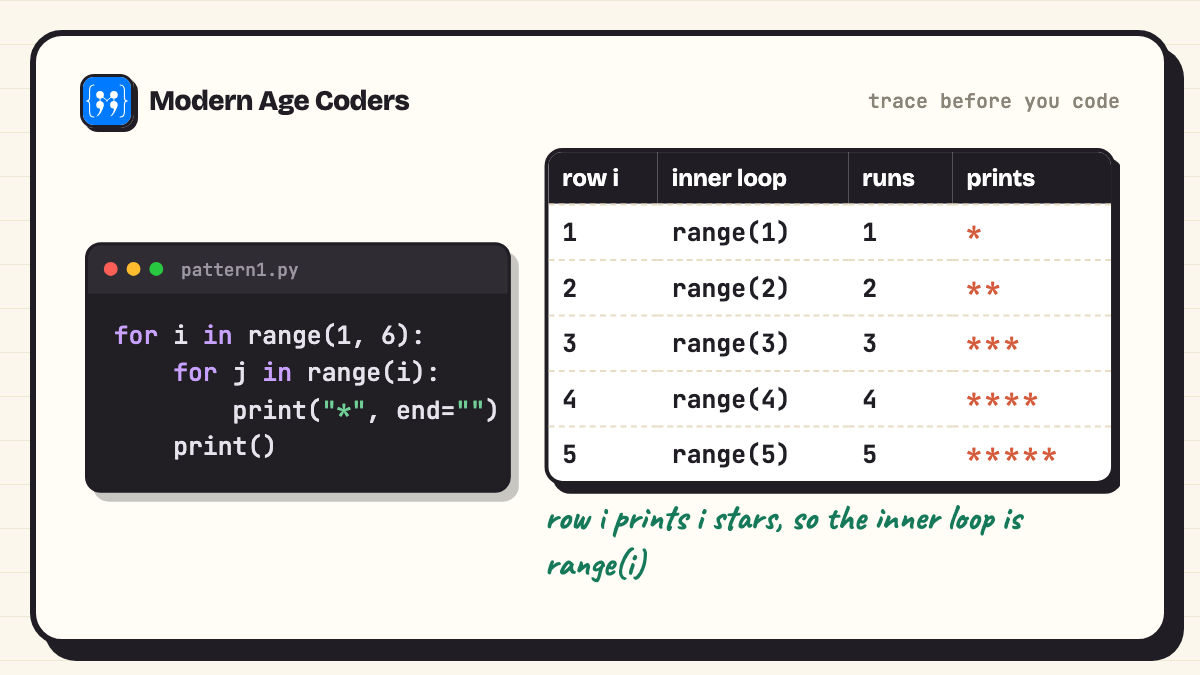
*****Row i has i stars. end="" keeps the stars on one line, and the empty print() moves to the next row.
17. Pattern 2: shrinking number rows
Question: Generate the pattern 12345, 1234, 123, 12, 1 using nested loops. (CS list)
rows = 5
for i in range(rows, 0, -1):
    for j in range(1, i + 1):
        print(j, end="")
print()12345
1234
123
12
1The outer loop counts down from 5, so each row is one number shorter than the last.
18. Pattern 3: alphabet triangle
Question: Generate the pattern A, AB, ABC, ABCD, ABCDE using nested loops. (CS list)
rows = 5
for i in range(1, rows + 1):
    for j in range(i):
        print(chr(65 + j), end="")
print()A
AB
ABC
ABCD
ABCDEchr(65) is "A" in ASCII, so chr(65 + j) walks through the alphabet. ASCII is in Unit 1 of the same syllabus.
How to crack any pattern
Write a small table before coding: row number in one column, what that row prints in the next. If row i prints i things, the inner loop is range(i). If it prints 6 minus i things, it is range(6 - i). Our 30 star pattern programs practise this one idea.
Series and number programs
The four series from the CS list, then the classic number checks: perfect, Armstrong, palindrome, prime, Fibonacci, GCD and LCM.
19. Series: 1 + x + x² + ... + xⁿ
Question: Input x and n and print the sum of 1 + x + x2 + x3 + ... + xn. (CS list)
x = float(input("Enter x: "))
n = int(input("Enter n: "))
total = 0
for i in range(n + 1):
    total += x ** i
print("Sum =", total)Enter x: 2
Enter n: 5
Sum = 63.0With x = 2 and n = 5 the terms are 1, 2, 4, 8, 16 and 32, which add up to 63.
20. Series: 1 − x + x² − x³ + ...
Question: Input x and n and print the sum of 1 − x + x2 − x3 + x4 − ... xn. (CS list)
x = float(input("Enter x: "))
n = int(input("Enter n: "))
total = 0
for i in range(n + 1):
    total += (-1) ** i * x ** i
print("Sum =", total)Enter x: 2
Enter n: 5
Sum = -21.0(-1) ** i is +1 for even i and −1 for odd i, which flips the sign of every other term.
21. Series: x + x²/2 + x³/3 + ... + xⁿ/n
Question: Input x and n and print the sum of x + x2/2 + x3/3 + ... + xn/n. (CS list)
x = float(input("Enter x: "))
n = int(input("Enter n: "))
total = 0
for i in range(1, n + 1):
    total += x ** i / i
print("Sum =", round(total, 4))Enter x: 2
Enter n: 4
Sum = 10.666722. Series: x + x²/2! + x³/3! + ... + xⁿ/n!
Question: Input x and n and print the sum of x + x2/2! + x3/3! + ... + xn/n!. (CS list)
x = float(input("Enter x: "))
n = int(input("Enter n: "))
total = 0
fact = 1
for i in range(1, n + 1):
    fact *= i               # fact is now i!
    total += x ** i / fact
print("Sum =", round(total, 4))Enter x: 1
Enter n: 10
Sum = 1.7183Keeping a running factorial avoids recomputing i! every time. With x = 1 the sum creeps towards e − 1, about 1.71828, a nice self-check.
23. Perfect number
Question: Input a number and check whether it is a perfect number (equal to the sum of its proper divisors). (CS list)
n = int(input("Enter a number: "))
total = 0
for d in range(1, n):
    if n % d == 0:
        total += d
if total == n:
    print(n, "is a perfect number")
else:
print(n, "is not a perfect number (divisor sum is", str(total) + ")")Enter a number: 28
28 is a perfect number28 = 1 + 2 + 4 + 7 + 14.
24. Armstrong number
Question: Input a number and check whether it is an Armstrong number. (CS list)
n = int(input("Enter a number: "))
digits = len(str(n))
total = 0
temp = n
while temp > 0:
    d = temp % 10
    total += d ** digits
    temp //= 10
if total == n:
    print(n, "is an Armstrong number")
else:
print(n, "is not an Armstrong number")Enter a number: 153
153 is an Armstrong number153 = 13 + 53 + 33. The power is the number of digits, which is why len(str(n)) appears.
25. Palindrome number
Question: Input a number and check whether it is a palindrome. (CS list)
n = int(input("Enter a number: "))
rev = 0
temp = n
while temp > 0:
    rev = rev * 10 + temp % 10
    temp //= 10
print("Reversed:", rev)
if rev == n:
    print(n, "is a palindrome")
else:
print(n, "is not a palindrome")Enter a number: 12321
Reversed: 12321
12321 is a palindromeReversing with % 10 and // 10 is the method examiners expect; str(n)[::-1] works too, but learn the digit loop first.
26. Prime or composite
Question: Input a number and check whether it is prime or composite. (CS list)
n = int(input("Enter a number greater than 1: "))
is_prime = True
for d in range(2, int(n ** 0.5) + 1):
    if n % d == 0:
        is_prime = False
        break
if n < 2:
    print(n, "is neither prime nor composite")
elif is_prime:
    print(n, "is a prime number")
else:
print(n, "is a composite number (divisible by", str(d) + ")")Enter a number greater than 1: 91
91 is a composite number (divisible by 7)Checking divisors only up to the square root is enough: if n had a factor bigger than its square root, it would also have one smaller. 91 looks prime but is 7 × 13.
27. Fibonacci series
Question: Display the first n terms of the Fibonacci series. (CS list)
n = int(input("How many terms? "))
a, b = 0, 1
for i in range(n):
    print(a, end=" ")
    a, b = b, a + b
print()How many terms? 12
0 1 1 2 3 5 8 13 21 34 55 89 28. GCD and LCM of two numbers
Question: Compute the greatest common divisor and the least common multiple of two integers. (CS list)
a = int(input("Enter first number: "))
b = int(input("Enter second number: "))
x, y = a, b
while y != 0:
    x, y = y, x % y      # Euclid's algorithm
gcd = x
lcm = a * b // gcd
print("GCD:", gcd)
print("LCM:", lcm)Enter first number: 84
Enter second number: 36
GCD: 12
LCM: 252Euclid's algorithm replaces (x, y) with (y, x mod y) until y is zero. Then LCM = a × b / GCD.
29. Factorial of a positive number
Question: Find the factorial of a positive number using a while loop. (CS list)
n = int(input("Enter a positive number: "))
fact = 1
i = 1
while i <= n:
    fact *= i
    i += 1
print(str(n) + "! =", fact)Enter a positive number: 10
10! = 3628800Named in the syllabus under iterative statements. Python integers never overflow, so 30! works just as well.
String programs
Counting, checking and changing text. The CS syllabus lists more than 20 string methods by name, so use them here instead of rewriting them by hand.
30. Count vowels, consonants, uppercase and lowercase characters
Question: Count and display the number of vowels, consonants, uppercase and lowercase characters in a string. (CS and IP lists)
s = input("Enter a string: ")
vowels = consonants = upper = lower = 0
for ch in s:
    if ch.isalpha():
        if ch.lower() in "aeiou":
            vowels += 1
        else:
            consonants += 1
        if ch.isupper():
            upper += 1
        else:
            lower += 1
print("Vowels:", vowels)
print("Consonants:", consonants)
print("Uppercase:", upper)
print("Lowercase:", lower)Enter a string: Python Is Fun In CBSE
Vowels: 5
Consonants: 12
Uppercase: 8
Lowercase: 9Spaces are not letters, so isalpha() keeps them out of every count.
31. String palindrome and case conversion
Question: Input a string, check whether it is a palindrome, and convert the case of its characters. (CS list)
s = input("Enter a string: ")
clean = s.replace(" ", "").lower()
if clean == clean[::-1]:
    print("It is a palindrome")
else:
    print("It is not a palindrome")
print("Uppercase:", s.upper())
print("Lowercase:", s.lower())
print("Swapped case:", s.swapcase())
print("Title case:", s.title())Enter a string: Never Odd Or Even
It is a palindrome
Uppercase: NEVER ODD OR EVEN
Lowercase: never odd or even
Swapped case: nEVER oDD oR eVEN
Title case: Never Odd Or EvenRemoving spaces and lowering the case first means "Never Odd Or Even" counts as a palindrome.
32. Words starting with a given letter
Question: Print the words in a user-entered string that start with a given alphabet. (IP list)
s = input("Enter a sentence: ")
letter = input("Enter the starting letter: ")
found = []
for word in s.split():
    if word.lower().startswith(letter.lower()):
        found.append(word)
print("Words starting with", letter + ":", found)
print("Count:", len(found))Enter a sentence: Python programs print patterns and process plain text
Enter the starting letter: p
Words starting with p: ['Python', 'programs', 'print', 'patterns', 'process', 'plain']
Count: 633. Occurrences of a letter in each string
Question: Print the number of occurrences of a given alphabet in each string entered. (IP list)
n = int(input("How many strings? "))
letter = input("Letter to count: ")
for i in range(n):
    s = input("String " + str(i + 1) + ": ")
print(" '" + letter + "' occurs", s.lower().count(letter.lower()), "times")How many strings? 3
Letter to count: a
String 1: Banana
'a' occurs 3 times
String 2: Apple
'a' occurs 1 times
String 3: Cherry
'a' occurs 0 times34. String methods in one program
Question: Show the working of the string methods named in the syllabus on one string. (Syllabus topic)
s = "  informatics practices and computer science  "
t = s.strip()
print(repr(t))
print("len:", len(t))
print("capitalize:", t.capitalize())
print("count('c'):", t.count("c"))
print("find('and'):", t.find("and"))
print("index('science'):", t.index("science"))
print("startswith('info'):", t.startswith("info"))
print("endswith('science'):", t.endswith("science"))
print("partition(' and '):", t.partition(" and "))
print("split():", t.split())
print("join:", "-".join(["CS", "IP", "AI"]))
print("replace:", t.replace("and", "&"))
print("isalnum / isdigit:", "Class11".isalnum(), "2026".isdigit())
print("lstrip / rstrip:", repr(s.lstrip()[:6]), repr(s.rstrip()[-6:]))'informatics practices and computer science'
len: 42
capitalize: Informatics practices and computer science
count('c'): 6
find('and'): 22
index('science'): 35
startswith('info'): True
endswith('science'): True
partition(' and '): ('informatics practices', ' and ', 'computer science')
split(): ['informatics', 'practices', 'and', 'computer', 'science']
join: CS-IP-AI
replace: informatics practices & computer science
isalnum / isdigit: True True
lstrip / rstrip: 'inform' 'cience'This is a quick reference you can run before the exam. The syllabus names each of these methods, and output questions in the theory paper love them.
List and tuple programs
Largest, smallest, third largest, swapping positions, searching and counting. The same ideas work on tuples, which the CS syllabus asks you to show as well.
35. Largest, smallest and mean of a list
Question: Input a list of numbers and find the largest, the smallest and the mean. (CS and IP lists)
nums = []
n = int(input("How many numbers? "))
for i in range(n):
    nums.append(int(input("Enter number: ")))
largest = smallest = nums[0]
for x in nums:
    if x > largest:
        largest = x
    if x < smallest:
        smallest = x
print("List:", nums)
print("Largest:", largest, " Smallest:", smallest)
print("Mean:", sum(nums) / len(nums))
print("Using max() and min():", max(nums), min(nums))How many numbers? 5
Enter number: 34
Enter number: 12
Enter number: 78
Enter number: 5
Enter number: 41
List: [34, 12, 78, 5, 41]
Largest: 78 Smallest: 5
Mean: 34.0
Using max() and min(): 78 5Write the loop version for the file and show max() and min() as a check.
36. Third largest and third smallest number in a list
Question: Find the third largest and the third smallest number in a list. (IP list)
nums = [45, 12, 89, 33, 67, 12, 90, 5]
unique = sorted(set(nums))
print("List:", nums)
print("Distinct values sorted:", unique)
if len(unique) >= 3:
    print("Third smallest:", unique[2])
    print("Third largest:", unique[-3])
else:
print("Need at least three different values")List: [45, 12, 89, 33, 67, 12, 90, 5]
Distinct values sorted: [5, 12, 33, 45, 67, 89, 90]
Third smallest: 33
Third largest: 67set() removes the repeated 12 first, otherwise the "third smallest" would be wrong.
37. Swap elements at even and odd positions
Question: Input a list of numbers and swap each element at an even index with the element at the next (odd) index. (CS list)
nums = eval(input("Enter a list: "))
print("Original:", nums)
for i in range(0, len(nums) - 1, 2):
    nums[i], nums[i + 1] = nums[i + 1], nums[i]
print("Swapped: ", nums)Enter a list: [10, 20, 30, 40, 50, 60, 70]
Original: [10, 20, 30, 40, 50, 60, 70]
Swapped: [20, 10, 40, 30, 60, 50, 70]The loop steps by 2 and stops one short, so a list with an odd length leaves its last element in place. eval() is fine for a school exercise; in real software use a safer parser.
38. Linear search in a list
Question: Input a list and an element, then search for the element and print its position. (CS list)
nums = [17, 42, 8, 99, 23, 42]
key = int(input("Enter element to search: "))
found = False
for i in range(len(nums)):
    if nums[i] == key:
        print(key, "found at index", i, "(position", str(i + 1) + ")")
        found = True
        break
if not found:
print(key, "not found")Enter element to search: 99
99 found at index 3 (position 4)39. Search, minimum, maximum and mean of a tuple
Question: Store numbers in a tuple, find the minimum, maximum and mean, and search for an element. (CS list)
t = (56, 23, 89, 12, 45, 23)
print("Tuple:", t)
print("Min:", min(t), " Max:", max(t), " Mean:", round(sum(t) / len(t), 2))
print("23 appears", t.count(23), "times, first at index", t.index(23))
key = int(input("Search for: "))
if key in t:
    print(key, "is in the tuple")
else:
print(key, "is not in the tuple")Tuple: (56, 23, 89, 12, 45, 23)
Min: 12 Max: 89 Mean: 41.33
23 appears 2 times, first at index 1
Search for: 45
45 is in the tupleTuples cannot be changed, but every reading operation, including in, count() and index(), works as on lists.
40. Frequency of elements in a list
Question: Count the frequency of each element in a list. (CS list)
items = [3, 7, 3, 1, 7, 7, 9, 1, 3, 3]
counted = []
for x in items:
    if x not in counted:
        print(x, "occurs", items.count(x), "times")
counted.append(x)3 occurs 4 times
7 occurs 3 times
1 occurs 2 times
9 occurs 1 times41. List methods in one program
Question: Show append, extend, insert, remove, pop, reverse and sort on one list. (Syllabus topic)
marks = [72, 88, 65]
marks.append(91)
print("append:", marks)
marks.extend([54, 77])
print("extend:", marks)
marks.insert(1, 80)
print("insert:", marks)
marks.remove(65)
print("remove:", marks)
last = marks.pop()
print("pop:", last, marks)
marks.reverse()
print("reverse:", marks)
marks.sort()
print("sort:", marks)
print("sorted desc:", sorted(marks, reverse=True))append: [72, 88, 65, 91]
extend: [72, 88, 65, 91, 54, 77]
insert: [72, 80, 88, 65, 91, 54, 77]
remove: [72, 80, 88, 91, 54, 77]
pop: 77 [72, 80, 88, 91, 54]
reverse: [54, 91, 88, 80, 72]
sort: [54, 72, 80, 88, 91]
sorted desc: [91, 88, 80, 72, 54]sort() changes the list itself; sorted() returns a new list. That difference is a favourite viva question.
Dictionary programs
Key and value pairs: student records, capitals, salaries, and counting characters. Dictionaries appear on both lists.
42. Students who scored above 75
Question: Create a dictionary with the roll number, name and marks of n students and display the names of students who have marks above 75. (CS list)
n = int(input("Number of students: "))
students = {}
for i in range(n):
    roll = int(input("Roll number: "))
    name = input("Name: ")
    marks = float(input("Marks: "))
    students[roll] = {"name": name, "marks": marks}

print("Students with marks above 75:")
for roll, info in students.items():
    if info["marks"] > 75:
print(roll, info["name"], info["marks"])Number of students: 3
Roll number: 1
Name: Aarav
Marks: 82
Roll number: 2
Name: Diya
Marks: 71
Roll number: 3
Name: Kabir
Marks: 94
Students with marks above 75:
1 Aarav 82.0
3 Kabir 94.0The roll number is the key because it is unique. Each value is itself a small dictionary.
43. States and their capitals
Question: Create a dictionary to store the names of states and their capitals, and look one up. (IP list)
capitals = {
    "Maharashtra": "Mumbai",
    "Karnataka": "Bengaluru",
    "Tamil Nadu": "Chennai",
    "West Bengal": "Kolkata",
    "Rajasthan": "Jaipur",
}
for state, capital in capitals.items():
    print(state, "->", capital)
state = input("Enter a state: ")
print("Capital:", capitals.get(state, "not in the dictionary"))Maharashtra -> Mumbai
Karnataka -> Bengaluru
Tamil Nadu -> Chennai
West Bengal -> Kolkata
Rajasthan -> Jaipur
Enter a state: Rajasthan
Capital: Jaipurget() with a default avoids a KeyError when the state is missing.
44. Student marks in five subjects
Question: Create a dictionary of students to store names and marks obtained in 5 subjects, and print each total and percentage. (IP list)
marks = {
    "Ishaan": [78, 85, 92, 70, 88],
    "Meera": [91, 89, 95, 87, 93],
    "Rohan": [65, 72, 58, 80, 69],
}
for name, m in marks.items():
    total = sum(m)
print(name, "total:", total, " percentage:", total / 5)Ishaan total: 413 percentage: 82.6
Meera total: 455 percentage: 91.0
Rohan total: 344 percentage: 68.845. Highest and lowest values in a dictionary
Question: Print the highest and lowest values in a dictionary, and who they belong to. (IP list)
scores = {"Asha": 87, "Vikram": 93, "Neha": 78, "Arjun": 93, "Sara": 65}
high = max(scores.values())
low = min(scores.values())
print("Highest:", high, "by", [k for k in scores if scores[k] == high])
print("Lowest:", low, "by", [k for k in scores if scores[k] == low])
print("Top scorer using max(key=):", max(scores, key=scores.get))Highest: 93 by ['Vikram', 'Arjun']
Lowest: 65 by ['Sara']
Top scorer using max(key=): VikramTwo people share 93, so collecting every matching name is more correct than returning just one.
46. Count each character with a dictionary
Question: Count the number of times each character appears in a given string using a dictionary. (CS list)
s = input("Enter a string: ")
freq = {}
for ch in s:
    if ch != " ":
        freq[ch] = freq.get(ch, 0) + 1
for ch in sorted(freq):
print(repr(ch), freq[ch])Enter a string: mississippi river
'e' 1
'i' 5
'm' 1
'p' 2
'r' 2
's' 4
'v' 1This is the suggested program from the dictionary topic of the CS syllabus.
47. Employee names and salaries
Question: Create a dictionary with names of employees and their salaries, and access, update and remove entries. (CS list)
salary = {"Anil": 52000, "Bhavna": 61000, "Chetan": 48000}
print("All:", salary)
print("Bhavna earns", salary["Bhavna"])
salary["Chetan"] = 50000          # modify
salary["Divya"] = 57000           # add
print("After update:", salary)
removed = salary.pop("Anil")
print("Removed Anil's salary:", removed)
print("Keys:", list(salary.keys()))
print("Total salary bill:", sum(salary.values()))All: {'Anil': 52000, 'Bhavna': 61000, 'Chetan': 48000}
Bhavna earns 61000
After update: {'Anil': 52000, 'Bhavna': 61000, 'Chetan': 50000, 'Divya': 57000}
Removed Anil's salary: 52000
Keys: ['Bhavna', 'Chetan', 'Divya']
Total salary bill: 168000Salaries here are plain numbers in a made-up company, to practise access, update, add and delete.
Modules: math, random, statistics and NumPy
The CS syllabus names exact functions from math, random and statistics. IP Class 11 adds a first look at NumPy arrays made from lists.
48. The math module
Question: Use the functions of the math module named in the syllabus. (Syllabus topic)
import math
print("pi =", round(math.pi, 5), " e =", round(math.e, 5))
print("sqrt(144) =", math.sqrt(144))
print("ceil(4.2) =", math.ceil(4.2), " floor(4.8) =", math.floor(4.8))
print("pow(2, 10) =", math.pow(2, 10))
print("fabs(-7.5) =", math.fabs(-7.5))
angle = math.radians(30)
print("sin 30 =", round(math.sin(angle), 4))
print("cos 30 =", round(math.cos(angle), 4))
print("tan 30 =", round(math.tan(angle), 4))pi = 3.14159 e = 2.71828
sqrt(144) = 12.0
ceil(4.2) = 5 floor(4.8) = 4
pow(2, 10) = 1024.0
fabs(-7.5) = 7.5
sin 30 = 0.5
cos 30 = 0.866
tan 30 = 0.5774The trigonometric functions take radians, which is why math.radians(30) comes first. math.pow() always returns a float.
49. The random module: a dice and a lucky draw
Question: Use random(), randint() and randrange() from the random module. (Syllabus topic)
import random
random.seed(11)   # fixes the sequence so this output can be reproduced
print("random():", round(random.random(), 4))
print("Five dice throws:", [random.randint(1, 6) for _ in range(5)])
print("An even number from 2 to 20:", random.randrange(2, 21, 2))
names = ["Aditi", "Rahul", "Zoya", "Kunal"]
print("Lucky draw winner:", names[random.randint(0, len(names) - 1)])random(): 0.4524
Five dice throws: [5, 4, 4, 5, 5]
An even number from 2 to 20: 8
Lucky draw winner: Rahulrandom.seed(11) makes the numbers repeatable. Remove it and you get different numbers on every run, which is what a real dice should do.
50. The statistics module: mean, median and mode
Question: Find the mean, median and mode of a list of marks using the statistics module. (Syllabus topic)
import statistics
marks = [72, 85, 90, 66, 85, 78, 91, 85, 70]
print("Marks:", marks)
print("Mean:", round(statistics.mean(marks), 2))
print("Median:", statistics.median(marks))
print("Mode:", statistics.mode(marks))Marks: [72, 85, 90, 66, 85, 78, 91, 85, 70]
Mean: 80.22
Median: 85
Mode: 8551. NumPy arrays from a list
Question: Create NumPy arrays from Python lists and do arithmetic on the whole array at once. (IP syllabus topic)
import numpy as np
marks = [78, 85, 92, 70, 88]
arr = np.array(marks)
print("Array:", arr)
print("Type:", type(arr).__name__, " dtype:", arr.dtype, " shape:", arr.shape)
print("Add 5 grace marks:", arr + 5)
print("Mean:", arr.mean(), " Max:", arr.max())
table = np.array([[1, 2, 3], [4, 5, 6]])
print("2D array:")
print(table)
print("Shape:", table.shape)Array: [78 85 92 70 88]
Type: ndarray dtype: int64 shape: (5,)
Add 5 grace marks: [83 90 97 75 93]
Mean: 82.6 Max: 92
2D array:
[[1 2 3]
[4 5 6]]
Shape: (2, 3)arr + 5 adds 5 to every element with no loop. That is the big idea NumPy introduces, and IP Class 12 builds on it with Pandas. The dtype printed (int64 here) can differ on some Windows set-ups.
Class 11 Python project ideas with starter code
The CS practical gives 8 marks to a project "that uses most of the concepts that have been learnt". A good Class 11 project is small, works every time, and uses loops, conditions, strings, lists and dictionaries together. Ideas that fit the syllabus:
- Student report card manager: add students, store marks in a dictionary, show totals and the topper (starter below).
- Quiz game: questions in a list of tuples, score kept in a variable,
random.shuffle()to change the order. - Library book tracker: a dictionary of book titles and whether they are issued, with search by title.
- Number system converter: binary, octal, decimal and hexadecimal conversions, which ties in Unit 1 of the CS syllabus.
- Expense diary: a list of (item, amount, category) entries with totals per category using a dictionary.
Here is a working menu-driven starter for the first idea. It runs until you choose Exit, which is the shape most Class 11 projects take:
records = {}
while True:
    print("\n1. Add student  2. Show all  3. Topper  4. Exit")
    choice = input("Choice: ")
    if choice == "1":
        name = input("Name: ")
        marks = [int(x) for x in input("Marks in 3 subjects (space separated): ").split()]
        records[name] = marks
        print("Saved", name)
    elif choice == "2":
        for name, marks in records.items():
            print(name, marks, "total", sum(marks), "average", round(sum(marks) / len(marks), 1))
    elif choice == "3":
        if records:
            top = max(records, key=lambda n: sum(records[n]))
            print("Topper:", top, "with", sum(records[top]))
        else:
            print("No records yet")
    elif choice == "4":
        print("Goodbye")
        break
    else:
        print("Invalid choice")
1. Add student  2. Show all  3. Topper  4. Exit
Choice: 1
Name: Tanvi
Marks in 3 subjects (space separated): 88 92 79
Saved Tanvi

1. Add student  2. Show all  3. Topper  4. Exit
Choice: 1
Name: Yash
Marks in 3 subjects (space separated): 91 85 95
Saved Yash

1. Add student  2. Show all  3. Topper  4. Exit
Choice: 2
Tanvi [88, 92, 79] total 259 average 86.3
Yash [91, 85, 95] total 271 average 90.3

1. Add student  2. Show all  3. Topper  4. Exit
Choice: 3
Topper: Yash with 271

1. Add student  2. Show all  3. Topper  4. Exit
Choice: 4
Goodbye
To grow it into a full project, add options to search, update and delete a student, check that the marks typed are numbers, and print a neat table. Each addition is one more elif.
How to write these in your practical file
- One program per page or half page: number, aim (the question), the code, and the output.
- Output from a real run: copy or print what your own computer showed, with the values you typed.
- Comments at the top: your name, the aim and the date. The CS lab test gives 20% of its marks to documentation, so the habit pays twice.
- An index at the front: the printable list above works as a template.
In Class 12 the file grows to include file handling, a stack and Python with SQL. Our Class 12 practical file guide shows that format in full.
How we teach it
On our how we teach page, students explain their thinking out loud, trace a loop line by line before running it, and see the same problem shown three ways, which is exactly how to use this list: write the Armstrong check with a loop, then with str(), then explain why both work. Mistakes are treated as data, so a wrong pattern becomes a lesson in what the inner loop is really counting. Our Computer Science Class 11 and 12 course and Informatics Practices course follow the CBSE syllabus, and our Python for Class 11 CBSE page explains the options. The first class is free.
Frequently asked questions
The programs on the CBSE suggested practical lists come first: patterns with nested loops, the four series, perfect, Armstrong and palindrome numbers, prime or composite, Fibonacci, GCD and LCM, string counting, list and tuple searches, and dictionaries of student records. For IP, add the calculation programs: grade, discount, interest, profit and loss, EMI and GST.
For Computer Science (083), the 2026-27 syllabus asks for a report file with a minimum of 20 Python programs. For Informatics Practices (065), the practical file needs a minimum of 14 Python programs and 14 SQL queries.
Both start with the same Python basics. Computer Science goes deeper into programming, with tuples, many string methods, and the math, random and statistics modules, plus number systems and Boolean logic. Informatics Practices covers less Python but adds MySQL, and introduces NumPy arrays as a step towards data handling with Pandas in Class 12.
Not in the CS or IP Class 11 lists for 2026-27. User-defined functions, along with file handling and the stack, are in the Class 12 Computer Science syllabus. That is why the programs here use loops and built-in functions only.
Use them to learn, then type and run each one yourself, change the input values, and paste your own output. The file is assessed as your work, and the viva will ask you to explain what each line does.
You can save this page as a PDF from your browser with Ctrl+P (Cmd+P on a Mac) and Save as PDF. It keeps every program and output in order.
Any current Python 3 release works for every program here. We ran them on Python 3.14. The only output that can change between computers is the NumPy dtype, and random numbers if you remove the seed.
Something small that combines loops, conditions, lists and dictionaries and always works: a report card manager, a quiz game, a library tracker or a number system converter. The starter code on this page runs as it is and can be extended one menu option at a time.
Keep going: 35 basic Python programs for beginners for extra practice, and 20 Python programs for CBSE Class 12 for what comes next.