Table of Contents
- What the syllabus asks for in the practical file
- The format of a practical file
- All 22 practical file programs at a glance
- Functions and exception handling
- Text file programs
- Binary file programs (pickle)
- CSV file programs
- Stack programs
- Random numbers
- SQL query sets for the practical file
- Python and MySQL connectivity programs
- Viva questions on the practical file, with answers
- Where the project fits
- How we teach it
- Frequently asked questions
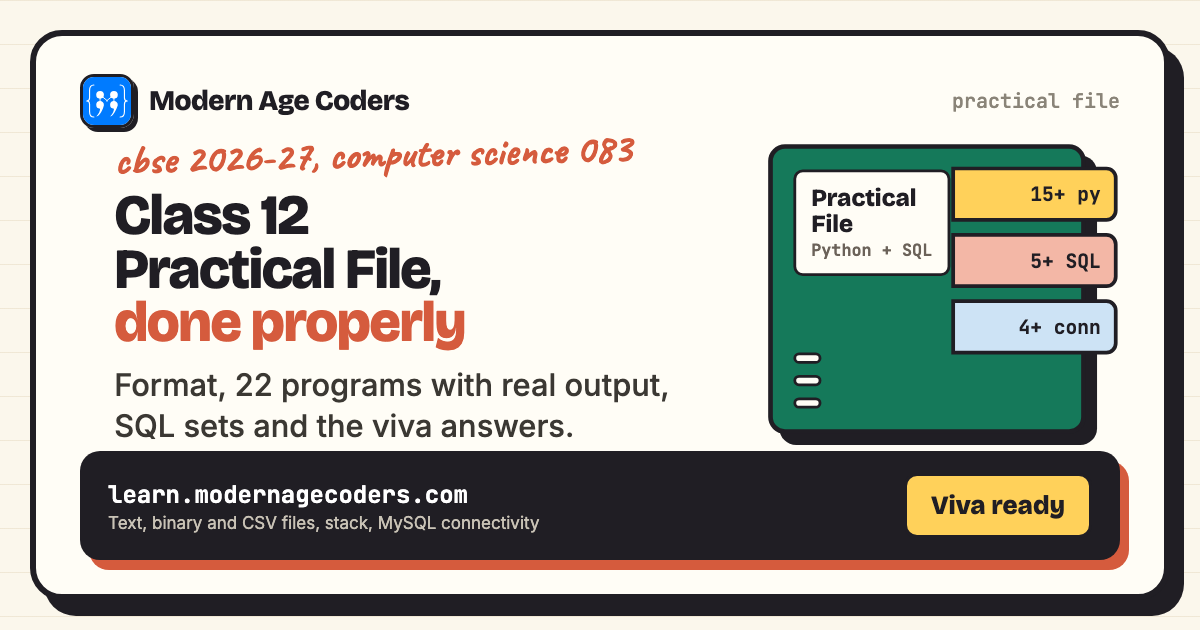
A Class 12 Computer Science practical file needs, according to the CBSE 2026-27 syllabus, at least 15 Python programs, at least 5 sets of SQL queries, and at least 4 Python and SQL connectivity programs. It is worth 7 of the 30 practical marks, and the viva (3 marks) is mostly questions about what is in it. This page gives you the format, 22 ready practical-file programs with their real output (functions, text, binary and CSV files, stack, SQL and connectivity), 5 SQL query sets, and the viva answers that go with them.
If you want a revision bank of exam-style programs rather than a file, see our 20 Python programs for CBSE Class 12. This page is about building the file itself: what to put in it, how to present each program, and how to talk about it when the examiner asks.
What the syllabus asks for in the practical file
The CBSE Class XII Computer Science (083) curriculum for 2026-27 splits the 30 practical marks like this. For the report file it asks for "Minimum 15 Python programs", SQL queries in "Minimum 5 sets using one table / two tables", and "Minimum 4 programs based on Python" and SQL connectivity.
| Component | Marks | What it means for you |
|---|---|---|
| Lab test: Python program | 8 | Write and run one program live (60% logic, 20% documentation, 20% code quality) |
| Lab test: SQL queries | 4 | 4 queries based on one or two tables |
| Report file | 7 | 15+ Python programs, 5+ SQL query sets, 4+ Python and SQL connectivity programs |
| Project | 8 | Using concepts from Classes 11 and 12, done in groups of two to three |
| Viva voce | 3 | Questions on your file, your project and the syllabus |
Source: CBSE curriculum 2026-27, Computer Science Class XII, section 5 (Practical) and section 6 (Suggested Practical List).
The format of a practical file
CBSE sets what goes in the file, not how it looks, so your school's own instructions come first. Most schools ask for the same structure, and examiners recognise it at a glance:
- Cover page: school name, "Computer Science (083) Practical File", session 2026-27, your name, class, section and roll number.
- Certificate: a page for your teacher and the external examiner to sign. Schools usually give a fixed wording.
- Acknowledgement: a short, honest thank-you. Two or three sentences is enough.
- Index: program number, aim, page number, date, and a column for the teacher's signature.
- Programs: one per page, each with four parts: aim, code, output, and (if your school wants it) a one-line conclusion.
- SQL section: the table structure, the queries, and the result of each query.
- Connectivity section: at least four Python programs that talk to MySQL, with output.
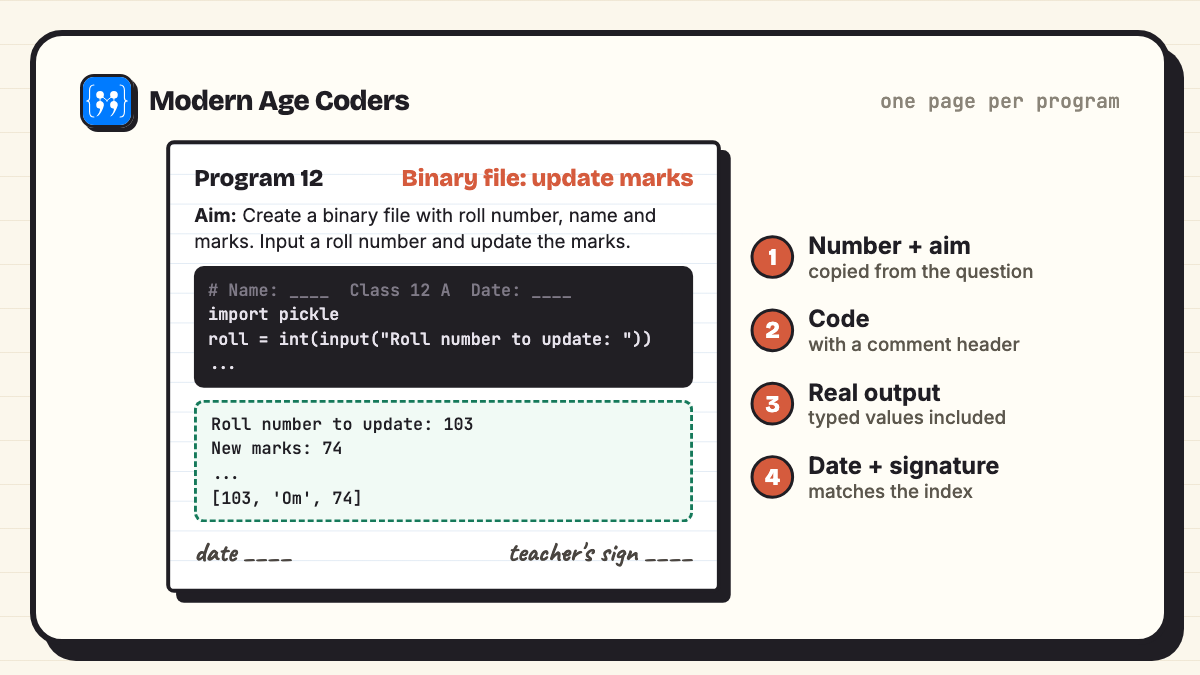
Output must be real
Run every program and copy the output exactly, including the values you typed. Examiners often ask you to run a program from your file in front of them; if the output on screen does not match the page, that is the first thing they notice.
Handwritten or printed?
That is a school rule, not a CBSE one. Many schools want the code handwritten on ruled pages with printed output pasted beside it, others accept a fully printed file. Ask your teacher before you start, not the week before submission.
All 22 practical file programs at a glance
| No. | Program | On the CBSE suggested list |
|---|---|---|
| 1 | Prime numbers in a range using a function | |
| 2 | Default and positional parameters | |
| 3 | A function that returns several values | |
| 4 | Global and local scope | |
| 5 | Exception handling with try, except and finally | |
| 6 | Create a text file with write() and writelines() | Yes |
| 7 | Display each word separated by # | Yes |
| 8 | Count vowels, consonants, uppercase and lowercase in a file | Yes |
| 9 | Remove lines containing "a" and write them to another file | Yes |
| 10 | read(), readline(), readlines(), seek() and tell() | |
| 11 | Binary file: search by roll number | Yes |
| 12 | Binary file: update marks | Yes |
| 13 | Binary file: append and display records | |
| 14 | CSV file: user-id and password search | Yes |
| 15 | CSV file: write rows and filter them | |
| 16 | Stack using a list (menu driven) | Yes |
| 17 | Push dictionary entries onto a stack | |
| 18 | Dice simulator | Yes |
| 19 | Python and SQL: create a table and insert records | Integrate SQL with Python |
| 20 | Python and SQL: display records with fetchall(), fetchone() and rowcount | Integrate SQL with Python |
| 21 | Python and SQL: update a record using input | Integrate SQL with Python |
| 22 | Python and SQL: delete a record and show what is left | Integrate SQL with Python |
Add the five SQL query sets further down and you have more than the minimum in every category.
Functions and exception handling
The syllabus opens Class 12 with user-defined functions (parameters, default values, return values, scope) and try-except-finally. Five programs cover all of it.
Program 1: Prime numbers in a range using a function
Aim: Write a function is_prime(n) that returns True if n is prime, and use it to print all primes between two numbers.
def is_prime(n):
    """Return True if n is a prime number."""
    if n < 2:
        return False
    for d in range(2, int(n ** 0.5) + 1):
        if n % d == 0:
            return False
    return True

low = int(input("Lower limit: "))
high = int(input("Upper limit: "))
primes = [n for n in range(low, high + 1) if is_prime(n)]
print("Primes:", primes)
print("Count:", len(primes))Lower limit: 10
Upper limit: 50
Primes: [11, 13, 17, 19, 23, 29, 31, 37, 41, 43, 47]
Count: 11Viva point: is_prime is a user-defined function with one positional parameter. The first return that runs ends the function, which is why the loop can stop early.
Program 2: Default and positional parameters
Aim: Write a function area(length, breadth=None) that returns the area of a square when one side is given, and of a rectangle when both are given.
def area(length, breadth=None):
    if breadth is None:          # default used: treat it as a square
        return length * length
    return length * breadth

print("Square of side 6:", area(6))
print("Rectangle 8 x 3:", area(8, 3))
print("Keyword arguments:", area(breadth=4, length=10))Square of side 6: 36
Rectangle 8 x 3: 24
Keyword arguments: 40Viva point: A default parameter must come after the positional ones. Keyword arguments can be passed in any order because Python matches them by name.
Program 3: A function that returns several values
Aim: Write a function that takes a list of marks and returns the highest, lowest and average marks together.
def analyse(marks):
    high = max(marks)
    low = min(marks)
    avg = sum(marks) / len(marks)
    return high, low, round(avg, 2)

result = analyse([67, 89, 92, 74, 58, 81])
print("Returned:", result, type(result).__name__)
h, l, a = result
print("Highest:", h, " Lowest:", l, " Average:", a)Returned: (92, 58, 76.83) tuple
Highest: 92 Lowest: 58 Average: 76.83Viva point: Returning several values actually returns one tuple. Unpacking h, l, a = result splits it again.
Program 4: Global and local scope
Aim: Write a program to show the difference between a local variable, a global variable, and the global keyword.
count = 10                     # global variable

def show_local():
    count = 99                 # a new local variable, the global is untouched
    print("Inside show_local:", count)

def change_global():
    global count
    count = count + 5          # changes the global variable
    print("Inside change_global:", count)

show_local()
print("After show_local:", count)
change_global()
print("After change_global:", count)Inside show_local: 99
After show_local: 10
Inside change_global: 15
After change_global: 15Viva point: Assigning to a name inside a function creates a local variable unless the function declares it global. This is the most asked scope question in the viva.
Program 5: Exception handling with try, except and finally
Aim: Write a program that divides two numbers entered by the user and handles a wrong value and division by zero using try-except-finally.
for attempt in range(3):
    try:
        a = int(input("Numerator: "))
        b = int(input("Denominator: "))
        print("Result:", a / b)
    except ValueError:
        print("Please type whole numbers only")
    except ZeroDivisionError:
        print("Cannot divide by zero")
    finally:
print("-- attempt", attempt + 1, "finished --")Numerator: 84
Denominator: 4
Result: 21.0
-- attempt 1 finished --
Numerator: ten
Please type whole numbers only
-- attempt 2 finished --
Numerator: 7
Denominator: 0
Cannot divide by zero
-- attempt 3 finished --Viva point: The finally block runs every time, error or not. On the second attempt the error happens at the first input(), so the denominator is never asked for.
Text file programs
Program 6 creates story.txt; programs 7 to 11 read it. Run them in the same folder, in order, exactly as you would in the lab. Three of these are word for word from the CBSE suggested list.
Program 6: Create a text file with write() and writelines()
Aim: Create a text file story.txt using write() and writelines(), then display its contents.
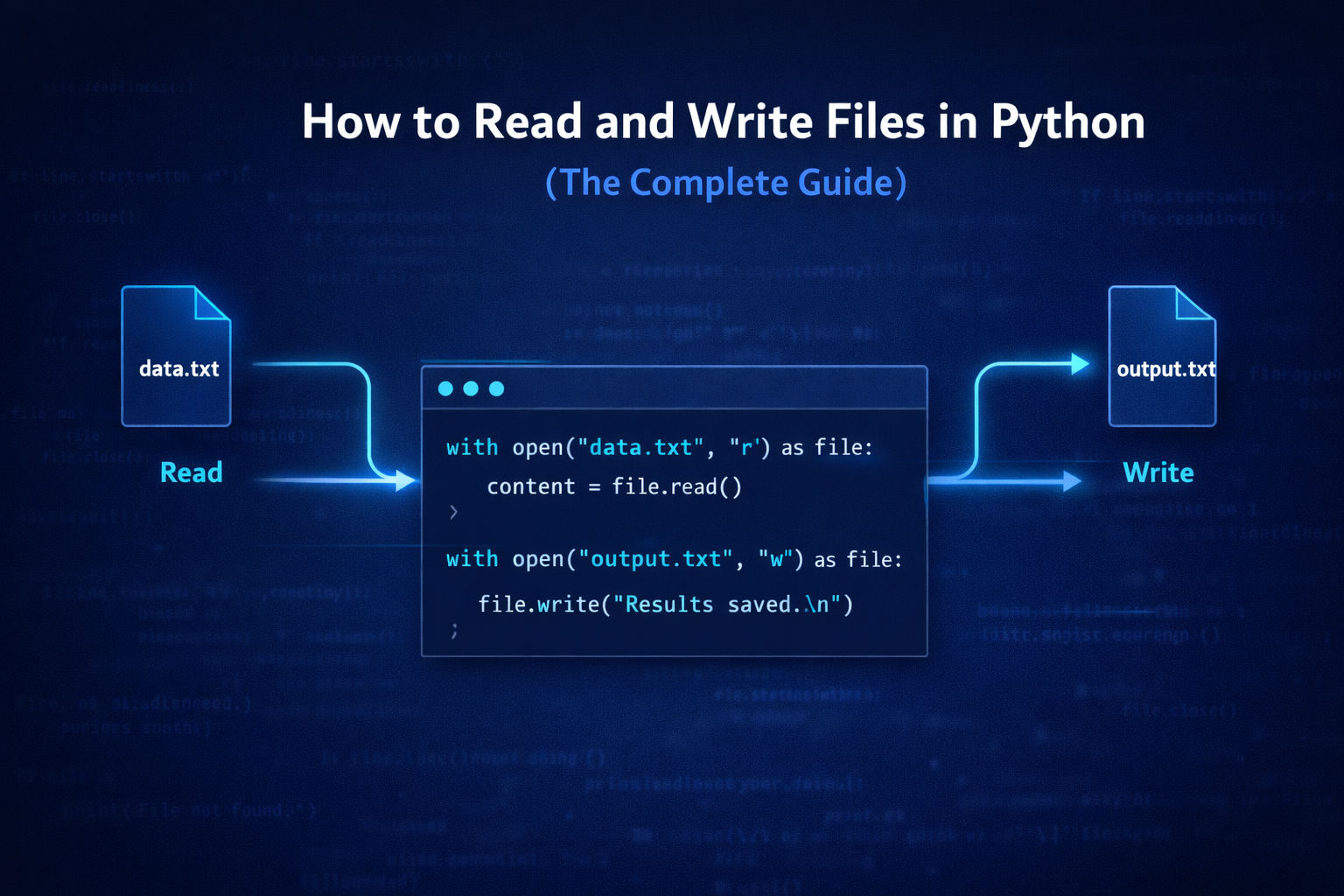
with open("story.txt", "w") as f:
    f.write("The fox ran across a field.\n")
    f.writelines([
        "Python is my first love.\n",
        "Every line in this file ends with a newline.\n",
        "Write your code, then test it.\n",
        "Revise binary files and CSV files.\n",
    ])

with open("story.txt", "r") as f:
print(f.read(), end="")The fox ran across a field.
Python is my first love.
Every line in this file ends with a newline.
Write your code, then test it.
Revise binary files and CSV files.Viva point: write() takes one string; writelines() takes a list of strings and adds no newlines of its own. Opening with with closes the file automatically.
Program 7: Display each word separated by #
Aim: Read a text file line by line and display each word separated by a #.
with open("story.txt", "r") as f:
    for line in f:
        words = line.split()
print("#".join(words))The#fox#ran#across#a#field.
Python#is#my#first#love.
Every#line#in#this#file#ends#with#a#newline.
Write#your#code,#then#test#it.
Revise#binary#files#and#CSV#files.Viva point: Looping over the file object reads it one line at a time, which also works on files too big to read at once.
Program 8: Count vowels, consonants, uppercase and lowercase in a file
Aim: Read a text file and display the number of vowels, consonants, uppercase and lowercase characters in the file.
v = c = up = lo = 0
with open("story.txt", "r") as f:
    text = f.read()
for ch in text:
    if ch.isalpha():
        if ch.lower() in "aeiou":
            v += 1
        else:
            c += 1
        if ch.isupper():
            up += 1
        else:
            lo += 1
print("Vowels:", v)
print("Consonants:", c)
print("Uppercase:", up)
print("Lowercase:", lo)Vowels: 46
Consonants: 80
Uppercase: 8
Lowercase: 118Viva point: read() returns the whole file as one string, so a single loop over characters is enough.
Program 9: Remove lines containing "a" and write them to another file
Aim: Remove all the lines that contain the character 'a' in a file and write them to another file.
with open("story.txt", "r") as f:
    lines = f.readlines()

keep = [ln for ln in lines if "a" not in ln]
moved = [ln for ln in lines if "a" in ln]

with open("story.txt", "w") as f:
    f.writelines(keep)
with open("lines_with_a.txt", "w") as f:
    f.writelines(moved)

print("Left in story.txt:")
print(open("story.txt").read(), end="")
print("Moved to lines_with_a.txt:", len(moved), "lines")Left in story.txt:
Python is my first love.
Write your code, then test it.
Moved to lines_with_a.txt: 3 linesViva point: You cannot delete a line in place, so the program reads every line, splits them into two lists and rewrites both files. Lower-case "a" only: "The fox ran..." moves because of "ran".
Program 10: read(), readline(), readlines(), seek() and tell()
Aim: Show how read(n), readline(), readlines(), tell() and seek() move through a file.
with open("notes.txt", "w") as f:
    f.write("Line one\nLine two\nLine three\n")

with open("notes.txt", "r") as f:
    print("tell at start:", f.tell())
    print("read(4):", repr(f.read(4)))
    print("tell now:", f.tell())
    print("readline():", repr(f.readline()))
    print("readlines():", f.readlines())
    f.seek(0)
print("after seek(0), readline():", repr(f.readline()))tell at start: 0
read(4): 'Line'
tell now: 4
readline(): ' one\n'
readlines(): ['Line two\n', 'Line three\n']
after seek(0), readline(): 'Line one\n'Viva point: tell() gives the current position in bytes; seek(0) jumps back to the start. readlines() returns only the lines not yet read. (We create a fresh notes.txt because program 9 changed story.txt.)
Binary file programs (pickle)
Binary files store Python objects as they are, using pickle.dump() and pickle.load(). Two of these three are on the suggested list.
Program 11: Binary file: search by roll number
Aim: Create a binary file with name and roll number. Search for a given roll number and display the name; if not found, display an appropriate message.
import pickle

students = [[1, "Aanya"], [2, "Kabir"], [3, "Ishita"], [4, "Rehan"]]
with open("students.dat", "wb") as f:
    for rec in students:
        pickle.dump(rec, f)

for _ in range(2):
    roll = int(input("Roll number to search: "))
    found = False
    with open("students.dat", "rb") as f:
        try:
            while True:
                rec = pickle.load(f)
                if rec[0] == roll:
                    print("Name:", rec[1])
                    found = True
                    break
        except EOFError:
            pass
    if not found:
print("Roll number", roll, "not found")Roll number to search: 3
Name: Ishita
Roll number to search: 9
Roll number 9 not foundViva point: Each pickle.dump() writes one record, so reading needs a loop of pickle.load() calls that ends when EOFError is raised. That try-except is the pattern examiners look for.
Program 12: Binary file: update marks
Aim: Create a binary file with roll number, name and marks. Input a roll number and update the marks.
import pickle

with open("marks.dat", "wb") as f:
    pickle.dump([[101, "Neel", 78], [102, "Tara", 85], [103, "Om", 69]], f)

roll = int(input("Roll number to update: "))
new_marks = int(input("New marks: "))

with open("marks.dat", "rb") as f:
    records = pickle.load(f)
for rec in records:
    if rec[0] == roll:
        rec[2] = new_marks
with open("marks.dat", "wb") as f:
    pickle.dump(records, f)

with open("marks.dat", "rb") as f:
    for rec in pickle.load(f):
print(rec)Roll number to update: 103
New marks: 74
[101, 'Neel', 78]
[102, 'Tara', 85]
[103, 'Om', 74]Viva point: Here the whole list is one pickled object: load it, change it in memory, write it back with "wb". It is the simplest correct way to update a binary file.
Program 13: Binary file: append and display records
Aim: Append new records to a binary file using "ab" mode and display all records with marks above 80.
import pickle

with open("results.dat", "wb") as f:
    pickle.dump({"roll": 1, "name": "Avni", "marks": 91}, f)
    pickle.dump({"roll": 2, "name": "Dev", "marks": 76}, f)

with open("results.dat", "ab") as f:          # append mode keeps old records
    pickle.dump({"roll": 3, "name": "Mira", "marks": 88}, f)

print("Students above 80:")
with open("results.dat", "rb") as f:
    while True:
        try:
            rec = pickle.load(f)
        except EOFError:
            break
        if rec["marks"] > 80:
print(rec["roll"], rec["name"], rec["marks"])Students above 80:
1 Avni 91
3 Mira 88Viva point: "wb" erases a file, "ab" adds to its end. Records can be dictionaries as easily as lists.
CSV file programs
CSV files are plain text in rows and columns, opened with the csv module. The user-id and password program is on the suggested list.
Program 14: CSV file: user-id and password search
Aim: Create a CSV file by entering user-id and password, read it and search the password for a given user-id.
import csv

n = int(input("How many users? "))
with open("users.csv", "w", newline="") as f:
    w = csv.writer(f)
    w.writerow(["userid", "password"])
    for i in range(n):
        uid = input("User id: ")
        pwd = input("Password: ")
        w.writerow([uid, pwd])

search = input("Find password for user id: ")
with open("users.csv", "r", newline="") as f:
    r = csv.reader(f)
    next(r)                                   # skip the header row
    for row in r:
        if row[0] == search:
            print("Password:", row[1])
            break
    else:
print("User id not found")How many users? 2
User id: riya07
Password: sunflower#12
User id: arjun_k
Password: monsoon@9
Find password for user id: arjun_k
Password: monsoon@9Viva point: newline="" stops blank lines appearing between rows on Windows. The else on the for loop runs only if the loop never hit break. (Storing real passwords in plain text is unsafe; this is a file-handling exercise.)
Program 15: CSV file: write rows and filter them
Aim: Write student records to a CSV file with writerows(), then read it and display students who scored 75 or more, with the class average.
import csv

rows = [["roll", "name", "marks"],
        [1, "Gauri", 82], [2, "Harsh", 64], [3, "Inaya", 91], [4, "Jai", 75]]
with open("class.csv", "w", newline="") as f:
    csv.writer(f).writerows(rows)

total = count = 0
with open("class.csv", "r", newline="") as f:
    r = csv.reader(f)
    header = next(r)
    print(header)
    for roll, name, marks in r:
        marks = int(marks)            # csv gives back strings
        total += marks
        count += 1
        if marks >= 75:
            print(roll, name, marks)
print("Class average:", total / count)['roll', 'name', 'marks']
1 Gauri 82
3 Inaya 91
4 Jai 75
Class average: 78.0Viva point: Everything read from a CSV file comes back as a string, so marks must be converted with int() before any arithmetic.
Stack programs
A stack is last in, first out. The syllabus asks you to implement it with a list: append() to push, pop() to pop.
Program 16: Stack using a list (menu driven)
Aim: Write a menu-driven program to implement a stack using a list, with push, pop, peek and display.
stack = []

def push(item):
    stack.append(item)

def pop():
    if not stack:
        return "Underflow: stack is empty"
    return stack.pop()

def peek():
    return stack[-1] if stack else "Stack is empty"

def display():
    if not stack:
        print("Stack is empty")
    for item in reversed(stack):
        print(item)

while True:
    ch = input("1 Push 2 Pop 3 Peek 4 Display 5 Exit: ")
    if ch == "1":
        push(input("Item: "))
    elif ch == "2":
        print("Popped:", pop())
    elif ch == "3":
        print("Top:", peek())
    elif ch == "4":
        display()
    elif ch == "5":
break1 Push 2 Pop 3 Peek 4 Display 5 Exit: 1
Item: 10
1 Push 2 Pop 3 Peek 4 Display 5 Exit: 1
Item: 20
1 Push 2 Pop 3 Peek 4 Display 5 Exit: 1
Item: 30
1 Push 2 Pop 3 Peek 4 Display 5 Exit: 4
30
20
10
1 Push 2 Pop 3 Peek 4 Display 5 Exit: 2
Popped: 30
1 Push 2 Pop 3 Peek 4 Display 5 Exit: 3
Top: 20
1 Push 2 Pop 3 Peek 4 Display 5 Exit: 2
Popped: 20
1 Push 2 Pop 3 Peek 4 Display 5 Exit: 2
Popped: 10
1 Push 2 Pop 3 Peek 4 Display 5 Exit: 2
Popped: Underflow: stack is empty
1 Push 2 Pop 3 Peek 4 Display 5 Exit: 5Viva point: The top of the stack is the end of the list. Popping from an empty stack is called underflow, and checking for it before calling pop() is what earns the code-quality marks.
Program 17: Push dictionary entries onto a stack
Aim: A dictionary holds student names and marks. Push the names of students who scored more than 75 onto a stack, then pop and display them until the stack is empty.
marks = {"Aditi": 82, "Bhuvan": 67, "Charu": 91, "Daksh": 74, "Esha": 88}
stack = []

def push_toppers(d):
    for name, m in d.items():
        if m > 75:
            stack.append(name)

def pop_all():
    while stack:
        print(stack.pop(), end=" ")
    print()
    print("Stack empty")

push_toppers(marks)
print("Stack (bottom to top):", stack)
pop_all()Stack (bottom to top): ['Aditi', 'Charu', 'Esha']
Esha Charu Aditi
Stack emptyViva point: The names come out in reverse order of going in: Esha was pushed last, so she is popped first. That reversal is the whole point of a stack, and a common board question.
Random numbers
One program, straight from the suggested list.
Program 18: Dice simulator
Aim: Write a random number generator that generates random numbers between 1 and 6 (simulates a dice).
import random

while True:
    ch = input("Press Enter to roll, or q to quit: ")
    if ch.lower() == "q":
        break
print("You rolled:", random.randint(1, 6))Press Enter to roll, or q to quit:
You rolled: 5
Press Enter to roll, or q to quit:
You rolled: 6
Press Enter to roll, or q to quit:
You rolled: 3
Press Enter to roll, or q to quit: qViva point: randint(1, 6) includes both ends. Your numbers will be different from ours, because nothing fixes the random sequence, which is exactly what a real dice should do.
SQL query sets for the practical file
The syllabus asks for at least 5 sets of SQL queries using one or two tables, built around a student table with ALTER, UPDATE, ORDER BY, DELETE and GROUP BY. Write these in MySQL in your lab. We ran every query below in SQLite 3.50 through Python's sqlite3 module, which uses the same SQL for all of these statements; where MySQL differs we say so.
CREATE TABLE student (
    rno     INT PRIMARY KEY,
    name    VARCHAR(20) NOT NULL,
    gender  CHAR(1),
    section CHAR(1),
    marks   INT,
    dob     DATE
);
INSERT INTO student VALUES (1, 'Aarav',  'M', 'A', 86, '2008-04-12');
INSERT INTO student VALUES (2, 'Bhavya', 'F', 'B', 92, '2008-11-03');
INSERT INTO student VALUES (3, 'Chirag', 'M', 'A', 67, '2009-01-25');
INSERT INTO student VALUES (4, 'Diya',   'F', 'A', 78, '2008-07-19');
INSERT INTO student VALUES (5, 'Eshan',  'M', 'B', 55, '2008-02-08');
INSERT INTO student VALUES (6, 'Farah',  'F', 'B', 89, '2009-03-30');
Set 1: Create the table, insert rows and display them
Create a student table with the roll number as the primary key, insert six rows and display the table. (The six INSERT statements are in the code above the result.)
SELECT * FROM student;+-----+--------+--------+---------+-------+------------+
| rno | name | gender | section | marks | dob |
+-----+--------+--------+---------+-------+------------+
| 1 | Aarav | M | A | 86 | 2008-04-12 |
| 2 | Bhavya | F | B | 92 | 2008-11-03 |
| 3 | Chirag | M | A | 67 | 2009-01-25 |
| 4 | Diya | F | A | 78 | 2008-07-19 |
| 5 | Eshan | M | B | 55 | 2008-02-08 |
| 6 | Farah | F | B | 89 | 2009-03-30 |
+-----+--------+--------+---------+-------+------------+Set 2: ALTER and UPDATE
Add a new attribute, fill it with UPDATE, then remove it again.
ALTER TABLE student ADD house VARCHAR(10);(statement executed, no rows returned)UPDATE student SET house = 'Red' WHERE section = 'A';(3 rows affected)UPDATE student SET house = 'Blue' WHERE section = 'B';(3 rows affected)SELECT rno, name, section, house FROM student;+-----+--------+---------+-------+
| rno | name | section | house |
+-----+--------+---------+-------+
| 1 | Aarav | A | Red |
| 2 | Bhavya | B | Blue |
| 3 | Chirag | A | Red |
| 4 | Diya | A | Red |
| 5 | Eshan | B | Blue |
| 6 | Farah | B | Blue |
+-----+--------+---------+-------+ALTER TABLE student DROP house;(statement executed, no rows returned)To change a data type MySQL uses ALTER TABLE student MODIFY name VARCHAR(30);. SQLite has no MODIFY, so that one statement is shown here but was not run.
Set 3: WHERE, BETWEEN, LIKE, IN and ORDER BY
Filter rows with the operators in the syllabus and sort the result.
SELECT rno, name, marks FROM student WHERE marks > 75 ORDER BY marks DESC;+-----+--------+-------+
| rno | name | marks |
+-----+--------+-------+
| 2 | Bhavya | 92 |
| 6 | Farah | 89 |
| 1 | Aarav | 86 |
| 4 | Diya | 78 |
+-----+--------+-------+SELECT rno, name, dob FROM student WHERE dob BETWEEN '2008-01-01' AND '2008-12-31' ORDER BY dob;+-----+--------+------------+
| rno | name | dob |
+-----+--------+------------+
| 5 | Eshan | 2008-02-08 |
| 1 | Aarav | 2008-04-12 |
| 4 | Diya | 2008-07-19 |
| 2 | Bhavya | 2008-11-03 |
+-----+--------+------------+SELECT name FROM student WHERE name LIKE '%a%' AND section IN ('A');+--------+
| name |
+--------+
| Aarav |
| Chirag |
| Diya |
+--------+Set 4: GROUP BY with aggregate functions and HAVING
Find the minimum, maximum, sum, count and average of marks for each section, then keep only groups that pass a condition.
SELECT section, MIN(marks), MAX(marks), SUM(marks), COUNT(*), AVG(marks) FROM student GROUP BY section;+---------+------------+------------+------------+----------+-------------------+
| section | MIN(marks) | MAX(marks) | SUM(marks) | COUNT(*) | AVG(marks) |
+---------+------------+------------+------------+----------+-------------------+
| A | 67 | 86 | 231 | 3 | 77.0 |
| B | 55 | 92 | 236 | 3 | 78.66666666666667 |
+---------+------------+------------+------------+----------+-------------------+SELECT gender, COUNT(*) AS students, AVG(marks) AS average FROM student GROUP BY gender HAVING AVG(marks) > 75;+--------+----------+-------------------+
| gender | students | average |
+--------+----------+-------------------+
| F | 3 | 86.33333333333333 |
+--------+----------+-------------------+MySQL rounds AVG() of whole numbers to four decimal places, so it shows 77.0000 and 78.6667 where SQLite prints 77.0 and 78.66666666666667. The rows and the values are the same.
Set 5: DELETE and a join across two tables
A second table, club, records which students joined which club. Join the two tables on rno (an equi-join), then delete a row.
CREATE TABLE club (
    cid  INT PRIMARY KEY,
    rno  INT,
    club VARCHAR(15)
);
INSERT INTO club VALUES (1, 2, 'Robotics');
INSERT INTO club VALUES (2, 4, 'Quiz');
INSERT INTO club VALUES (3, 6, 'Robotics');
SELECT s.rno, s.name, c.club FROM student s, club c WHERE s.rno = c.rno;+-----+--------+----------+
| rno | name | club |
+-----+--------+----------+
| 2 | Bhavya | Robotics |
| 4 | Diya | Quiz |
| 6 | Farah | Robotics |
+-----+--------+----------+DELETE FROM student WHERE marks < 60;(1 row affected)SELECT COUNT(*) AS remaining FROM student;+-----------+
| remaining |
+-----------+
| 5 |
+-----------+Python and MySQL connectivity programs
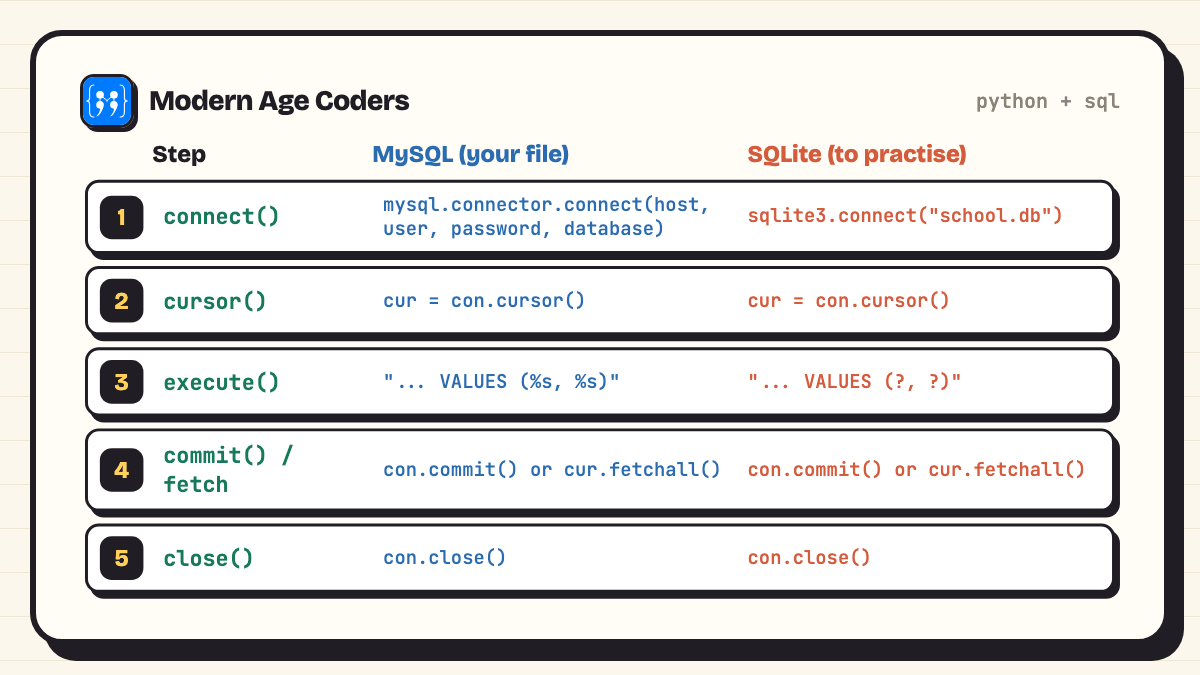
The syllabus asks for at least four programs that connect Python to SQL, using connect(), cursor(), execute(), commit(), fetchone(), fetchall() and rowcount. For your file, write the MySQL version (it needs a running MySQL server and the mysql-connector-python package).
Why there are two versions of each program
We did not have a MySQL server on the computer we tested on, and we will not print output we did not see. So for each task you get the MySQL code for your file, whose output depends on your database, and the same steps written for Python's built-in sqlite3 module, which we actually ran. The steps are identical; only the import, the connect() line and the placeholder (? instead of %s) change.
Program 19: Create a table and insert records
Aim: Connect Python to a database, create an employee table and insert records using placeholders.
import mysql.connector

con = mysql.connector.connect(host="localhost", user="root",
                              password="your_password", database="school")
cur = con.cursor()
cur.execute("CREATE TABLE IF NOT EXISTS employee "
            "(eid INT PRIMARY KEY, name VARCHAR(20), dept VARCHAR(15), salary INT)")
staff = [(1, "Asha", "Sales", 42000), (2, "Bilal", "IT", 58000),
         (3, "Charu", "IT", 61000), (4, "Dinesh", "HR", 39000)]
for row in staff:
    cur.execute("INSERT INTO employee VALUES (%s, %s, %s, %s)", row)
con.commit()
print("Rows inserted:", len(staff))
con.close()import sqlite3
con = sqlite3.connect("school.db")
cur = con.cursor()
cur.execute("DROP TABLE IF EXISTS employee")
cur.execute("CREATE TABLE employee "
"(eid INT PRIMARY KEY, name VARCHAR(20), dept VARCHAR(15), salary INT)")
staff = [(1, "Asha", "Sales", 42000), (2, "Bilal", "IT", 58000),
(3, "Charu", "IT", 61000), (4, "Dinesh", "HR", 39000)]
for row in staff:
cur.execute("INSERT INTO employee VALUES (?, ?, ?, ?)", row)
con.commit()
print("Rows inserted:", len(staff))
con.close()Rows inserted: 4Viva point: commit() makes the inserts permanent. Without it, the rows vanish when the connection closes. The placeholders (%s in MySQL, ? in SQLite) let the module insert the values safely.
Program 20: Display records with fetchall(), fetchone() and rowcount
Aim: Display all employees, then the first employee of the IT department, and show how many rows were fetched.
import mysql.connector

con = mysql.connector.connect(host="localhost", user="root",
                              password="your_password", database="school")
cur = con.cursor()
cur.execute("SELECT * FROM employee")
rows = cur.fetchall()
for r in rows:
    print(r)
print("Rows fetched:", cur.rowcount)
cur.execute("SELECT name, salary FROM employee WHERE dept = %s", ("IT",))
print("First IT employee:", cur.fetchone())
con.close()import sqlite3
con = sqlite3.connect("school.db")
cur = con.cursor()
cur.execute("SELECT * FROM employee")
rows = cur.fetchall()
for r in rows:
print(r)
print("Rows fetched:", len(rows))
cur.execute("SELECT name, salary FROM employee WHERE dept = ?", ("IT",))
print("First IT employee:", cur.fetchone())
con.close()(1, 'Asha', 'Sales', 42000)
(2, 'Bilal', 'IT', 58000)
(3, 'Charu', 'IT', 61000)
(4, 'Dinesh', 'HR', 39000)
Rows fetched: 4
First IT employee: ('Bilal', 58000)Viva point: fetchall() returns a list of tuples, fetchone() returns the next single tuple (or None). In MySQL, cur.rowcount after fetchall() gives the number of rows; SQLite returns -1 for SELECT, so we count the list instead.
Program 21: Update a record using input
Aim: Input an employee id and a new salary, update the record and confirm how many rows changed.
import mysql.connector

con = mysql.connector.connect(host="localhost", user="root",
                              password="your_password", database="school")
cur = con.cursor()
eid = int(input("Employee id: "))
sal = int(input("New salary: "))
cur.execute("UPDATE employee SET salary = {} WHERE eid = {}".format(sal, eid))
con.commit()
print("Rows updated:", cur.rowcount)
con.close()import sqlite3
con = sqlite3.connect("school.db")
cur = con.cursor()
eid = int(input("Employee id: "))
sal = int(input("New salary: "))
cur.execute("UPDATE employee SET salary = ? WHERE eid = ?", (sal, eid))
con.commit()
print("Rows updated:", cur.rowcount)
cur.execute("SELECT * FROM employee WHERE eid = ?", (eid,))
print(cur.fetchone())
con.close()Employee id: 4
New salary: 45000
Rows updated: 1
(4, 'Dinesh', 'HR', 45000)Viva point: The syllabus mentions both %s and format(). Building SQL with format() works for numbers you converted with int(), but placeholders are safer for anything a user types, because they cannot change the meaning of the query.
Program 22: Delete a record and show what is left
Aim: Input an employee id, delete that employee, and display the remaining records.
import mysql.connector

con = mysql.connector.connect(host="localhost", user="root",
                              password="your_password", database="school")
cur = con.cursor()
eid = int(input("Employee id to delete: "))
cur.execute("DELETE FROM employee WHERE eid = %s", (eid,))
con.commit()
if cur.rowcount == 0:
    print("No such employee")
else:
    print("Deleted. Remaining:")
    cur.execute("SELECT * FROM employee")
    for r in cur.fetchall():
        print(r)
con.close()import sqlite3
con = sqlite3.connect("school.db")
cur = con.cursor()
eid = int(input("Employee id to delete: "))
cur.execute("DELETE FROM employee WHERE eid = ?", (eid,))
con.commit()
if cur.rowcount == 0:
print("No such employee")
else:
print("Deleted. Remaining:")
cur.execute("SELECT * FROM employee")
for r in cur.fetchall():
print(r)
con.close()Employee id to delete: 1
Deleted. Remaining:
(2, 'Bilal', 'IT', 58000)
(3, 'Charu', 'IT', 61000)
(4, 'Dinesh', 'HR', 45000)Viva point: rowcount after DELETE tells you whether anything matched, which is how the program knows to print "No such employee".
When you run the MySQL version at school, create the database first (CREATE DATABASE school;), replace your_password with your own, and paste the output your screen shows.
Viva questions on the practical file, with answers
The viva is short, and almost every question is about something already in your file. If you can answer these in your own words, you are ready.
A text file stores characters you can read in any editor, line by line. A binary file stores data in the form Python uses in memory; in the syllabus we write and read it with the pickle module, and it cannot be read as plain text.
dump() converts a Python object, such as a list or dictionary, into bytes and writes it to a binary file opened in "wb" or "ab" mode. load() reads the next object back. Reading past the last object raises EOFError, which is why we wrap load() in try-except.
"w" creates the file or erases it if it exists, then writes from the start. "a" keeps the existing content and writes at the end. The binary versions are "wb" and "ab".
with closes the file automatically when the block ends, even if an error occurs, so data is not lost and the file is not left open.
tell() returns the current position of the file pointer in bytes. seek(n) moves the pointer to position n; seek(0) goes back to the start.
The csv module handles line endings itself. Without newline="", Python adds its own line ending as well, which shows up as blank rows between records on Windows.
A stack is a last in, first out structure: the last item pushed is the first popped. Underflow is trying to pop from an empty stack. Overflow is pushing into a stack that is full; a Python list has no fixed size, so in our programs only underflow can happen.
A local variable is created inside a function and exists only while it runs. A global variable is created outside all functions. To change a global inside a function you must declare it with the global keyword.
Code in finally runs whether an exception happened or not. It is used for clean-up, such as closing a file or a database connection.
It saves the changes made by INSERT, UPDATE or DELETE permanently to the database. Without commit(), those changes are lost when the connection closes. SELECT queries do not need it.
fetchone() returns the next row as a tuple, or None if there are no more rows. fetchall() returns all remaining rows as a list of tuples.
WHERE filters individual rows before grouping. HAVING filters groups after GROUP BY, so it can use aggregate functions such as AVG() or COUNT().
A column (or set of columns) whose value is unique for every row and never NULL, so each row can be identified. In our student table it is rno.
Where the project fits
The project is a separate 8 marks, but it usually lives in the same folder. The syllabus asks for something "tangible and useful using Python file handling/ Python-SQL connectivity", done in groups of two to three, started at least 6 months before the deadline. Its own example is a program that takes a list of transactions, groups them by category, applies GST rates and creates invoices. The connectivity programs above are the building blocks: a project is often those four programs joined by a menu, with checks on every input.
How we teach it
Our how we teach page describes the approach: students explain their thinking, trace code line by line until they can predict every step, and treat mistakes as data. For the practical file that means a student can open any page and explain why the EOFError appears, or what happens if commit() is missing, before the examiner asks. Our Computer Science Class 11 and 12 course covers the full 083 syllabus, and the Python for Class 12 CBSE and Computer Science Class 12 CBSE pages explain the options. The first class is free.
Frequently asked questions
The CBSE 2026-27 syllabus asks for a minimum of 15 Python programs, a minimum of 5 sets of SQL queries using one or two tables, and a minimum of 4 programs based on Python and SQL connectivity.
The report file is 7 marks out of the 30 practical marks. The rest are the lab test (8 for the Python program and 4 for SQL queries), the project (8) and the viva (3).
The program number and aim, the code with a short comment header, the real output from your own run (with the values you typed), and the date. Many schools also want a teacher signature column in the index.
Reading a text file and separating words with #, counting vowels, consonants, uppercase and lowercase characters in a file, moving lines containing "a" to another file, binary file search and update by roll number, a dice simulator, a stack using a list, a CSV user-id and password search, SQL commands on a student table, and integrating SQL with Python. All of them are on this page.
You need MySQL to run the mysql.connector programs for your file. To practise the same steps at home, Python's built-in sqlite3 module works with no installation, as shown on this page; just remember MySQL uses %s where SQLite uses ?.
CBSE does not specify. It is your school's rule, so ask your teacher. Whatever the format, the output must come from your own run.
Mostly questions on your file and project: file modes, pickle, CSV, the stack, functions and scope, exception handling, SQL clauses and connectivity functions such as commit() and fetchall(). The viva section above has 13 of the most common, with answers.
The suggested list is the same for everyone, so overlap is normal. Change the data, write your own comments, and make sure you can explain every line: the viva tests understanding, not the file alone.
Starting from Class 11? Our Python programs for Class 11 covers the CS and IP practical lists the year before.