Table of Contents
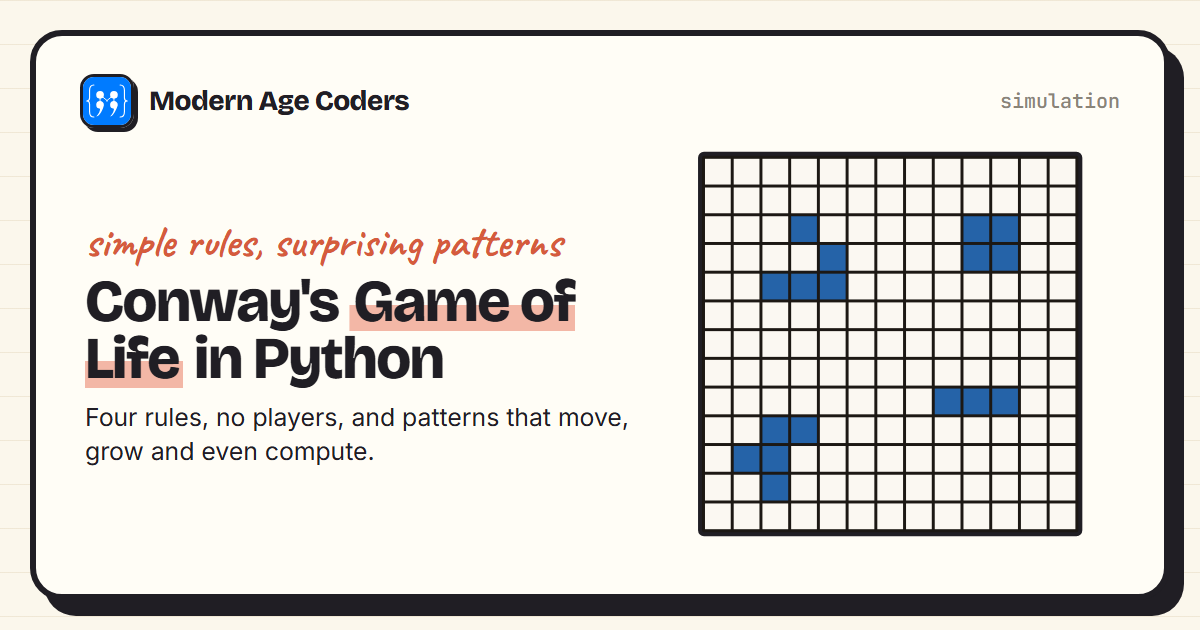
The Game of Life is not really a game. There are no players and no winning. You set up a grid of cells, some alive and some dead, and then four simple rules decide what happens next, generation after generation. What makes it famous is how much comes out of so little: patterns that stay still, patterns that pulse, patterns that walk across the grid, and patterns that grow chaotically for over a thousand generations before settling down.
It was invented by the mathematician John Conway and first shared with the public in Martin Gardner's "Mathematical Games" column in Scientific American in October 1970. This guide explains the rules, builds the whole simulation in about ten lines of Python, and uses it to check some of the Game of Life's most famous results for ourselves.
The rules
Each cell on the grid has eight neighbours: the cells above, below, to the sides and on the diagonals. Every generation, all cells update at the same time:
- Survival: a live cell with 2 or 3 live neighbours stays alive.
- Birth: a dead cell with exactly 3 live neighbours comes alive.
- Loneliness: a live cell with fewer than 2 live neighbours dies.
- Overcrowding: a live cell with more than 3 live neighbours dies.
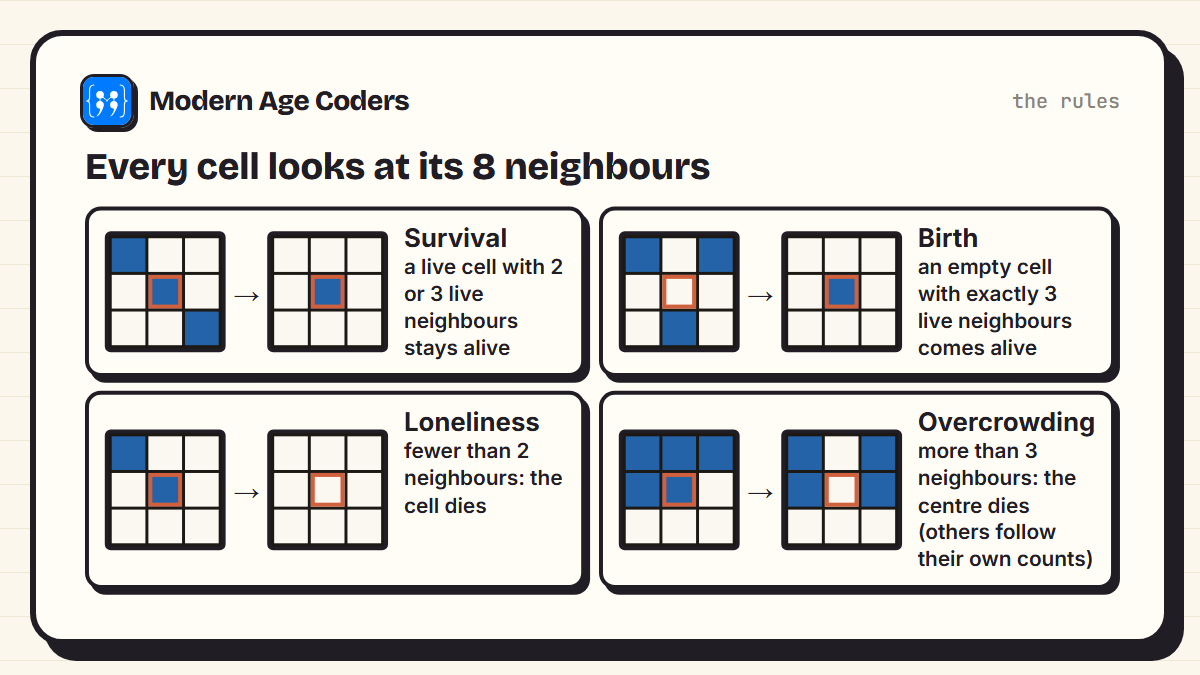
That is the entire rule book. Conway chose these rules carefully, after trying many others, so that patterns would be hard to predict: not so strict that everything dies, and not so generous that everything fills up.
The whole simulation in Python
A neat way to code it is to store only the live cells, as a set of (x, y) coordinates, so the grid can be unlimited in size. For each live cell, count one "vote" for each of its eight neighbours. A cell is alive in the next generation if it got exactly 3 votes, or 2 votes and was already alive:
from collections import Counter

def step(alive):
    """One generation. `alive` is a set of (x, y) cells on an unlimited grid."""
    counts = Counter((x + dx, y + dy)
                     for x, y in alive
                     for dx in (-1, 0, 1) for dy in (-1, 0, 1)
                     if (dx, dy) != (0, 0))
    return {cell for cell, n in counts.items()
            if n == 3 or (n == 2 and cell in alive)}
The last two lines are the four rules compressed into one condition. Exactly 3 neighbours means birth or survival; 2 neighbours means survival only for cells that were already alive; any other count means dead. Python's Counter, set and a comprehension do all the work, which makes this a lovely example of how much a few well-chosen data structures can express.
Still lifes, oscillators and spaceships
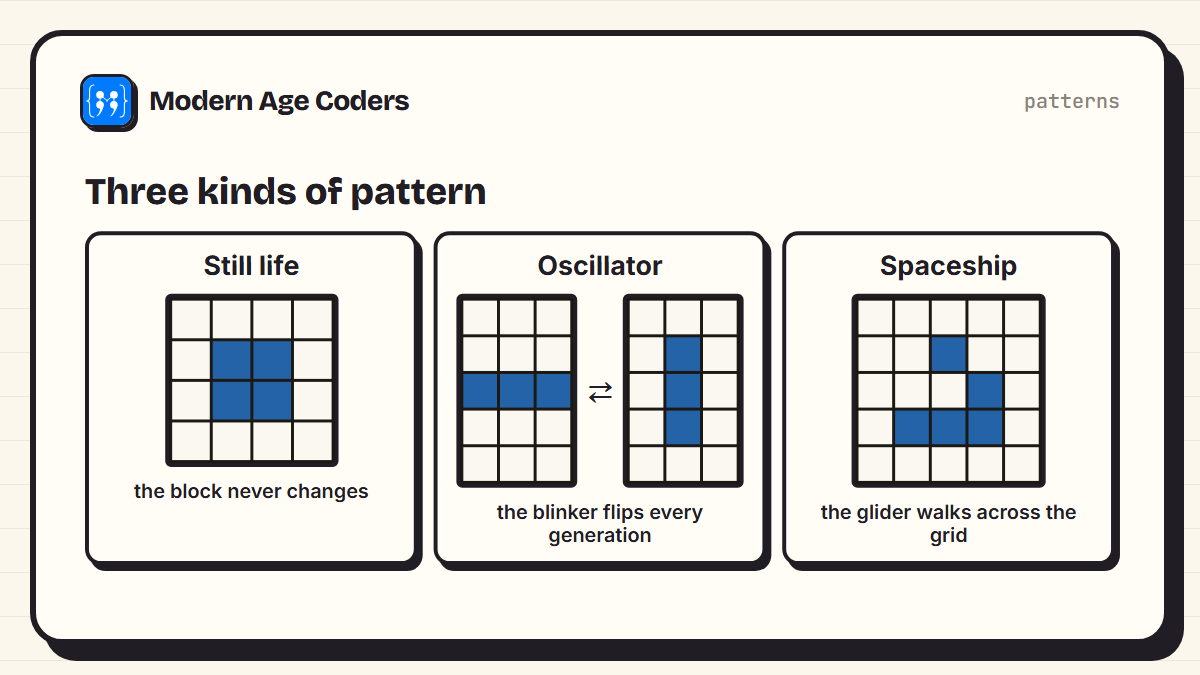
Some patterns never change (still lifes), some repeat after a fixed number of steps (oscillators), and some repeat in a new position, so they travel across the grid (spaceships). We can test three famous examples:
from life import step

block = {(0, 0), (1, 0), (0, 1), (1, 1)}
blinker = {(0, 1), (1, 1), (2, 1)}
glider = {(1, 0), (2, 1), (0, 2), (1, 2), (2, 2)}

print("block unchanged after 1 step:  ", step(block) == block)
print("blinker back after 2 steps:    ", step(step(blinker)) == blinker, "(but not after 1:", step(blinker) == blinker, ")")
g = glider
for _ in range(4):
    g = step(g)
moved = {(x + 1, y + 1) for x, y in glider}
print("glider after 4 steps = same shape moved one square diagonally:", g == moved)block unchanged after 1 step: True
blinker back after 2 steps: True (but not after 1: False )
glider after 4 steps = same shape moved one square diagonally: True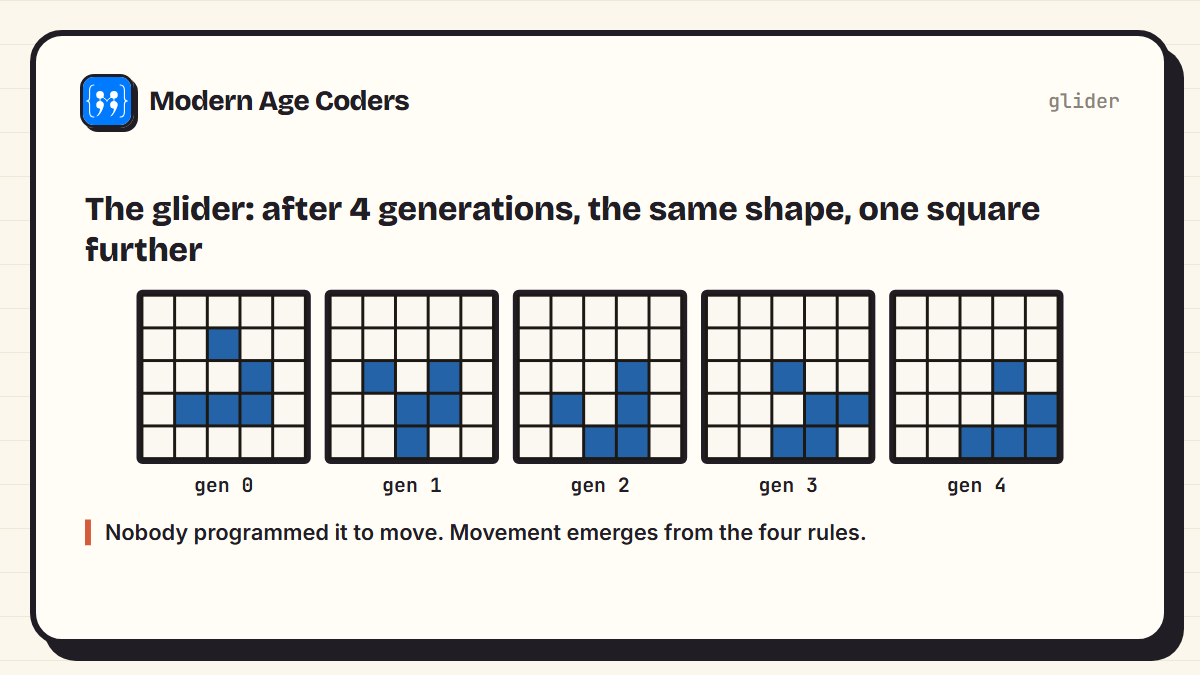
The glider is the star. After four generations it has returned to its original shape, one square further along diagonally, and it will keep going forever on an empty grid. Nothing in the rules mentions movement. Motion simply emerges from cells following local rules, which is the big idea the Game of Life is famous for.
Five cells, 1,103 generations
Some tiny starting patterns behave wildly. The R-pentomino has just five cells, and Conway's early experiments found it did not settle down quickly. Let the simulation run and track the population:
from life import step

cells = {(1, 0), (2, 0), (0, 1), (1, 1), (1, 2)}      # the R-pentomino: just 5 cells
history = [len(cells)]
for gen in range(1, 1500):
    cells = step(cells)
    history.append(len(cells))

# the first generation after which the population never changes again (up to 1,500)
settled = next(g for g in range(len(history)) if len(set(history[g:])) == 1)
print(f"starts with {history[0]} cells")
print(f"largest population: {max(history)} cells, at generation {history.index(max(history))}")
print(f"population stops changing at generation {settled}, with {history[settled]} cells")starts with 5 cells
largest population: 319 cells, at generation 821
population stops changing at generation 1103, with 116 cells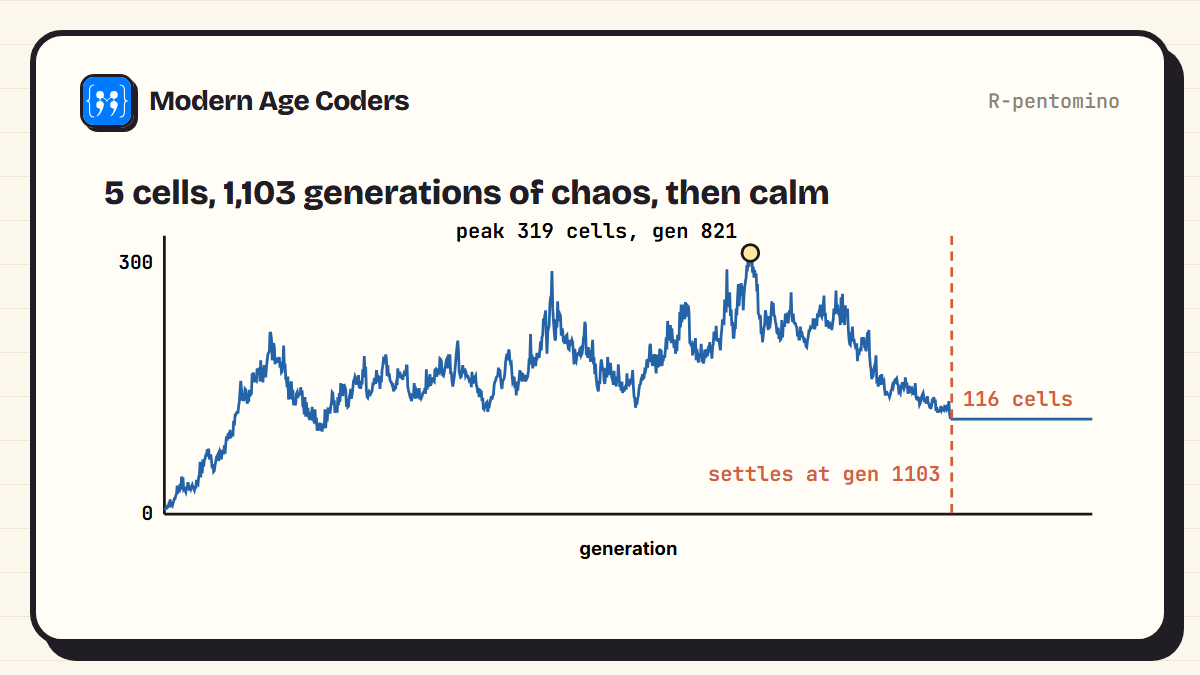
From 5 cells, the population rises to a peak of 319 at generation 821, swings up and down, and only stops changing at generation 1103, with 116 cells. That matches the published account exactly: the R-pentomino takes 1,103 generations to stabilise, ending with a population of 116, and along the way it throws out six gliders that fly off forever. The gliders it produced were the first spaceships ever discovered. Being able to reproduce a famous result with ten lines of your own code is one of the most satisfying things in programming.
A computer inside the game
The Game of Life has been proved to be Turing complete: with the right starting pattern, it can in principle compute anything an ordinary computer can. People have built working logic gates, counters and even a pattern that runs Tetris, all from the same four rules. Our guide to logic gates explains the building blocks such machines use.
Ideas to try
- Print the grid as text after each generation, using
#for live cells, and watch a glider walk. - Start from random cells and count how many generations until the population stops changing.
- Find the smallest pattern that keeps growing. (Hint: search online for the Gosper glider gun, which fires a new glider every 30 generations.)
- Change the rules: what happens if birth needs 3 or 6 neighbours? This variant is called HighLife.
- Draw it with a graphics library such as Pygame or turtle so you can watch it animate.
The Game of Life makes a superb coding project at almost any level, because the rules take a minute to learn and the patterns take a lifetime to explore. If you are starting out, our list of basic Python programs covers the skills you need first, and our text adventure game guide is another good first project.
Four rules, no players, and a universe of behaviour. The Game of Life is the best argument there is for simple rules applied many times.
How we teach it
The Game of Life is learning by building at its best, one of the principles on our how we teach page: students can ship a working simulation in the same lesson they meet the rules. Tracing one generation by hand until every cell can be predicted, then checking against the code, is how the rules really sink in. Our Python course for teens runs one to one or in small groups of 5 to 10.
Frequently asked questions
A cellular automaton invented by the mathematician John Conway: a grid of cells that are alive or dead, updated each generation by four rules based on how many of each cell's eight neighbours are alive. It has no players; the starting pattern decides everything.
A live cell with 2 or 3 live neighbours survives; a dead cell with exactly 3 live neighbours comes alive; every other live cell dies, from loneliness with fewer than 2 neighbours or overcrowding with more than 3.
Store the live cells as a set of coordinates, count how many live neighbours each nearby cell has with a Counter, and keep the cells with exactly 3 neighbours, or 2 if they were already alive. The whole update fits in about ten lines.
A five-cell pattern that returns to its original shape every four generations, shifted one square diagonally, so it travels across the grid. It is the most famous spaceship in the Game of Life.
Because extremely simple rules produce complex, unpredictable behaviour, including moving patterns and even structures that can compute. It is a classic example of emergence, studied in mathematics, computer science and biology.
Yes. It has been shown that suitable patterns can perform any computation a normal computer can, given enough space and time, and people have built working computers and a Tetris game inside it.
Yes. It uses loops, lists or sets and simple conditions, gives immediate visual results, and can be extended endlessly with graphics, new rules and pattern searches. It suits learners from their early teens upwards.