Table of Contents
- The 15 mini projects at a glance
- How to read someone else's source code
- Games and quizzes
- Codes and security
- Records and management systems
- Everyday tools
- Algorithms worth knowing
- Python mini projects for college students
- Python mini projects for beginners: where to start
- More Python mini project ideas
- How we teach it
- Frequently asked questions
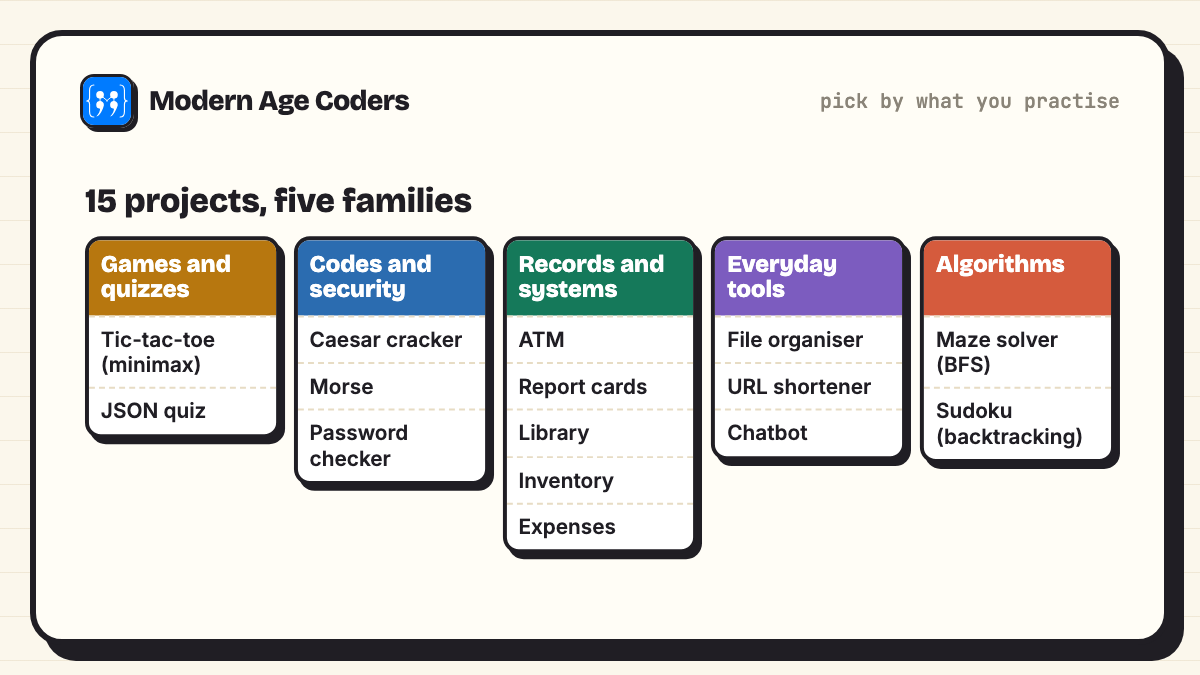
Python mini projects with source code are short, complete programs, usually 30 to 80 lines, that do one useful or fun job from start to finish. Below are 15 Python mini projects with full source code, from a Caesar cipher and an ATM simulator to an unbeatable tic-tac-toe, a maze solver and a Sudoku solver. Every one uses only Python's standard library, so it runs on any computer with Python 3, and every one was run by us with the output pasted exactly as it appeared.
This page is the step after our 30 Python project ideas for beginners, which gives short starters to grow yourself. Here each project is finished: copy it, run it, read it line by line, then use the "take it further" line to make it your own. For college students, each project also has a suggested extension that turns it into something worth a mini project submission or a GitHub repository.
How these were tested
Each program was saved as its own file and run with Python 3.14 using python3 -I (isolated mode, nothing installed beyond the standard library). Where a program asks for input, the output shows the screen as it looked, with our typed answers. Programs that create files (CSV, JSON, a demo folder) create them next to themselves, so run them in an empty folder.
The 15 mini projects at a glance
Line counts include comments and blank lines. Print this table (Ctrl+P, Save as PDF) if you want a checklist.
| No. | Mini project | Level | Main ideas | Lines |
|---|---|---|---|---|
| 1 | Tic-tac-toe against an unbeatable computer | Intermediate | recursion, minimax search | 53 |
| 2 | Quiz app with a JSON question bank | Beginner | json, random.shuffle, zip | 35 |
| 3 | Caesar cipher with a code cracker | Beginner | strings, ord and chr, modulo | 38 |
| 4 | Morse code translator | Beginner | dictionaries, reversing a dictionary | 31 |
| 5 | Password strength checker and passphrase generator | Beginner | string module, secrets, scoring rules | 43 |
| 6 | ATM and bank account simulator | Beginner | classes, exceptions, menus | 55 |
| 7 | Student report card manager | Beginner | csv, dictionaries, formatting | 40 |
| 8 | Library management system | Intermediate | classes, datetime, timedelta | 52 |
| 9 | Shop inventory manager | Beginner | json files, dictionaries | 49 |
| 10 | Expense tracker with a text chart | Beginner | csv, defaultdict, sorting | 34 |
| 11 | File organiser | Intermediate | pathlib, moving files | 35 |
| 12 | URL shortener | Intermediate | base-62 encoding, two-way dictionaries | 45 |
| 13 | Rule-based chatbot | Intermediate | regular expressions, functions as data | 39 |
| 14 | Maze solver (shortest path) | Advanced | breadth-first search, deque | 44 |
| 15 | Sudoku solver | Advanced | recursion, backtracking | 47 |
How to read someone else's source code
Copying a program teaches you very little. Reading it properly teaches a lot. Before you run each project, try this:
- Read the docstring and the last ten lines first. The top says what it does; the bottom shows how it is used. The middle is how.
- Predict the first three lines of output before running. Being wrong is useful: it shows exactly which line you misread.
- Change one thing and predict again. A different key in the cipher, a wall moved in the maze, a different PIN.
- Explain one function out loud as if to a friend. If you cannot, trace it on paper with real values.
Games and quizzes
1. Tic-tac-toe against an unbeatable computer
You play X in the terminal; the computer plays O and never loses. Its brain is minimax: for every free square it imagines the rest of the game, assuming both sides play perfectly, and picks the move with the best guaranteed result. The board is just a list of nine strings. (Level: Intermediate. Main ideas: recursion, minimax search.)
"""Tic-tac-toe against a computer that never loses (minimax search)."""

LINES = [(0, 1, 2), (3, 4, 5), (6, 7, 8), (0, 3, 6),
         (1, 4, 7), (2, 5, 8), (0, 4, 8), (2, 4, 6)]


def winner(board):
    for a, b, c in LINES:
        if board[a] != " " and board[a] == board[b] == board[c]:
            return board[a]
    return "draw" if " " not in board else None


def minimax(board, player):
    """Return (score, move) from O's point of view: +1 O wins, -1 X wins, 0 draw."""
    result = winner(board)
    if result == "O":
        return 1, None
    if result == "X":
        return -1, None
    if result == "draw":
        return 0, None
    best = None
    for move in [i for i, cell in enumerate(board) if cell == " "]:
        board[move] = player
        score, _ = minimax(board, "X" if player == "O" else "O")
        board[move] = " "
        if best is None or (player == "O" and score > best[0]) or (player == "X" and score < best[0]):
            best = (score, move)
    return best


def show(board):
    rows = [" | ".join(board[r * 3:r * 3 + 3]) for r in range(3)]
    print("\n---------\n".join(rows))


board = [" "] * 9
print("You are X. Squares are numbered 1 to 9, left to right, top to bottom.")
while winner(board) is None:
    move = int(input("Your square: ")) - 1
    if not 0 <= move < 9 or board[move] != " ":
        print("That square is not free.")
        continue
    board[move] = "X"
    if winner(board) is None:
        _, reply = minimax(board, "O")
        board[reply] = "O"
        print(f"Computer takes square {reply + 1}")
    show(board)

result = winner(board)
print("It's a draw." if result == "draw" else f"{result} wins!")You are X. Squares are numbered 1 to 9, left to right, top to bottom.
Your square: 5
Computer takes square 1
O | |
---------
| X |
---------
| |
Your square: 9
Computer takes square 3
O | | O
---------
| X |
---------
| | X
Your square: 2
Computer takes square 8
O | X | O
---------
| X |
---------
| O | X
Your square: 4
Computer takes square 6
O | X | O
---------
X | X | O
---------
| O | X
Your square: 7
O | X | O
---------
X | X | O
---------
X | O | X
It's a draw.In the run below we blocked every threat, so the game ended in a draw, which is the best anyone can do against perfect play.
Take it further: Add alpha-beta pruning and count how many positions it skips, or let the computer go first.
2. Quiz app with a JSON question bank
Questions live in questions.json, are shuffled each run and marked as you go. Wrong answers come back at the end for review. The random.seed(7) line keeps this demo repeatable; delete it for a real quiz. (Level: Beginner. Main ideas: json, random.shuffle, zip.)
"""Quiz app: questions stored in JSON, shuffled each run, scored with a review at the end."""
import json
import random

BANK = """[
 {"q": "Which keyword starts a loop that repeats a fixed number of times?", "options": ["if", "for", "def", "try"], "answer": "for"},
 {"q": "What does len([3, 1, 4]) return?", "options": ["3", "4", "8", "error"], "answer": "3"},
 {"q": "Which type is {'a': 1}?", "options": ["list", "tuple", "dict", "set"], "answer": "dict"},
 {"q": "What is 17 // 5 in Python?", "options": ["3.4", "3", "2", "4"], "answer": "3"},
 {"q": "Which of these is immutable?", "options": ["list", "dict", "set", "tuple"], "answer": "tuple"}
]"""

with open("questions.json", "w") as f:
    f.write(BANK)
with open("questions.json") as f:
    questions = json.load(f)

random.seed(7)               # fixed so this demo is repeatable; remove it for a real quiz
random.shuffle(questions)
wrong = []
for number, item in enumerate(questions, start=1):
    print(f"Q{number}. {item['q']}")
    for letter, option in zip("abcd", item["options"]):
        print(f"   {letter}) {option}")
    reply = input("Answer (a-d): ").strip().lower()
    chosen = dict(zip("abcd", item["options"])).get(reply)
    if chosen == item["answer"]:
        print("   Correct")
    else:
        print("   Wrong")
        wrong.append(item)

print(f"\nScore: {len(questions) - len(wrong)}/{len(questions)}")
for item in wrong:
print("Review:", item["q"], "->", item["answer"])Q1. Which of these is immutable?
a) list
b) dict
c) set
d) tuple
Answer (a-d): d
Correct
Q2. Which keyword starts a loop that repeats a fixed number of times?
a) if
b) for
c) def
d) try
Answer (a-d): b
Correct
Q3. What is 17 // 5 in Python?
a) 3.4
b) 3
c) 2
d) 4
Answer (a-d): b
Correct
Q4. What does len([3, 1, 4]) return?
a) 3
b) 4
c) 8
d) error
Answer (a-d): d
Wrong
Q5. Which type is {'a': 1}?
a) list
b) tuple
c) dict
d) set
Answer (a-d): c
Correct
Score: 4/5
Review: What does len([3, 1, 4]) return? -> 3Take it further: Add a timer per question and a high-score table saved to a file.
Codes and security
3. Caesar cipher with a code cracker
Shifts every letter by a key to encrypt and back to decrypt. The interesting part is crack(): it tries all 25 keys and scores each result by how many common English words appear, so it finds the message without being told the key. (Level: Beginner. Main ideas: strings, ord and chr, modulo.)
"""Caesar cipher: encrypt, decrypt, and crack a message without the key."""
import string

COMMON = ["the", "and", "is", "to", "of", "you", "at", "meet"]


def shift_text(text, key):
    out = []
    for ch in text:
        if ch.isalpha():
            base = ord("A") if ch.isupper() else ord("a")
            out.append(chr((ord(ch) - base + key) % 26 + base))
        else:
            out.append(ch)
    return "".join(out)


def crack(secret):
    """Try all 25 keys and score each result by how many common English words it contains."""
    best_key, best_score = 0, -1
    for key in range(1, 26):
        guess = shift_text(secret, -key).lower()
        words = guess.translate(str.maketrans("", "", string.punctuation)).split()
        score = sum(word in COMMON for word in words)
        if score > best_score:
            best_key, best_score = key, score
    return best_key, shift_text(secret, -best_key)


message = "Meet me at the library at five, and bring the notes."
secret = shift_text(message, 7)
print("Original: ", message)
print("Encrypted:", secret)
print("Decrypted:", shift_text(secret, -7))

key, plain = crack(secret)
print(f"Cracked without the key: key = {key}")
print("Message: ", plain)Original: Meet me at the library at five, and bring the notes.
Encrypted: Tlla tl ha aol spiyhyf ha mpcl, huk iypun aol uvalz.
Decrypted: Meet me at the library at five, and bring the notes.
Cracked without the key: key = 7
Message: Meet me at the library at five, and bring the notes.Take it further: Score with letter frequencies instead of a word list, so it cracks messages with no common words.
4. Morse code translator
One dictionary maps letters to Morse; a dictionary comprehension flips it for decoding. The program spots which direction you want by checking whether the input is only dots, dashes, spaces and slashes. (Level: Beginner. Main ideas: dictionaries, reversing a dictionary.)
"""Morse code translator, both directions."""

MORSE = {
    "A": ".-", "B": "-...", "C": "-.-.", "D": "-..", "E": ".", "F": "..-.",
    "G": "--.", "H": "....", "I": "..", "J": ".---", "K": "-.-", "L": ".-..",
    "M": "--", "N": "-.", "O": "---", "P": ".--.", "Q": "--.-", "R": ".-.",
    "S": "...", "T": "-", "U": "..-", "V": "...-", "W": ".--", "X": "-..-",
    "Y": "-.--", "Z": "--..", "0": "-----", "1": ".----", "2": "..---",
    "3": "...--", "4": "....-", "5": ".....", "6": "-....", "7": "--...",
    "8": "---..", "9": "----.",
}
BACK = {code: letter for letter, code in MORSE.items()}


def to_morse(text):
    words = text.upper().split()
    return " / ".join(" ".join(MORSE[ch] for ch in word if ch in MORSE) for word in words)


def from_morse(code):
    return " ".join("".join(BACK.get(sym, "?") for sym in word.split()) for word in code.split(" / "))


while True:
    line = input("Text or Morse (blank to stop): ").strip()
    if not line:
        break
    if set(line) <= set(".-/ "):
        print("  ->", from_morse(line))
    else:
print(" ->", to_morse(line))Text or Morse (blank to stop): SOS
-> ... --- ...
Text or Morse (blank to stop): Hello World
-> .... . .-.. .-.. --- / .-- --- .-. .-.. -..
Text or Morse (blank to stop): .... .. / - .... . .-. .
-> HI THERE
Text or Morse (blank to stop): Take it further: Play the Morse as beeps, or flash it on screen with the right timings.
5. Password strength checker and passphrase generator
Scores a password out of 6 for length and character variety, rejects famous passwords outright, and says exactly what to fix. Then it builds a random passphrase with secrets, which is the module meant for anything security related. (Level: Beginner. Main ideas: string module, secrets, scoring rules.)
"""Password strength checker that explains its score, plus a passphrase generator."""
import secrets
import string

WORDS = ["river", "mango", "pixel", "tiger", "cloud", "rocket", "violet",
         "pepper", "comet", "lantern", "maple", "quartz", "orbit", "falcon"]
COMMON = {"password", "123456", "qwerty", "letmein", "iloveyou", "admin"}


def check(pw):
    tips = []
    score = 0
    if pw.lower() in COMMON:
        return 0, ["This is one of the most common passwords. Never use it."]
    if len(pw) >= 12:
        score += 2
    elif len(pw) >= 8:
        score += 1
        tips.append("Use 12 or more characters.")
    else:
        tips.append("Far too short: use 12 or more characters.")
    for pool, name in [(string.ascii_lowercase, "a lowercase letter"),
                       (string.ascii_uppercase, "a capital letter"),
                       (string.digits, "a number"),
                       (string.punctuation, "a symbol")]:
        if any(ch in pool for ch in pw):
            score += 1
        else:
            tips.append(f"Add {name}.")
    return score, tips


def passphrase(n=4):
    return "-".join(secrets.choice(WORDS) for _ in range(n)) + str(secrets.randbelow(100))


for pw in ["qwerty", "sunshine", "Sunshine2026", "Tiger!Mango-Orbit7"]:
    score, tips = check(pw)
    label = ["very weak", "weak", "weak", "fair", "good", "strong", "strong"][score]
    print(f"{pw:<20} score {score}/6  {label}")
    for tip in tips:
        print("    -", tip)
print("Suggested passphrase:", passphrase())qwerty score 0/6 very weak
- This is one of the most common passwords. Never use it.
sunshine score 2/6 weak
- Use 12 or more characters.
- Add a capital letter.
- Add a number.
- Add a symbol.
Sunshine2026 score 5/6 strong
- Add a symbol.
Tiger!Mango-Orbit7 score 6/6 strong
Suggested passphrase: pepper-lantern-quartz-tiger45Take it further: Check a password against a downloaded list of the most common passwords instead of six.
Records and management systems
6. ATM and bank account simulator
A BankAccount class keeps the balance and a history, and refuses bad withdrawals by raising ValueError. The menu catches the error and shows it, so the program never crashes. Three wrong PINs block the card. (Level: Beginner. Main ideas: classes, exceptions, menus.)
"""ATM simulator: a BankAccount class with PIN check, deposits, withdrawals and a statement."""


class BankAccount:
    def __init__(self, owner, pin, balance=0):
        self.owner = owner
        self._pin = pin
        self.balance = balance
        self.history = []

    def check_pin(self, pin):
        return pin == self._pin

    def deposit(self, amount):
        if amount <= 0:
            raise ValueError("Deposit must be more than zero.")
        self.balance += amount
        self.history.append(("deposit", amount))

    def withdraw(self, amount):
        if amount > self.balance:
            raise ValueError("Not enough balance.")
        self.balance -= amount
        self.history.append(("withdraw", amount))


account = BankAccount("Asha", pin="4321", balance=5000)

for attempt in range(3):
    if account.check_pin(input("Enter PIN: ")):
        break
    print("Wrong PIN.")
else:
    print("Card blocked after 3 wrong attempts.")
    raise SystemExit

while True:
    choice = input("1 Balance  2 Deposit  3 Withdraw  4 Statement  5 Exit: ")
    try:
        if choice == "1":
            print("Balance:", account.balance)
        elif choice == "2":
            account.deposit(int(input("Amount: ")))
            print("Done. Balance:", account.balance)
        elif choice == "3":
            account.withdraw(int(input("Amount: ")))
            print("Done. Balance:", account.balance)
        elif choice == "4":
            for kind, amount in account.history:
                print(f"  {kind:<9}{amount:>7}")
        elif choice == "5":
            print("Thank you,", account.owner)
            break
    except ValueError as err:
print("Error:", err)Enter PIN: 1234
Wrong PIN.
Enter PIN: 4321
1 Balance 2 Deposit 3 Withdraw 4 Statement 5 Exit: 1
Balance: 5000
1 Balance 2 Deposit 3 Withdraw 4 Statement 5 Exit: 2
Amount: 1500
Done. Balance: 6500
1 Balance 2 Deposit 3 Withdraw 4 Statement 5 Exit: 3
Amount: 9000
Error: Not enough balance.
1 Balance 2 Deposit 3 Withdraw 4 Statement 5 Exit: 3
Amount: 2500
Done. Balance: 4000
1 Balance 2 Deposit 3 Withdraw 4 Statement 5 Exit: 4
deposit 1500
withdraw 2500
1 Balance 2 Deposit 3 Withdraw 4 Statement 5 Exit: 5
Thank you, AshaTake it further: Support several accounts in a dictionary keyed by account number, and add transfers between them.
7. Student report card manager
Writes a small marks file, reads it back with csv.DictReader, and prints each student's total, average and grade, the class topper and the average for every subject. Change the CSV and the report changes with it. (Level: Beginner. Main ideas: csv, dictionaries, formatting.)
"""Student report cards from a CSV file: averages, grades, class topper and subject averages."""
import csv

DATA = """name,maths,science,english,computer
Aarav,92,85,78,95
Diya,88,91,94,90
Kabir,67,72,58,81
Meera,75,64,88,70
Rohan,45,52,61,48
"""

with open("marks.csv", "w") as f:
    f.write(DATA)


def grade(avg):
    for cutoff, letter in [(90, "A1"), (80, "A2"), (70, "B1"), (60, "B2"), (50, "C1"), (40, "C2")]:
        if avg >= cutoff:
            return letter
    return "Needs support"


with open("marks.csv", newline="") as f:
    rows = list(csv.DictReader(f))

subjects = [key for key in rows[0] if key != "name"]
print(f"{'Name':<8}{'Total':>6}{'Avg':>7}  Grade")
results = []
for row in rows:
    marks = [int(row[s]) for s in subjects]
    avg = sum(marks) / len(marks)
    results.append((row["name"], sum(marks), avg))
    print(f"{row['name']:<8}{sum(marks):>6}{avg:>7.1f}  {grade(avg)}")

topper = max(results, key=lambda r: r[1])
print(f"\nClass topper: {topper[0]} with {topper[1]} marks")
print("Subject averages:")
for s in subjects:
    avg = sum(int(row[s]) for row in rows) / len(rows)
print(f" {s:<9}{avg:.1f}")Name Total Avg Grade
Aarav 350 87.5 A2
Diya 363 90.8 A1
Kabir 278 69.5 B2
Meera 297 74.2 B1
Rohan 206 51.5 C1
Class topper: Diya with 363 marks
Subject averages:
maths 73.4
science 72.8
english 75.8
computer 76.8Take it further: Read the file name from the user, and write the report to a new CSV that opens in a spreadsheet.
8. Library management system
Two classes, Book and Library, handle issuing, returning, the shelf list and how many days late a return is. Dates are passed in rather than read from the clock, so the run is repeatable and easy to test. (Level: Intermediate. Main ideas: classes, datetime, timedelta.)
"""Library management: books, members, issuing, returning and counting late days."""
from datetime import date, timedelta

LOAN_DAYS = 14


class Book:
    def __init__(self, isbn, title):
        self.isbn, self.title = isbn, title
        self.borrower, self.due = None, None


class Library:
    def __init__(self):
        self.books = {}

    def add(self, isbn, title):
        self.books[isbn] = Book(isbn, title)

    def issue(self, isbn, member, today):
        book = self.books[isbn]
        if book.borrower:
            return f"'{book.title}' is already out with {book.borrower}."
        book.borrower, book.due = member, today + timedelta(days=LOAN_DAYS)
        return f"Issued '{book.title}' to {member}, due {book.due}."

    def give_back(self, isbn, today):
        book = self.books[isbn]
        late = (today - book.due).days
        who = book.borrower
        book.borrower, book.due = None, None
        if late > 0:
            return f"{who} returned '{book.title}' {late} days late."
        return f"{who} returned '{book.title}' on time."

    def available(self):
        return [b.title for b in self.books.values() if not b.borrower]


lib = Library()
lib.add("111", "Wings of Fire")
lib.add("222", "The Hobbit")
lib.add("333", "Python Crash Course")

start = date(2026, 11, 1)
print(lib.issue("222", "Ishaan", start))
print(lib.issue("222", "Sara", start))
print(lib.issue("333", "Sara", start))
print("On the shelf:", lib.available())
print(lib.give_back("222", start + timedelta(days=10)))
print(lib.give_back("333", start + timedelta(days=19)))
print("On the shelf:", lib.available())Issued 'The Hobbit' to Ishaan, due 2026-11-15.
'The Hobbit' is already out with Ishaan.
Issued 'Python Crash Course' to Sara, due 2026-11-15.
On the shelf: ['Wings of Fire']
Ishaan returned 'The Hobbit' on time.
Sara returned 'Python Crash Course' 5 days late.
On the shelf: ['Wings of Fire', 'The Hobbit', 'Python Crash Course']Take it further: Add members with a borrowing limit and save everything to JSON between runs.
9. Shop inventory manager
Tracks stock levels with a reorder level for each item, refuses to sell more than you have, saves to inventory.json and reads it back, just as the next run of the program would. The low-stock report tells you what to reorder. (Level: Beginner. Main ideas: json files, dictionaries.)
"""Shop inventory manager saved to JSON, with a low-stock report."""
import json
import os

FILE = "inventory.json"


def load():
    if os.path.exists(FILE):
        with open(FILE) as f:
            return json.load(f)
    return {}


def save(stock):
    with open(FILE, "w") as f:
        json.dump(stock, f, indent=2)


def receive(stock, item, qty, reorder_at=5):
    entry = stock.setdefault(item, {"qty": 0, "reorder_at": reorder_at})
    entry["qty"] += qty


def sell(stock, item, qty):
    if stock.get(item, {}).get("qty", 0) < qty:
        return f"Cannot sell {qty} {item}: only {stock.get(item, {}).get('qty', 0)} left."
    stock[item]["qty"] -= qty
    return f"Sold {qty} {item}."


def low_stock(stock):
    return [(name, e["qty"]) for name, e in sorted(stock.items()) if e["qty"] <= e["reorder_at"]]


if os.path.exists(FILE):
    os.remove(FILE)          # start fresh for this demo run
stock = load()
receive(stock, "notebook", 40, reorder_at=10)
receive(stock, "pencil", 100, reorder_at=20)
receive(stock, "eraser", 12)
print(sell(stock, "notebook", 33))
print(sell(stock, "eraser", 20))
print(sell(stock, "pencil", 15))
save(stock)

again = load()               # read it back from disk, as the next run would
print("Stock on disk:", {k: v["qty"] for k, v in again.items()})
print("Reorder now:", low_stock(again))Sold 33 notebook.
Cannot sell 20 eraser: only 12 left.
Sold 15 pencil.
Stock on disk: {'notebook': 7, 'pencil': 85, 'eraser': 12}
Reorder now: [('notebook', 7)]Take it further: Keep a sales log with dates and print the best-selling item each week.
10. Expense tracker with a text chart
Logs spending to expenses.csv, then totals it by category and by month, with a percentage and a bar of # characters for each category. The amounts are plain numbers, so it works in any currency. (Level: Beginner. Main ideas: csv, defaultdict, sorting.)
"""Expense tracker: log spending to CSV, then summarise by category and by month."""
import csv
from collections import defaultdict

FILE = "expenses.csv"
entries = [
    ("2026-10-03", "food", 240), ("2026-10-05", "travel", 120),
    ("2026-10-12", "books", 450), ("2026-10-20", "food", 310),
    ("2026-11-02", "travel", 160), ("2026-11-04", "food", 180),
    ("2026-11-09", "fun", 300),
]

with open(FILE, "w", newline="") as f:
    writer = csv.writer(f)
    writer.writerow(["date", "category", "amount"])
    writer.writerows(entries)

by_category = defaultdict(int)
by_month = defaultdict(int)
with open(FILE, newline="") as f:
    for row in csv.DictReader(f):
        amount = int(row["amount"])
        by_category[row["category"]] += amount
        by_month[row["date"][:7]] += amount

total = sum(by_category.values())
print("Spending by category")
for cat, amount in sorted(by_category.items(), key=lambda kv: -kv[1]):
    bar = "#" * (amount // 40)
    print(f"  {cat:<7}{amount:>5}  {amount / total:>4.0%}  {bar}")
print("Spending by month")
for month, amount in sorted(by_month.items()):
    print(f"  {month}  {amount}")
print("Total:", total)Spending by category
food 730 41% ##################
books 450 26% ###########
fun 300 17% #######
travel 280 16% #######
Spending by month
2026-10 1120
2026-11 640
Total: 1760Take it further: Add a monthly budget per category and warn when one goes over.
Everyday tools
11. File organiser
Sorts a messy folder into images, documents, code, music and other, by file extension. To be safe anywhere, it first builds its own messy demo folder and only touches that. (Level: Intermediate. Main ideas: pathlib, moving files.)
"""File organiser: sort a messy folder into sub-folders by file type."""
from pathlib import Path
import shutil

TYPES = {
    "images": {".jpg", ".png", ".gif"},
    "documents": {".pdf", ".docx", ".txt"},
    "code": {".py", ".js", ".java"},
    "music": {".mp3", ".wav"},
}

# make a messy demo folder so the program is safe to run anywhere
messy = Path("messy_downloads")
shutil.rmtree(messy, ignore_errors=True)
messy.mkdir()
for name in ["holiday.jpg", "notes.txt", "game.py", "song.mp3", "essay.docx",
             "meme.png", "app.js", "setup.exe", "report.pdf"]:
    (messy / name).write_text("demo")


def organise(folder):
    moved = {}
    for item in sorted(folder.iterdir()):
        if item.is_dir():
            continue
        target = next((kind for kind, exts in TYPES.items() if item.suffix.lower() in exts), "other")
        (folder / target).mkdir(exist_ok=True)
        item.rename(folder / target / item.name)
        moved.setdefault(target, []).append(item.name)
    return moved


for kind, names in sorted(organise(messy).items()):
    print(f"{kind}/  {', '.join(names)}")
print("Folders now:", sorted(p.name for p in messy.iterdir()))code/ app.js, game.py
documents/ essay.docx, notes.txt, report.pdf
images/ holiday.jpg, meme.png
music/ song.mp3
other/ setup.exe
Folders now: ['code', 'documents', 'images', 'music', 'other']Take it further: Add a dry-run mode that prints the moves without making them, then point it at a copy of your Downloads folder.
12. URL shortener
Gives every new link a number and writes that number in base 62 (digits, lowercase and capitals), which is how many real shorteners make short codes. Shortening the same link twice returns the same code. (Level: Intermediate. Main ideas: base-62 encoding, two-way dictionaries.)
"""URL shortener: turn long links into short codes with base-62, and expand them again."""
import string

ALPHABET = string.digits + string.ascii_letters      # 62 symbols


def encode(n):
    if n == 0:
        return ALPHABET[0]
    code = ""
    while n:
        n, r = divmod(n, 62)
        code = ALPHABET[r] + code
    return code


class Shortener:
    def __init__(self, start_id=100000):
        self.next_id = start_id
        self.code_to_url = {}
        self.url_to_code = {}

    def shorten(self, url):
        if url in self.url_to_code:            # same link, same code
            return self.url_to_code[url]
        code = encode(self.next_id)
        self.next_id += 1
        self.code_to_url[code] = url
        self.url_to_code[url] = code
        return code

    def expand(self, code):
        return self.code_to_url.get(code, "not found")


s = Shortener()
links = [
    "https://docs.python.org/3/tutorial/datastructures.html",
    "https://en.wikipedia.org/wiki/Base62",
    "https://docs.python.org/3/tutorial/datastructures.html",
]
for url in links:
    print(f"short.ly/{s.shorten(url)}  <-  {url}")
print("Expand q0V:", s.expand("q0V"))
print("Expand zzz:", s.expand("zzz"))short.ly/q0U <- https://docs.python.org/3/tutorial/datastructures.html
short.ly/q0V <- https://en.wikipedia.org/wiki/Base62
short.ly/q0U <- https://docs.python.org/3/tutorial/datastructures.html
Expand q0V: https://en.wikipedia.org/wiki/Base62
Expand zzz: not foundTake it further: Wrap it in a small Flask web app so the short links really redirect.
13. Rule-based chatbot
A list of pattern and reply pairs, checked in order. It remembers your name, does simple sums and tells you the date. It is not AI, and that is the lesson: you can see exactly why it answers the way it does, and why it fails on anything outside its rules. (Level: Intermediate. Main ideas: regular expressions, functions as data.)
"""Rule-based chatbot: patterns with regular expressions, plus memory of your name."""
import re
from datetime import date

memory = {}
RULES = [
    (r"\b(hi|hello|hey)\b", lambda m: f"Hello{', ' + memory['name'] if 'name' in memory else ''}! Ask me anything simple."),
    (r"my name is (\w+)", lambda m: remember_name(m.group(1))),
    (r"what('s| is) my name", lambda m: f"You are {memory['name']}." if "name" in memory else "You have not told me yet."),
    (r"what day", lambda m: f"Today is {date.today():%A, %d %B %Y}."),
    (r"(\d+)\s*([+*/-])\s*(\d+)", lambda m: f"That is {calc(m)}."),
    (r"\b(bye|quit)\b", lambda m: "Goodbye!"),
]


def remember_name(name):
    memory["name"] = name.capitalize()
    return f"Nice to meet you, {memory['name']}."


def calc(m):
    a, op, b = int(m.group(1)), m.group(2), int(m.group(3))
    return {"+": a + b, "-": a - b, "*": a * b, "/": a / b if b else "undefined"}[op]


def reply(text):
    for pattern, make in RULES:
        m = re.search(pattern, text.lower())
        if m:
            return make(m)
    return "I don't understand that yet. Try asking me a sum."


while True:
    said = input("You: ")
    answer = reply(said)
    print("Bot:", answer)
    if answer == "Goodbye!":
breakYou: hello
Bot: Hello! Ask me anything simple.
You: my name is riya
Bot: Nice to meet you, Riya.
You: what day is it?
Bot: Today is Sunday, 15 November 2026.
You: what is 12 * 7
Bot: That is 84.
You: what is my name
Bot: You are Riya.
You: tell me a joke
Bot: I don't understand that yet. Try asking me a sum.
You: hi
Bot: Hello, Riya! Ask me anything simple.
You: bye
Bot: Goodbye!Take it further: Add rules from a JSON file and log every message it could not answer, so you know which rule to write next.
Algorithms worth knowing
14. Maze solver (shortest path)
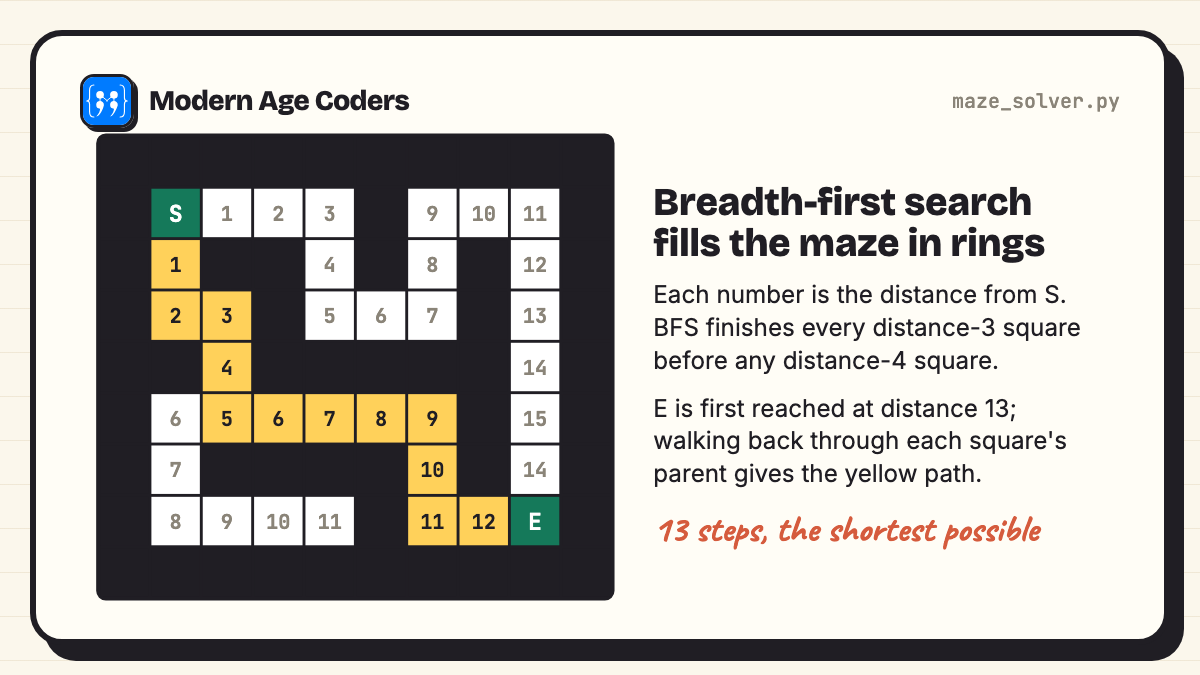
Reads a maze drawn with # walls and finds the shortest route from S to E using breadth-first search, then marks the path with dots. BFS explores the maze in rings, one step further each time, which is why the first path it finds is the shortest. (Level: Advanced. Main ideas: breadth-first search, deque.)
"""Maze solver: breadth-first search finds the shortest path from S to E."""
from collections import deque

MAZE = [
    "##########",
    "#S   #   #",
    "# ## # # #",
    "#  #   # #",
    "## ##### #",
    "#      # #",
    "# #### # #",
    "#    #  E#",
    "##########",
]


def solve(maze):
    grid = [list(row) for row in maze]
    start = next((r, c) for r, row in enumerate(grid) for c, ch in enumerate(row) if ch == "S")
    queue = deque([start])
    came_from = {start: None}
    while queue:
        r, c = queue.popleft()
        if grid[r][c] == "E":
            break
        for dr, dc in [(1, 0), (-1, 0), (0, 1), (0, -1)]:
            nxt = (r + dr, c + dc)
            if grid[nxt[0]][nxt[1]] != "#" and nxt not in came_from:
                came_from[nxt] = (r, c)
                queue.append(nxt)
    else:
        return None, 0
    steps = 0
    cell = came_from[(r, c)]
    while cell != start:              # walk back from E, marking the path
        grid[cell[0]][cell[1]] = "."
        cell = came_from[cell]
        steps += 1
    return ["".join(row) for row in grid], steps + 1


solved, steps = solve(MAZE)
print("\n".join(solved))
print("Shortest path:", steps, "steps")##########
#S # #
#.## # # #
#..# # #
##.##### #
# .....# #
# ####.# #
# #..E#
##########
Shortest path: 13 stepsTake it further: Generate random mazes, and compare BFS with depth-first search on the same maze.
15. Sudoku solver
Fills each empty square with the first digit that breaks no rule, moves on, and undoes the digit if it leads to a dead end. That idea, called backtracking, solves puzzles, plans timetables and places queens on a chessboard. (Level: Advanced. Main ideas: recursion, backtracking.)
"""Sudoku solver using backtracking: try a digit, go deeper, undo if it leads nowhere."""

PUZZLE = """
530070000
600195000
098000060
800060003
400803001
700020006
060000280
000419005
000080079
"""

grid = [[int(ch) for ch in line] for line in PUZZLE.split()]
tries = 0


def allowed(r, c, d):
    if d in grid[r] or any(grid[i][c] == d for i in range(9)):
        return False
    br, bc = 3 * (r // 3), 3 * (c // 3)
    return all(grid[br + i][bc + j] != d for i in range(3) for j in range(3))


def solve():
    global tries
    for r in range(9):
        for c in range(9):
            if grid[r][c] == 0:
                for d in range(1, 10):
                    if allowed(r, c, d):
                        grid[r][c] = d
                        tries += 1
                        if solve():
                            return True
                        grid[r][c] = 0          # backtrack
                return False
    return True


solve()
for r, row in enumerate(grid):
    if r and r % 3 == 0:
        print("------+-------+------")
    print(" | ".join(" ".join(map(str, row[i:i + 3])) for i in (0, 3, 6)))
print("Digits placed (including undone ones):", tries)5 3 4 | 6 7 8 | 9 1 2
6 7 2 | 1 9 5 | 3 4 8
1 9 8 | 3 4 2 | 5 6 7
------+-------+------
8 5 9 | 7 6 1 | 4 2 3
4 2 6 | 8 5 3 | 7 9 1
7 1 3 | 9 2 4 | 8 5 6
------+-------+------
9 6 1 | 5 3 7 | 2 8 4
2 8 7 | 4 1 9 | 6 3 5
3 4 5 | 2 8 6 | 1 7 9
Digits placed (including undone ones): 4208Take it further: Fill the square with the fewest options first and watch the number of placements drop.
Python mini projects for college students
A college mini project is judged on more than whether it runs. Examiners and interviewers look for a clear problem, sensible structure, input checking, and your ability to explain choices. Any project here can be grown into a submission:
| Start from | Grow it into | What it shows |
|---|---|---|
| Library management (8) | Members, borrowing limits, JSON or SQLite storage, a search menu | Object-oriented design and persistence |
| Inventory manager (9) | Sales log, weekly reports, a small Flask web front end | Files, reporting, web basics |
| Expense tracker (10) | Budgets, monthly charts with matplotlib, CSV import from a bank statement | Data handling and visualisation |
| Maze solver (14) | Random maze generator, BFS against DFS against A*, timings | Algorithms and analysis |
| Sudoku solver (15) | Puzzle generator with a unique-solution check, difficulty rating | Recursion, backtracking, testing |
| Chatbot (13) | Rules in JSON, unit tests, a log of unanswered questions | Pattern matching and maintainable design |
Whatever you pick, add three things before you submit: a README (what it does, how to run it, one screenshot or output sample), a few tests with unittest or pytest for the core functions, and a short section on limitations. Being honest about what your program cannot do reads as maturity, not weakness.
Python mini projects for beginners: where to start
If you are new, take them in this order: Caesar cipher, Morse code translator, report cards, password checker, quiz, ATM. Each adds one idea to the last. Leave tic-tac-toe, the maze solver and the Sudoku solver for later: they are short, but they use recursion and search, which deserve their own week. If even these feel big, start with the 13 short starters in our beginner project ideas or the 35 simple programs with output.
More Python mini project ideas
- Hotel room booking: rooms, dates and clashes; good practice for comparing date ranges.
- Unit converter with history: every conversion saved and searchable.
- Birthday reminder: a CSV of birthdays and a list of who is coming up in the next 14 days.
- Matrix calculator: add, multiply and transpose matrices stored as lists of lists.
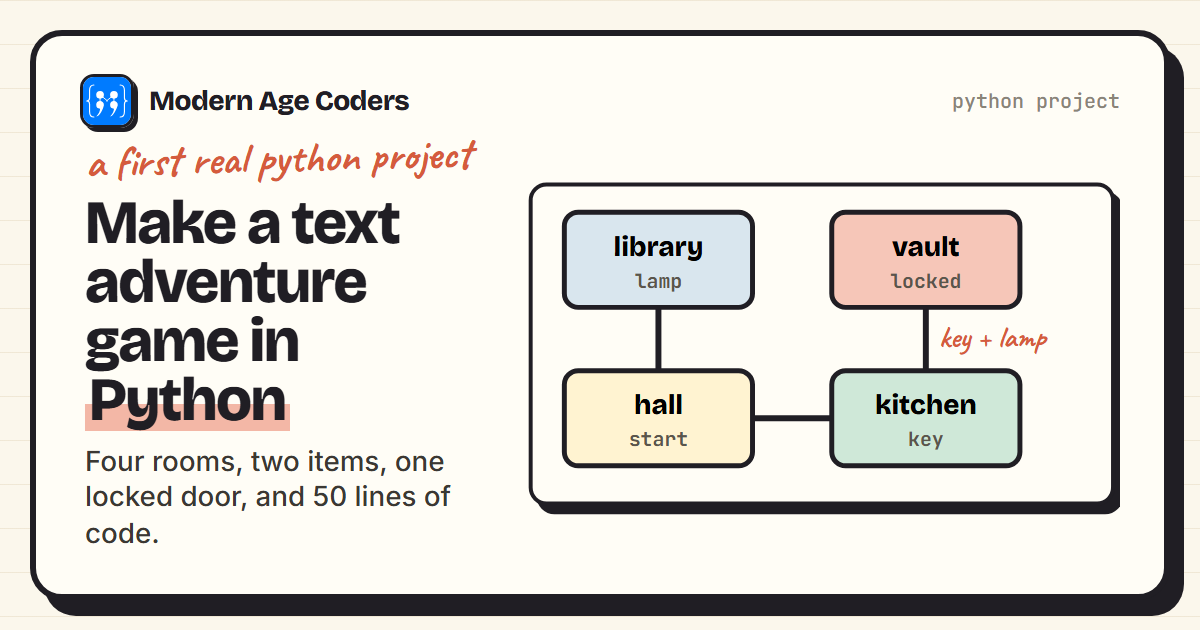
- Text adventure: rooms as a dictionary, explained step by step in our text adventure tutorial.
- Game of Life: a ten-line simulation with surprising results, in our Conway's Game of Life post.
How we teach it
Projects like these are how our classes run, following our how we teach page: students explain their thinking out loud, trace a loop line by line before running it, derive the rule themselves before they ever see it written down, and see the same problem three ways (the Sudoku solver, for example, by brute force, by backtracking, and by filling the most constrained square first). Mistakes are data, not failures. College students and adults can take this further in our Python masterclass or Python for AI and automation, and teens in Python for teens. The first class is free: book a free demo class.
Frequently asked questions
This page has 15 with complete source code and real output: tic-tac-toe with an unbeatable computer, a Caesar cipher with a cracker, an ATM simulator, report cards from CSV, library management, an inventory manager, an expense tracker, a URL shortener, a password checker, a JSON quiz, a maze solver, a Sudoku solver, a Morse translator, a file organiser and a rule-based chatbot.
Library management, the expense tracker or the Sudoku solver, extended as the table on this page suggests. Choose one you can explain fully and add a README, tests and a limitations section.
No. All 15 use only Python's standard library, so they run with a normal Python 3 installation. They were tested with Python 3.14.
Use them as a starting point and build on them. Copying a project unchanged is easy to spot and teaches you little; adding a real feature, tests and your own write-up makes it your work. Check your institution's rules on reuse and cite where you started.
A mini project does one job and fits in one file, usually under 100 lines. A full project has several files or modules, saves data, handles bad input everywhere, and often has a user interface or a web front end.
Start with the Caesar cipher, Morse code translator, report cards and password checker. They use strings, dictionaries and simple files. Leave the maze and Sudoku solvers until you are comfortable with functions calling themselves.
Save the code as a file ending in .py, open a terminal in that folder and type python3 followed by the file name (python on Windows). Run file-writing projects in an empty folder so the files they create are easy to find.
No. It is rule-based: it matches patterns with regular expressions and replies with fixed answers. That makes it a good way to see why modern AI chatbots, which learn patterns from data, behave so differently.