Table of Contents
- Step 1: Your First Class and Objects
- Step 2: What self Actually Is
- Step 3: Methods That Do Real Work
- Step 4: Printing Objects Nicely with __str__
- Step 5: Inheritance: Building on What Exists
- Step 6: Encapsulation: Guarding Your Data
- Step 7: Objects Inside Objects: Composition
- Step 8: Class Attributes vs Object Attributes
- Do You Even Need a Class?
- Mistakes Every Beginner Makes Once
- Frequently Asked Questions
- From Blueprints to Real Programs
Sooner or later, every Python learner meets a line like class Student: and wonders why the simple world of functions was not enough. This tutorial is that missing conversation: object oriented programming, explained from zero, with one running example and no jargon walls.
The idea behind OOP is almost disappointingly simple. Instead of keeping your data in one place and the functions that work on it somewhere else, you bundle them together into objects: a student who knows her own marks and can compute her own average, a wallet that guards its own balance. Programs built this way read like descriptions of the real things they model.
Every snippet below was run before it was pasted in, and each builds on the last. If functions and lists still feel wobbly, do a lap of Python for beginners first, then come back.
Step 1: Your First Class and Objects
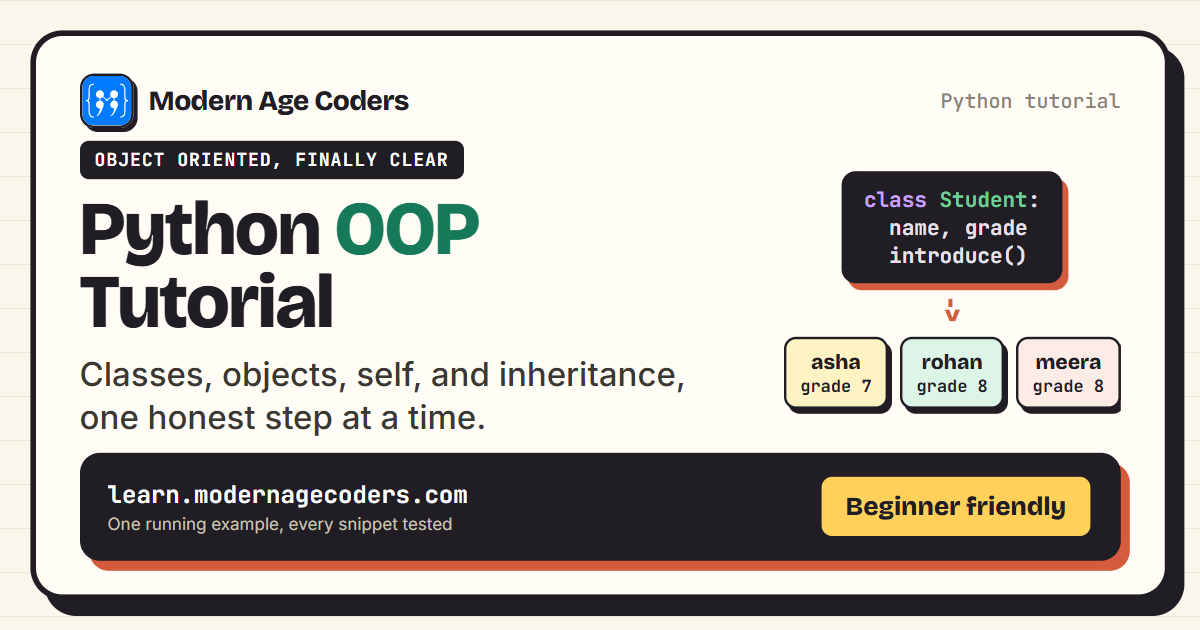
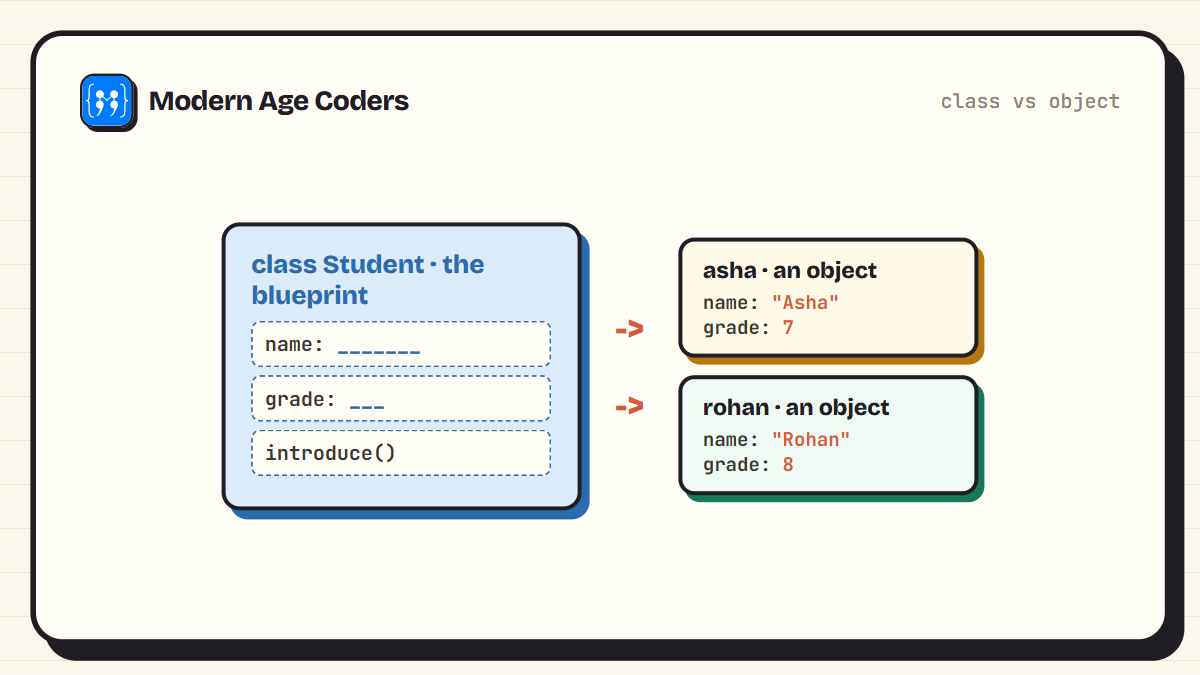
A class is a blueprint. It describes what every student has, without being any particular student. An object is one real student stamped out from that blueprint. You can stamp out as many as you like, and each keeps its own data.
class Student:
    def __init__(self, name, grade):
        self.name = name
        self.grade = grade

asha = Student("Asha", 7)
rohan = Student("Rohan", 8)

print(asha.name, "is in grade", asha.grade)
print(rohan.name, "is in grade", rohan.grade)
Asha is in grade 7
Rohan is in grade 8Two objects, one blueprint. asha and rohan share the same structure but carry their own names and grades. The __init__ method runs automatically each time you create an object, and its job is to fill in that object's starting data.
Step 2: What self Actually Is
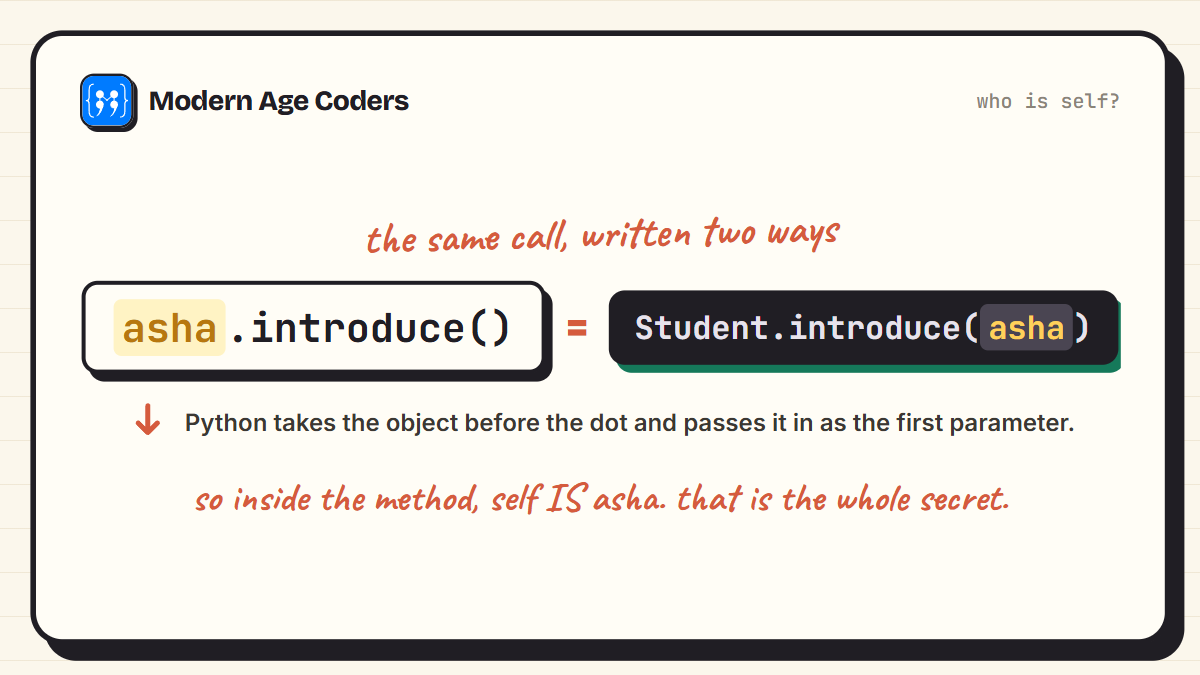
self is the word that confuses everyone for a week and then becomes obvious. It simply means this particular object. When you write asha.introduce(), Python quietly passes asha in as self. The proof: calling the method the long way does exactly the same thing.
class Student:
    def __init__(self, name, grade):
        self.name = name
        self.grade = grade

    def introduce(self):
        return "Hi, I am " + self.name

asha = Student("Asha", 7)

print(asha.introduce())
print(Student.introduce(asha))   # the same call, written long-hand
Hi, I am Asha
Hi, I am AshaBoth lines print the same sentence because they are the same call. The short form is just Python filling in self for you. Once that clicks, self stops being magic and starts being a plain parameter.
Step 3: Methods That Do Real Work
Attributes store what an object has. Methods define what it can do. Because every method receives self, it can read and change that object's own data without touching anyone else's.
class Student:
    def __init__(self, name, grade):
        self.name = name
        self.grade = grade
        self.marks = []

    def add_mark(self, score):
        self.marks.append(score)

    def average(self):
        return sum(self.marks) / len(self.marks)

asha = Student("Asha", 7)
asha.add_mark(92)
asha.add_mark(85)
asha.add_mark(78)

print(asha.marks)
print(asha.average())
[92, 85, 78]
85.0asha collected her own marks, and her average came from her own list. If we created rohan too, his marks list would start empty. That per-object memory is the whole reason classes exist.
Step 4: Printing Objects Nicely with __str__
Print an object as-is and Python shows you an unhelpful memory address. Give the class a __str__ method and you decide what printing means.
class Student:
    def __init__(self, name, grade):
        self.name = name
        self.grade = grade

    def __str__(self):
        return "Student " + self.name + ", grade " + str(self.grade)

asha = Student("Asha", 7)
print(asha)
Student Asha, grade 7Methods with double underscores, like __init__ and __str__, are hooks that Python calls at special moments: __init__ at creation, __str__ when printing. There are many more, but these two carry you a long way.
Step 5: Inheritance: Building on What Exists
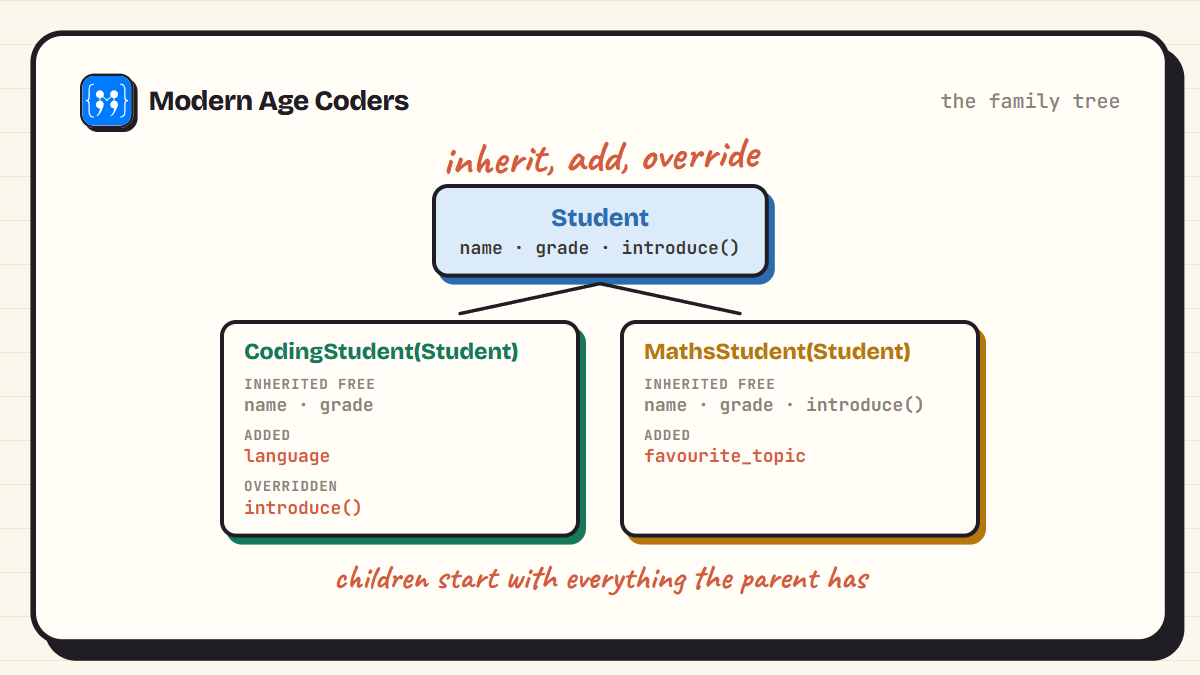
Suppose coding students are students too, with one extra detail: a favourite language. Instead of rewriting the Student class, we extend it. The child class inherits everything the parent has, adds what is new, and may override what needs to change.
class Student:
    def __init__(self, name, grade):
        self.name = name
        self.grade = grade

    def introduce(self):
        return "Hi, I am " + self.name

class CodingStudent(Student):
    def __init__(self, name, grade, language):
        super().__init__(name, grade)   # let the parent set up name and grade
        self.language = language

    def introduce(self):                # override with a better version
        return "Hi, I am " + self.name + " and I code in " + self.language

meera = CodingStudent("Meera", 8, "Python")

print(meera.introduce())
print(meera.grade)                       # inherited from Student
print(isinstance(meera, Student))        # a CodingStudent IS a Student
Hi, I am Meera and I code in Python
8
TrueThree things happened. super().__init__ asked the parent to do its normal setup. meera.grade worked even though CodingStudent never mentions grade, because it was inherited. And introduce() ran the child's version, since a child's method wins when both define one.
Step 6: Encapsulation: Guarding Your Data
Objects can protect their own data. The underscore in _balance is Python's polite signal: this is internal, change it through the methods. The methods can then enforce rules, like refusing a negative deposit.
class Wallet:
    def __init__(self):
        self._balance = 0

    def deposit(self, amount):
        if amount > 0:
            self._balance = self._balance + amount
        else:
            print("Ignored:", amount)

    def balance(self):
        return self._balance

w = Wallet()
w.deposit(50)
w.deposit(-10)
w.deposit(30)

print(w.balance())
Ignored: -10
80The wallet ignored the bad deposit because every change passes through deposit(), where the rule lives. Scatter that rule across a whole program instead, and one forgotten check corrupts the data.
Step 7: Objects Inside Objects: Composition
Not everything is inheritance. A school is not a kind of student, it has students. Storing objects inside other objects is called composition, and real programs are mostly built from it.
class Student:
    def __init__(self, name):
        self.name = name

class School:
    def __init__(self, name):
        self.name = name
        self.students = []

    def enroll(self, student):
        self.students.append(student)

    def roll_call(self):
        return [s.name for s in self.students]

school = School("Modern Age Coders")
school.enroll(Student("Asha"))
school.enroll(Student("Rohan"))
school.enroll(Student("Meera"))

print(school.roll_call())
['Asha', 'Rohan', 'Meera']A quick rule of thumb: say the sentence aloud. If X IS a Y, inherit. If X HAS a Y, compose. A coding student is a student. A school has students.
Step 8: Class Attributes vs Object Attributes
One last distinction that trips people up. Attributes set inside __init__ belong to each object. Attributes set directly on the class are shared by every object.
class Student:
    school = "Modern Age Coders"   # shared by all students

    def __init__(self, name):
        self.name = name           # personal to each student

asha = Student("Asha")
rohan = Student("Rohan")

print(asha.name, "and", rohan.name)
print(asha.school)
print(rohan.school)
Asha and Rohan
Modern Age Coders
Modern Age CodersBoth students report the same school because there is only one copy of it, living on the class. Keep shared facts on the class and personal data in __init__, and this distinction never bites you.
Do You Even Need a Class?
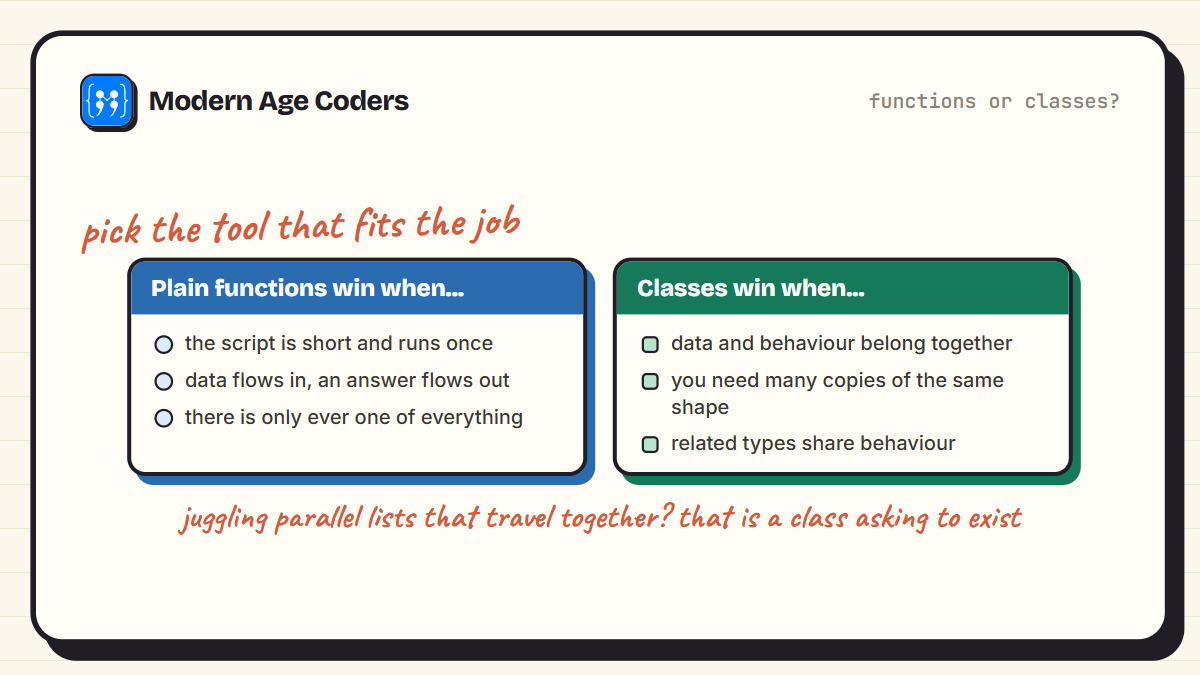
Honest answer: not always. A script that reads a file and prints a summary is happier as plain functions. Classes earn their keep when several pieces of data travel together and have behaviour attached, when you need many copies of the same shape of thing, or when a family of related types shares behaviour. If you are juggling parallel lists like names, grades, and marks and passing them around together, that is your sign: those belong in one class.
Mistakes Every Beginner Makes Once
- Forgetting self in the method definition: def introduce(): raises a TypeError the moment you call it. Every instance method's first parameter is self.
- Forgetting the parentheses when creating an object: asha = Student stores the class itself. You want asha = Student("Asha", 7).
- Putting a mutable default on the class: a class attribute like marks = [] is shared by every object. Create fresh lists inside __init__ instead.
- Skipping super().__init__ in a child class: the parent's setup never runs, and the attributes it would have created simply do not exist.
- Reaching into _underscore attributes from outside: it works, but it bypasses the rules the class wrote for itself. Use the methods.
The fastest way to make OOP stick
Model something from your own life: a cricket team, a playlist, a school timetable. Give it three attributes and two methods, create a few objects, and make them talk to each other. One hour of that beats ten hours of reading.
Frequently Asked Questions
A class is the blueprint: it defines what attributes and methods something will have. An object is one concrete thing built from that blueprint, with its own real data. Student is a class; asha, a particular student in grade 7, is an object.
self is the object a method was called on. When you write asha.introduce(), Python translates it to Student.introduce(asha), so inside the method, self is asha. It has to be the first parameter of every instance method.
__init__ is the setup method Python runs automatically whenever you create a new object. Its job is to attach the object's starting data: self.name = name and so on. It does not create the object, it initialises it, hence the name.
A way for one class to build on another. class CodingStudent(Student) means CodingStudent starts with everything Student has, then adds or overrides what it needs. Use it when the child genuinely IS a kind of the parent.
Inheritance models IS-A: a coding student is a student. Composition models HAS-A: a school has students, stored as objects inside it. Beginners tend to over-use inheritance; most real relationships in programs are composition.
Python has no enforced private variables. A single underscore, like _balance, is a convention meaning internal, do not touch directly. A double underscore adds name mangling, which discourages access but does not truly forbid it. The culture is trust plus clear signals.
When data and behaviour belong together, when you need many objects of the same shape, or when related types share behaviour. For short scripts, plain functions are simpler and better. Learning to choose between the two is itself the skill.
Yes. Numbers, strings, lists, functions, even classes themselves are objects, which is why they all have methods you can call, like "hello".upper(). The class system you just learned is the same machinery the whole language runs on.
From Blueprints to Real Programs
You now hold the four ideas that carry all of OOP: classes stamp out objects, self is just this object, inheritance extends what exists, and composition assembles bigger things from smaller ones. Every framework you will ever meet, from game engines to web servers, is these four ideas wearing work clothes. This build-it-from-the-ground-up approach is exactly how we teach in coding from first principles.
Keep the momentum with our dictionary guide, or see OOP working inside real exam programs in Top 20 Java programs for ICSE. And for a live teacher who reads every class you write, our coding courses welcome learners aged 6 to 67.