Table of Contents
Every programmer remembers their first star pattern. A few loops, a print statement, and suddenly the screen is drawing triangles. Pattern programs stay popular for a good reason: they are the clearest way to learn how nested loops actually behave, and they show up in ICSE, CBSE, and college lab exams year after year.
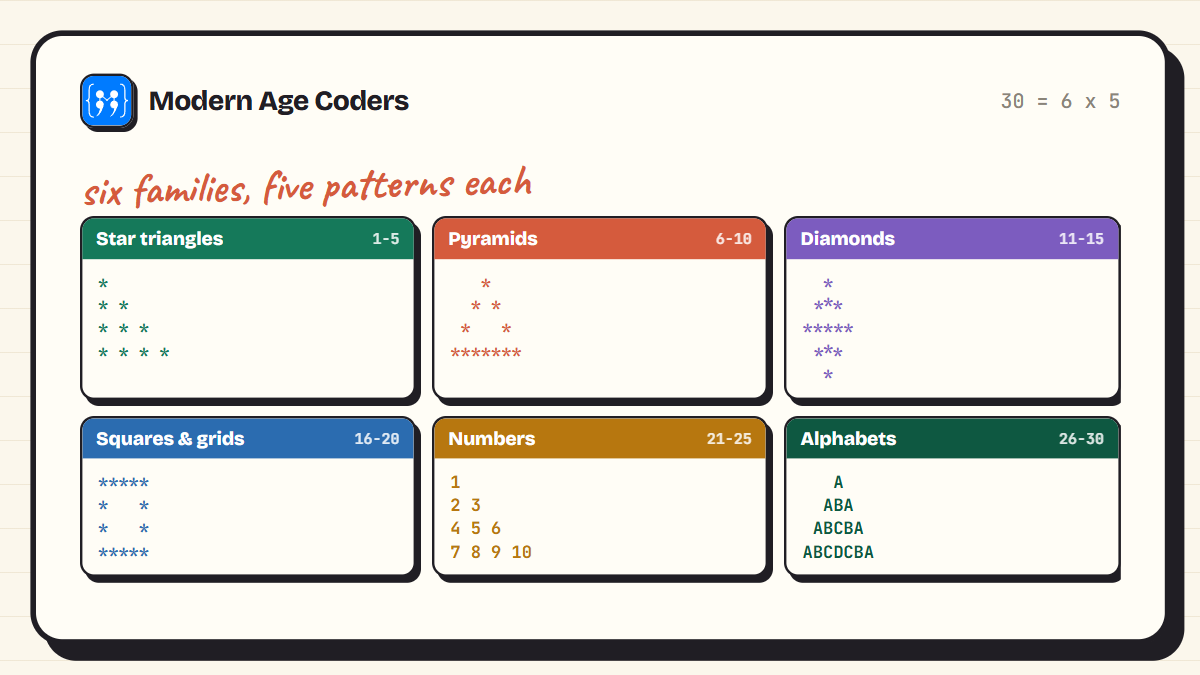
This page collects 30 star pattern programs in Python, organised into six families: star triangles, pyramids, diamonds, grids, number patterns, and alphabet patterns. Every program was run before it was pasted here, and the output shown under each one is the real output it printed.
You do not need much to follow along, just loops and print(). If those still feel shaky, warm up with our Python for beginners guide first, then come back and draw.
The Two-Loop Idea Behind Every Pattern
All 30 patterns below run on the same engine. The outer loop picks a row. The inner loop, or a string expression, decides what that row contains. That is the whole secret. When a pattern looks complicated, it is never the loops that changed, only the decision about what to print at row i, column j.
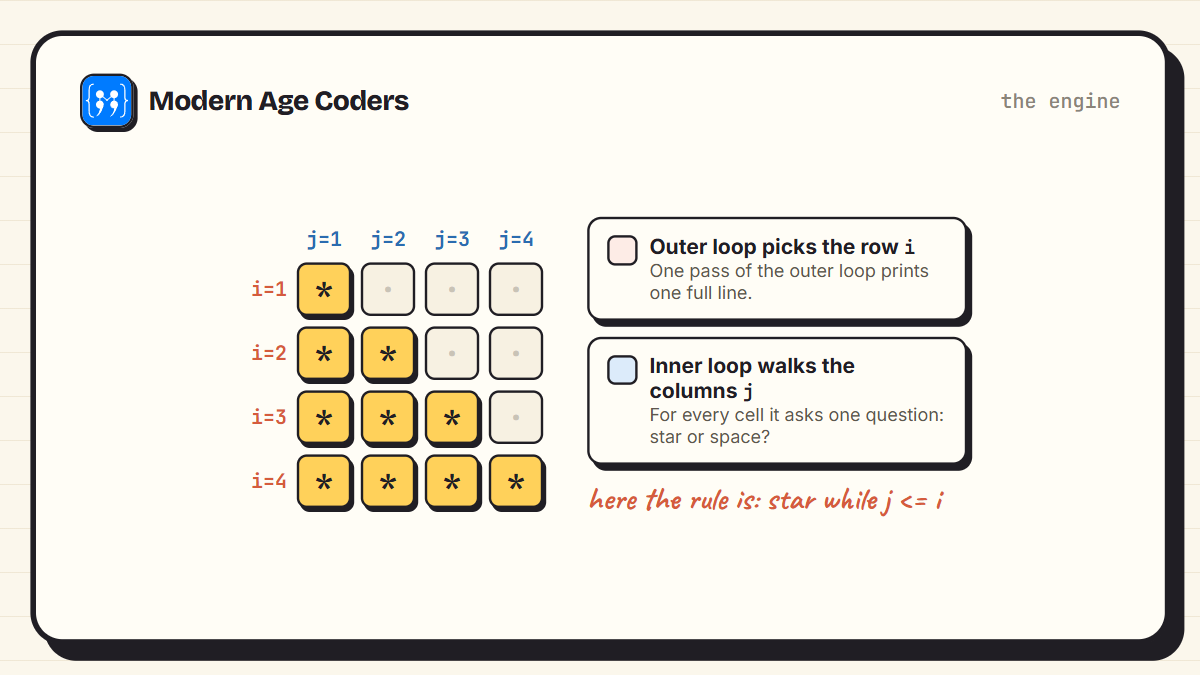
Python gives you two shortcuts worth knowing before you start. First, string multiplication: "*" * 3 gives ***, so a whole row can be one print call. Second, print("*", end="") prints a star without jumping to the next line, which is how the cell-by-cell patterns stay on one row until you call an empty print().
How to practise these
Do not copy all 30 in one sitting. Pick one family, type each pattern by hand, then change rows to 4 or 7 and predict what will happen before you run it. The prediction step is where the learning happens.
The Six Families at a Glance
Star Triangles
Triangles are where everyone starts, because Python's string multiplication does most of the work. One loop, one print, and the shape appears.
1. Right triangle
The starter pattern. Row i gets i stars, and Python's string multiplication does the counting for you.
rows = 5
for i in range(1, rows + 1):
    print("*" * i)
*
**
***
****
*****2. Inverted right triangle
Same idea, opposite direction. Counting down from rows to 1 flips the triangle upside down.
rows = 5
for i in range(rows, 0, -1):
    print("*" * i)
*****
****
***
**
*3. Right-aligned triangle
Push each row to the right by printing spaces first. Row i needs rows - i spaces before its stars.
rows = 5
for i in range(1, rows + 1):
print(" " * (rows - i) + "*" * i) *
**
***
****
*****4. Inverted right-aligned triangle
Combine the two tricks: count down and pad with spaces.
rows = 5
for i in range(rows, 0, -1):
print(" " * (rows - i) + "*" * i)*****
****
***
**
*5. Hollow right triangle
Print a star only on the edges: the first column, the diagonal, and the last row. Everything else is a space.
rows = 5
for i in range(1, rows + 1):
for j in range(1, i + 1):
if j == 1 or j == i or i == rows:
print("*", end="")
else:
print(" ", end="")
print()*
**
* *
* *
*****Pyramids
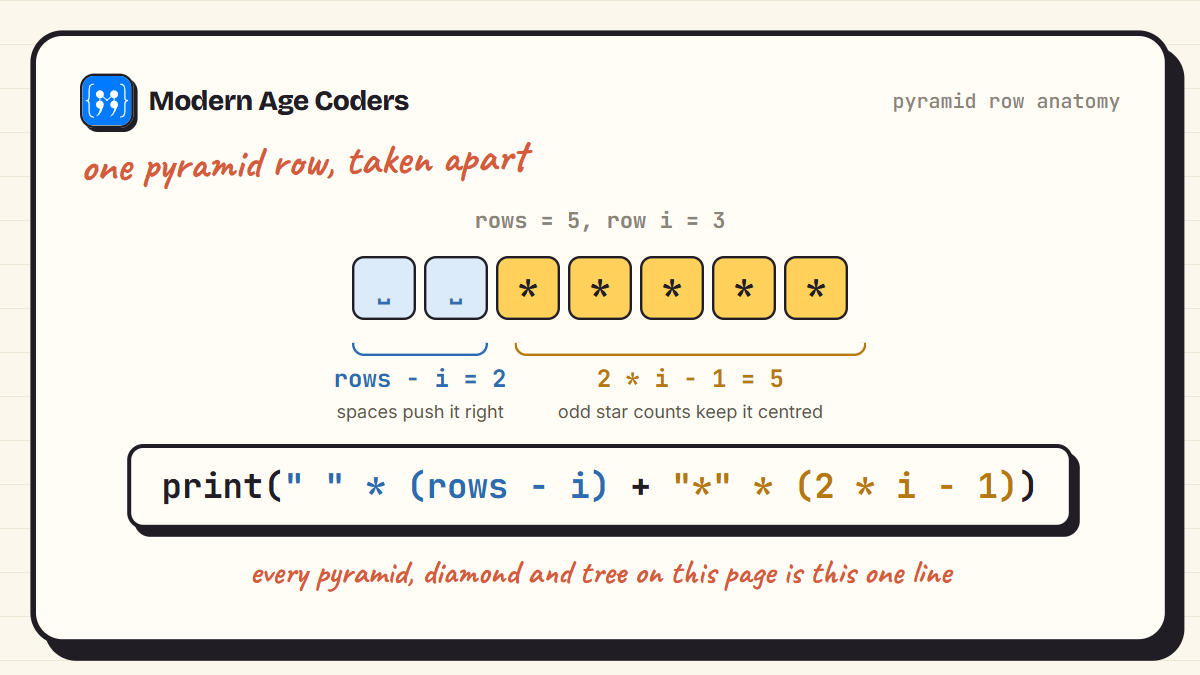
Pyramids add one new idea: leading spaces. Get the spaces right and the stars centre themselves. The row formula to remember is rows - i spaces followed by 2i - 1 stars.
6. Full pyramid
The most asked pattern in exams. Each row is rows - i spaces followed by 2i - 1 stars, which keeps it centred.
rows = 5
for i in range(1, rows + 1):
print(" " * (rows - i) + "*" * (2 * i - 1)) *
***
*****
*******
*********7. Inverted pyramid
Run the same row formula backwards.
rows = 5
for i in range(rows, 0, -1):
print(" " * (rows - i) + "*" * (2 * i - 1))*********
*******
*****
***
*8. Hollow pyramid
Stars only at the two slanting edges and across the base. The two edge positions are rows - i + 1 and rows + i - 1.
rows = 5
for i in range(1, rows + 1):
for j in range(1, 2 * rows):
if j == rows - i + 1 or j == rows + i - 1 or i == rows:
print("*", end="")
else:
print(" ", end="")
print() *
* *
* *
* *
*********9. Hourglass
An inverted pyramid on top of a normal one. The second loop starts at 2 so the middle row is not printed twice.
rows = 5
for i in range(rows, 0, -1):
print(" " * (rows - i) + "*" * (2 * i - 1))
for i in range(2, rows + 1):
print(" " * (rows - i) + "*" * (2 * i - 1))*********
*******
*****
***
*
***
*****
*******
*********10. Christmas tree
Two stacked pyramids and a one-character trunk. A favourite in school projects every December.
rows = 4
for i in range(1, rows + 1):
print(" " * (rows - i) + "*" * (2 * i - 1))
for i in range(2, rows + 1):
print(" " * (rows - i) + "*" * (2 * i - 1))
print(" " * (rows - 1) + "|") *
***
*****
*******
***
*****
*******
|Diamonds and Wings
These shapes are two triangles or pyramids glued together. If you can print a pyramid, you already know how to print all five of these.
11. Diamond
A pyramid going up, then the same rows going back down. Note the second loop starts at rows - 1 so the widest row prints once.
rows = 5
for i in range(1, rows + 1):
print(" " * (rows - i) + "*" * (2 * i - 1))
for i in range(rows - 1, 0, -1):
print(" " * (rows - i) + "*" * (2 * i - 1)) *
***
*****
*******
*********
*******
*****
***
*12. Hollow diamond
Only the two edge stars of each row survive. The top row is the single point where both edges meet.
rows = 5
for i in range(1, rows + 1):
for j in range(1, 2 * rows):
if j == rows - i + 1 or j == rows + i - 1:
print("*", end="")
else:
print(" ", end="")
print()
for i in range(rows - 1, 0, -1):
for j in range(1, 2 * rows):
if j == rows - i + 1 or j == rows + i - 1:
print("*", end="")
else:
print(" ", end="")
print() *
* *
* *
* *
* *
* *
* *
* *
*13. Right Pascal triangle
Grow to the full width, then shrink back. Two simple loops, no spaces needed.
rows = 5
for i in range(1, rows + 1):
print("*" * i)
for i in range(rows - 1, 0, -1):
print("*" * i)*
**
***
****
*****
****
***
**
*14. Left Pascal triangle
The mirrored version. The space padding from the right-aligned triangle does the aligning.
rows = 5
for i in range(1, rows + 1):
    print(" " * (rows - i) + "*" * i)
for i in range(rows - 1, 0, -1):
print(" " * (rows - i) + "*" * i) *
**
***
****
*****
 ****
  ***
   **
*15. Butterfly
Stars on both sides with a widening gap of spaces in the middle. The gap for row i is 2 * (rows - i) spaces.
rows = 4
for i in range(1, rows + 1):
    print("*" * i + " " * (2 * (rows - i)) + "*" * i)
for i in range(rows, 0, -1):
    print("*" * i + " " * (2 * (rows - i)) + "*" * i)
* *
** **
*** ***
********
********
*** ***
** **
* *Squares and Grids
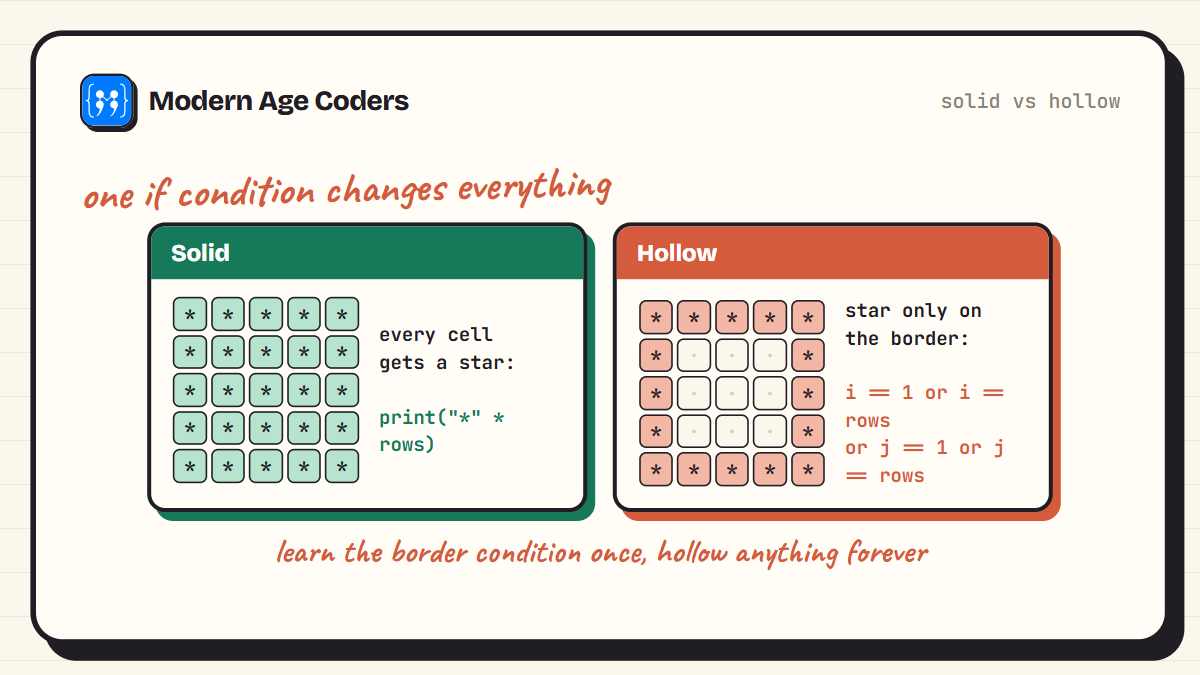
Grid patterns think in coordinates. The inner loop asks one question for every cell: does a star belong at row i, column j? The if condition is the whole pattern.
16. Solid square
One line of stars, printed rows times.
rows = 5
for i in range(rows):
    print("*" * rows)
*****
*****
*****
*****
*****17. Hollow square
Stars on the border only: first row, last row, first column, last column.
rows = 5
for i in range(1, rows + 1):
    for j in range(1, rows + 1):
        if i == 1 or i == rows or j == 1 or j == rows:
            print("*", end="")
        else:
            print(" ", end="")
    print()
*****
* *
* *
* *
*****18. X pattern
A star lands where the row and column meet on either diagonal: j == i or j == size - 1 - i.
size = 5
for i in range(size):
    for j in range(size):
        if j == i or j == size - 1 - i:
            print("*", end="")
        else:
            print(" ", end="")
    print()
* *
* *
*
* *
* *19. Plus pattern
Stars along the middle row and the middle column. Use an odd size so there is a true centre.
size = 5
mid = size // 2
for i in range(size):
for j in range(size):
if i == mid or j == mid:
print("*", end="")
else:
print(" ", end="")
print() *
*
*****
*
*20. Checkerboard
A star wherever row + column is even. Change the % 2 test to flip the colours.
rows = 5
for i in range(rows):
for j in range(rows):
if (i + j) % 2 == 0:
print("*", end="")
else:
print(" ", end="")
print()* * *
*   *
 * *
  *
 * *
* * *Number Patterns
Swap the star for a number and the same loops teach you something new: what the loop variables are actually doing. These five turn up constantly in ICSE and CBSE papers.
21. Number triangle
Swap stars for the column number and the counting becomes visible.
rows = 5
for i in range(1, rows + 1):
    for j in range(1, i + 1):
        print(j, end=" ")
    print()
1
1 2
1 2 3
1 2 3 4
1 2 3 4 522. Repeated row number
Every row repeats its own row number i, exactly i times.
rows = 5
for i in range(1, rows + 1):
    print((str(i) + " ") * i)
1
2 2
3 3 3
4 4 4 4
5 5 5 5 523. Floyd's triangle
A running counter that never resets, so the numbers flow across the rows: 1, then 2 3, then 4 5 6.
rows = 5
num = 1
for i in range(1, rows + 1):
    for j in range(i):
        print(num, end=" ")
        num += 1
    print()
1
2 3
4 5 6
7 8 9 10
11 12 13 14 1524. Palindrome number pyramid
Build the left half as a string, mirror it without its last character, and glue the two together.
rows = 5
for i in range(1, rows + 1):
    left = "".join(str(j) for j in range(1, i + 1))
    print(" " * (rows - i) + left + left[:-1][::-1])
1
121
12321
1234321
12345432125. Inverted number triangle
The number triangle, counting down. Row one is the longest and it shrinks from there.
rows = 5
for i in range(rows, 0, -1):
    for j in range(1, i + 1):
        print(j, end=" ")
    print()
1 2 3 4 5
1 2 3 4
1 2 3
1 2
1Alphabet and Word Patterns
One small tool makes letter patterns possible: chr(). Since chr(65) is A, the letter for column j is chr(65 + j), and everything else works like the number patterns.
26. Alphabet triangle
chr(65) is the letter A, chr(66) is B, and so on. Each row walks a little further down the alphabet.
rows = 5
for i in range(1, rows + 1):
    for j in range(i):
        print(chr(65 + j), end=" ")
    print()
A
A B
A B C
A B C D
A B C D E27. Repeated letter rows
Row i repeats its own letter i times, the alphabet cousin of the repeated number pattern.
rows = 5
for i in range(rows):
    print((chr(65 + i) + " ") * (i + 1))
A
B B
C C C
D D D D
E E E E E28. Alphabet palindrome pyramid
The classic A, ABA, ABCBA shape. Same mirror trick as the number version, with letters.
rows = 5
for i in range(1, rows + 1):
    left = "".join(chr(64 + j) for j in range(1, i + 1))
    print(" " * (rows - i) + left + left[:-1][::-1])
A
ABA
ABCBA
ABCDCBA
ABCDEDCBA29. Inverted alphabet triangle
Start wide and lose one letter per row.
rows = 5
for i in range(rows, 0, -1):
    for j in range(i):
        print(chr(65 + j), end=" ")
    print()
A B C D E
A B C D
A B C
A B
A30. Word staircase
A gentle finisher: slice a word one letter longer each row. Try it with your own name.
word = "PYTHON"
for i in range(1, len(word) + 1):
    print(word[:i])
P
PY
PYT
PYTH
PYTHO
PYTHONWhen Your Pattern Looks Wrong
Every pattern that comes out crooked fails for one of a small number of reasons. Check these before staring at the loops.
- Everything prints on one line: you forgot the empty print() after the inner loop.
- Everything prints on its own line: you forgot end="" inside the inner loop.
- The shape leans left: your space count is off by one. Print rows - i spaces, not rows - i + 1.
- One row too few: range(1, rows) stops before rows. You almost always want range(1, rows + 1).
- The hollow shape is filled: your if condition prints a star in the else branch too. Only the edges get stars.
The exam shortcut
In ICSE and CBSE papers, pattern questions are marks waiting to be collected. Learn the pyramid row formula, the border condition for hollow shapes, and Floyd's running counter, and you can rebuild nearly any pattern they throw at you. Students in our live classes drill exactly these, one pattern family at a time.
Frequently Asked Questions
The outer loop runs once per row. For each row, the inner loop runs once per column and decides whether to print a star, a number, a letter, or a space. After the inner loop finishes a row, an empty print() moves to the next line. Every pattern on this page follows that structure.
Use print("*", end=""). By default print jumps to a new line after every call, and end="" replaces that newline with nothing, so the next star lands beside the previous one.
For row i out of n rows, print n - i spaces followed by 2i - 1 stars. The spaces push the stars toward the centre and the odd star counts (1, 3, 5, 7) keep the shape symmetrical.
Print a star only when the cell sits on the border of the shape, and a space everywhere else. For a square that means the first row, last row, first column, or last column. For a pyramid it means the two slanted edges and the base.
Every program here stores the size in a variable named rows or size at the top. Change that one number and the whole shape scales, which is exactly why the loop limits are written in terms of the variable instead of fixed numbers.
The full pyramid, the right triangle and its inverted form, Floyd's triangle, the number triangle, and at least one hollow shape appear again and again in ICSE and CBSE papers. If you are preparing for a board exam, master those six first.
Use the chr() function. chr(65) is A, chr(66) is B, and so on, so the letter for column j is chr(65 + j). After that, alphabet patterns work exactly like number patterns.
Draw Your Way to Real Skill
Thirty patterns sounds like a lot, but you have really practised six ideas: string multiplication, leading spaces, running counters, border conditions, mirroring, and chr(). Those six carry you far beyond patterns, into every loop you will ever write. For more hands-on practice like this, try reversing a string five ways or the HCF and LCM guide next.
And if you are working toward a school exam, our Python classes for Class 10 practise exactly these patterns with a teacher checking every line, and our live coding courses welcome learners aged 6 to 67.