Table of Contents
Touch typing means typing without looking at the keyboard, using all ten fingers, each responsible for its own keys. It is one of the few skills that pays off every single day for the rest of a child's life: in homework, in exams taken on screen, in writing, and in coding. It also takes only a few weeks of short practice to get started.
This guide covers when children are ready to start, how the home row works, a week-by-week practice plan, and the mistake almost everyone makes. There is also a section for coders, with a measurement we made of which keys programming actually uses, and a small typing speed tester you can build in Python.
What is touch typing?
In touch typing, your fingers rest on a fixed set of keys called the home row, and each finger moves up or down its own column to reach other keys. Because every finger always starts from the same place, your hands learn the positions and your eyes can stay on the screen. Compare that with hunt and peck typing, where two fingers search for each key while you look down, then back up, then down again.
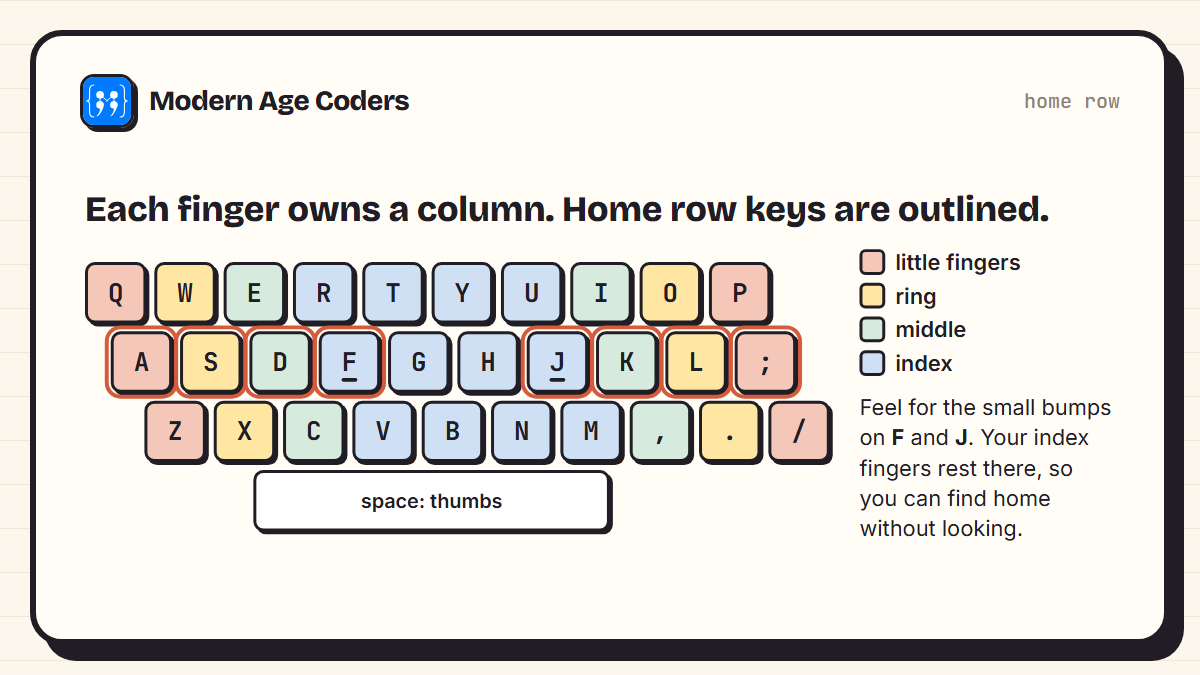
- Left hand rests on A, S, D, F. Right hand rests on J, K, L and the semicolon key.
- The bumps on F and J let your index fingers find home by touch.
- Thumbs share the space bar.
- Index fingers each cover two columns, which is why the middle of the keyboard (T, G, B and Y, H, N) feels hardest at first.
What age should children learn touch typing?
There is no single correct age, but two things need to be in place: the child can read and spell simple words, and their hands are big enough to rest across the home row comfortably. For many children, that is around 7 or 8. Younger children aged 6 can enjoy keyboard games and learn where letters are, but formal ten-finger practice is often more frustrating than useful at that stage.
If your young child is starting to code, typing does not need to come first. Block-based tools like Scratch involve almost no typing, which is one reason they suit younger learners. Our guide to coding for 7 year olds explains the usual path. Touch typing becomes much more valuable when a child moves to typed languages like Python, usually from around 10 to 12.
Hunt and peck habits are harder to undo later
A child who types a lot with two fingers gets quite fast at it, and then touch typing feels slower for the first few weeks. That dip is normal and temporary. Starting before hunt and peck is firmly set makes the switch easier.
How to practise: a week-by-week plan
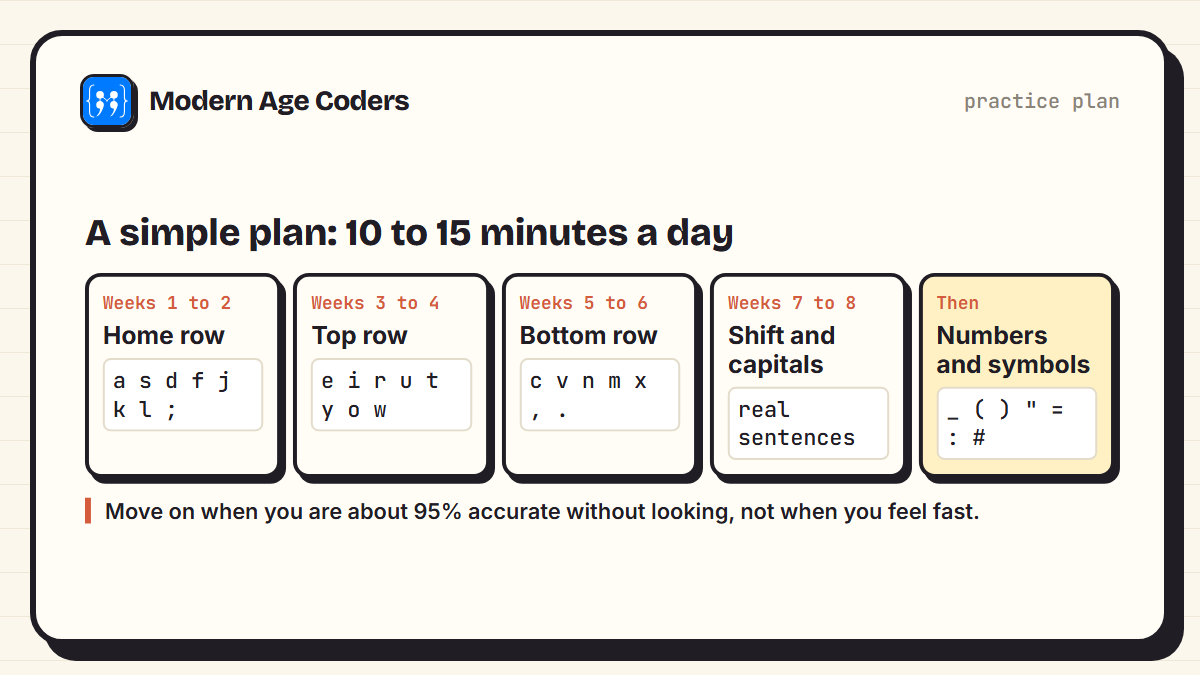
- Keep sessions short and daily. 10 to 15 minutes a day works far better than an hour on Saturday. Motor skills build through frequent repetition.
- Learn a few keys at a time. Start with the home row only, then add the top row, then the bottom row. Adding everything at once overwhelms the fingers.
- Never look down. This is the whole skill. Some families lay a light cloth over the hands. If a child has to look, they should look at a keyboard picture on screen, not the real keys.
- Return to home after every key. Fingers reach up or down, then come back to rest on the home row.
- Sit well. Feet flat, wrists straight and floating, screen at eye level. Posture habits formed now last.
- Move on by accuracy, not by feel. About 95% accuracy without looking is a good sign a row is ready.
Accuracy first, speed second
The most common mistake is pushing for speed too early. Fast typing with errors is slower overall, because every mistake has to be found and fixed, and the finger learns the wrong movement. To show this clearly, we built a small scorer and gave it two attempts at the same sentence:
from typer import score
target = "the quick brown fox jumps over the lazy dog"
print(len(target), "characters")
print(score(target, "the quick brown fox jumps over the lazy dog", 12.0))
print(score(target, "the quick brwon fox jumps over teh lazy dog", 9.0))
print(score(target, "the quick brown fox jumps over the lazy dog", 30.0))43 characters
(43, 100, [])
(52, 91, [12, 13, 32, 33])
(17, 100, [])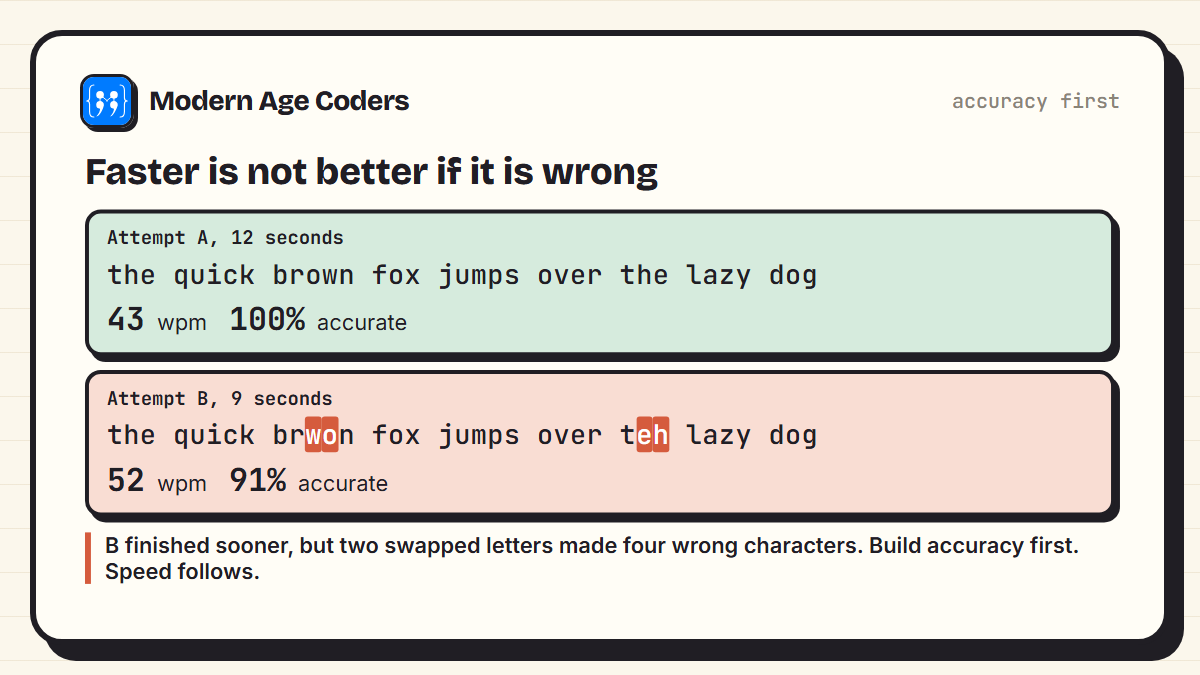
Attempt B finished three seconds sooner, but typed "brwon" and "teh". Each swapped pair counts as two wrong characters, so its accuracy fell to 91%, and in real writing those words would still need fixing. The third line shows a beginner: slow (17 words per minute) but perfectly accurate. That is exactly where a beginner should be. Speed grows naturally from accurate repetition.
Does typing speed matter for coding?
Honestly, typing speed is not what makes a good programmer. Most programming time goes into thinking, reading code and fixing problems, not typing. But slow hunt and peck typing does get in the way: every time you look down for a bracket, you lose your train of thought. And code uses the keyboard very differently from English.
To measure how differently, we counted every character in the 152 top-level modules of the Python 3.13.6 standard library, over 3,019,425 characters, and compared them with the paragraphs of 200 blog posts on this site, spaces excluded in both. Here is the script:
import sys, sysconfig, collections, pathlib, json, re, html

# 1. Every top-level module of the Python standard library
lib = pathlib.Path(sysconfig.get_paths()["stdlib"])
files = sorted(lib.glob("*.py"))
code = "".join(p.read_text(encoding="utf-8", errors="ignore") for p in files)

# 2. The paragraphs of 200 blog posts on this site, HTML tags removed
prose = []
for f in sorted(pathlib.Path("content/blog/data").glob("*.json"))[:200]:
    d = json.loads(f.read_text(encoding="utf-8"))
    for s in d.get("sections") or d.get("content", {}).get("sections", []):
        if s.get("type") == "paragraph":
            prose.append(html.unescape(re.sub(r"<[^>]+>", "", s["text"])))
prose = " ".join(prose)

SHIFT_US = set('~!@#$%^&*()_+{}|:"<>?ABCDEFGHIJKLMNOPQRSTUVWXYZ')

def shares(text):
    chars = [c for c in text if not c.isspace()]
    counts = collections.Counter(chars)
    n = len(chars)
    symbols = sum(k for c, k in counts.items() if not c.isalnum())
    shift = sum(k for c, k in counts.items() if c in SHIFT_US)
    return n, counts, symbols / n, shift / n

cn, cc, csym, csh = shares(code)
pn, pc, psym, psh = shares(prose)
print(f"python {sys.version.split()[0]}, {len(files)} files")
print(f"code:  {cn:,} characters, symbols {csym:.1%}, need shift {csh:.1%}")
print(f"prose: {pn:,} characters, symbols {psym:.1%}, need shift {psh:.1%}")
print("symbol  code    prose")
top = [c for c, _ in cc.most_common() if not c.isalnum()][:10]
for c in top:
print(f" {c} {cc[c] / cn:.3%} {pc[c] / pn:.3%}")python 3.13.6, 152 files
code: 3,019,425 characters, symbols 16.8%, need shift 14.1%
prose: 961,533 characters, symbols 3.9%, need shift 3.4%
symbol code prose
_ 2.491% 0.007%
. 1.813% 1.312%
) 1.578% 0.085%
( 1.577% 0.085%
, 1.496% 1.239%
" 1.294% 0.086%
= 1.198% 0.014%
' 1.197% 0.358%
: 1.118% 0.310%
# 0.605% 0.001%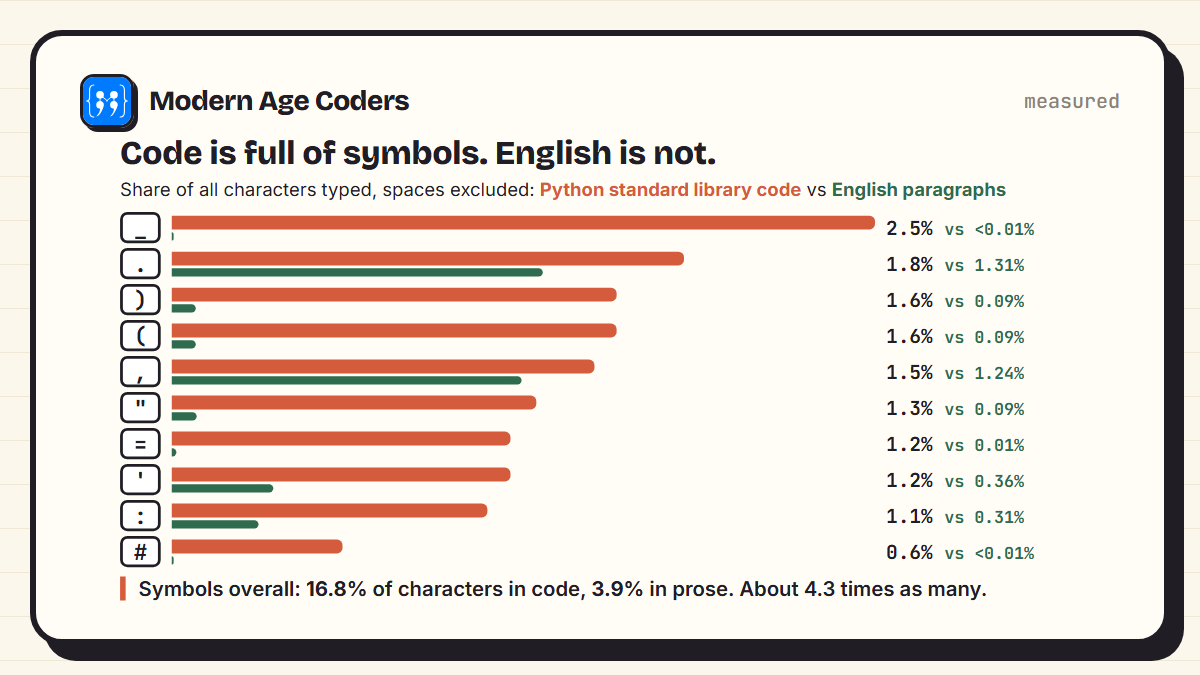
Symbols made up 16.8% of the characters in code and only 3.9% in prose, roughly 4 times as many. The most common were _, ., ), (, ,. The underscore, which almost never appears in normal writing, was the single most frequent symbol in Python, because Python names like file_name and __init__ use it constantly. Code also needed the Shift key for 14.1% of characters, against 3.4% for prose.
What this means for coders
Once letters are comfortable, deliberately practise the symbol keys: the underscore, brackets, quotes, the equals sign and the colon. Most typing courses spend little time on them, but they are a large part of what you type as a programmer.
Build your own typing speed tester
Here is the full tester behind the scores above. It shows a sentence, times you with time.perf_counter(), and reports words per minute and accuracy. By convention, one "word" is five characters, so words per minute is correct characters divided by five, per minute. Save it as typer.py and run it:
import time

def score(target, typed, seconds):
    """Words per minute (a word = 5 characters) and accuracy."""
    correct = sum(1 for a, b in zip(target, typed) if a == b)
    minutes = seconds / 60
    wpm = (correct / 5) / minutes
    accuracy = correct / len(target)
    mistakes = [i for i, (a, b) in enumerate(zip(target, typed)) if a != b]
    return round(wpm), round(accuracy * 100), mistakes

def play(target):
    print("Type this, then press Enter:\n")
    print("   ", target, "\n")
    start = time.perf_counter()
    typed = input("    ")
    seconds = time.perf_counter() - start
    wpm, acc, mistakes = score(target, typed, seconds)
    print(f"\n{wpm} words per minute, {acc}% accurate")
    if mistakes:
        print("Check positions:", mistakes)

if __name__ == "__main__":
    play("the quick brown fox jumps over the lazy dog")
Ideas to extend it: pick a random sentence from a list, keep a history of scores in a file, or add lines of code as targets so you practise symbols too. It is a good first project for anyone learning Python, and our basic Python programs list has more at the same level.
Signs of progress, and when to stop worrying
| Stage | What it looks like | What to do |
|---|---|---|
| First week | Slower than hunt and peck, lots of looking down | Normal. Keep sessions short and cover the hands |
| Weeks 2 to 4 | Home and top rows without looking, still slow | Add the bottom row once accuracy is steady |
| Weeks 5 to 8 | All letters by touch, speed starting to climb | Add capitals, punctuation and real sentences |
| After that | Faster than before, eyes on the screen | Practise numbers and symbols, and use it daily |
Everyone progresses at a different pace, and the timings above are a guide, not a test. The most reliable sign of progress is not the speed number. It is the moment a child types a whole sentence while looking at the screen, without thinking about the keys at all.
Touch typing is the rare skill you learn once and use every day for the rest of your life.
How we teach it
Typing matters most at the moment a student moves from blocks to typed code. The principles on our how we teach page, starting with a spark and learning by building, apply to typing too: a small project like the tester above turns practice into something a child made. For younger children still on blocks, our Scratch classes need very little typing, and typed languages like Python come when they are ready.
Frequently asked questions
Many children are ready around 7 or 8, once they can read simple words and their hands rest comfortably across the home row. Younger children can play keyboard games, and adults of any age can learn touch typing too.
With 10 to 15 minutes of daily practice, many learners can type all the letters without looking within about six to eight weeks. Speed keeps improving for months after that with regular use.
A, S, D and F for the left hand, and J, K, L and the semicolon for the right hand. The bumps on F and J help your index fingers find home without looking. Thumbs rest on the space bar.
Accuracy first. Aim for about 95% accuracy without looking before pushing for speed. Fast typing with mistakes is slower overall and trains the wrong finger movements.
Not as much as thinking skills, but slow typing that makes you look down for every bracket breaks your concentration. Code uses far more symbols than English, so coders benefit from practising symbol keys specifically.
By convention, a word is counted as five characters. Words per minute is the number of correctly typed characters divided by five, divided by the time in minutes.
Usually yes, especially if they will be typing a lot for school or coding. Expect a few weeks where they feel slower. With daily practice, touch typing soon overtakes two-finger typing.