Table of Contents
- Why Age 7 is a Critical Year for Coding Development
- What Should a 7-Year-Old Learn in Coding?
- Best Coding Platforms for 7-Year-Olds
- Is Scratch Good for a 7-Year-Old?
- Project-Based Learning: What 7-Year-Olds Should Build
- How Do I Know If My Child is Actually Learning Coding?
- Balancing Creativity and Logic in Coding
- Can Kids Start Coding at 7 Without Prior Experience?
- Beginner Coding for 7 Year Olds: The First Month, Week by Week
- Roblox or Minecraft for a 7 Year Old Who Wants to Code?
- How Long and How Often Should 7-Year-Olds Code?
- Common Challenges at Age 7 and Solutions
- Frequently Asked Questions
- Final Thoughts
- Coding for 7 Year Olds: Questions Parents Ask
- Related Posts
At age 7, children are ready for a significant leap in their coding journey. They're reading more fluently, thinking more abstractly, and capable of understanding structured programming concepts that were too advanced just a year earlier. This is the age when coding transitions from playful exploration to genuine skill-building.
Seven-year-olds can grasp fundamental programming concepts like loops, conditions, and events. They can plan multi-step projects, debug their code systematically, and create programs that actually do something meaningful.
The short answer: coding for 7 year olds means Scratch or Code.org, four concepts (loops, conditions, events and variables), projects rather than lessons, and sessions of 30 to 45 minutes three or four times a week. A complete beginner who starts at 7 is building their own small games within a month; the week-by-week first month below shows how. This guide covers what a 7 year old should learn, the best platforms, whether Roblox or Minecraft is the right door, and how to recognise real progress rather than screen time.
Why Age 7 is a Critical Year for Coding Development
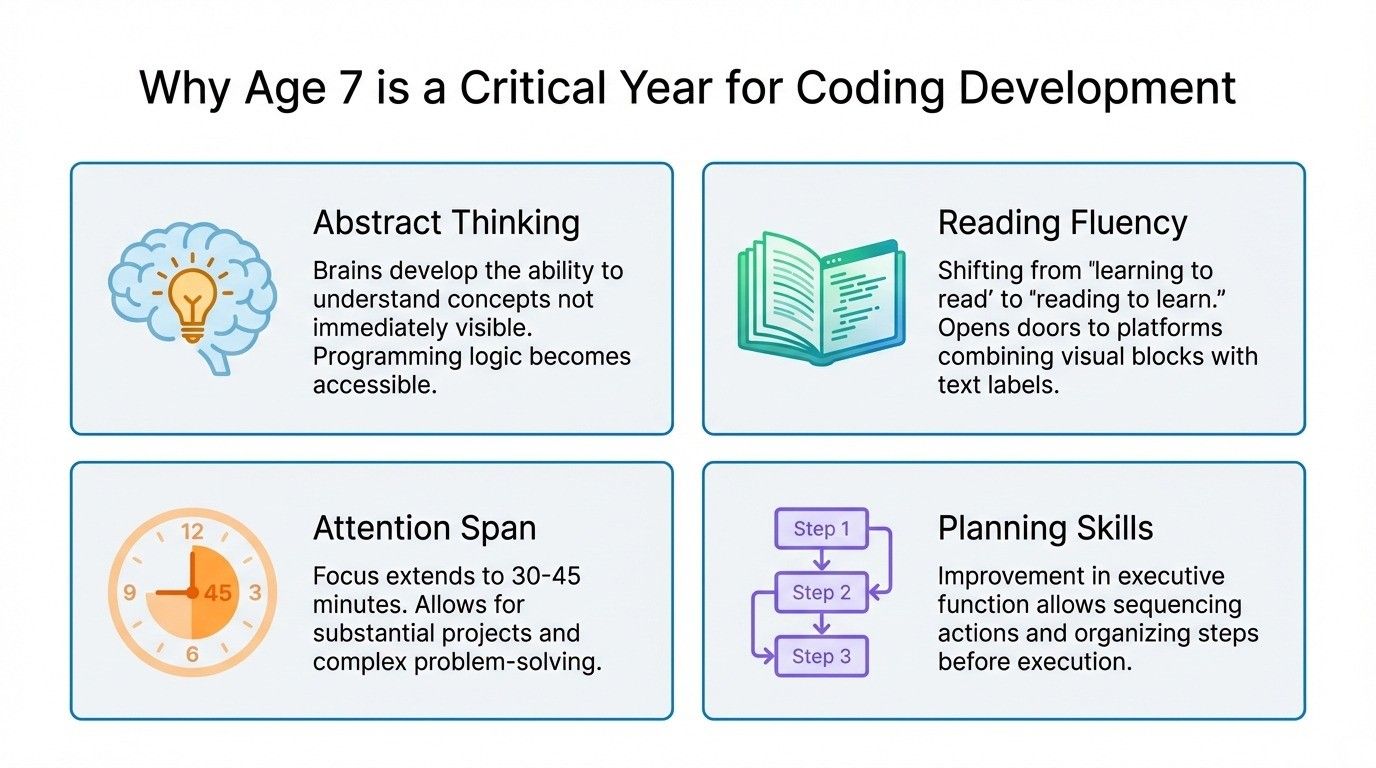
Age 7 marks a significant cognitive leap. Children's brains are developing abstract thinking abilities. They can understand concepts that aren't immediately visible or tangible. This makes programming logic suddenly accessible in ways it wasn't even six months earlier.
Reading fluency changes everything: Most 7-year-olds are moving from "learning to read" to "reading to learn." This opens doors to coding platforms that combine visual blocks with text labels, bridging the gap toward eventual text-based programming.
Attention span expansion: Seven-year-olds can focus on engaging activities for 30-45 minutes compared to 20-30 minutes at age 6. This extended focus allows them to complete more substantial projects and work through complex problems.
Better planning skills: They're beginning to think ahead, plan sequences of actions, and organize steps logically. These executive function improvements directly support coding, where planning before implementing prevents frustration.
Understanding cause-effect deeply: While younger kids grasp simple cause-effect, 7-year-olds can follow chains of cause-effect: "If I do this, then that happens, which causes this other thing." This multi-step reasoning is essential for programming.
Ready for structured learning: Unlike age 6 where structure needs gentle introduction, most 7-year-olds are comfortable with classroom-style learning. They can follow curricula, complete assignments, and work toward defined goals, all beneficial for systematic coding education.
What Should a 7-Year-Old Learn in Coding?
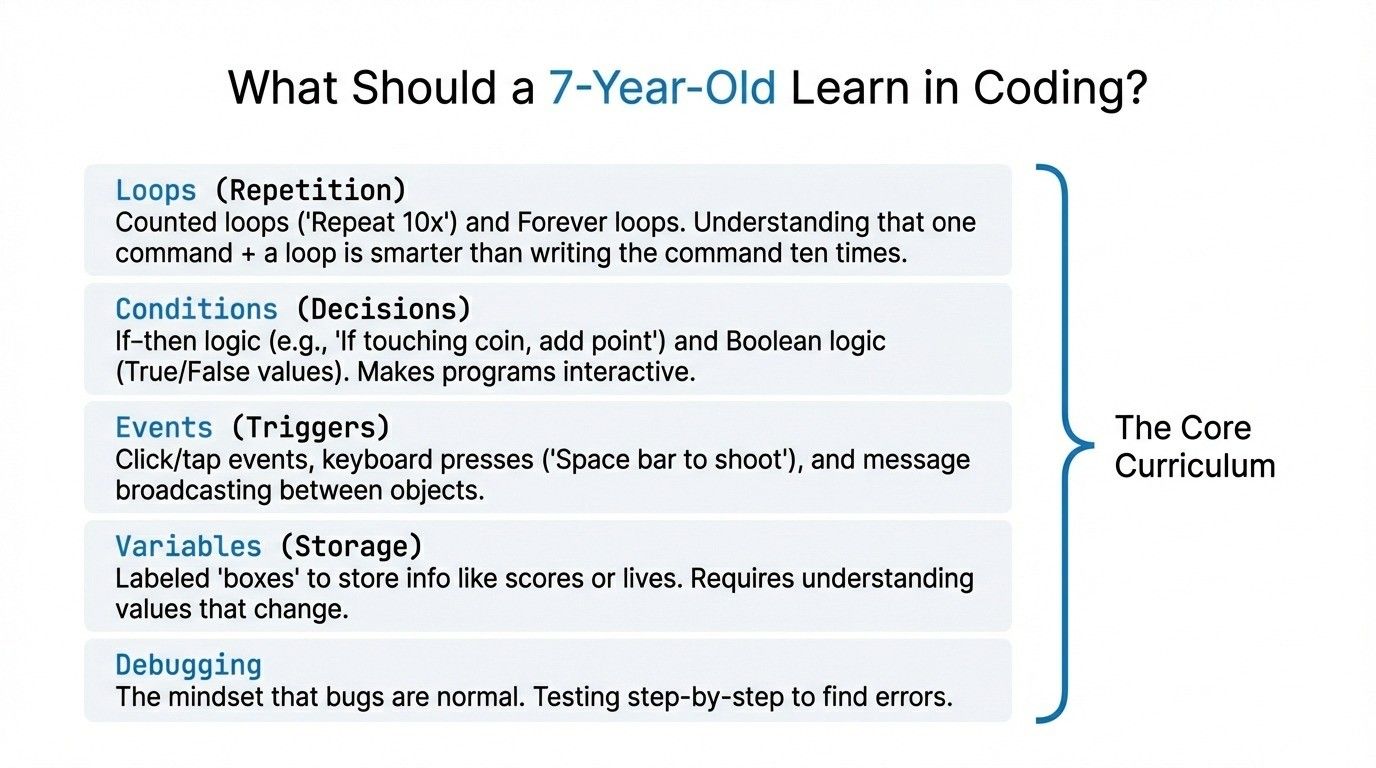
Loops: Understanding Repetition
Loops are fundamental to all programming. At age 7, children can understand why programmers use loops and how they make code efficient.
Counted loops: "Repeat this action 10 times" makes perfect sense to 7-year-olds. They understand that writing one command plus a loop is smarter than writing the same command ten times.
Forever loops: Continuous repetition until something stops it. Think of a game character that keeps moving forward until it hits a wall. Seven-year-olds grasp this concept intuitively.
Nested loops: Introduction level only, a loop within a loop. For example, drawing a grid requires looping rows, and within each row, looping to create squares. Advanced 7-year-olds can handle simple nested loops.
Real-world examples: Brushing teeth (repeat motion many times), walking to school (repeat steps until you arrive), video game enemies (repeat movement pattern). Connecting loops to familiar experiences makes them concrete.
Conditions: Making Decisions with Code
Conditional logic, if-then statements, lets programs make decisions. This is where coding becomes truly interactive rather than just sequential.
If-then logic: "If the character touches the coin, then add one point." Simple conditionals with clear results work perfectly at age 7.
If-then-else: "If you press the right arrow, move right; else if you press left arrow, move left." Choosing between options based on conditions.
Boolean logic basics: Understanding true/false values. "Is the score greater than 10? True or false?" This foundational concept appears everywhere in programming.
Creating interactivity: Conditions make programs responsive. Games react to player input, quizzes check answers, stories branch based on choices. Seven-year-olds love seeing their code respond to actions.
Events: Making Programs Interactive
Events are triggers that make things happen in programs. At age 7, understanding events transforms coding from creating animations to building truly interactive experiences.
Click/tap events: "When this character is clicked, make it jump." User interaction through mouse or touch.
Keyboard events: "When space bar is pressed, shoot." Connecting specific keys to specific actions.
Collision events: "When character touches enemy, lose a life." Detecting when objects interact in games.
Message broadcasting: Objects communicating with each other. One object can send a message that triggers actions in other objects. This teaches how complex programs coordinate multiple elements.
Variables: Storing and Using Information
Variables are containers that hold information programs need to remember. For 7-year-olds, variables make sense when connected to concrete examples.
What variables are: Like labeled boxes that store numbers, text, or true/false values. The label stays the same; the contents can change.
Creating and naming: Choosing meaningful names like "score" instead of "x." This teaches clear communication in code.
Changing values: Score starts at 0, increases each time you collect a coin. Lives start at 3, decrease when you hit obstacles.
Using in programs: Displaying the score on screen, checking if lives = 0 to end the game, tracking time or levels. Variables make programs remember and respond.
Debugging Basics: Finding and Fixing Problems
Debugging is where real learning happens. Seven-year-olds need to understand that bugs aren't failures. They're normal parts of programming.
Understanding bugs are normal: Every programmer debugs constantly. Professional developers spend more time debugging than writing new code. This mindset prevents frustration.
Reading error messages: When available, error messages provide clues. Teaching kids to read these messages carefully builds problem-solving skills.
Testing step-by-step: Run the program, see where it stops working correctly, check that section of code. Systematic testing beats random changes.
Learning from mistakes: Each bug teaches something. "Oh, I put the jump command before the move command. That's why it didn't work." This iterative learning builds understanding.
Best Coding Platforms for 7-Year-Olds
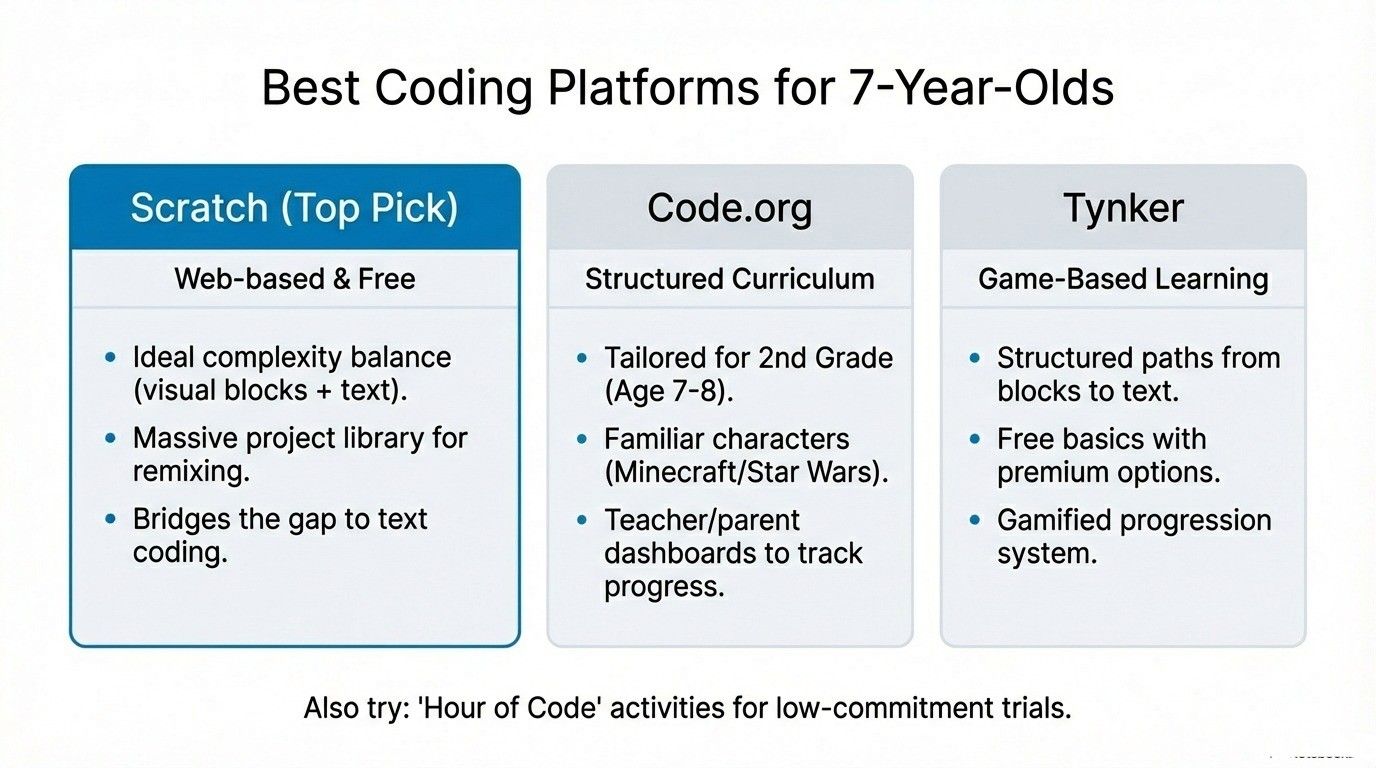
Scratch (Primary Recommendation)
Platform: Web browser, completely free
Website: scratch.mit.edu
Why perfect for age 7: While designed for ages 8-16, capable 7-year-olds thrive with Scratch. It offers the ideal complexity level, challenging enough to build real skills, accessible enough to stay engaging.
Visual blocks use both pictures and text, bridging toward text-based coding. Each block clearly shows what it does, but reading the labels reinforces literacy while coding.
Massive project library: Browse millions of projects other kids created. This provides inspiration, shows what's possible, and allows "remixing", copying someone's project and modifying it to learn how it works.
What they'll create: Games with multiple levels, animated stories with branching choices, music creation tools, art generators, quizzes, simulations. The depth is remarkable.
Community aspect: Kids can share projects, receive comments, and see what peers worldwide are building. This social element motivates many young coders.
Learning curve: Initial navigation takes 2-3 sessions to master. Then progression is steady. Scratch can engage kids for years, many continue using it through age 12-14.
For students ready to explore more structured approaches, understanding how coding improves mathematical thinking in children shows the broader benefits Scratch develops.
Code.org (Structured Curriculum)
Platform: Web browser, free
Website: code.org
Offers courses specifically designed for 2nd grade (age 7-8). Guided lessons introduce concepts systematically with clear progression. Each course includes video tutorials, step-by-step challenges, and open-ended projects.
Familiar characters: Uses themes from Frozen, Minecraft, Star Wars, and other popular media. Kids engage more when coding with characters they already love.
Certificates of completion: Receiving certificates motivates goal-oriented children. They can print and display achievements, building pride in learning.
Teacher/parent dashboards: Track progress, see which concepts they've mastered, and identify where they might need help.
Tynker (Comprehensive Platform)
Platform: Web, iPad, Android
Website: tynker.com
Age-appropriate courses for 7+ with game-based learning approach. Starts with visual blocks, gradually introduces text-based coding concepts as skills develop.
Structured paths: Clear course progression from beginner through advanced. Kids know what comes next and can see their advancement.
Cost: Free basics with limited features, premium subscription $10/month for full access. Free version works well initially; premium adds value as skills grow.
Hour of Code Activities
Short, focused coding experiences (typically one hour each) with different themes and characters. Perfect for exploring various coding concepts without long-term commitment.
Try multiple Hour of Code activities to discover which types of projects engage your child most. Then choose a platform that emphasizes those project types.
Is Scratch Good for a 7-Year-Old?
Yes: Scratch is arguably the best coding platform for this exact age. Here's why it works so well:
Appropriate complexity level: Not too simple (like some apps for younger kids), not too advanced (like pure text-based languages). Scratch hits the developmental sweet spot for 7-year-olds.
Visual + text balance: Blocks use pictures so concepts are clear, plus text labels that build reading skills. This combination prepares kids for eventual text-based coding.
Real programming concepts: Loops, conditions, variables, events, functions, everything in Scratch directly translates to professional programming languages later.
Years of growth potential: Unlike platforms kids outgrow in months, Scratch remains challenging and engaging for years. Even teenagers use Scratch for complex projects.
Shareable creations: Kids can publish projects and receive feedback from peers worldwide. This authentic audience motivates quality work.
Huge community: Stuck on a concept? Thousands of tutorials exist. Want project ideas? Browse millions of examples.
Transition tool: Scratch bridges visual coding and text-based programming. Many kids transition to Python or JavaScript around age 10-12, and Scratch knowledge transfers directly.
Potential challenges: The interface can feel overwhelming initially with many features. Sitting with your child for first few sessions helps. Some kids get distracted browsing others' projects instead of creating. Setting time limits for browsing vs. creating helps maintain focus.
Project-Based Learning: What 7-Year-Olds Should Build
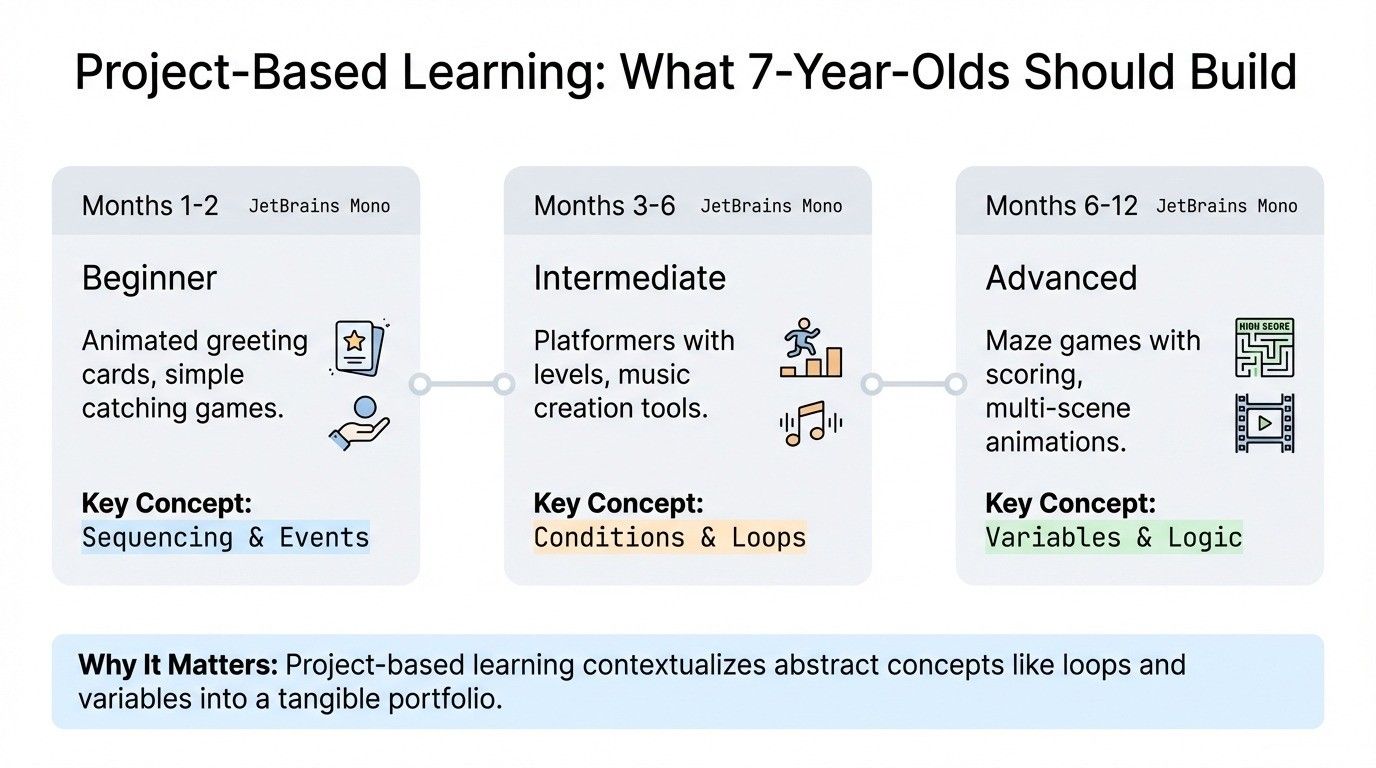
Beginner Projects (First 2 Months)
Animated greeting card: Character moves across screen, says message, changes background. Teaches basic animation, sequencing, and events.
Simple catching game: Objects fall from top; player moves character to catch them. Score increases with each catch. Introduces variables, collision detection, and loops.
Interactive quiz: Ask questions, check if answers are correct, keep score. Teaches conditions (if-then), variables (score tracking), and input handling.
Story with choices: Reader makes decisions that change the story's direction. Develops conditional logic and branching narratives.
Intermediate Projects (Months 3-6)
Platformer game with levels: Character jumps over obstacles, collects items, advances through levels. Combines loops, conditions, variables, and events in one project.
Drawing/paint program: User clicks to draw, changes colors and brush sizes. Teaches mouse tracking, variables for storing tool settings, and coordinate systems.
Music creation tool: Clicking different objects plays different sounds. Sequence sounds to create songs. Introduces sound programming and timing.
Pet simulation game: Virtual pet gets hungry, needs play, shows mood. Kids must care for it. Teaches variables changing over time, conditions for responses, and timers.
Advanced Projects (Months 6-12)
Maze game with scoring: Navigate character through increasingly difficult mazes. Add timer, high scores, multiple levels. Complex logic combining many concepts.
Animation with multiple scenes: Create multi-scene story with characters that interact. Scene transitions, character dialogue, complex sequencing.
Simple calculator: Click buttons to input numbers and operations, display result. Teaches variable manipulation, string handling, and mathematical operations in code.
Interactive story with variables: Story changes based on player decisions stored in variables. Character traits, inventory items, relationship scores affect outcomes. Advanced variable usage and complex conditionals.
Why Projects Matter
Apply concepts in context: Learning loops in isolation is one thing. Using loops to create game mechanics makes the concept stick permanently.
Tangible results: "Look what I made!" Projects give kids something concrete to show family and friends, building pride and motivation.
Portfolio building: Save completed projects. Looking back shows growth: "I made that six months ago, and now I can make much more complex programs!"
Ownership and creativity: Following tutorials teaches skills; creating original projects develops creativity and problem-solving. Both matter.
How Do I Know If My Child is Actually Learning Coding?
Observable Progress Indicators
Technical skills you can see:
Using loops appropriately without prompting or copying examples. They recognize, "This action repeats: I should use a loop."
Adding conditions to create game logic independently. "I want the score to increase when the character touches the coin, so I need an if-then."
Debugging independently for 5+ minutes before asking for help. They systematically test, observe, and modify rather than immediately seeking assistance.
Explaining their code to others. "This loop makes the character jump five times, then this condition checks if it touched the goal."
Using variables to track information across the program. Creating score, lives, time, level variables and updating them appropriately.
Planning projects before coding. Sketching ideas, listing features they want, thinking through logic before placing blocks.
Conceptual understanding indicators:
Talking about coding concepts outside coding sessions. "This pattern repeats, like a loop!" during other activities.
Recognizing coding patterns in other contexts. Seeing if-then logic in board game rules, loops in daily routines, variables in scoreboards.
Predicting what code will do before running it. "If I put this block here, the character will move, then jump, then change color."
Understanding why code doesn't work. "It's not working because I put the stop block before the move block."
Suggesting solutions to problems. "Maybe I should add a condition to check if the score is greater than 10."
Problem-solving growth:
Trying multiple approaches systematically. Not just clicking randomly, but testing specific changes: "Let me try moving this block. That didn't work. What if I change this number?"
Breaking complex problems into steps. "To make this game, I need: a moving character, falling objects, score tracking, and a timer."
Using previous solutions in new contexts. "I made a score variable in my last game. I can do that same thing here."
Asking specific questions. Instead of "It doesn't work," asking "Why does the character move before the background changes?"
Persistence increasing over time. Sticking with challenging problems longer without frustration or giving up.
Red Flags That Suggest Issues
Only copying tutorials without understanding: Can follow step-by-step instructions perfectly but can't explain why each step matters or modify the project independently.
Random trial-and-error with no logic: Just clicking things randomly hoping something works, with no systematic testing or problem-solving approach.
Immediate frustration: Giving up the moment something doesn't work, showing no attempt to debug or figure out the problem.
Cannot explain own code: When asked "What does this part do?" can't describe what blocks accomplish or why they're placed in specific order.
Not retaining concepts week-to-week: Relearning the same concepts repeatedly with no transfer of knowledge between sessions. Each session starts from scratch.
Avoiding coding or showing disinterest: Resistance to coding time, rushing through activities, showing no curiosity or engagement.
When to Adjust Approach
Too easy: If completing activities quickly without challenge, introduce more advanced concepts, try harder projects, or explore new platforms with greater depth.
Too hard: If consistently frustrated and making no progress, step back to strengthen basics. Slower progression with solid understanding beats rushing through without comprehension.
Lost interest: Change platforms, try different project types, connect coding to current interests (favorite games, hobbies, topics), or take a short break and return fresh.
Frequently frustrated: Check difficulty level, might be attempting projects beyond current skills. Increase support, simplify challenges temporarily, or work collaboratively until confidence rebuilds.
Balancing Creativity and Logic in Coding
Both creative and logical thinking matter in programming. Different kids naturally lean toward one or the other, but experiencing both develops well-rounded skills.
Creative coding projects: Focus on art, music, storytelling, animation, visual design. Kids express themselves while learning coding concepts. These projects engage children who might not initially connect with pure logic.
Logic-heavy projects: Puzzles, algorithms, efficiency challenges, mathematical programs, games requiring strategic thinking. Develops systematic problem-solving and computational thinking.
If your child enjoys these, the number guessing game is a lovely way in: counting up takes up to 100 guesses, while halving never needs more than 7. What is an algorithm? shows both strategies side by side with simple code.
Combining both: The best projects merge creativity with logic. Creating a game requires logical thinking (how mechanics work, scoring systems, win/loss conditions) plus creativity (characters, story, visual design, sound).
Follow natural inclination: If your child loves art, start with creative coding. If they love puzzles, emphasize logic projects. Meeting kids where their interests lie builds engagement.
Expose to both approaches: Even creativity-oriented kids benefit from logic challenges. Even logic-focused kids benefit from open-ended creative projects. Breadth develops stronger overall skills.
For parents wanting to understand this balance better, exploring the role of mathematics in programming and logical problem-solving provides valuable context.
Can Kids Start Coding at 7 Without Prior Experience?
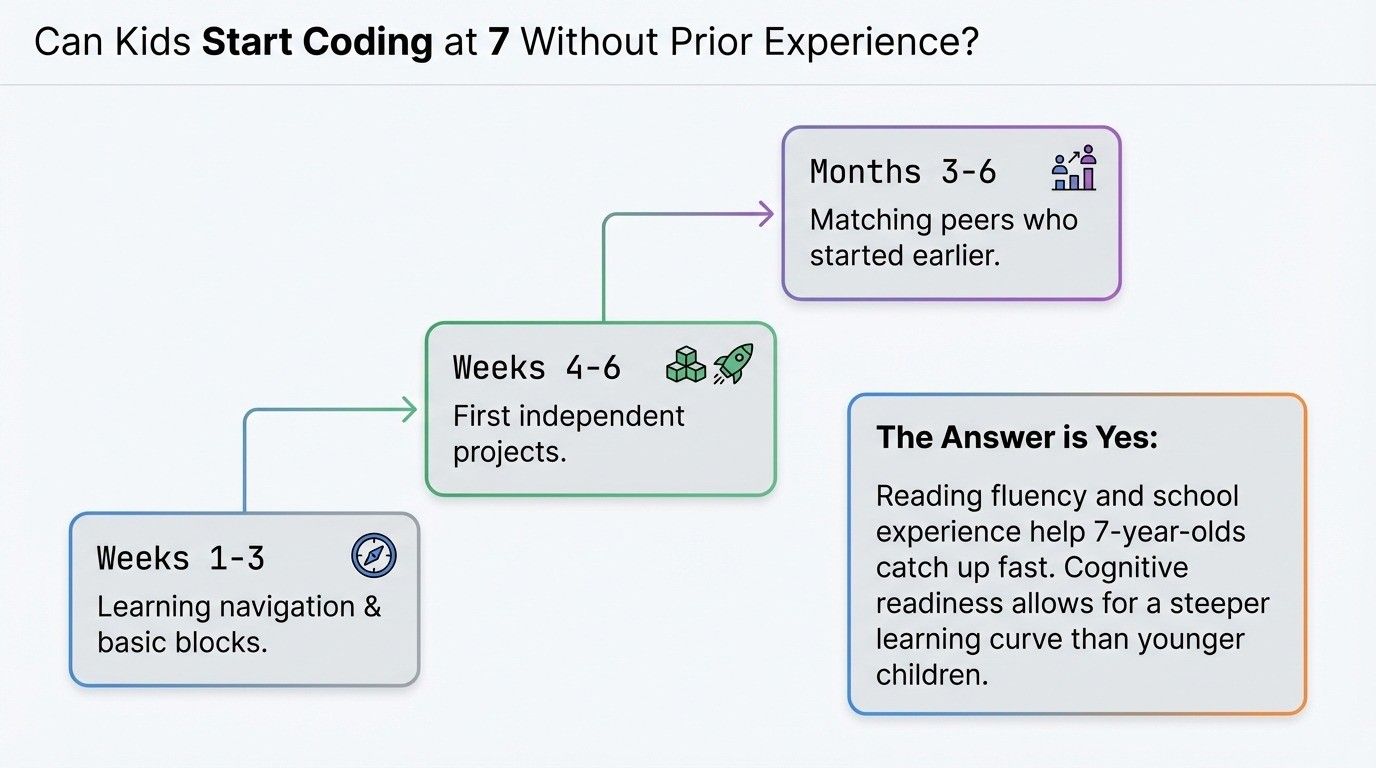
Absolutely! Seven is an excellent starting age even without any prior coding exposure. No need to have started earlier: 7-year-olds can build strong foundations from scratch.
Why 7 is great for beginners:
Reading fluency means they can follow instructions independently. Abstract thinking ability means programming concepts make sense. Attention span allows completing meaningful projects. School experience means they're comfortable with structured learning.
Recommended starting platforms for complete beginners:
Scratch offers gentle entry with massive growth potential. Code.org's 2nd-grade course provides step-by-step introduction. Tynker's beginner paths guide systematic learning.
Initial learning curve expectations:
First 2-3 weeks: Learning platform navigation, understanding basic blocks, completing simple sequences.
Weeks 4-6: Grasping loops and simple conditions, creating first independent projects (with guidance).
Months 2-3: Comfortable with core concepts, debugging basic issues, following tutorials then modifying.
Months 3-6: Creating original projects, using variables, combining multiple concepts, developing personal coding style.
Catching up to peers who started earlier:
Kids who started at 5-6 have familiarity advantage initially, but 7-year-olds' cognitive development often means faster comprehension of complex concepts. Within 3-6 months, beginners at 7 often match or surpass peers who started younger but with less focused learning.
Building confidence as beginner:
Start with high-success activities that build confidence. Celebrate every small achievement. Emphasize that everyone starts somewhere, even professional programmers once didn't know what loops were.
Beginner Coding for 7 Year Olds: The First Month, Week by Week
Most parents searching for beginner coding for 7 year olds want to know what the first weeks actually look like. This is a plan for a complete beginner at home, in Scratch, at three sessions a week of about 40 minutes. It matches the learning-curve expectations above, just with the projects named.
Week 1, the stage and the cat. Open Scratch, meet the sprite, the stage and the green flag. Build the classic first project: the cat walks, hits the edge, turns around. Add a costume change so it looks like it is walking. The concept is sequence: blocks run top to bottom. Success looks like the child dragging blocks without help by the third session.
Week 2, loops. Turn the walk into a forever loop, then a repeat-10 loop with a sound. Make an animated greeting card: a character moves, speaks, the background changes. Ask the child to predict what happens before they click the flag. Success looks like the child choosing a loop on their own instead of stacking the same block twenty times.
Week 3, events and conditions. Arrow keys move the sprite (events). A falling star, a bag at the bottom, and "if touching star, change score by 1" (a condition and a variable together). This is the simple catching game from the projects section, and it is the first thing most 7 year olds want to show the family.
Week 4, their own idea. The child names a project, sketches it on paper, and builds it from the pieces of weeks 1 to 3. It will be smaller than the sketch. That is fine; the point is that the ideas came from them. A short quiz with two questions, a chase game or a two-scene story are all typical, and all count.
After the first month the pace slows down and deepens: variables for lives and timers, broadcasting between sprites, multi-level games. A child who does this month at home can carry on alone with the project lists above; a child who wants a teacher on screen can do the same month in our live Scratch course, which takes children from 6 to 12 in a batch of 5 to 10 or 1-on-1, one hour per class, with a free demo first. When your child turns 8 the coding for 8 year olds page shows what changes in the next year.
Roblox or Minecraft for a 7 Year Old Who Wants to Code?
Parents ask this because both games advertise coding, and the honest answer at 7 is: play them as games, and code in Scratch. Minecraft has the gentler on-ramp. Code.org's Minecraft Hour of Code activities are block-based, free in the browser and fine for a 7 year old, and Minecraft Education Edition uses the same block approach in class settings. Roblox Studio, by contrast, is a real game engine scripted in Lua, a typed text language, and most children are not ready for it before 10 or 11; at 7 the child ends up watching a tutorial rather than coding.
So if your 7 year old loves Minecraft, use the Minecraft Hour of Code as a warm-up and move to Scratch for the projects in this guide. If they love Roblox, let them know that Roblox Studio is a goal for a few years from now, and that the loops, conditions and variables they learn in Scratch are exactly what Lua will ask of them later.
How Long and How Often Should 7-Year-Olds Code?
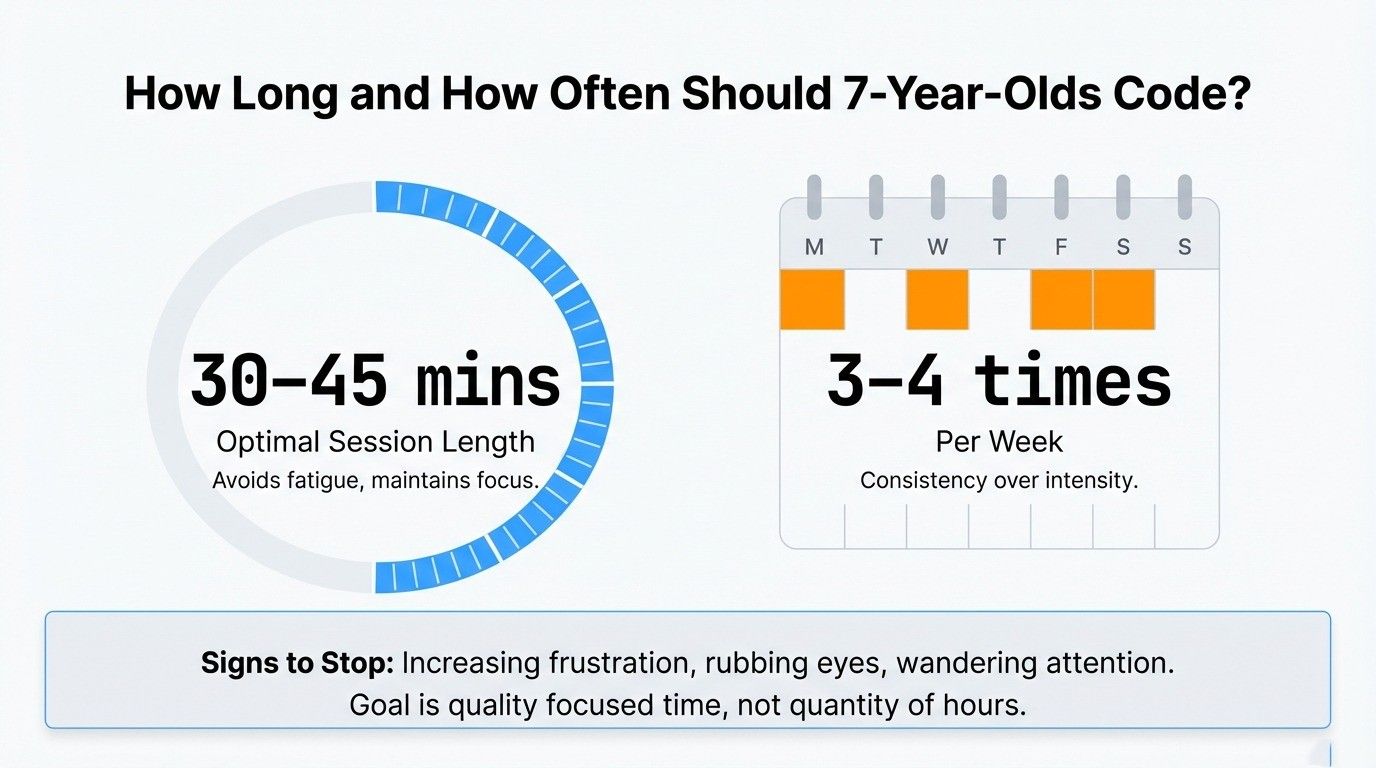
Recommended session length: 30-45 minutes per session works well. This allows time to engage with concepts, complete projects, and debug issues without mental fatigue.
Some highly engaged 7-year-olds can focus for 60 minutes on projects they love. Others work better with 25-minute sessions. Watch individual attention and engagement rather than following rigid timing.
Optimal frequency: 3-4 times per week provides consistency without overwhelming. This frequency allows skills to build progressively while giving mental breaks between sessions.
Daily sessions for motivated kids: If your child asks to code daily, allow it! High motivation should be supported. Even 20-minute daily sessions build skills effectively.
Signs session should end:
Frustration increasing despite debugging attempts. Attention wandering, looking around room, asking about other activities. Eyes rubbing or physical signs of fatigue. Completion of natural stopping point (finished project, completed level).
Breaking longer projects:
Multi-session projects teach planning and persistence. "Today we'll build the character and basic movement. Tomorrow we'll add obstacles." This approach develops project management skills.
Summer intensive vs. school year:
Summer offers opportunities for daily coding or longer sessions. School year requires balance with homework and activities: 3-4 weekly sessions work well.
Quality over quantity:
Thirty minutes of focused, engaged coding beats two hours of distracted, frustrated clicking. Prioritize genuine learning and enjoyment over total time.
Common Challenges at Age 7 and Solutions
"My code isn't working and I don't know why"
Teach systematic debugging:
- Run the program and watch where it stops working correctly
- Check the code section that should handle that part
- Look for common mistakes: wrong order, missing blocks, incorrect values
- Test one change at a time to see what fixes it
Read error messages: When platforms provide error messages, teach kids to read them carefully. "It says 'variable not defined'. That means we forgot to create that variable."
Compare to working examples: "This part works in your other project. What's different here?"
"This is too hard"
Assess difficulty appropriately:
- Is the platform too advanced? Scale back to beginner-appropriate challenges.
- Is this specific project too complex? Try simpler version first, add features gradually.
Break into smaller steps: "Making a whole game feels hard. Let's just make the character move today. Tomorrow we'll add jumping. Next session we'll add obstacles."
Scaffold support: Work collaboratively on challenging parts. Guide with questions: "What do you think should happen next?" rather than doing it for them.
Build confidence with success: Ensure regular achievable wins. Mix challenging and easy tasks. Success builds motivation to tackle harder problems.
"I don't know what to make"
Idea generation strategies:
- Ask what games/apps they enjoy, then recreate simplified versions.
- Brainstorm together: list favorite activities, animals, stories, each can become project inspiration.
- Browse project galleries for ideas (Scratch, Code.org).
- Start with tutorial, then modify: "Let's make this maze game, but change it to a space theme."
Interest-based suggestions:
- Loves sports? Make sports game with scoring.
- Loves animals? Create virtual pet or animal quiz.
- Loves art? Build drawing tool or pattern generator.
- Loves stories? Make interactive adventure.
Challenge prompts: "Make a game where you catch falling objects." "Create an animation with three scenes." "Build a quiz about your favorite topic." Clear prompts remove decision paralysis.
"Can I just copy this tutorial?"
Understanding vs. copying distinction: Following tutorials teaches mechanics. Copying to learn how something works is valuable. But if only copying without understanding, learning is limited.
Remix approach works better: Follow tutorial to completion. Then modify it: change characters, add features, combine with own ideas. This transforms copying into learning.
When copying is okay:
- Learning new concepts through guided examples.
- Seeing how specific features work to apply later.
- Understanding complex techniques beyond current independent skill level.
When copying is problematic:
- Only copying, never creating original projects.
- Can't explain what copied code does.
- No attempt to modify or personalize.
- Claims copied work as entirely own creation.
Frequently Asked Questions
What should a 7-year-old learn in coding?
Focus on beginner programming concepts: loops (repetition), conditions (if-then logic), events (interactivity), variables (storing information), and debugging basics. They should learn through project-based activities, creating games, animations, and interactive stories. Scratch is ideal for this age, offering visual blocks with enough depth to learn real programming fundamentals while staying engaging and accessible.
How do I know if my child is actually learning coding?
Watch for: using loops and conditions appropriately without prompting, debugging independently for 5+ minutes before asking help, explaining their code to others, planning projects before coding, and applying concepts in new contexts. They should show increasing persistence, ask specific questions (not just "it doesn't work"), and retain concepts week-to-week. Red flags include only copying without understanding, random trial-and-error with no logic, or showing no problem-solving attempts before giving up.
Is Scratch good for a 7-year-old?
Yes! While designed for ages 8-16, capable 7-year-olds thrive with Scratch. It offers the right complexity level, visual blocks bridge to text-based coding, teaches real programming concepts, and provides years of growth potential. The massive community offers inspiration, and projects are shareable. It balances creative freedom with structured learning, making it ideal for developing both logical thinking and creative problem-solving at this critical age.
Can kids start coding at 7 without any prior experience?
Absolutely! Seven is an excellent starting age even without prior coding experience. Their reading fluency, abstract thinking ability, and attention span make them ready for structured programming fundamentals. Start with beginner-friendly platforms like Scratch or Code.org's 2nd-grade courses. Expect 4-6 weeks for initial comfort with concepts, then steady progress. No need to have started younger: 7-year-olds can build strong foundations from scratch and often catch up to earlier starters within 3-6 months.
Final Thoughts
Seven-year-olds are at the perfect developmental stage for learning real programming fundamentals. They're ready to move beyond playful exploration into structured coding that builds genuine skills.
Focus on core concepts, loops, conditions, events, and variables, through engaging, project-based learning. Scratch offers the ideal balance of visual accessibility with programming depth, making it the primary platform recommendation for this age. Supplement with Code.org's structured curriculum or Tynker's courses for variety and systematic progression.
Understanding best coding languages for kids ages 10-18 helps parents see the progression path, what comes after mastering Scratch fundamentals.
Support their learning by asking questions rather than providing answers, celebrating problem-solving efforts, and maintaining the fun factor that keeps them engaged. Whether your child has prior coding experience or is starting fresh at seven, this is an ideal time to build a foundation that will serve them for years.
Start with projects that interest them, keep sessions consistent at 30-45 minutes 3-4 times weekly, and watch their logical thinking and creative problem-solving flourish.
Coding for 7 Year Olds: Questions Parents Ask
Sequence first (blocks run in order), then loops, then events (when a key is pressed), then conditions and a variable for the score. In Scratch that is roughly the first month of guided projects: a walking cat, an animated card, a catching game, and one project of the child's own.
Yes. Scratch is designed for 8 to 16, but a 7 year old who reads short sentences manages it well, because the blocks read like English and snap together with the mouse. Scratch Junior suits a child who is not reading yet. Code.org's second-grade course is the other good starting point.
Three or four sessions of 30 to 45 minutes. A 7 year old who asks for more can have more; a 7 year old who is frustrated needs a shorter session or an easier project, not more time. Ending a session while the child still wants to continue is the surest way to keep them coming back.
Minecraft, through the block-based Hour of Code activities, is the one a 7 year old can actually code in. Roblox Studio uses Lua, a typed language, and suits children of 10 or 11 and up. At 7, let them play both and do the real coding in Scratch.
Yes. Our live Scratch course takes children from 6 to 12, in a batch of 5 to 10 children of a similar age or 1-on-1, one hour per class with a teacher on screen for the whole hour, and the first class is a free demo. If your child is not ready to sit for an hour yet, waiting a few months loses nothing: the course starts from zero at any age in that range.
Related Posts
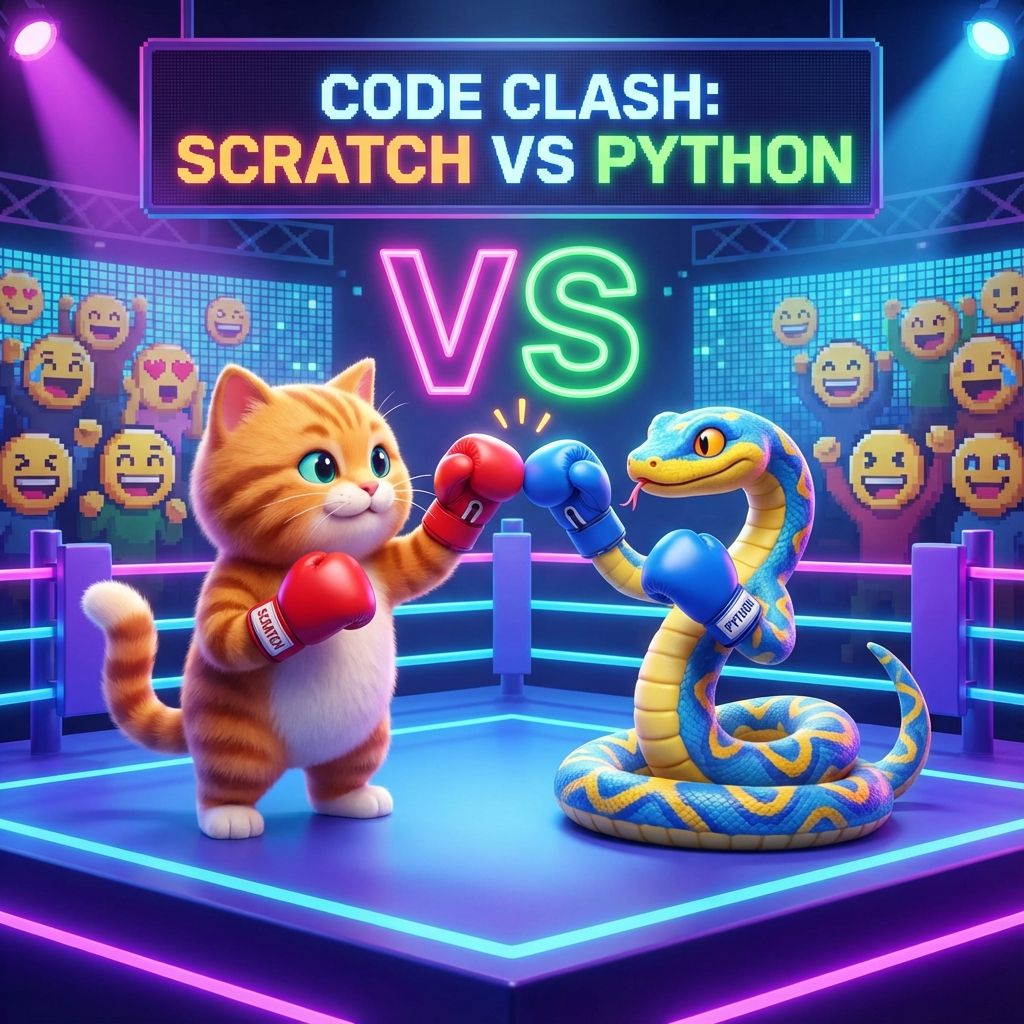
Scratch vs Python: Which is Better for Young Learners? Understanding when to transition from visual programming like Scratch to text-based languages like Python helps guide your 7-year-old's coding journey.
Common Myths About Coding for School Students Debunk misconceptions about learning to code and understand what coding education really involves for elementary-age children.
Top Coding Games and Platforms That Make Learning Fun for Kids Discover additional coding platforms and games perfect for 7-year-olds who want to explore beyond Scratch and Code.org.