Table of Contents
- Why computers use binary
- Place value: the same idea as decimal
- Converting binary to decimal
- Converting decimal to binary
- Counting in binary
- Bits, bytes and why 255 keeps turning up
- Adding in binary, and overflow
- Hexadecimal: binary made readable
- Where binary turns up in exams
- How we teach it
- Frequently asked questions
Every photo, message, song and game on your phone is stored as a long list of 0s and 1s. That is binary, the number system computers use. It sounds alien, but binary works exactly like the decimal numbers you already use, with one change: instead of ten digits, it has only two. Once that clicks, converting between binary and decimal takes a minute, and a lot of computing suddenly makes sense.
This guide explains binary from the ground up: why computers use it, how place value works in base 2, how to convert both ways, how to count and add in binary, what bits and bytes are, and where hexadecimal fits in. Every conversion is shown step by step by a short Python program, and checked against Python's own built-in functions.
Why computers use binary
Inside a computer, information is stored and moved as electrical signals, and the most reliable signal to detect is a simple one: on or off, high voltage or low voltage. Telling ten different voltage levels apart would be fragile, because a small bit of electrical noise could turn a 6 into a 7. Telling on from off is robust. So computers use a number system with exactly two digits: 1 for on and 0 for off.
Each 0 or 1 is called a bit, short for binary digit. With enough bits, you can represent any number, and with an agreed code, any letter, colour or sound.
Place value: the same idea as decimal
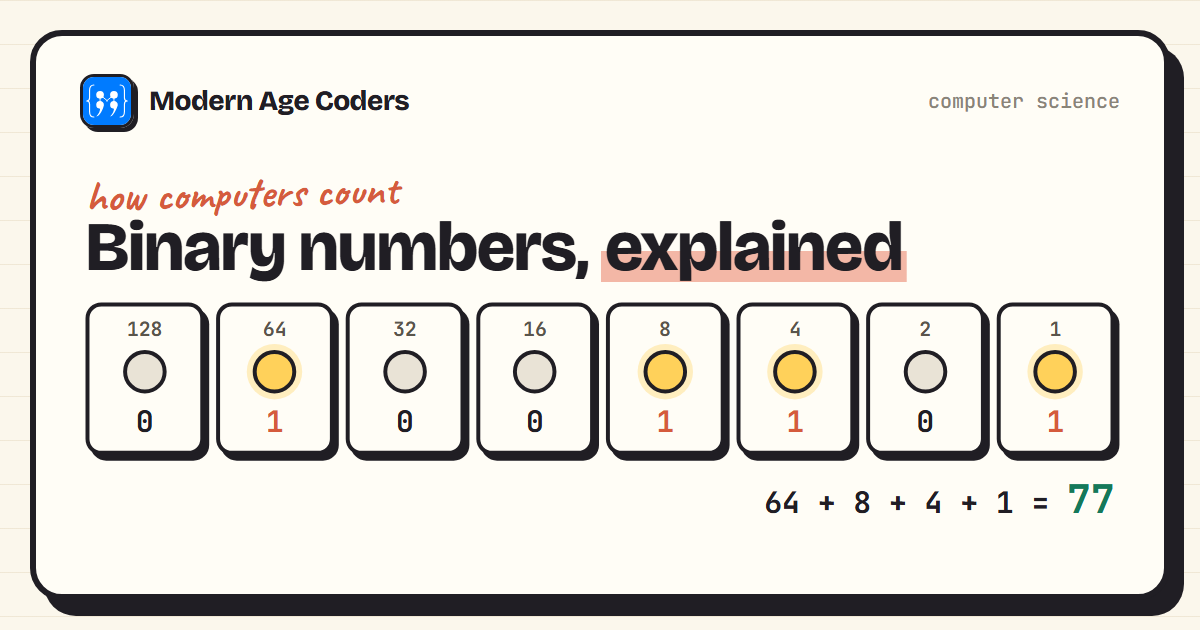
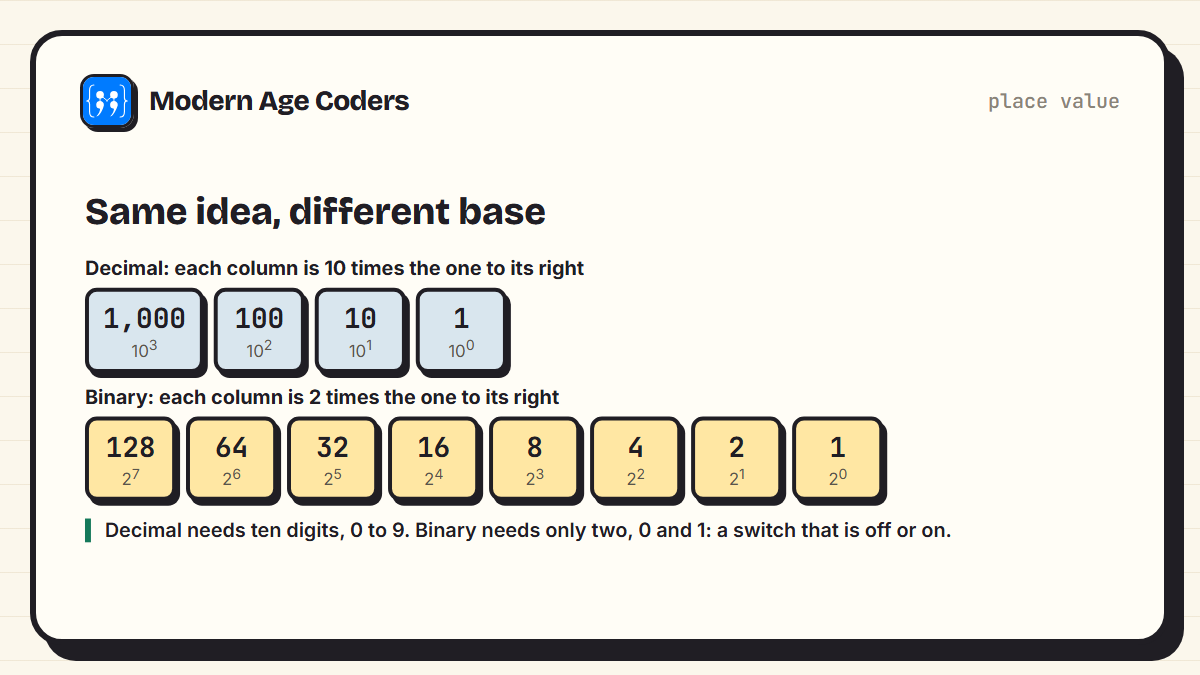
In ordinary decimal numbers, each column is worth ten times the column to its right: ones, tens, hundreds, thousands. The number 345 means 3 hundreds, 4 tens and 5 ones. Binary uses exactly the same idea, but each column is worth two times the column to its right: 1, 2, 4, 8, 16, 32, 64, 128 and so on.
Converting binary to decimal
To read a binary number, write the column values above the bits, then add up the columns that contain a 1. Here is 01001101, done by a short program that shows each column it adds:
def binary_to_decimal(bits):
    total = 0
    place = 2 ** (len(bits) - 1)
    for bit in bits:
        if bit == "1":
            print(f"  1 in the {place:>3}s column  -> add {place}")
            total += place
        place //= 2
    return total

print("01001101 =", binary_to_decimal("01001101"))
print("check with Python's int():", int("01001101", 2)) 1 in the 64s column -> add 64
1 in the 8s column -> add 8
1 in the 4s column -> add 4
1 in the 1s column -> add 1
01001101 = 77
check with Python's int(): 77So 01001101 is 64 + 8 + 4 + 1 = 77. The zero at the front makes no difference, just as 077 is the same as 77, but computers often write numbers with a fixed number of bits, so leading zeros are common.
Converting decimal to binary
There are two methods. The first is to find the largest column value that fits, write a 1 there, subtract it, and repeat. For 45: 32 fits (leaving 13), 16 does not, 8 fits (leaving 5), 4 fits (leaving 1), 2 does not, 1 fits. That gives 101101.
The second method is easier to do without thinking and is exactly what computers do: divide by 2 over and over, writing down the remainder each time, then read the remainders from the bottom up.
def decimal_to_binary(n):
    remainders = []
    while n > 0:
        print(f"  {n:>3} / 2 = {n // 2:>3}  remainder {n % 2}")
        remainders.append(str(n % 2))
        n //= 2
    return "".join(reversed(remainders))     # read the remainders from the bottom up

print("45 in binary is", decimal_to_binary(45))
print("check with Python's bin():", bin(45)) 45 / 2 = 22 remainder 1
22 / 2 = 11 remainder 0
11 / 2 = 5 remainder 1
5 / 2 = 2 remainder 1
2 / 2 = 1 remainder 0
1 / 2 = 0 remainder 1
45 in binary is 101101
check with Python's bin(): 0b101101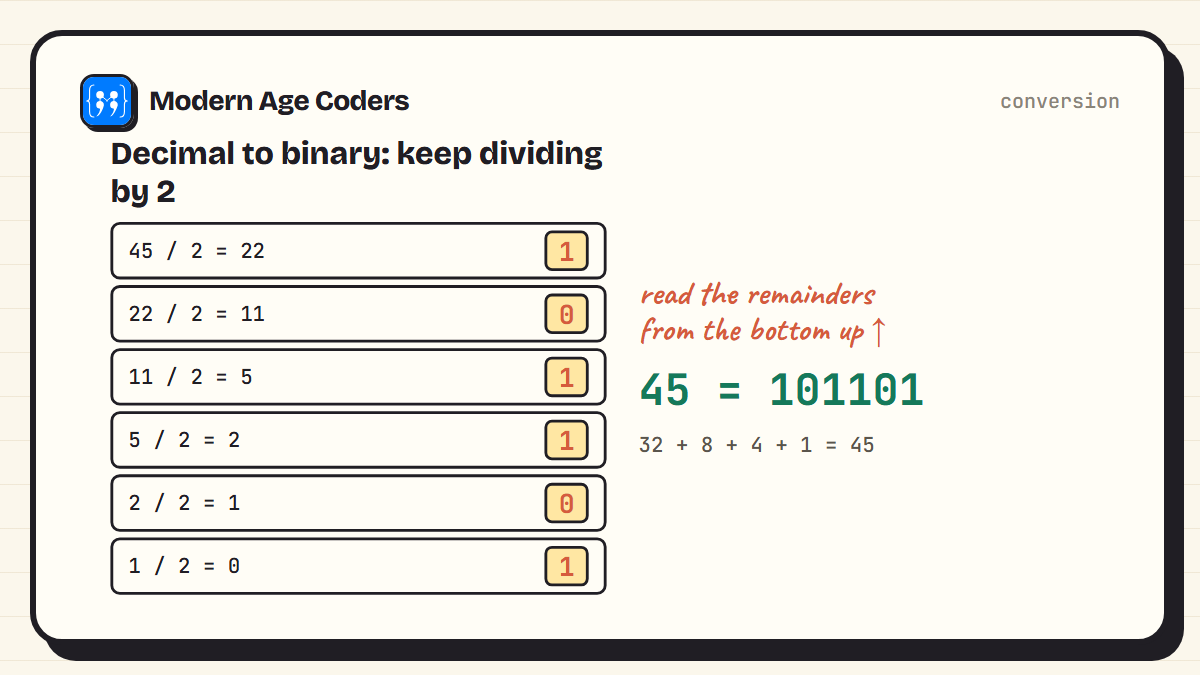
Always check your answer
Convert back the other way. 101101 is 32 + 8 + 4 + 1 = 45, so the answer is right. In exams this takes twenty seconds and catches the most common mistake, reading the remainders from the top instead of the bottom.
Counting in binary
Counting in binary follows the same rule as counting in decimal: when a column is full, reset it to zero and carry one to the next column. In decimal, a column is full at 9. In binary, it is full at 1. So after 1 comes 10, after 11 comes 100, and after 111 comes 1000.
for n in range(16):
print(f"{n:>2} = {n:04b}", end=" " if n % 4 != 3 else "\n") 0 = 0000 1 = 0001 2 = 0010 3 = 0011
4 = 0100 5 = 0101 6 = 0110 7 = 0111
8 = 1000 9 = 1001 10 = 1010 11 = 1011
12 = 1100 13 = 1101 14 = 1110 15 = 1111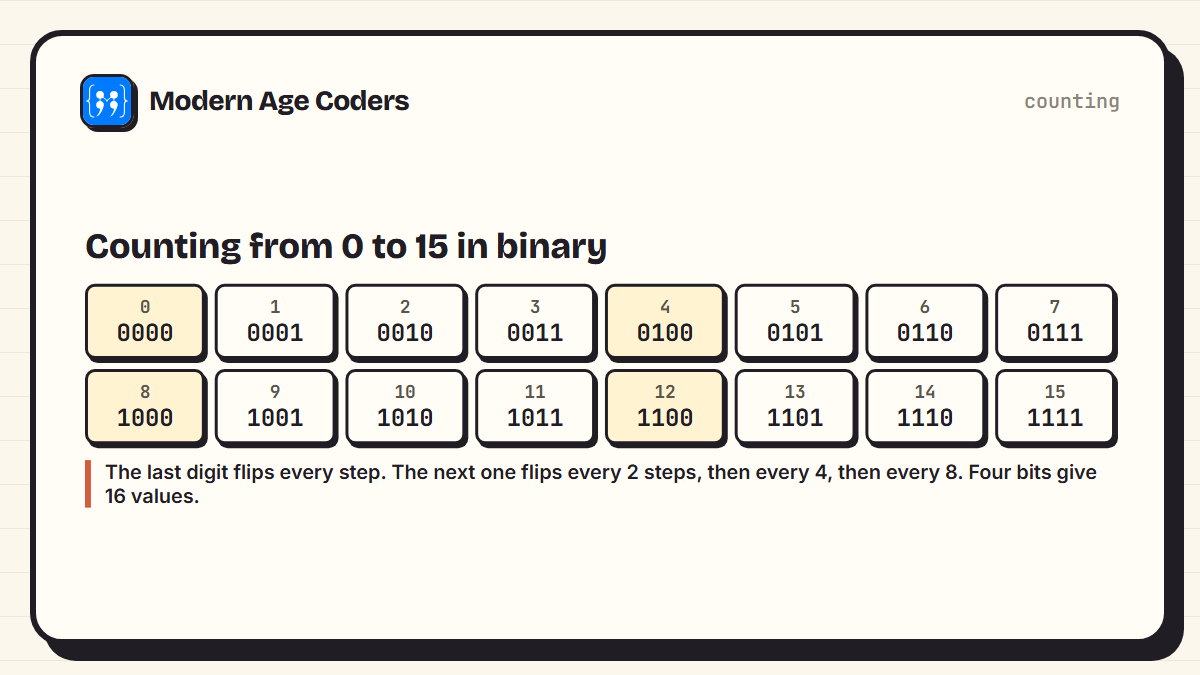
A fun way to practise with children: use your fingers as bits. Thumb is 1, index finger 2, middle 4, ring 8, little finger 16. Raised means 1. With one hand you can count from 0 to 31, and with two hands up to 1023.
Bits, bytes and why 255 keeps turning up
A group of 8 bits is called a byte. Eight bits can make 2 x 2 x 2 x 2 x 2 x 2 x 2 x 2 = 256 different patterns, from 00000000 to 11111111, which are the numbers 0 to 255. That is why 255 appears all over computing: each red, green and blue value in a screen colour runs from 0 to 255, and each of the four numbers in an older-style IP address such as 192.168.1.1 is one byte.
| Unit | Size | Different values |
|---|---|---|
| Bit | 1 binary digit | 2 |
| Nibble | 4 bits | 16 |
| Byte | 8 bits | 256 |
| Two bytes | 16 bits | 65,536 |
Bigger units follow: a kilobyte is about a thousand bytes, a megabyte about a million, a gigabyte about a billion. (Strictly, storage makers use powers of 1,000 while some operating systems count in powers of 1,024, which is why a new drive always seems slightly smaller than advertised.)
Adding in binary, and overflow
Binary addition uses four facts: 0 + 0 = 0, 0 + 1 = 1, 1 + 1 = 10 (write 0, carry 1), and 1 + 1 + 1 = 11 (write 1, carry 1). You work from right to left, carrying just as in decimal column addition.
def add_8_bit(a, b):
    total = int(a, 2) + int(b, 2)
    result = format(total, "b").zfill(8)
    overflow = total > 255
    return result[-8:], overflow

print("00101101 + 00011011 =", *add_8_bit("00101101", "00011011"))
print("11111111 + 00000001 =", *add_8_bit("11111111", "00000001"))
print("biggest 8-bit number:", int("11111111", 2), " how many values:", 2 ** 8)00101101 + 00011011 = 01001000 False
11111111 + 00000001 = 00000000 True
biggest 8-bit number: 255 how many values: 256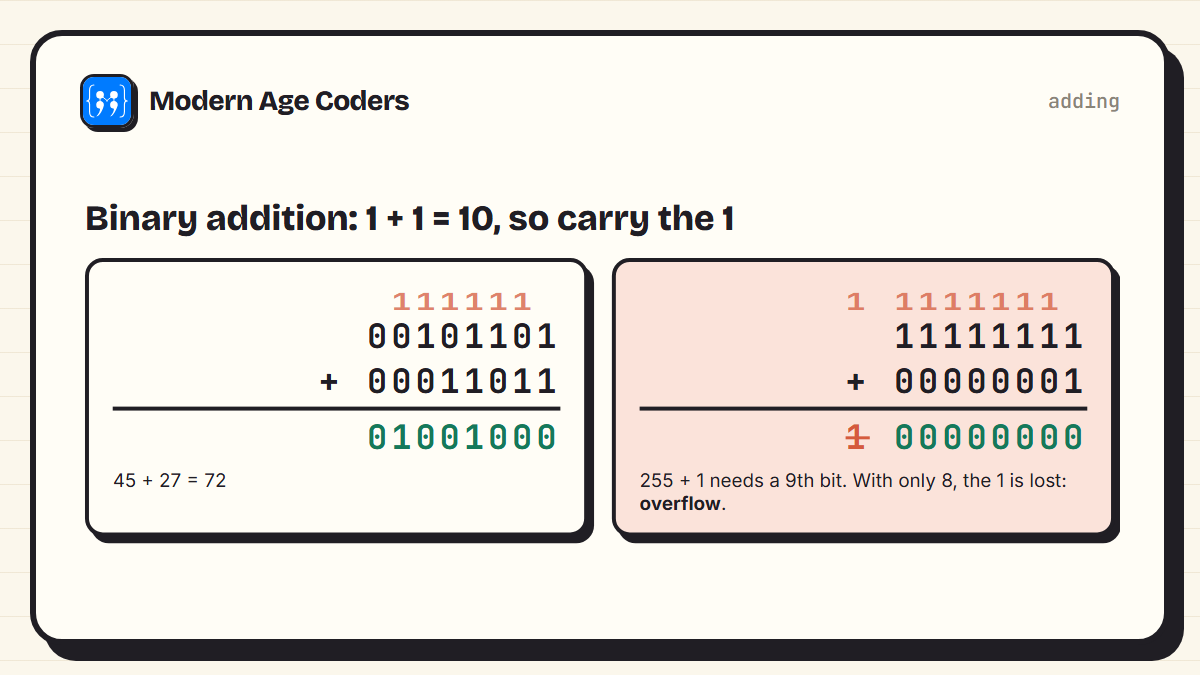
The second line is important for exams and for real programming. 11111111 is 255, the largest number that fits in 8 bits. Add 1 and the true answer, 256, needs a ninth bit. If there is nowhere to put it, the extra 1 is lost and the result wraps around to 0. This is called overflow, and it has caused real bugs, including counters in games that suddenly jump from their maximum back to zero.
Hexadecimal: binary made readable
Long strings of bits are hard for people to read, so programmers often use hexadecimal, base 16. It uses the digits 0 to 9 and then A to F for 10 to 15. Each hex digit stands for exactly four bits, so one byte is always two hex digits. FF is 255, which is 11111111. You have probably seen hex in colour codes on websites:
for colour in ["FF8800", "00B4D8", "1C1814"]:
    r, g, b = (int(colour[i:i + 2], 16) for i in (0, 2, 4))
    print(f"#{colour} -> red {r:>3}, green {g:>3}, blue {b:>3}")
print("FF in hex =", int("FF", 16), "in decimal =", format(int("FF", 16), "08b"), "in binary")#FF8800 -> red 255, green 136, blue 0
#00B4D8 -> red 0, green 180, blue 216
#1C1814 -> red 28, green 24, blue 20
FF in hex = 255 in decimal = 11111111 in binaryWhere binary turns up in exams
Number systems are part of most computer science courses. GCSE and IGCSE Computer Science include binary and hexadecimal conversion, binary addition and overflow. AP Computer Science Principles covers how data is represented in bits. CBSE Class 11 Computer Science covers number systems and conversions between them. If you are revising for one of these, our guides to revising GCSE Computer Science and IGCSE 0478 pseudocode cover the programming side.
Binary is not a different kind of maths. It is place value with a smaller multiplier.
How we teach it
We teach number systems within our school computer science tutoring, such as KS3 computing, following the principles on our how we teach page: learning by building, and one concept fully understood before the next. Writing a small conversion program is a good test of understanding, because a program cannot fake a step. Classes are live, one to one or in small groups of 5 to 10.
Frequently asked questions
Binary is a way of writing numbers using only two digits, 0 and 1. Each column is worth twice the one to its right, so the columns are 1, 2, 4, 8, 16 and so on. Computers use binary because their circuits have two reliable states: on and off.
Write the column values 1, 2, 4, 8, 16, 32, 64, 128 above the bits from right to left, then add up the values in the columns that contain a 1. For example, 1011 is 8 + 2 + 1 = 11.
Keep dividing the number by 2 and write down the remainder each time, until you reach 0. Then read the remainders from the bottom to the top. For example, 45 gives remainders 1, 0, 1, 1, 0, 1, which read upwards is 101101.
A bit is a single binary digit, 0 or 1. A byte is 8 bits, which can represent 256 different values, from 0 to 255. Bytes are the basic unit for measuring computer memory and file sizes.
Because 8 bits can form 2 to the power of 8, which is 256, different patterns. Starting from 0, the largest is 255, written as 11111111 in binary.
Overflow happens when the result of a calculation needs more bits than are available. Adding 1 to 11111111 gives 256, which needs 9 bits. In an 8-bit system the extra bit is lost, and the result wraps around to 0.
Binary is base 2 and uses the digits 0 and 1. Hexadecimal is base 16 and uses 0 to 9 and A to F. Each hex digit represents exactly four binary digits, so hex is a shorter, more readable way of writing binary.