Table of Contents
- What a Crash Actually Looks Like
- try and except: Catching the Error
- Catch the Specific Error, Not Everything
- else and finally: The Full Toolkit
- Reading the Error's Details with as
- raise: Throwing Your Own Exceptions
- Custom Exceptions for Your Own Rules
- A Real Pattern: Parsing Messy Input
- The Habits That Separate Good Error Handling from Noise
- Frequently Asked Questions
- Errors Stop Being Scary Here
Every program eventually meets a moment it did not plan for. A user types "twelve" where a number should go, a file is missing, a divisor turns out to be zero. Beginners treat these moments as failures. Working programmers treat them as Tuesdays, because Python gives you a whole machinery for meeting them calmly: exception handling with try, except, else, and finally.
This guide walks through that machinery with tested examples, including the crashes themselves. When you see a traceback below, it is a real one, produced by really running the broken code. By the end you will know how to catch errors precisely, clean up reliably, raise your own exceptions, and, just as important, when not to catch anything at all.
You only need functions and basic types to follow along. If those need a refresher, start at Python for beginners.
What a Crash Actually Looks Like
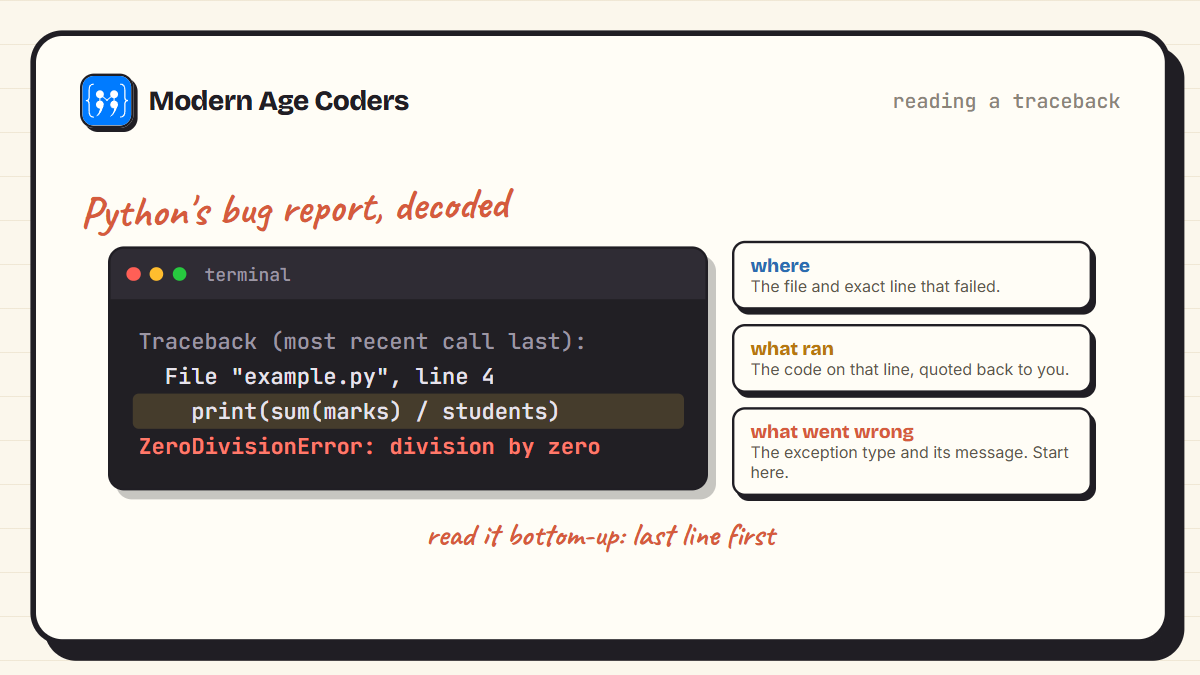
Before handling errors, learn to read one. Here is a small program that divides by zero, and the exact message Python prints when it dies.
marks = [92, 85, 78]
students = 0

print("Average:", sum(marks) / students)
Traceback (most recent call last):
File "example.py", line 4, in <module>
print("Average:", sum(marks) / students)
~~~~~~~~~~~^~~~~~~~~~
ZeroDivisionError: division by zeroRead a traceback from the bottom up. The last line names the exception and explains it: ZeroDivisionError, division by zero. The lines above point to the exact file and line where it happened. A traceback is not Python shouting at you, it is Python filing a precise bug report.
try and except: Catching the Error
Wrap the risky line in try, and describe the rescue plan in except. If nothing goes wrong, except is skipped entirely. If the named error occurs, Python jumps straight to it instead of crashing.
marks = [92, 85, 78]
students = 0

try:
    average = sum(marks) / students
    print("Average:", average)
except ZeroDivisionError:
    print("No students yet, so no average to show.")

print("The program is still alive.")
No students yet, so no average to show.
The program is still alive.The last line is the point. The error happened, the program answered it sensibly, and life went on.
Catch the Specific Error, Not Everything
Different mistakes raise different exceptions, and you can give each its own answer. Stack multiple except blocks and Python picks the one that matches.
def safe_divide(a, b):
    try:
        return a / b
    except ZeroDivisionError:
        return "Cannot divide by zero"
    except TypeError:
        return "Both values must be numbers"

print(safe_divide(10, 2))
print(safe_divide(10, 0))
print(safe_divide(10, "two"))
5.0
Cannot divide by zero
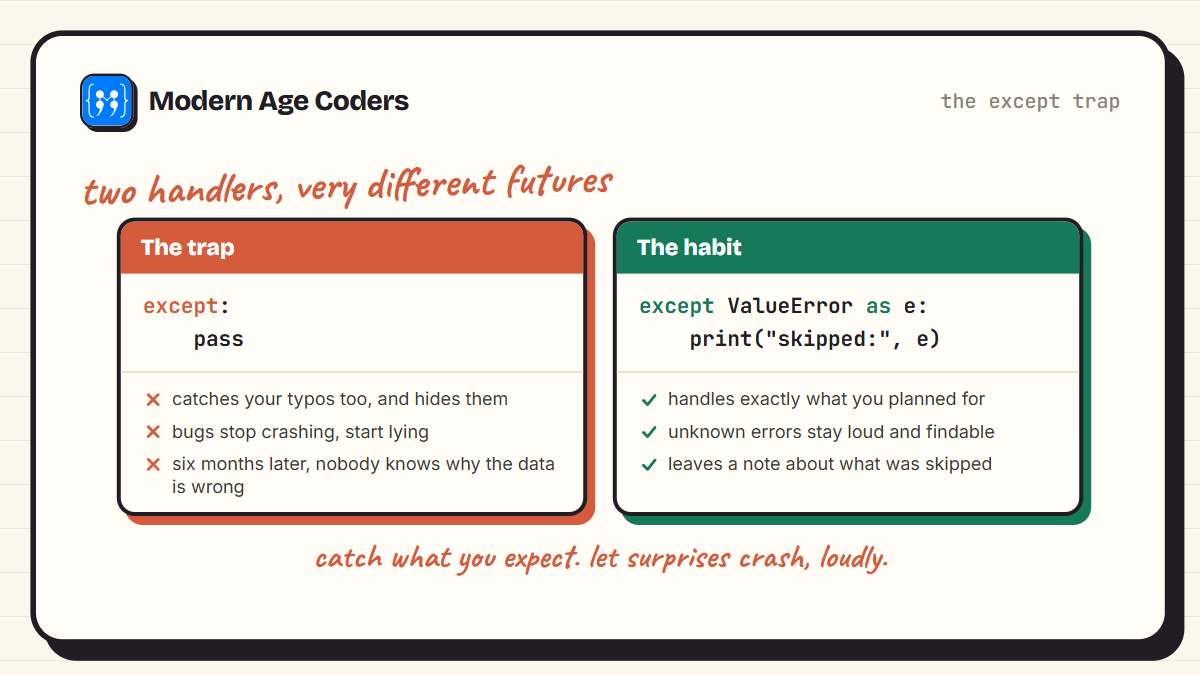
Both values must be numbersThe tempting shortcut is a bare except: that catches everything. Resist it. A bare except swallows errors you never imagined, including your own typos, and turns loud, findable bugs into silent wrong answers.
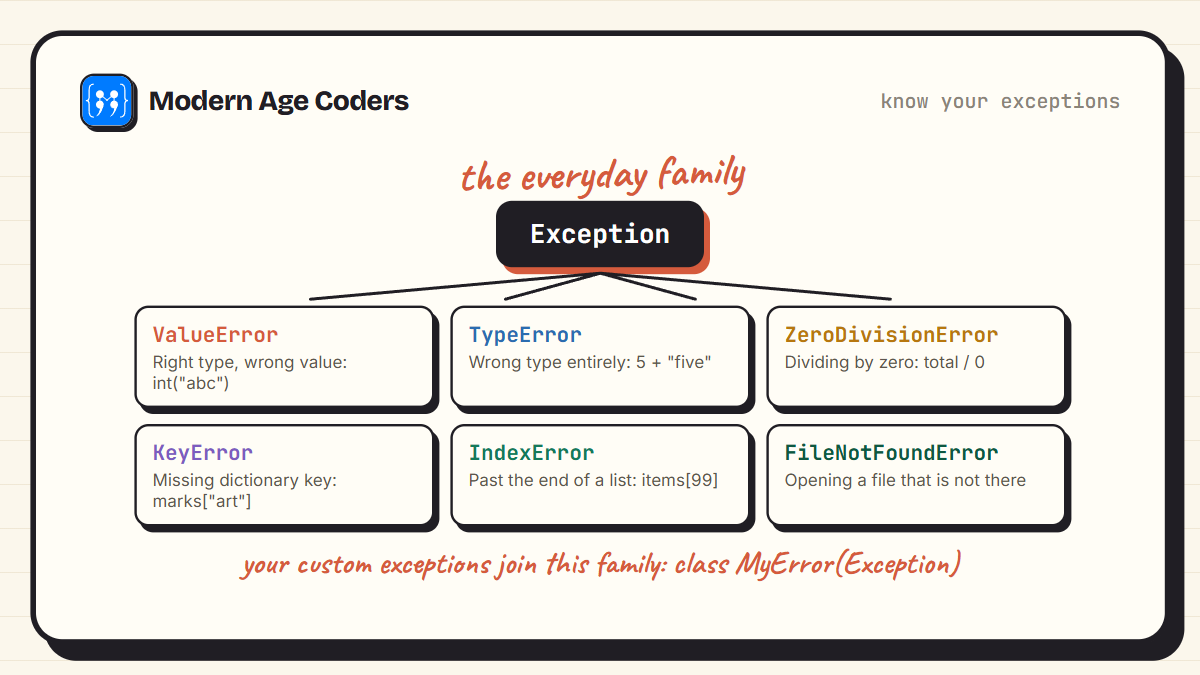
It helps to know the family you are catching from. Most everyday errors are cousins under one parent class, Exception.
else and finally: The Full Toolkit
Two more blocks complete the set. else runs only when no error occurred, which keeps your happy path separate from your risky line. finally runs no matter what happened, which makes it the home for cleanup: closing files, releasing connections, saying goodbye.
def read_marks(raw):
    try:
        value = int(raw)
    except ValueError:
        print(repr(raw), "is not a number")
    else:
        print("Recorded mark:", value)
    finally:
        print("-- entry processed --")

read_marks("92")
read_marks("ninety two")
Recorded mark: 92
-- entry processed --
'ninety two' is not a number
-- entry processed --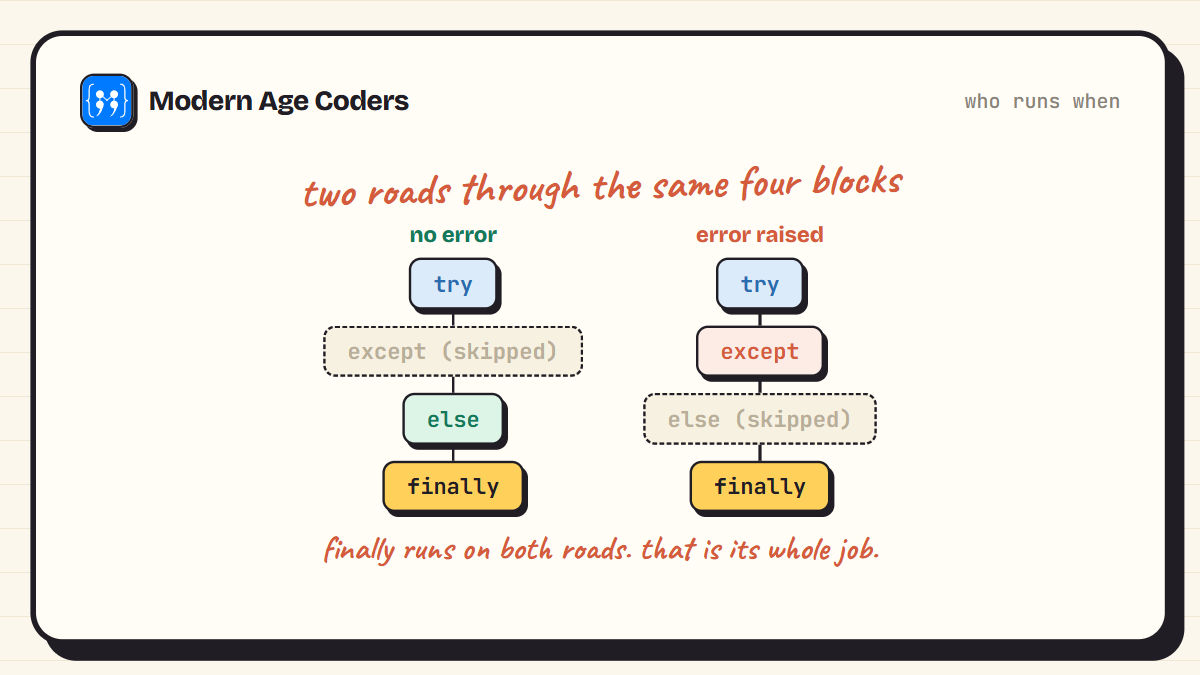
Files close themselves with with
The most common cleanup job, closing files, has its own shortcut. Writing with open("data.txt") as f: guarantees the file closes even if the code inside fails, no finally required. Use with for files and save finally for everything else.
Reading the Error's Details with as
Sometimes the handler needs to know exactly what went wrong. Capture the exception object with as and it will tell you.
values = ["10", "abc", "25"]

for raw in values:
    try:
        print(int(raw) * 2)
    except ValueError as e:
        print("Skipped one:", e)
20
Skipped one: invalid literal for int() with base 10: 'abc'
50raise: Throwing Your Own Exceptions
Handling errors is half the story. The other half is refusing bad data early. When your function receives something it cannot honestly work with, raise an exception instead of limping on and producing nonsense later.
def set_age(age):
    if age < 0 or age > 130:
        raise ValueError("age must be between 0 and 130, got " + str(age))
    print("Age set to", age)

set_age(12)

try:
    set_age(-5)
except ValueError as e:
    print("Rejected:", e)
Age set to 12
Rejected: age must be between 0 and 130, got -5A crash at the boundary, with a clear message, is a gift to whoever debugs the program later. Usually that is you.
Custom Exceptions for Your Own Rules
When your program has rules of its own, give their failures names of their own. A custom exception is just a class inheriting from Exception, and even an empty one makes error handling read like plain English.
class InsufficientFunds(Exception):
    pass

class Wallet:
    def __init__(self, balance):
        self.balance = balance

    def spend(self, amount):
        if amount > self.balance:
            raise InsufficientFunds("tried to spend " + str(amount) + ", have " + str(self.balance))
        self.balance = self.balance - amount
        return self.balance

w = Wallet(100)
print("Left:", w.spend(60))

try:
    w.spend(500)
except InsufficientFunds as e:
    print("Blocked:", e)
Left: 40
Blocked: tried to spend 500, have 40If classes are new territory, our Python OOP tutorial covers exactly the two lines that custom exception used.
A Real Pattern: Parsing Messy Input
Here is the shape you will reuse constantly: a batch of messy, human-typed data, processed with one small try inside the loop, so a single bad entry never sinks the batch.
entries = ["92", "85", "eighty", "78", ""]

valid = []
rejected = 0

for raw in entries:
    try:
        valid.append(int(raw))
    except ValueError:
        rejected = rejected + 1

print("Marks recorded:", valid)
print("Rejected entries:", rejected)
print("Average:", sum(valid) / len(valid))
Marks recorded: [92, 85, 78]
Rejected entries: 2
Average: 85.0The Habits That Separate Good Error Handling from Noise
- Keep the try small: wrap the one line that can fail, not the whole function. A big try hides which line actually threw.
- Catch the specific exception: except ValueError, not bare except. Unknown errors should stay loud.
- Never pass silently: except: pass is how bugs disappear for six months. At minimum, print or log what happened.
- Do not use exceptions for normal flow: if a missing key is expected, dict.get() says it better than try and except KeyError.
- Raise early, with clear messages: reject bad data at the boundary of your function, naming what you got and what you wanted.
The Python way: ask forgiveness
Python culture prefers EAFP, easier to ask forgiveness than permission: try the operation and handle the exception, rather than checking every condition first. It reads cleaner and avoids the gap between checking and doing. The exception list above tells you where the limits of that philosophy sit.
Frequently Asked Questions
A way to respond to runtime errors instead of crashing. Risky code goes inside a try block; the response to a named error goes in an except block. If the error occurs, Python jumps to the handler and the program continues.
Syntax errors are mistakes in the code's grammar, caught before the program even runs, and try cannot help with them. Exceptions are problems that arise while the program runs, like dividing by zero or opening a missing file, and those are what try and except are for.
The finally block runs no matter how the try ended, on success, on a handled error, even on an unhandled one. That makes it the reliable place for cleanup like closing connections. For files specifically, the with statement does this automatically.
Only when the try block finished with no exception. It is where the happy-path code goes, keeping the try itself down to just the risky line.
Almost always. A bare except catches everything, including typos like a misspelled variable name, and even the exception raised when a user presses Ctrl+C. Bugs stop crashing and start silently corrupting. Name the exception you expect.
Use the raise keyword with an exception object: raise ValueError("age must be positive"). Do it when your code receives data it cannot honestly work with, so the problem surfaces at its source instead of three functions later.
Define a class that inherits from Exception, even an empty one: class InsufficientFunds(Exception): pass. Then raise and catch it by name. Custom names make error-handling code read like a description of your program's rules.
Easier to Ask Forgiveness than Permission: the Python habit of trying an operation and handling the exception, instead of pre-checking every condition. The opposite style, Look Before You Leap, has its places, but EAFP is the community default.
Errors Stop Being Scary Here
The shift this topic brings is quiet but permanent: errors go from something that happens to you to something you design for. Your programs stop dying at the first surprise, and your tracebacks turn into fast, readable bug reports. That confidence under failure is a skill we drill deliberately in our real coding classes, because it is what separates typing code from engineering it.
Keep building with the OOP tutorial or the dictionary guide, and when you want a teacher who watches your code fail and shows you why that is good news, our live coding courses welcome learners aged 6 to 67.
)