Table of Contents
- 1. Decomposition examples
- 2. Pattern recognition examples
- 3. Abstraction examples
- 4. Algorithm examples
- All four skills on one problem
- Computational thinking examples in maths
- Computational thinking examples for kids
- Computational thinking in the classroom
- Why computational thinking matters more when AI can write code
- How we teach it
- Frequently asked questions
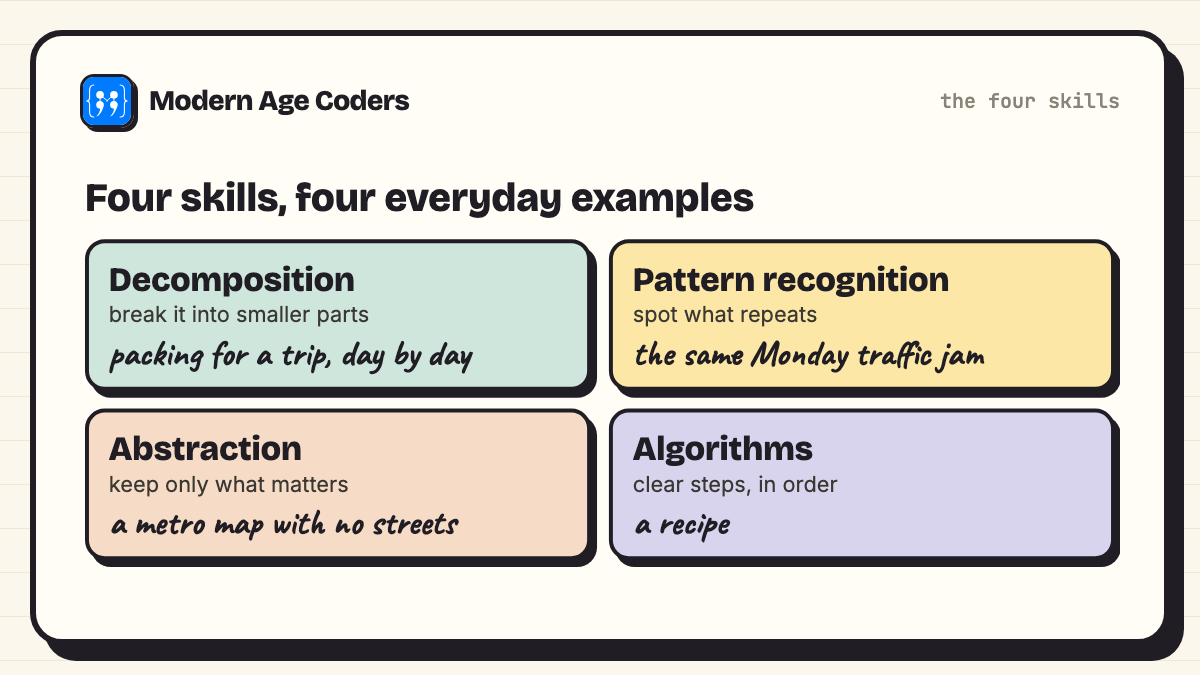
Computational thinking is a way of solving problems using four skills: decomposition (breaking a problem into parts), pattern recognition (spotting what repeats), abstraction (keeping only the details that matter) and algorithms (writing clear step-by-step instructions). Everyday examples are packing for a trip (decomposition), noticing that the same traffic jam happens every Monday (patterns), a metro map that ignores real distances (abstraction) and a recipe (algorithm). None of them needs a computer.
Below are three real-life examples for each of the four skills, one short Python program for each that we ran ourselves (the output is pasted underneath), and sections for computational thinking in maths, for kids and in the classroom. At the end, all four skills work together on one problem.
The four-part description is the one schools commonly use. BBC Bitesize, for example, calls them the "four key techniques (cornerstones) to computational thinking" (BBC Bitesize). The idea was popularised by the computer scientist Jeannette Wing, who wrote in 2006 that "Computational thinking is a fundamental skill for everyone, not just for computer scientists" (Communications of the ACM, March 2006).
1. Decomposition examples
Decomposition means "breaking down a complex problem or system into smaller, more manageable parts" (BBC Bitesize). A problem that feels impossible usually becomes a list of problems that each feel easy.
- Planning a birthday party: guests, food, games, decorations and timing are five separate jobs. Each can be given to a different person, and each has its own deadline.
- Cleaning a very messy room: "tidy your room" is too big. "Clothes in the basket, books on the shelf, rubbish in the bin, then the desk" is four jobs a child can finish.
- Writing an essay: introduction, three points with evidence, conclusion. Writers draft the parts separately and then join them.
Coding example: a report card in four small functions
A report-card program feels like one job. Decomposed, it is four: get the marks, work out an average, turn a score into a grade, print the card. Each function is small enough to check on its own.
# Decomposition: a report card is four small problems, not one big one.
# (The grade bands are an example school's, not any board's official scale.)
def read_marks():
    return {"Maths": 78, "Science": 85, "English": 91, "Hindi": 66, "Computer": 95}

def average(marks):
    return sum(marks.values()) / len(marks)

def grade(score):
    if score >= 90: return "A"
    if score >= 80: return "B"
    if score >= 70: return "C"
    if score >= 60: return "D"
    return "E"

def print_report(name, marks):
    print(f"Report card: {name}")
    for subject, m in marks.items():
        print(f"  {subject:<9} {m:>3}  {grade(m)}")
    avg = average(marks)
    print(f"  Average   {avg:.1f}  {grade(avg)}")

print_report("Riya", read_marks())Report card: Riya
Maths 78 C
Science 85 B
English 91 A
Hindi 66 D
Computer 95 A
Average 83.0 B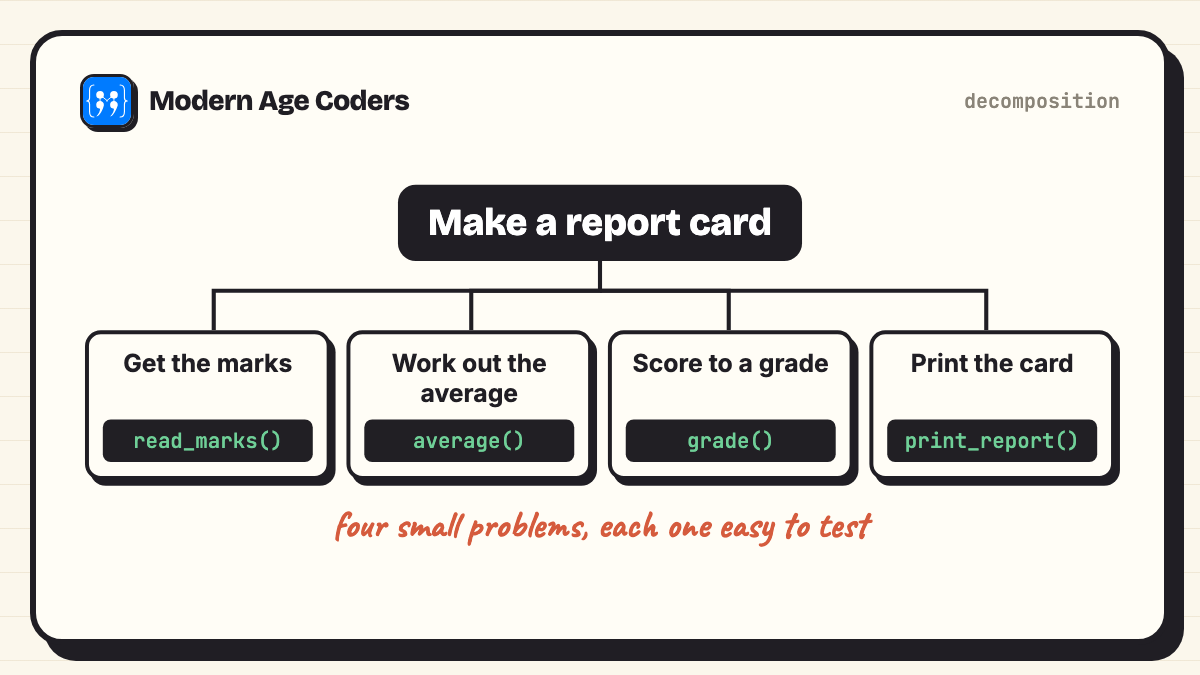
Notice that grade() is used twice: once for each subject and once for the average. Decomposition often reveals that a part you wrote once can be reused, which is where the next skill comes in.
2. Pattern recognition examples
Pattern recognition is "looking for similarities among and within problems" (BBC Bitesize). Once you see a pattern, you can solve one case and reuse the answer.
- Traffic: the road outside school is jammed at 8:10 every weekday and clear at 7:55. Leaving fifteen minutes earlier solves every school day at once.
- Spelling: hop and hopping, run and running, sit and sitting. Spotting the doubled-consonant pattern beats memorising each word.
- A doctor's diagnosis: fever, rash and a sore throat together form a pattern doctors have seen before, which points to a short list of likely causes.
Coding example: a stacked cup pyramid
A pyramid of stacked cups has 1 cup in the top row, 2 in the next, and so on. How many cups for 100 rows? Counting is slow. Count small cases, look for the pattern, then let the pattern do the work. The pattern here: pairing the first row with the last (1 + 100, 2 + 99, ...) gives n(n + 1) / 2.
# Pattern recognition: how many cups in a stacked pyramid with n rows?
# Count small cases, spot the pattern, then let the pattern do the work.
def cups_by_counting(rows):
    total = 0
    for r in range(1, rows + 1):   # row r has r cups
        total += r
    return total

for rows in range(1, 7):
    print(f"rows: {rows}  cups: {cups_by_counting(rows)}")

# Pattern spotted: pair the first row with the last, n(n + 1) / 2
for rows in [10, 50, 100]:
print(f"rows: {rows} formula: {rows * (rows + 1) // 2} counting: {cups_by_counting(rows)}")rows: 1 cups: 1
rows: 2 cups: 3
rows: 3 cups: 6
rows: 4 cups: 10
rows: 5 cups: 15
rows: 6 cups: 21
rows: 10 formula: 55 counting: 55
rows: 50 formula: 1275 counting: 1275
rows: 100 formula: 5050 counting: 5050The program checks the pattern against plain counting for 10, 50 and 100 rows. A pattern you have spotted is a guess until something independent agrees with it.
3. Abstraction examples
Abstraction means "focusing on the important information only, ignoring irrelevant detail" (BBC Bitesize). It is the hardest of the four to explain and one of the most useful.
- A metro map: it ignores real distances, streets and bends, and shows only stations, lines and where to change. That is exactly what a traveller needs, and nothing more.
- A recipe card: it leaves out which shop the flour came from and the colour of the bowl. It keeps quantities, order and timing.
- A football formation: a coach's 4-4-2 drawing ignores who the players are, their boots and the weather. It shows positions and roles, so the same plan works with any eleven players.
Coding example: one function for every journey
A walk to school, a cycle ride, a bus trip and a train journey look different. Ignore the colour of the bus, the weather and the route's name, and every journey is the same problem: distance, speed and any waiting time. One function then answers all of them.
# Abstraction: one function for every journey. Colour of the bus, the
# weather and the route's name do not matter; distance and speed do.
def minutes_needed(distance_km, speed_kmh, waiting_min=0):
    return waiting_min + distance_km / speed_kmh * 60

journeys = [
    ("walk to school",       1.2,  5,  0),
    ("cycle to the library", 3.0, 15,  0),
    ("bus to grandma's",     9.0, 24, 10),
    ("train to the match",  42.0, 60, 15),
]
for name, d, v, w in journeys:
print(f"{name:<22} {minutes_needed(d, v, w):5.1f} minutes")walk to school 14.4 minutes
cycle to the library 12.0 minutes
bus to grandma's 32.5 minutes
train to the match 57.0 minutesThe cycle to the library is farther than the walk to school but quicker, which is the kind of thing an abstraction makes easy to see. Choosing what to leave out is a decision, though: this model ignores traffic, so it is right only when traffic does not matter much.
4. Algorithm examples
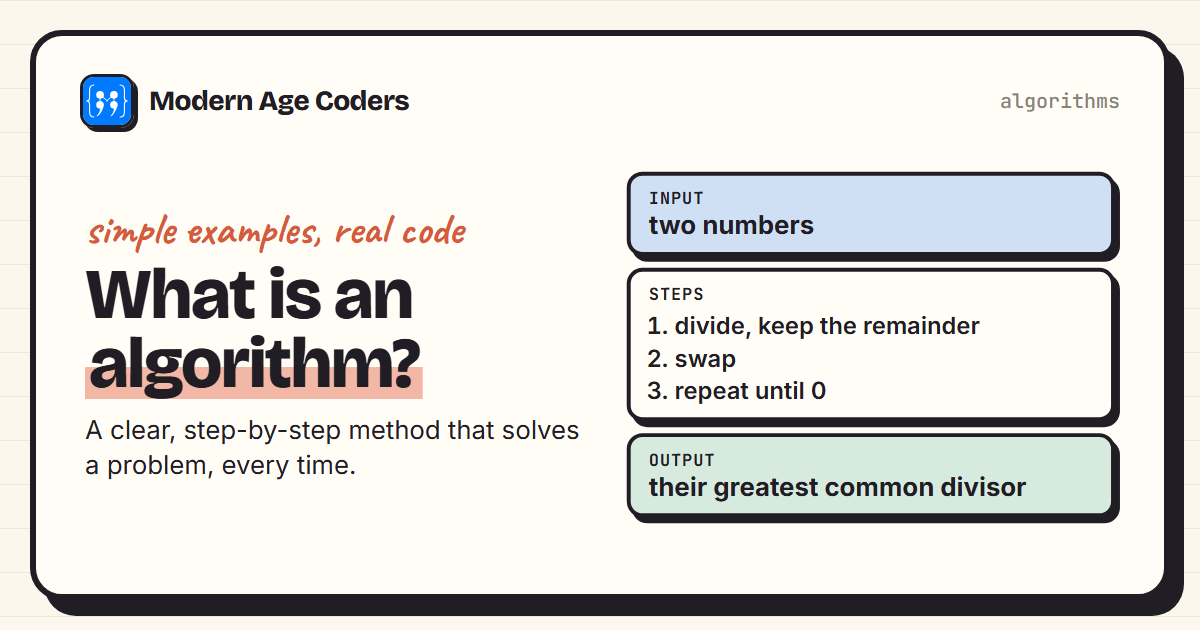
An algorithm is "developing a step-by-step solution to the problem, or the rules to follow to solve the problem" (BBC Bitesize). Our post what is an algorithm covers what makes one correct and fast; here are three everyday ones.
- Brushing your teeth: the same steps in the same order every time, with a clear end.
- Looking up a word in a dictionary: open near the right letter, then go forwards or backwards depending on whether the word comes before or after. Nobody reads a dictionary from page one.
- Sorting playing cards in your hand: take the next card and slide it left until the card before it is smaller. People do this without being taught, and it is a real sorting algorithm.
Coding example: sorting exam papers like playing cards
A teacher has a pile of exam papers and wants them in roll-number order. The playing-card method, called insertion sort, works the same way on paper: take the next one and slide it into place among the ones already sorted.
# Algorithm: sort a pile of exam papers by roll number the way you
# sort playing cards in your hand (insertion sort).
def insertion_sort(papers):
    papers = papers[:]                 # work on a copy
    for i in range(1, len(papers)):
        card = papers[i]
        j = i - 1
        while j >= 0 and papers[j] > card:   # shift bigger ones right
            papers[j + 1] = papers[j]
            j -= 1
        papers[j + 1] = card
        print(f"step {i}: {papers}")
    return papers

pile = [27, 4, 15, 31, 9, 22]
print("start: ", pile)
result = insertion_sort(pile)
print("sorted:", result, "| matches sorted():", result == sorted(pile))start: [27, 4, 15, 31, 9, 22]
step 1: [4, 27, 15, 31, 9, 22]
step 2: [4, 15, 27, 31, 9, 22]
step 3: [4, 15, 27, 31, 9, 22]
step 4: [4, 9, 15, 27, 31, 22]
step 5: [4, 9, 15, 22, 27, 31]
sorted: [4, 9, 15, 22, 27, 31] | matches sorted(): True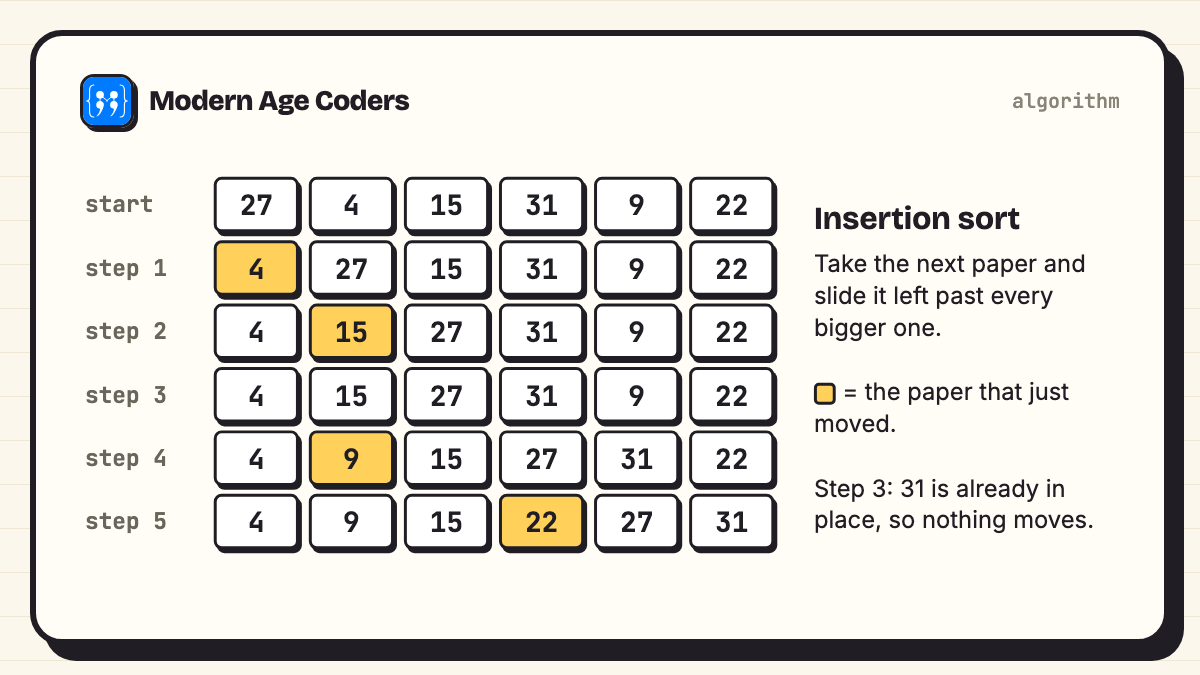
Step 3 is worth a look: 31 is already bigger than everything before it, so nothing moves. Spotting why a step does nothing is good practice for reading algorithms. The final line checks the result against Python's own sorted(), an independent answer.
All four skills on one problem
Real problems use all four at once. Take a class trip to a museum for 32 students.
| Skill | What it looks like on the trip |
|---|---|
| Decomposition | Transport, permission forms, money collection, groups, timings, lunch, first aid: seven separate jobs. |
| Pattern recognition | Last year's trip ran late at lunch and at the gift shop. Expect the same pinch points. |
| Abstraction | For the timetable, a student is just a name in a group of eight. Shoe size and favourite colour do not matter. |
| Algorithm | At every stop: line up in groups, each group leader counts to eight, the teacher ticks four groups, then move. |
The headcount algorithm is the part that runs dozens of times a day, and it has a check built in: four groups of eight must make 32. That is computational thinking without a single line of code.
Computational thinking examples in maths
- Decomposition: the area of an L-shaped room is two rectangles added together.
- Pattern recognition: in the 9 times table, the digits of each answer up to 90 add to 9 (18, 27, 36...), which is also a quick check.
- Abstraction: a word problem about trains, apples or pocket money becomes the same equation once the story is set aside. Our guide to solving maths word problems shows how.
- Algorithm: long division, column addition and finding a highest common factor are algorithms children use for years before anyone calls them that.
This is why many curricula teach computational thinking inside maths lessons, and why our Maths Through Coding course uses Python to explore patterns like the cup pyramid above.
Computational thinking examples for kids
Children aged about 6 to 10 learn these skills best without a screen, through things they already do.
- Decomposition: building a LEGO model by sections, or getting ready for school as a list of small jobs.
- Patterns: bead necklaces, clapping rhythms, and "what comes next?" in a row of shapes.
- Abstraction: drawing a map of the route to school that shows only the turns and landmarks.
- Algorithms: giving a friend or parent instructions to draw a picture they cannot see, then comparing. Vague steps produce funny pictures, which is the lesson.
In India, CBSE's 2026-27 curriculum teaches computational thinking in Classes 3 to 5, integrated into Mathematics. Our CBSE computational thinking guide for Classes 3 to 5 explains exactly what that curriculum covers and what it does not. For children who want more, block coding with Scratch turns the same skills into games they build.
Computational thinking in the classroom
Four activities teachers can run in one lesson each, with no computers:
- Robot teacher (algorithms): students write instructions for the teacher to walk from the door to a desk. The teacher follows them exactly, including the mistakes.
- Sandwich split (decomposition): groups break "make lunch for the class" into jobs, then compare how finely each group split it.
- Spot the rule (patterns): the teacher writes number pairs, such as 2 and 5, 3 and 7, 10 and 21, and the class finds the rule (double it and add 1) before anyone says it aloud.
- Map it (abstraction): students draw a map of the school for a new student, then argue about what to leave out.
Each activity ends with the same question: how would you check that it worked? That habit is what turns an activity into thinking.
Why computational thinking matters more when AI can write code
AI assistants can now write programs like the four above from a one-line request. That changes what is worth practising, but not in the direction people fear. Writing the request well is decomposition and abstraction: you have to know what the parts are and which details matter. Judging the answer is pattern recognition and algorithmic thinking: you have to be able to read the steps and predict what they will do.
The tool makers say the same. GitHub's documentation for its Copilot coding assistant says it "may generate code that appears to be valid but may not actually be semantically or syntactically correct" and that "Users are responsible for reviewing and validating suggestions before accepting them" (GitHub Docs). A student who can trace the insertion sort above can review a sorting function an AI writes. One who cannot is left trusting it.
Age rules for AI tools
Computational thinking does not need AI, and young children should not use most AI chat tools. Most require users to be at least 13; ChatGPT's terms ask for a parent's or guardian's permission for anyone under 18, and Claude is for adults (18 and over) only. Every example and activity on this page works with paper, blocks or plain Python.
How we teach it
Computational thinking is close to how we teach everything, as our how we teach page describes: students explain their thinking, we trace a loop line by line until the student can predict every step, as with the insertion sort above, learners derive a rule before seeing it written down, we show the same problem three ways, and mistakes are data, not failures. You will find it in our problem solving and computational thinking course for kids, the CBSE computational thinking and AI course for Classes 3 to 8 and Maths Through Coding, one to one or in groups of 15 to 20. The first class is free.
Frequently asked questions
Packing for a trip by listing what each day needs (decomposition), noticing that traffic is bad at the same time every weekday (pattern recognition), reading a metro map that ignores real distances (abstraction) and following a recipe (algorithm). This post gives three examples for each skill.
Decomposition, pattern recognition, abstraction and algorithms. Decomposition breaks a problem into parts, pattern recognition spots what repeats, abstraction keeps only the details that matter, and an algorithm is a clear set of steps that solves it.
Finding the area of an L-shaped room by splitting it into two rectangles is decomposition. Turning a word problem into an equation is abstraction. Long division is an algorithm. Spotting that the digits of answers in the 9 times table add to 9 is pattern recognition.
Building a LEGO model in sections, making bead patterns, drawing a simple map of the route to school, and giving a friend step-by-step instructions to draw a hidden picture. None of them needs a screen.
Unplugged activities work well: a robot-teacher game for algorithms, splitting a big task into jobs for decomposition, spot-the-rule number puzzles for patterns, and map drawing for abstraction. Finish each with the question: how would we check it worked?
No. Coding is one way to express computational thinking, but the thinking comes first and works without a computer. A child who can break a task into steps and spot patterns will find coding easier, and an adult who codes without it will find problems harder.
Yes. CBSE's 2026-27 curriculum teaches computational thinking in Classes 3 to 5, integrated into Mathematics, with AI introduced from Class 6. Our CBSE computational thinking guide for Classes 3 to 5 explains what it covers.
Because someone still has to describe the problem clearly and check the answer. Describing it well uses decomposition and abstraction; checking it uses pattern recognition and the ability to read an algorithm. AI tool makers such as GitHub tell users to review and validate generated code before accepting it.