Table of Contents
- The five-step problem solving method
- Example 1: planning a trip budget
- Example 2: splitting a restaurant bill fairly
- Example 3: a timetable clash
- Example 4: finding a bug in a class average
- Example 5: a project due on Friday
- The same method on a coding problem
- The same method on a maths problem
- How to improve problem solving skills in programming
- How to improve problem solving skills in maths
- Problem solving in software engineering and the workplace
- How to improve problem solving skills for students
- Why problem solving matters more when AI can write code
- How we teach it
- Frequently asked questions
To improve your problem solving skills, stop waiting for ideas and use the same five steps on every problem: define what a finished answer looks like, break the problem into parts, try the smallest version by hand, check the result against a test you wrote before you started, and improve by writing down what went wrong. Practise those steps on small everyday problems first, then on one coding or maths problem a day. Problem solving grows with practice of a method, not with talent.
This guide shows the method working on five real-life problems (a trip budget, a restaurant bill, a timetable clash, a bug in a class average and a project deadline), then on one coding problem and one maths problem with real Python code and its real output. After that come the add-ons people search for: problem solving in programming, in maths, in software engineering, and for students of different ages.
If you can follow worked solutions but freeze on a blank page, read why you can understand solutions but not solve problems alongside this one. That post is about how to practise. This one is about what to do, step by step, once the problem is in front of you.
The five-step problem solving method
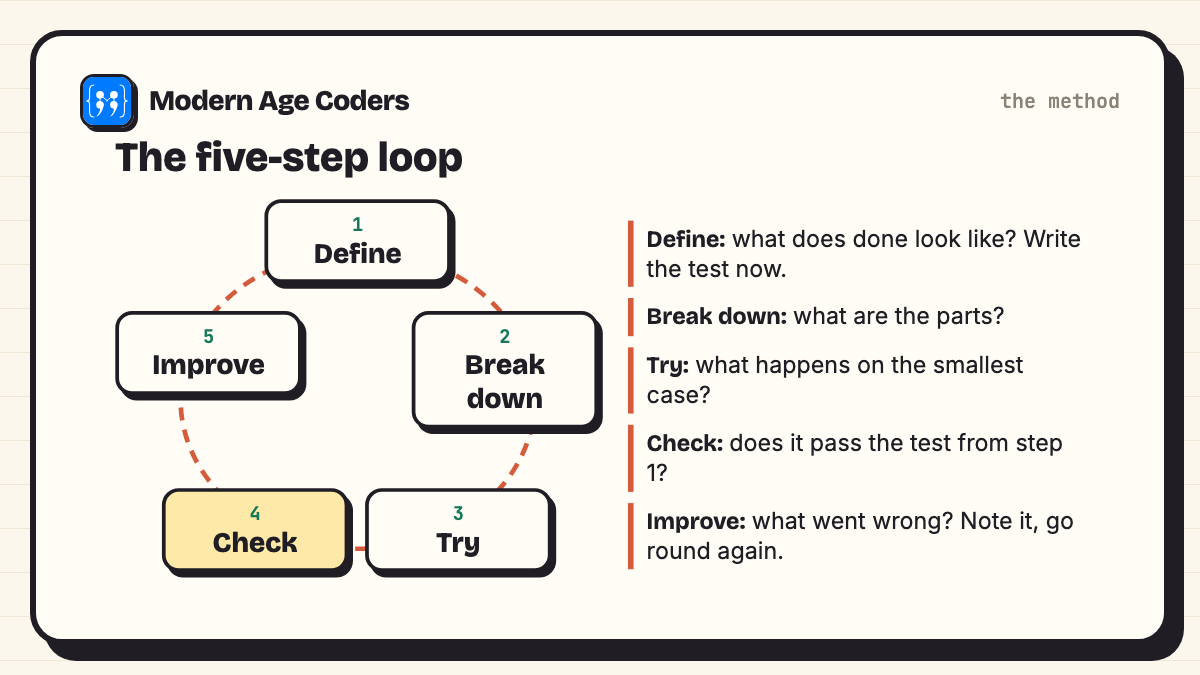
Every step has one question attached. When you are stuck, the question tells you which step you skipped.
- Define: what does done look like? Write one sentence that describes a correct answer, and one test you could use to check it. If you cannot write the test, you do not understand the problem yet.
- Break down: what are the parts? List the smaller problems inside the big one. Each part should be small enough that you can see how to start it.
- Try: what happens on the smallest case? Work one tiny example by hand, with real numbers, before you plan anything clever. Most good ideas come from noticing something in a small case.
- Check: does it pass the test from step 1? Compare your answer with the test, then with the awkward cases: zero, empty, the biggest value, a tie.
- Improve: what would I do differently? Fix what failed, then write one line about the mistake. That line is what makes the next problem easier.
The method is not new. The mathematician George Pólya described a very similar loop in his book How to Solve It: understand the problem, make a plan, carry it out, look back. What we add is one habit that matters even more today: write the check before you have the answer. A check written afterwards tends to agree with whatever you already did.
The one habit to start today
Before you solve anything, write the line "I will know I am right when..." and finish the sentence. It takes thirty seconds and it changes how you read the whole problem.
Example 1: planning a trip budget
A family plans a three-day trip and wants to keep a safety buffer for surprises. We will work in shares of the total budget, so the method works whatever your currency.
- Define: every cost fits inside the budget and 10% is left untouched as a buffer. Test: travel + stay + food + tickets + buffer is no more than 100%.
- Break down: five parts, each with its own estimate: travel, two nights' stay, food for three days, entry tickets, buffer.
- Try: first guesses from last year's trip and a few booking sites: travel 30%, stay 35%, food 18%, tickets 9%, buffer 10%.
- Check: 30 + 35 + 18 + 9 + 10 = 102%. Over by 2%. The plan fails its own test, which is exactly why the test was written first.
- Improve: the biggest part is usually the best place to look, so look at the stay. A guest house near the station brings it to 33%, and the total becomes 100%. Note for next time: price the biggest part first.
Thinking skill: working inside a constraint. The buffer is a test that protects you from your own optimistic estimates.
Example 2: splitting a restaurant bill fairly
Three friends eat together. Splitting equally feels unfair to Chen, who had a salad. The problem is not the arithmetic; it is the word fair, which nobody has defined.
- Define: each person pays for what they ordered; shared dishes are split only among the people who shared them; service is added in proportion. Test: the shares must add up to the whole bill, exactly.
- Break down: personal items, shared items, service.
- Try: work Chen's share by hand first. Salad 240, a third of the garlic bread (60) and half the dessert (100) makes 400.
- Check: run the same rule for everyone and add the shares back up.
- Improve: once the rule is clear it can be written as a short program, and it works for any group.
# Splitting a bill fairly: each person pays for what they ordered,
# shared items are split between the people who shared them.
orders = {
    "Asha":  [("pasta", 320)],
    "Ben":   [("burger", 280), ("shake", 150)],
    "Chen":  [("salad", 240)],
}
shared = [("garlic bread", 180, ["Asha", "Ben", "Chen"]),
          ("dessert", 200, ["Asha", "Chen"])]
service_rate = 0.10

subtotal = {name: sum(price for _, price in items) for name, items in orders.items()}
for item, price, people in shared:
    for p in people:
        subtotal[p] += price / len(people)

bill_total = sum(p for items in orders.values() for _, p in items) + sum(s[1] for s in shared)
for name, amount in subtotal.items():
    print(f"{name}: {amount:.2f} + service {amount * service_rate:.2f} = {amount * (1 + service_rate):.2f}")
print("Check, shares add up to the bill:",
round(sum(subtotal.values()) * (1 + service_rate), 2), "=", round(bill_total * (1 + service_rate), 2))Asha: 480.00 + service 48.00 = 528.00
Ben: 490.00 + service 49.00 = 539.00
Chen: 400.00 + service 40.00 = 440.00
Check, shares add up to the bill: 1507.0 = 1507.0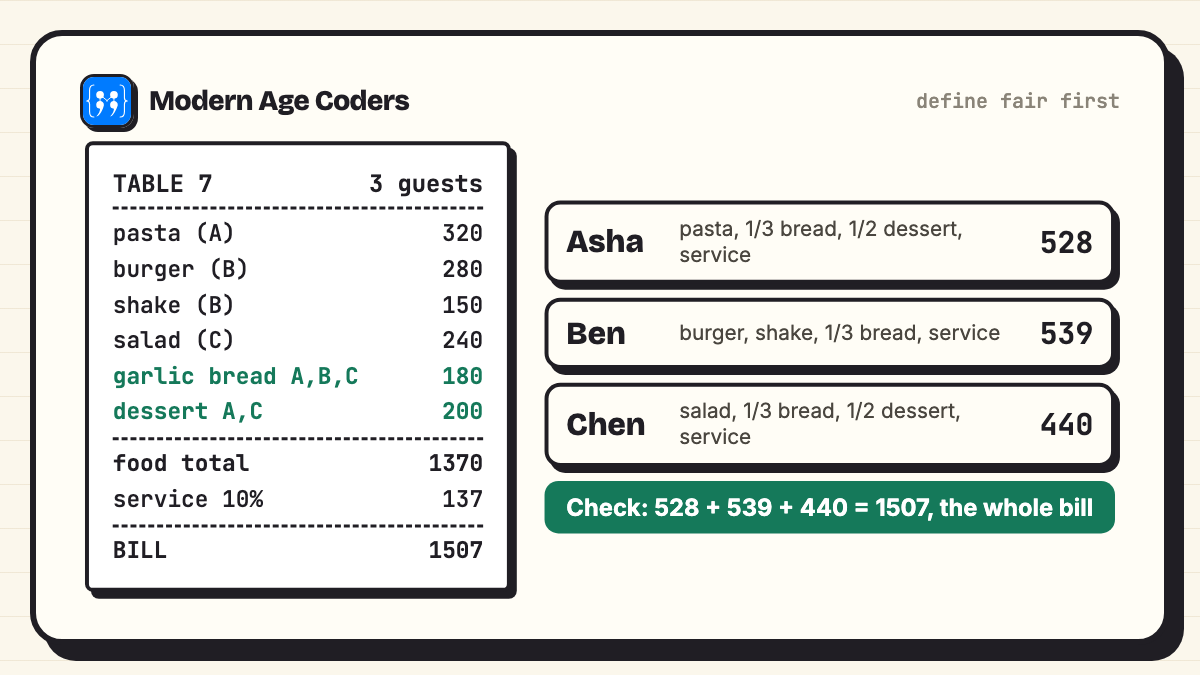
Thinking skill: turning a vague word into a rule, then checking that nothing was lost. The line "shares add up to the bill" is the kind of check that catches most money mistakes.
Example 3: a timetable clash
A Class 9 student has robotics club, maths tuition and football practice, and something keeps going wrong on Tuesdays.
| Activity | Day | Time | Fixed or movable? |
|---|---|---|---|
| Robotics club | Tuesday | 4:00 to 5:30 | Fixed (school) |
| Maths tuition | Tuesday | 5:00 to 6:00 | Movable |
| Football practice | Thursday | 4:30 to 6:00 | Fixed (team) |
- Define: every activity happens each week, no two overlap, and there are at least 15 minutes between them for travel.
- Break down: sort activities into fixed and movable. Only movable ones can be the answer.
- Try: draw the week as columns and the hours as rows, and shade each activity. The clash is visible at once: 5:00 to 5:30 on Tuesday is shaded twice.
- Check: two time slots overlap when the first starts before the second ends and the second starts before the first ends. Robotics starts at 4:00, before tuition ends at 6:00, and tuition starts at 5:00, before robotics ends at 5:30. So they overlap.
- Improve: move tuition to Wednesday 5:00 to 6:00, then run the overlap rule on every pair again, not just the pair you fixed.
Thinking skill: abstraction. The overlap rule ignores which activity it is and looks only at start and end times, so the same rule works for exam timetables, meeting rooms and train platforms.
Example 4: finding a bug in a class average
A teacher's program says the class average is 77.7, but the marks were 42, 78, 65 and 90, and that average looks too high.
- Define: the average is the total of all marks divided by the number of students. Test: work it out by hand. (42 + 78 + 65 + 90) / 4 = 68.75.
- Break down: the program does two things, adding up and dividing. Check each part on its own.
- Try: print the total inside the loop. It starts from the second student. The first mark, 42, is never added.
- Check: compare the fixed version with the hand answer, and try an empty class too.
- Improve: the note to keep is "loops that start at 1 skip the first item".
# The bug: a class average that comes out too high
def average_buggy(marks):
    total = 0
    for i in range(1, len(marks)):   # starts at 1, so it skips the first student
        total += marks[i]
    return total / (len(marks) - 1)

def average(marks):
    if not marks:
        return None                  # an empty class has no average
    return sum(marks) / len(marks)

marks = [42, 78, 65, 90]
print("buggy:", average_buggy(marks))
print("fixed:", average(marks))
print("by hand: (42 + 78 + 65 + 90) / 4 =", (42 + 78 + 65 + 90) / 4)
print("empty class:", average([]))buggy: 77.66666666666667
fixed: 68.75
by hand: (42 + 78 + 65 + 90) / 4 = 68.75
empty class: NoneNotice the order. The hand calculation came first, so there was a definite right answer to search towards. Our page on how to debug code goes much further into searching for a bug instead of guessing.
Example 5: a project due on Friday
A ten-page history project is due on Friday morning, and it is Monday evening.
- Define: ten pages, with sources listed, printed by Thursday night. Test: a checklist from the teacher's instructions.
- Break down: research, outline, draft, pictures and captions, edit, print.
- Try: work backwards from the deadline. Printing is Thursday night, so editing is Thursday, so the draft has to be finished on Wednesday, so research must end on Tuesday.
- Check: on Tuesday night, is research really done? If not, the plan has already told you what to cut, before it is too late to cut it.
- Improve: next time, note how long each part really took. Most people underestimate the draft.
Thinking skill: working backwards from the goal. It works for revision timetables, saving up for something and catching a train.
The same method on a coding problem
Problem: a learning app records each day as 1 (practised) or 0 (skipped). Write a function that returns the longest run of practised days.
- Define: for [1, 1, 0, 1, 1, 1, 0, 1] the answer is 3. Before writing any code, also decide the awkward answers: an empty list gives 0, all zeros gives 0, and a streak that runs to the last day must still count.
- Break down: walk through the days once, keep the length of the current streak, and remember the best so far.
- Try: trace the example by hand: current goes 1, 2, 0, 1, 2, 3, 0, 1 and best ends at 3.
- Check: run every test from the define step, not just the friendly one.
- Improve: our first attempt updated the best streak only when a 0 arrived. It passes the friendly example and fails the streak-to-the-end test.
# First attempt: only updates best when a streak is broken by a 0
def longest_streak_v1(days):
    best = 0
    current = 0
    for d in days:
        if d == 1:
            current += 1
        else:
            best = max(best, current)
            current = 0
    return best

print(longest_streak_v1([1, 1, 0, 1, 1, 1, 0, 1]))   # friendly test: 3
print(longest_streak_v1([1, 1, 1, 1])) # streak to the end: should be 43
0The friendly example says 3, which is right. The second test says 0 when the answer is 4: a streak that never meets a 0 is never counted. Updating the best on every practised day fixes it, and now all five tests pass.
def longest_streak(days):
    """days is a list of 1 (practised) and 0 (skipped)."""
    best = 0
    current = 0
    for d in days:
        if d == 1:
            current += 1
            best = max(best, current)
        else:
            current = 0
    return best

# Check: tests written before the code, including the awkward ones
tests = [
    ([1, 1, 0, 1, 1, 1, 0, 1], 3),   # the example from the problem
    ([], 0),                          # no data at all
    ([0, 0, 0], 0),                   # never practised
    ([1, 1, 1, 1], 4),                # streak runs to the very end
    ([1, 0, 1, 0, 1], 1),             # streaks of one
]
for days, expected in tests:
    got = longest_streak(days)
print(days, "->", got, "OK" if got == expected else f"WRONG, expected {expected}")[1, 1, 0, 1, 1, 1, 0, 1] -> 3 OK
[] -> 0 OK
[0, 0, 0] -> 0 OK
[1, 1, 1, 1] -> 4 OK
[1, 0, 1, 0, 1] -> 1 OKThe same method on a maths problem
Problem: how many squares of any size are there on a chessboard? (The answer is not 64.)
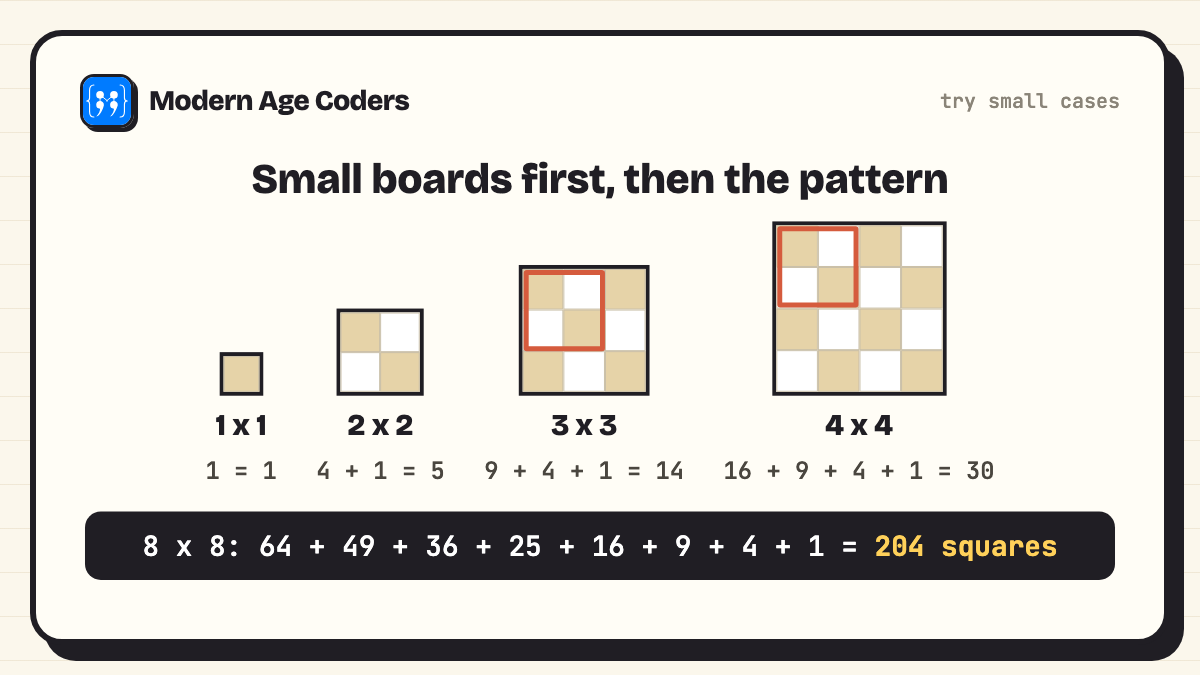
- Define: count every square whose sides lie on the grid lines: 1 by 1, 2 by 2, and so on up to the whole 8 by 8 board.
- Break down: count each size separately, then add.
- Try: start with smaller boards. A 2 by 2 board has four small squares and one big one, so 5. A 3 by 3 board has 9 + 4 + 1 = 14. The pattern: a k by k square fits in (n − k + 1) × (n − k + 1) positions, so the total is a sum of square numbers.
- Check: for 8 by 8, 64 + 49 + 36 + 25 + 16 + 9 + 4 + 1 = 204. Then check it a second, independent way: let a program count every square one by one.
- Improve: the sum 1 + 4 + 9 + ... + n² has a known formula, n(n + 1)(2n + 1) / 6. All three answers should agree.
# How many squares of any size are on a chessboard?
# Try: count by brute force on small boards, look for the pattern.
def count_squares_brute(n):
    total = 0
    for size in range(1, n + 1):          # every square size
        for row in range(n - size + 1):    # every top-left corner
            for col in range(n - size + 1):
                total += 1
    return total

for n in range(1, 9):
    print(f"{n} x {n} board, total squares: {count_squares_brute(n)}")

# Check the rule we derived by hand: 1*1 + 2*2 + ... + n*n
rule = sum(k * k for k in range(1, 9))
print("Rule for 8 x 8:", rule)
print("Formula n(n+1)(2n+1)/6:", 8 * 9 * 17 // 6)1 x 1 board, total squares: 1
2 x 2 board, total squares: 5
3 x 3 board, total squares: 14
4 x 4 board, total squares: 30
5 x 5 board, total squares: 55
6 x 6 board, total squares: 91
7 x 7 board, total squares: 140
8 x 8 board, total squares: 204
Rule for 8 x 8: 204
Formula n(n+1)(2n+1)/6: 204The program did not find the answer for us; the small cases did. The program is the second, independent check, and the brute-force count agrees with both the hand sum and the formula.
How to improve problem solving skills in programming
- Write the tests before the code. Even three lines of expected inputs and outputs, as in the streak example, will catch most mistakes.
- Solve it on paper first. If you cannot do it by hand for a small input, you cannot tell a computer how to.
- Read the whole error message. It usually names the line and the kind of mistake.
- Trace before you run. Predict what each variable will be after each line, then run and compare.
- Re-solve without notes. A day later, solve the same problem from a blank file. This is what turns recognition into skill.
Our page on how to think like a programmer goes deeper on the reasoning experienced programmers do before they type, such as deciding what a function may assume and what it guarantees.
How to improve problem solving skills in maths
- Try small cases. As with the chessboard, the pattern often appears by the third case.
- Draw it. A bar model, a number line or a table turns a paragraph into something you can see.
- Estimate first. Decide roughly how big the answer should be, so a wrong answer looks wrong.
- Work backwards from what the question asks for.
- Check with a second method, or substitute your answer back into the question.
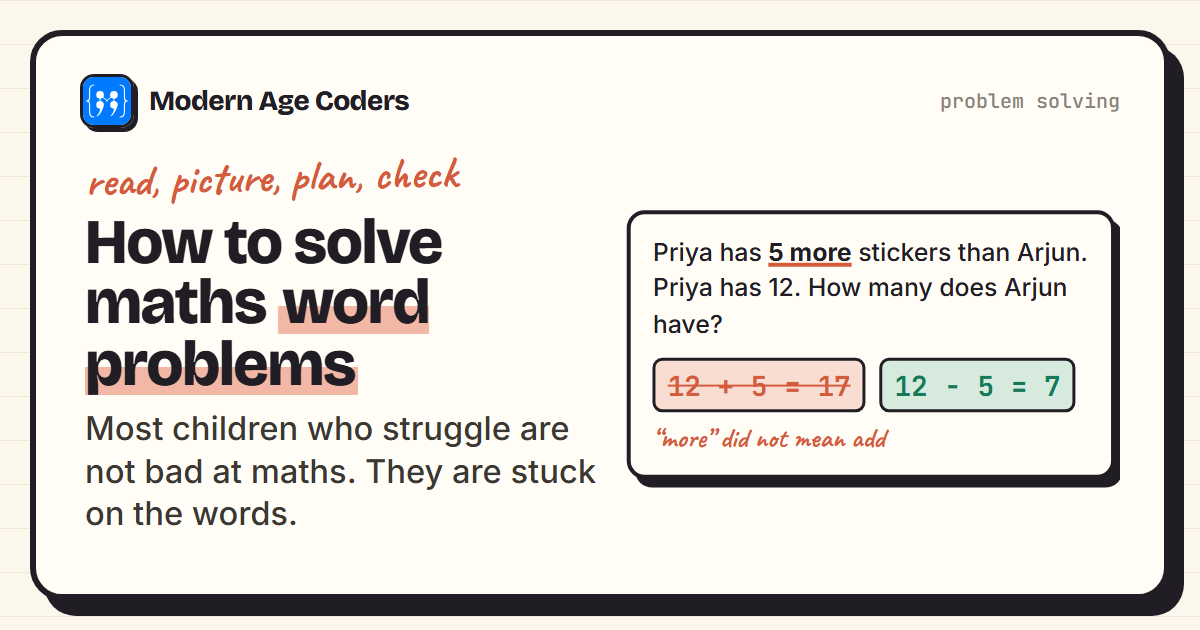
For word problems in particular, see how to solve maths word problems, and for general study habits, how to get better at maths.
Problem solving in software engineering and the workplace
At work, in software teams and in most other jobs, the same five steps have different names, and the problems are bigger, but the order does not change.
| Step | What it is called at work | What it looks like |
|---|---|---|
| Define | Requirements, acceptance criteria | "The report must load in under two seconds for a class of 40." |
| Break down | Tasks, tickets | Split one feature into pieces small enough to finish in a day. |
| Try | Prototype, reproduce the bug | Make the problem happen on purpose before changing anything. |
| Check | Tests, code review | Automated tests plus a second person reading the change. |
| Improve | Retrospective, post-mortem | Write down what went wrong so the team does not repeat it. |
Our think like a software engineer page shows how these habits are trained from a student's first program onwards.
How to improve problem solving skills for students
The method is the same at every age. What changes is the size of the problem and how much is written down.
| Age | Good problems to practise on | What to focus on |
|---|---|---|
| 6 to 9 | Puzzles, building with blocks, Scratch games, sharing sweets fairly | Saying the goal out loud before starting; trying again after a mistake |
| 10 to 13 | Logic puzzles, word problems, small Python programs, planning a class event | Small cases, drawing the problem, checking answers |
| 14 to 18 | Olympiad-style questions, coding challenges, projects with deadlines | Writing tests first, a mistake log, explaining a solution to someone else |
| Adults | Work tasks, budgets, learning to code for a new career | Defining done, breaking work into tasks, reviewing decisions |
A 20-minute daily routine:
- Pick one problem slightly too hard for you (five minutes of being stuck is the right level).
- Write "I will know I am right when..." before anything else.
- Work one small case by hand.
- Solve, then check against your sentence and one awkward case.
- Write one line in a mistake log. Read the log every Sunday.
Why problem solving matters more when AI can write code
AI assistants are now good at the try step: ask for a function and one appears in seconds. That is useful. But the other four steps are still yours. Someone has to decide what the code should do, break a vague request into clear parts, check that the answer is right and decide what to change. Those are exactly the steps this method trains.
The tool makers say so themselves. GitHub's own documentation for its Copilot coding assistant warns that it "may generate code that appears to be valid but may not actually be semantically or syntactically correct or may not accurately reflect the intent of the developer", and says that "Users are responsible for reviewing and validating suggestions before accepting them" (GitHub Docs).
Take Example 4. If you ask an AI for a class-average function, you still need to know that the answer for 42, 78, 65 and 90 is 68.75, and to ask what happens for an empty class. A person who can define and check can use AI to go faster. A person who cannot is left trusting whatever comes back. AI does not make problem solving less important; it moves the skill from typing the answer to judging it and directing the work.
AI tools have age rules
Check the vendor's age rule before a young learner uses any AI tool. Most chat assistants require users to be at least 13. ChatGPT's terms ask for a parent's or guardian's permission for anyone under 18, and Claude is for adults (18 and over) only. Under-13s should build problem solving with puzzles, Scratch and Python, without a chatbot account. Our guide to teaching kids AI at home covers safe options by age.
How we teach it
The principles on our how we teach page are this method in a classroom: students explain their thinking in every lesson, we trace a loop line by line until the student can predict every step, learners derive a rule themselves before they see it written down, we show the same problem three ways, and mistakes are treated as data, not failures. You can see it in our problem solving course for kids, the problem solving and algorithms course for teens and Maths Through Coding, one to one or in groups of 15 to 20. The first class is free.
Frequently asked questions
Use one method every time: define what a correct answer looks like, break the problem into parts, try the smallest case by hand, check against a test you wrote first, and note what went wrong. Then practise for 20 minutes a day on problems slightly too hard for you.
Define the goal and how you will check it, break the problem down into smaller parts, try a small case or a first attempt, check the result against your test and the awkward cases, and improve by fixing what failed and noting the lesson. It is a loop: the improve step often sends you back to define.
Write expected inputs and outputs before the code, solve a small case on paper, trace your code line by line before running it, read whole error messages, and re-solve problems a day later without notes. The coding example in this post shows tests written first catching a real mistake.
Try small cases until a pattern appears, draw the problem, estimate the answer before calculating, work backwards from what is asked, and check with a second method. The chessboard example in this post uses all of these.
It can be learned. What looks like talent is usually a set of habits, such as trying small cases and checking answers, practised so often that they happen automatically. The same habits can be taught step by step at any age from 6 to 67.
Planning a trip within a budget, splitting a bill fairly, fixing a timetable clash, finding a mistake in a calculation and planning a project backwards from its deadline are all worked through in this post. For ten more, see our post on problem solving examples in real life.
Yes, and arguably more so. AI is good at producing a first attempt. A person still has to define what is wanted, break it into clear requests, check the answer and decide what to change. GitHub's own Copilot documentation says users are responsible for reviewing and validating its suggestions.
Games with clear rules and a way to check your answer work best: chess, Sudoku, KenKen, tangrams, Rubik's cubes, logic grid puzzles and building games in Scratch. The habit to add is the same as in this post: before each move or attempt, say what you expect to happen, then check whether it did.
As early as six, through puzzles, building, sharing tasks and block coding such as Scratch. The method is the same at every age; younger children say each step out loud, and older students write their tests and mistake log down.