UK / K31 / 01
First Python
The crossing from blocks to typed code, taken slowly enough to stick.
Open the syllabusEngland · Years 7 to 9 · Ages 11 to 14
The statutory computing curriculum for Years 7 to 9 opens with two lines that almost nobody teaches properly. The first asks pupils to "design, use and evaluate computational abstractions that model the state and behaviour of real-world problems and physical systems". The second asks them to "use logical reasoning to compare the utility of alternative algorithms for the same problem". Modelling state, and choosing between algorithms. Neither produces a colourful result to show at a parents' evening, both take real thought to teach, and both are exactly what a GCSE Computer Science course will assume a student has already met. This page sets out the whole programme of study, those two lines in particular, and what a student who has genuinely done key stage 3 can do when they walk into Year 10.
Teaching live since 2020 · 10,000+ students · Every statutory line, not only the visible ones
In short
Key stage 3 computing is where the subject stops being about making things and starts being about systems. The statutory programme asks Years 7 to 9 to model the state and behaviour of real problems, to understand sorting and searching and compare alternative algorithms for the same task, to use at least one textual programming language with proper data structures and modular code, and to handle Boolean logic, binary arithmetic and how data and instructions are stored. The two lines most often skipped are the first two, modelling and comparing, because they are slow to teach and produce nothing visible, and they are precisely what GCSE Computer Science assumes. We teach the whole programme live online, in groups of fifteen to twenty at one level or one to one. The first lesson is free, then USD 100 a month in a group or USD 150 one to one.
Start here
A textual language, the algorithms, and the thinking underneath both. Cards open the full syllabus.
KS3 / 01
The textual language key stage 3 requires, for students arriving in Year 7 having only used blocks.
Open the syllabus →
KS3 / 02
Sorting, searching and comparing methods for the same job, which is the second statutory line almost word for word.
Open the syllabus →
KS3 / 03
Lists, functions and modular programs, for Year 8 and 9 students ready to go well beyond the minimum.
Open the syllabus →The two lines
The first two statutory lines of key stage 3, and why they so rarely survive into a real timetable.
The full line asks pupils to "design, use and evaluate computational abstractions that model the state and behaviour of real-world problems and physical systems". In plain terms: take something real, a traffic light, a vending machine, a queue at a till, and describe it precisely enough that a computer could follow it.
That means deciding what to keep and what to ignore, naming the states the thing can be in, and saying what moves it from one state to another. It is the most important idea in the whole subject, and it is almost invisible when done well.
The second asks pupils to "understand several key algorithms that reflect computational thinking [for example, ones for sorting and searching]" and then to "use logical reasoning to compare the utility of alternative algorithms for the same problem".
Knowing one way to sort a list is programming. Knowing two, and being able to say which is better for this list and why, is computer science. The curriculum asks for the second, at thirteen.
| The line | What it produces | Why it survives badly |
|---|---|---|
| Modelling state and behaviour | A diagram and a precise description | Nothing runs, nothing moves, and it looks like maths rather than computing |
| Comparing algorithms | An argument about which method is better and why | It needs two working methods first, and a class that has barely finished one |
| Everything else in key stage 3 | A program, a website, a calculation, a finished task | Visible, finishable, easy to assess in a single lesson |
Neither line is beyond an eleven-year-old. A child who can say that a vending machine is either waiting for money, holding some money, or dispensing, and who can say what moves it between those, is modelling state. A child who notices that checking every item in a list is slow and that halving the list each time is faster has compared two algorithms. The ideas are simple. Teaching them takes patience rather than cleverness.
Source: National curriculum in England: computing programmes of study, statutory guidance first published 11 September 2013. Key stage 3 covers Years 7 to 9, ages 11 to 14.
The rest of it
The remaining statutory lines, grouped by what a student ends up able to do.
| Area | What the programme of study says | What a student can do |
|---|---|---|
| Programming | "Use 2 or more programming languages, at least one of which is textual"; "make appropriate use of data structures [for example, lists, tables or arrays]"; "design and develop modular programs that use procedures or functions" | Write typed code, store collections of things properly, and split a program into named parts |
| Logic and numbers | "Understand simple Boolean logic [for example, AND, OR and NOT]"; "carry out simple operations on binary numbers [for example, binary addition, and conversion between binary and decimal]" | Work out a logic expression by hand, and add and convert binary numbers without a calculator |
| How computers work | "Understand the hardware and software components that make up computer systems"; "understand how instructions are stored and executed within a computer system" | Explain what happens inside a machine when a program runs |
| Representing data | "Understand how data of various types (including text, sounds and pictures) can be represented and manipulated digitally, in the form of binary digits" | Say how a letter, a sound and a photograph all end up as ones and zeros |
| Projects | "Undertake creative projects that involve selecting, using, and combining multiple applications ... meeting the needs of known users" | Build something for a real person, and find out whether it actually suits them |
| Safety | "Understand a range of ways to use technology safely, respectfully, responsibly and securely, including protecting their online identity and privacy" | Protect their own accounts and recognise what should be reported |
This is the one parents can check most easily, and it is covered in detail on the England page: ask which two languages a child will use by the end of Year 9, and which of them is typed.
If the answer is only a block language, the student reaches Year 10 without having met the medium every GCSE board examines.
Binary addition and Boolean logic by hand are the key stage 3 content that GCSE papers lean on hardest, and several of them are non-calculator throughout.
They are also purely a matter of practice. A student who has done fifty binary additions finds them trivial, and one who has done five finds them frightening.
A reminder that applies to every English school page on this site: academies are not required to follow the national curriculum, and most secondary schools are academies. For a great many students this programme of study describes what they are entitled to be offered rather than what they will certainly receive, which is why it is worth knowing in detail.
The bridge to GCSE
Every English GCSE board assumes this foundation. The gap shows up in the first term of Year 10, and it is much cheaper to close in Year 8.
| Key stage 3 asks for | GCSE then expects | If it was skipped |
|---|---|---|
| Modelling state and behaviour | Decomposition and abstraction in every programming question | Students write code before they understand the problem, and cannot plan |
| Comparing sorting and searching algorithms | Named algorithms explained, traced and compared | The comparison questions become memorisation of phrases rather than reasoning |
| A textual language and data structures | Programs written by hand or at a keyboard, with lists and functions | The first term of Year 10 is spent on syntax while the content moves on |
| Binary and Boolean logic by hand | Non-calculator conversions, arithmetic and truth tables | Easy marks lost to hesitation rather than to difficulty |
| How data and instructions are stored | Systems architecture and data representation topics | Topics that feel new when they should feel like revision |
Modelling first, on paper, with real things a student already knows. Draw the states, name the transitions, then write the program. A student who has drawn the model never has to guess what the code should do.
Then two algorithms for the same job, both written, both timed on growing inputs, and a written sentence saying which is better and when. That sentence is the whole point of the exercise.
Before anything runs, the student says what it will do. For modelling, that means predicting the next state. For algorithms, it means predicting which will be faster before measuring.
Being wrong out loud and then finding out why is the mechanism, and it is what the statutory phrase "use logical reasoning" actually describes in practice.
For the step before this, the key stage 2 page sets out what Years 3 to 6 are supposed to reach. For the step after, the Year 9 options page covers the decision itself, and the three board pages cover what each English GCSE asks.
The research behind teaching this way, including why problem-solving skill comes from accumulated subject knowledge rather than generic training, is set out on the problem-solving page.
Progression
A student is placed by what they can do unaided, not by their year group.
| Rung | What is being learnt | How you can tell |
|---|---|---|
| 1. Into typed code | A textual language, variables, selection and loops | Short programs written from an empty file without copying an example |
| 2. Structure | Lists, functions and modular programs | A longer program split into named parts that each do one job |
| 3. Models and algorithms | State and behaviour, sorting and searching, comparing methods | A drawn model of a real system, and a reasoned choice between two algorithms |
| 4. How it all works | Binary, Boolean logic, data representation and systems | Binary sums and truth tables done by hand, and an explanation of what happens when code runs |
It is also the rung that separates a student who can program from one who can think about programs, and GCSE rewards the second.
The full topic order runs down the coding roadmap.
Nothing on rungs two to four is available to a student who cannot yet type code comfortably, which is why it comes first regardless of age.
The free lesson is where the starting rung is decided honestly.
The catalogue
Grouped by which part of key stage 3 they serve. The free lesson settles where to start.
UK / K31 / 01
The crossing from blocks to typed code, taken slowly enough to stick.
Open the syllabusUK / K31 / 02
Lists, functions and files, which is where key stage 3 programming is meant to end up.
Open the syllabusUK / K31 / 03
A second typed language inside a game, for students who need a reason to type.
Open the syllabusUK / K32 / 01
Sorting and searching, written twice and compared, which is the statutory line in practice.
Open the syllabusUK / K32 / 02
Modelling real systems on paper before any code, for students who find this the hard part.
Open the syllabusUK / K32 / 03
Binary, logic and number work done by writing programs, which makes the arithmetic stick.
Open the syllabusUK / K33 / 01
A site built for a real user, which is exactly what the project line in key stage 3 asks for.
Open the syllabusUK / K33 / 02
Training and testing models, for students who have finished the programme and want more.
Open the syllabusUK / K33 / 03
For Year 9 students who have chosen the subject and want to arrive in Year 10 ahead.
Open the syllabusHow lessons work
Our teachers work from India on a clock that never shifts, so the UK runs five and a half hours behind from October and four and a half from March. Slots are agreed in UK time.
After school
Where most Year 7 to 9 students settle.
Early evening
Once football, music or the bus home is out of the way.
Weekend morning
Good for a longer build or a model drawn out properly.
States and transitions drawn before any code, so the program is a translation rather than a guess.
Every algorithm topic ends with two working methods and a written reason for choosing one.
Binary and logic practised without a calculator from the start, because GCSE papers will demand it.
The student states the output first. The gap between expectation and result is the lesson.
Fifteen to twenty students at the same rung, arguing about whose model is more accurate.
Finished projects saved where a family can open them, which is usually how a parent learns it is working.
Student work
Four projects from students of about this age. More sit in student labs.
AI and ML
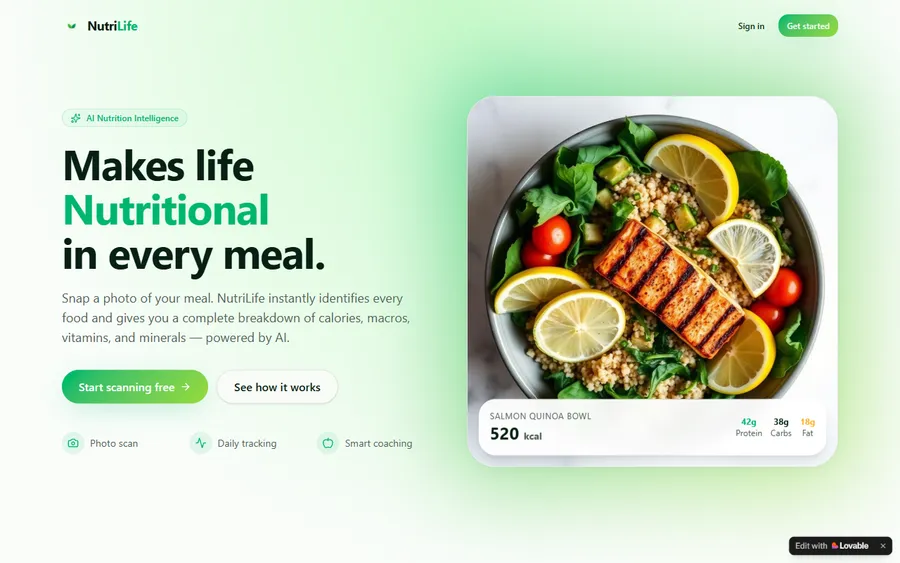
An AI nutrition coach that reads what you eat and works you toward a target.
AI and ML
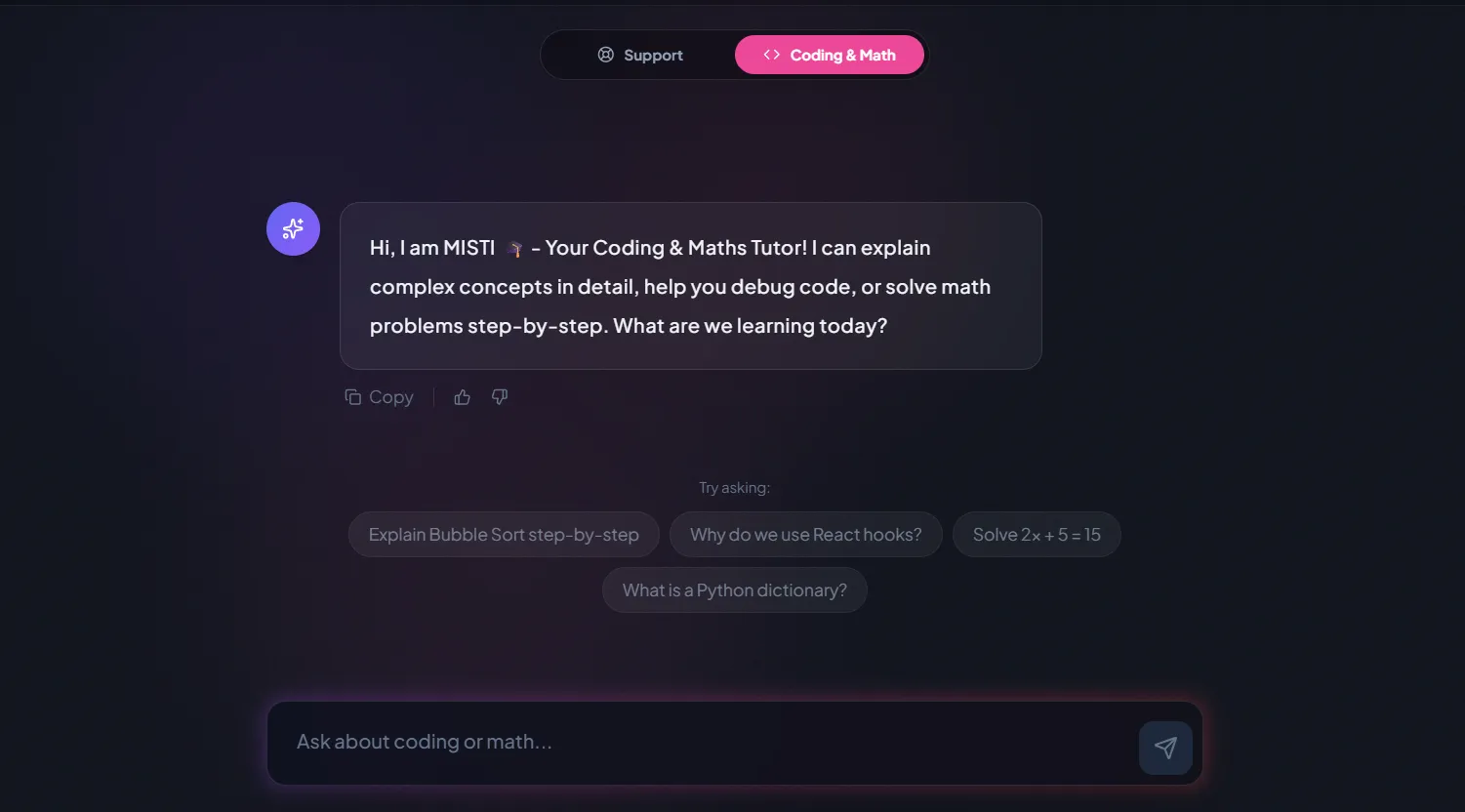
A chatbot that answers mathematics and programming questions, built and deployed by a student.
AI and ML
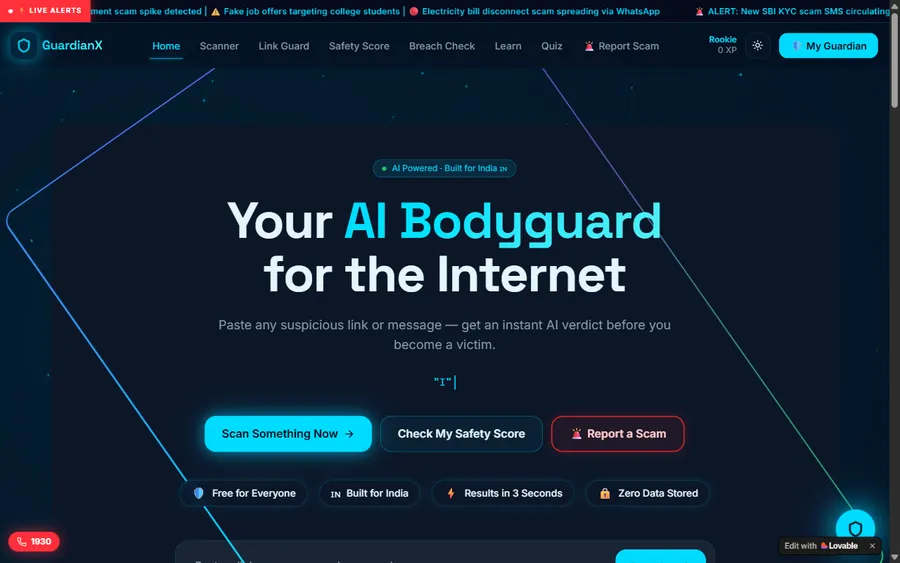
An assistant that helps a young person recognise unsafe situations online.
Web app
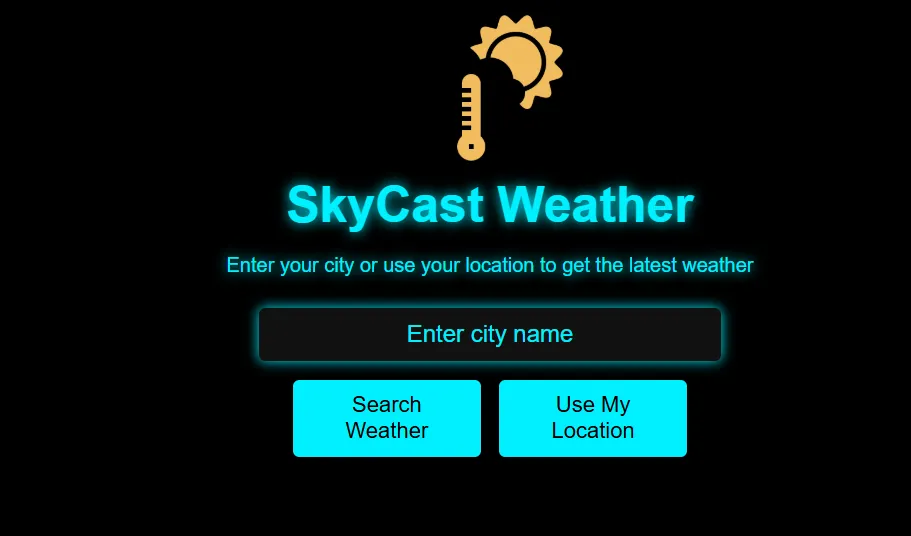
A weather forecasting site with live conditions for any location.
Fees
A flat monthly charge in US dollars, the rate everywhere outside India. The free lesson comes first and nothing is taken until a course and a weekly time are agreed.
Free first class
USD 0
no card required
Group batch
USD 100
a month, billed in US dollars
One to one
USD 150
a month, billed in US dollars
What families say
From Google, word for word, by families nobody asked.
★★★★★
"The one step solution for my son. Modern Age Coders make learning coding so simple that kids love it. The teachers explain complex concepts clearly with practical exercises and interactive content."
Ria Mukherjee
Parent
★★★★★
"Modern Age Coders has been a game-changer for me. I struggled to grasp IT concepts and coding before joining, but their classes transformed everything. I can now confidently write complex programs with ease."
Samriddha Mondal
Student
★★★★★
"One of the most wonderful education centres out there. Education is not limited to school syllabus but focuses on skill development."
Vansh Agarwal
Student
★★★★★
"My child Dhairya is really enjoying the Modern Age Coders classes. This is his first online class and he eagerly looks forward to it. I can already see his improvement, and the teachers are very cooperative."
Sonam Oswal
Parent of Dhairya
★★★★★
"Modern Age Coders have wonderful teachers who teach in a clear, easy and practical way. The teacher boosts students' confidence and inspires them to learn without hesitation."
Sonu Goyal
Parent
★★★★★
"I highly recommend this computer coding class! The teachers are incredibly knowledgeable and passionate about coding."
Ritu Kedia
Parent
Questions about Key Stage 3 computing
The statutory programme expects them to model real systems, understand and compare sorting and searching algorithms, program in at least one textual language with data structures and functions, and handle binary arithmetic and Boolean logic.
Describing a real thing, such as a vending machine or a traffic light, precisely enough that a computer could follow it: the states it can be in and what moves it between them.
Because knowing one way to do something is programming, while knowing two and being able to say which suits a given problem is computer science. The curriculum asks for the second.
The programme of study requires two or more programming languages, at least one of which is textual. A student who has only used blocks has not met that requirement.
Yes. Pupils should be able to carry out simple operations on binary numbers, including binary addition and conversion between binary and decimal, by the end of key stage 3.
Not necessarily. Academies are not required to follow the national curriculum, and most secondary schools in England are academies.
Every English GCSE board assumes this foundation. The commonest gaps are typed code, the algorithm comparisons and binary done by hand, and they show up in the first term of Year 10.
Harder problems rather than more of the same, and often an early start on GCSE content, competitions or a real project for a real user.
For typed code, usually about a term of weekly lessons. The algorithm and modelling work takes longer, because it is thinking rather than syntax.
The first lesson is free. After that a group place is USD 100 a month and one-to-one teaching USD 150, charged monthly with nothing in advance.
Elsewhere on this site
Each takes a different part of this further.
What Years 3 to 6 are supposed to reach, including variables and selection.
The Year 9 options decision, and when it is really made.
The national curriculum, and the 83.9 per cent of secondaries outside it.
The first of the three English boards, and what it asks.
What the research says builds skill, and the claim we refuse to make.
Why checking a program beats trusting a chatbot, with Ofcom’s 2026 figures.
Start here
Send a number and we will reply at a British hour you choose. The lesson is real teaching on real key stage 3 material, and it ends with a straight view of the starting rung.
Would you rather read first? Syllabuses sit on each course page, how we teach is honest about who the method does not suit, and the coding roadmap lays out the order.
WhatsApp us · +91 91233 66161 · connect@modernagecoders.com
WhatsApp gets the quickest reply and costs nothing from a British mobile. The number is registered in India, which we say here rather than leave you to discover.
A priority demo is a full class of about 45 to 60 minutes. After the class the mentor sends a written skill report and a personal learning roadmap on WhatsApp. If you enrol, the demo fee is adjusted against your first month's fee. Share your demo Order ID with us on WhatsApp and we take it off.
Book a priority demo