Table of Contents
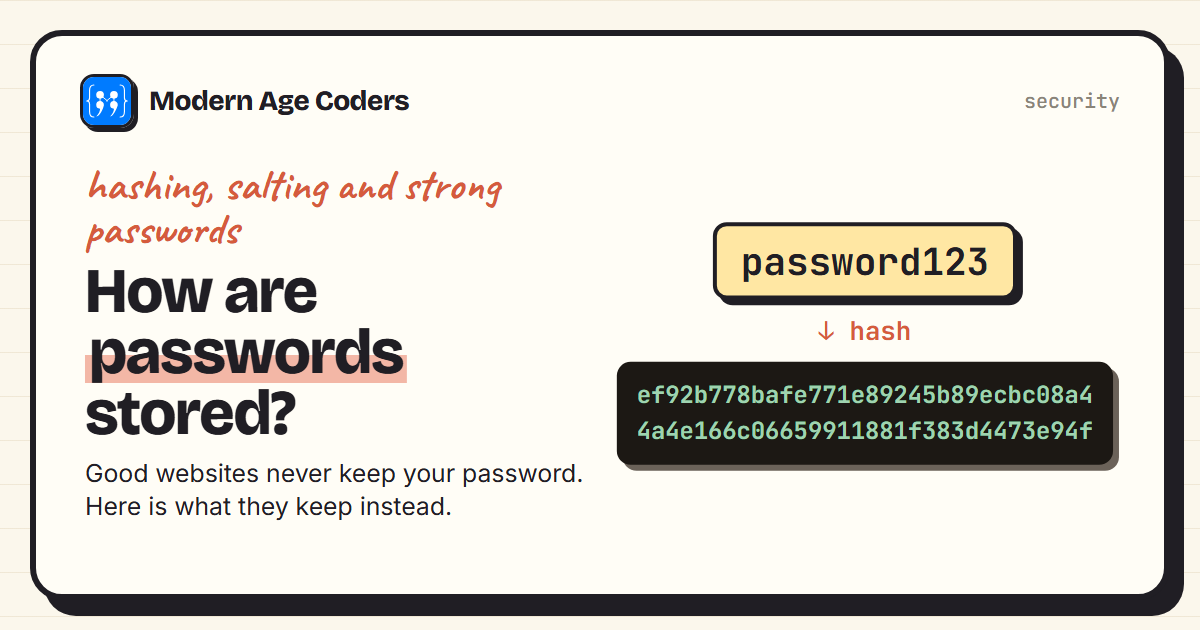
When you create an account, a well-built website does not store your password at all. It stores a scrambled fingerprint of it, called a hash, and when you log in it hashes what you type and compares the fingerprints. That way, even if the database is stolen, the attacker does not simply get everyone's passwords.
This guide shows how that works with Python's built-in hashlib: what a hash is, why unsalted hashes still leak common passwords, how salting and deliberately slow hashing fix that, and what it all means for choosing your own passwords. Every output, including the speed measurements, comes from running the code.
What is a hash?
A hash function turns any input into a fixed-length output that looks random. SHA-256, one of the most widely used, always produces 256 bits, usually shown as 64 hexadecimal characters. Three properties matter: the same input always gives the same hash, you cannot work backwards from the hash to the input, and a tiny change to the input changes the hash completely:
import hashlib

def sha256(text):
    return hashlib.sha256(text.encode()).hexdigest()

a, b = sha256("password123"), sha256("password124")
print("password123 ->", a)
print("password124 ->", b)
bits = bin(int(a, 16) ^ int(b, 16)).count("1")
print(f"one character changed, {bits} of 256 bits changed")password123 -> ef92b778bafe771e89245b89ecbc08a44a4e166c06659911881f383d4473e94f
password124 -> 33631376724e5d5480fa397dfcf03b66ad47b934ab495174d7058c38f2bb0087
one character changed, 118 of 256 bits changed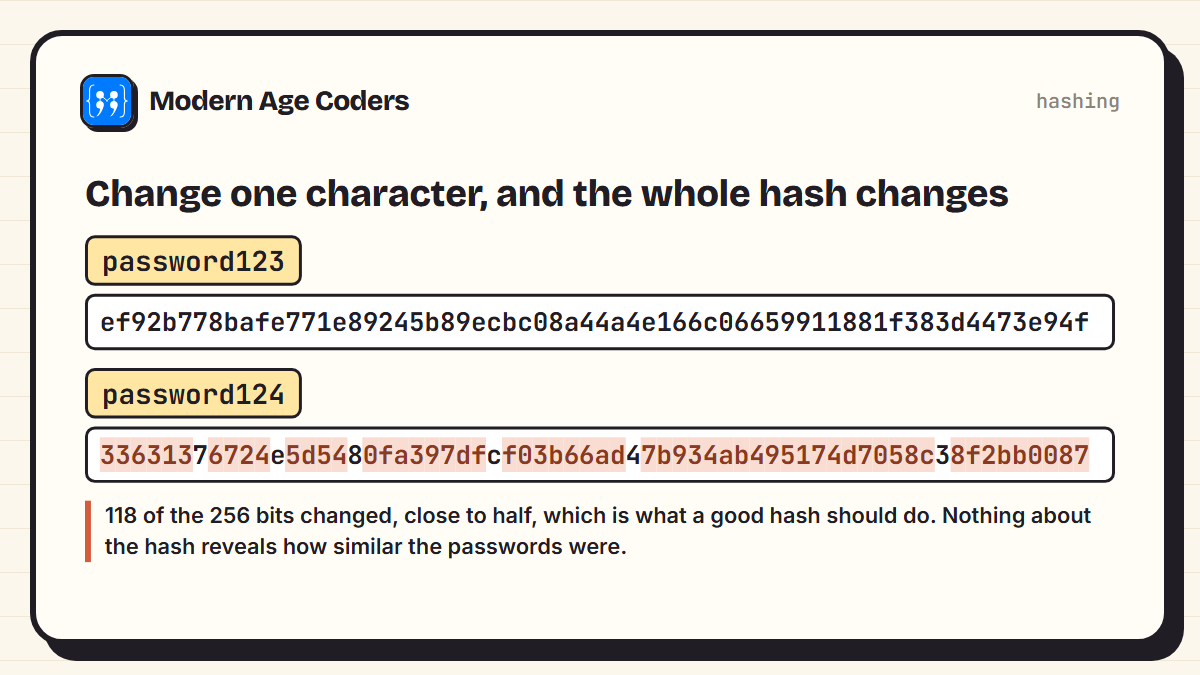
Changing the last character changed 118 of the 256 bits, close to half, which is exactly what a good hash should do. Unlike encryption, hashing has no key and cannot be reversed: there is no way to decrypt a hash back into the password. The only way to find a password from its hash is to guess passwords, hash each one, and compare.
Why hashing alone is not enough
Guessing is exactly what attackers do. Most people choose from a surprisingly small set of passwords, so an attacker can hash a list of common ones in advance and simply look up every stolen hash:
import hashlib
sha256 = lambda t: hashlib.sha256(t.encode()).hexdigest()

# A leaked table of UNSALTED hashes (the passwords themselves were never stored)
leaked = {"asha": sha256("sunshine"), "ben": sha256("7gQ!pz#Lw2"),
          "chen": sha256("football"), "dara": sha256("sunshine")}

# An attacker hashes a list of common passwords once...
common = ["123456", "password", "qwerty", "111111", "iloveyou",
          "letmein", "football", "dragon", "monkey", "sunshine"]
lookup = {sha256(p): p for p in common}

# ...then simply looks every leaked hash up
for user, h in leaked.items():
    print(f"{user:<5} {lookup.get(h, 'not found')}")
print("asha and dara have identical hashes:", leaked["asha"] == leaked["dara"])asha sunshine
ben not found
chen football
dara sunshine
asha and dara have identical hashes: True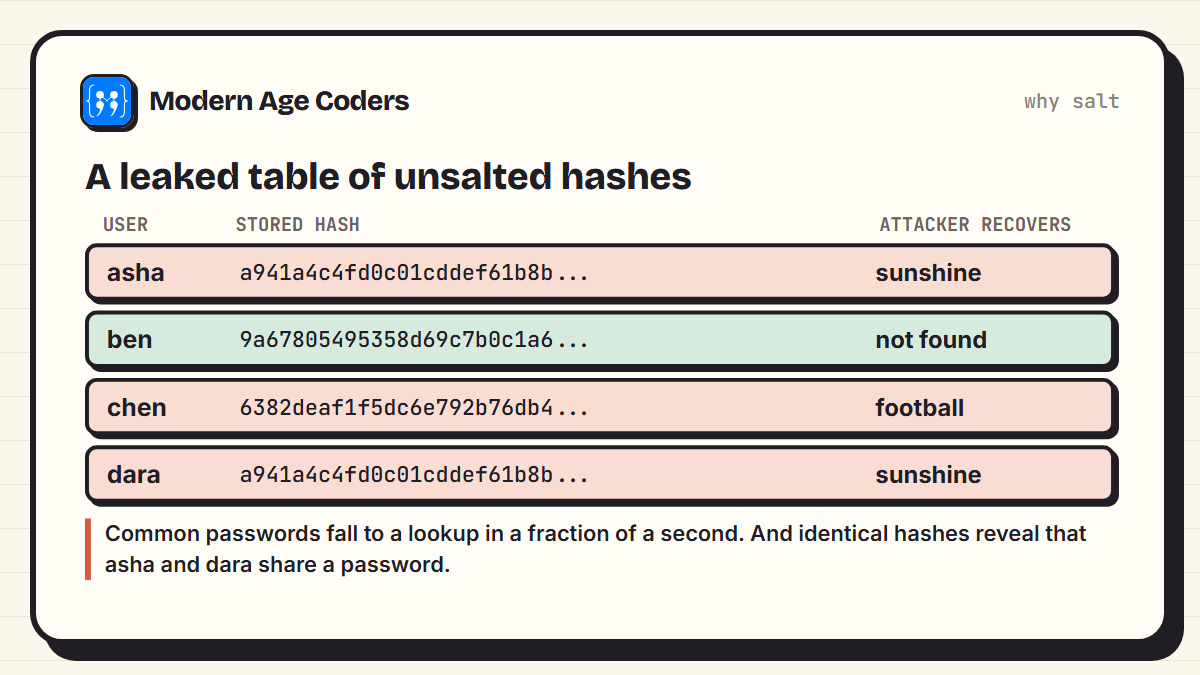
Three of the four passwords were recovered instantly, and the attacker also learned something extra: asha and dara have identical hashes, so they must share a password. Only ben, with a long random password, was safe. Real attackers use lists of millions of leaked passwords, not ten.
Salting: a random extra for every user
The fix is a salt: a random value generated separately for every user, added to the password before hashing, and stored alongside the hash. The salt is not secret. Its job is to make every user's hash unique:
import hashlib

def store(password, salt):
    return hashlib.sha256(salt + password.encode()).hexdigest()

# Real systems make each salt with secrets.token_bytes(16); fixed ones keep this demo repeatable
salt_asha = bytes.fromhex("9f2c1a7e44d05b3e8a61c2f07d93be15")
salt_dara = bytes.fromhex("03b87e5c1fd29a64e0c7b1582a4f6d39")
print("asha:", store("sunshine", salt_asha))
print("dara:", store("sunshine", salt_dara))
print("same password, same hash?", store("sunshine", salt_asha) == store("sunshine", salt_dara))asha: 93cda3b9b8326d915330c5656180fa82edea55f6f593bdfc31111569e72323e2
dara: 8aba973758fce76b400fe781d763e7d4b2be3eb6a2f8001ea8463d7f2fc87416
same password, same hash? False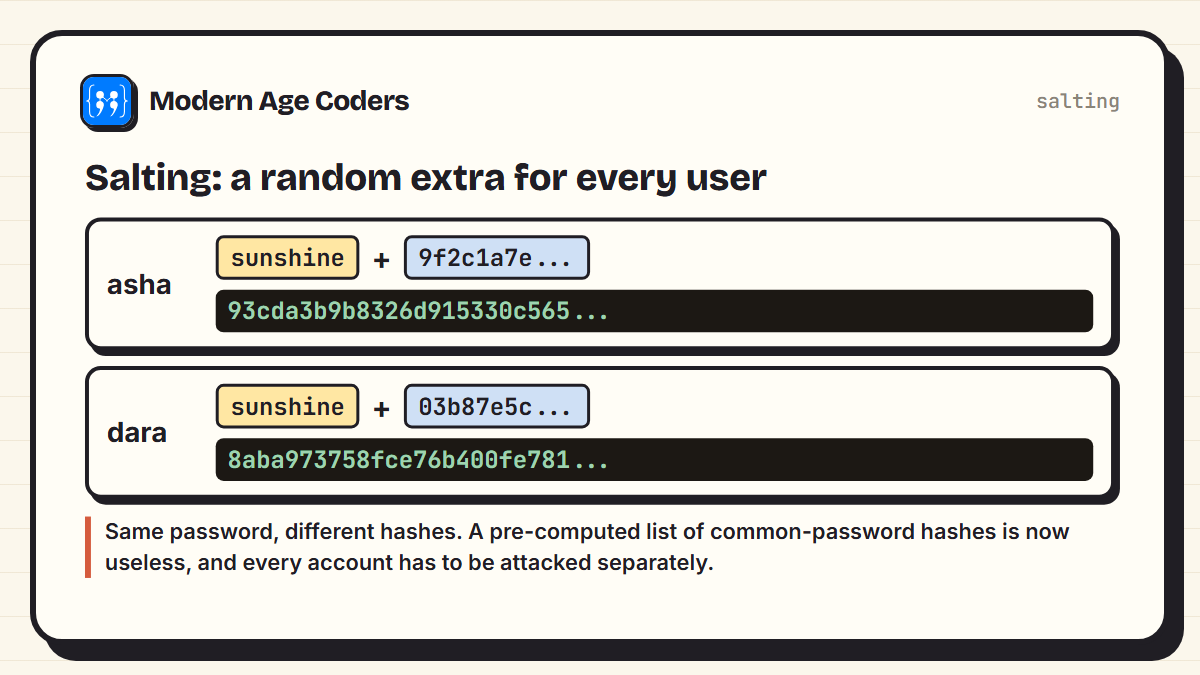
Now the same password gives two unrelated hashes. A pre-computed lookup list is useless, because it would need a separate list for every possible salt, and nobody can tell that two users share a password. The attacker has to start from scratch for every single account.
Slow on purpose: why speed matters
There is one more problem. SHA-256 was designed to be fast, which is great for checking files and terrible for passwords, because it lets an attacker try guesses quickly. Password storage uses hash functions that are deliberately slow, such as bcrypt, scrypt, Argon2 or PBKDF2, which repeats a hash many times. The OWASP Password Storage Cheat Sheet recommends Argon2id, and gives 600,000 iterations for PBKDF2 with SHA-256. We measured the difference on one laptop:
import hashlib, time

# Fast hash: how many SHA-256 guesses per second on this laptop?
start = time.perf_counter()
for i in range(200_000):
    hashlib.sha256(b"guess" + str(i).encode()).digest()
fast = 200_000 / (time.perf_counter() - start)

# Slow hash: PBKDF2 with 600,000 rounds, as OWASP recommends for this method
start = time.perf_counter()
for i in range(3):
    hashlib.pbkdf2_hmac("sha256", b"guess" + str(i).encode(), b"some-salt", 600_000)
slow = 3 / (time.perf_counter() - start)

print(f"SHA-256 once:          {fast:>12,.0f} guesses per second")
print(f"PBKDF2, 600,000 rounds: {slow:>12,.2f} guesses per second")

def how_long(seconds):
    for unit, size in [("years", 31_557_600), ("days", 86_400), ("hours", 3_600), ("minutes", 60)]:
        if seconds >= size:
            return f"{seconds / size:,.0f} {unit}"
    return f"{seconds:,.1f} seconds"

styles = [("8 lowercase letters", 26 ** 8), ("8 characters, any keyboard symbol", 94 ** 8),
          ("4 random common words", 7776 ** 4), ("6 random common words", 7776 ** 6)]
print("\ntime to try every possibility, one laptop:")
for name, n in styles:
print(f" {name:<34} fast hash {how_long(n / fast):>22} slow hash {how_long(n / slow):>28}")SHA-256 once: 540,935 guesses per second
PBKDF2, 600,000 rounds: 1.83 guesses per second
time to try every possibility, one laptop:
8 lowercase letters fast hash 4 days slow hash 3,622 years
8 characters, any keyboard symbol fast hash 357 years slow hash 105,720,775 years
4 random common words fast hash 214 years slow hash 63,410,696 years
6 random common words fast hash 12,950,554,294 years slow hash 3,834,202,282,655,382 years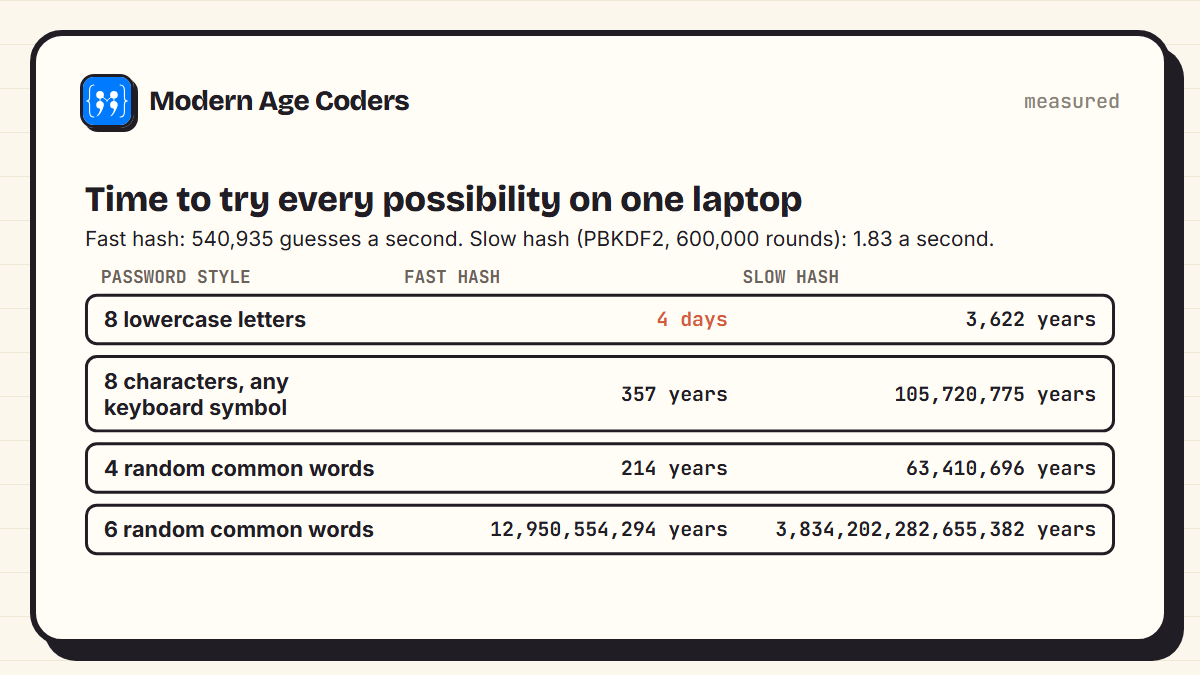
On this laptop, Python managed about 540,935 SHA-256 guesses a second, but only 1.83 PBKDF2 guesses a second. With a fast hash, every 8-letter lowercase password could be tried in 4 days. With the slow hash, the same search takes 3,622 years. A user logging in waits a fraction of a second once; an attacker pays that cost for every single guess.
Real attackers are much faster
These timings are for one laptop running Python. Attackers use specialised hardware and optimised software that can be many thousands of times faster, especially against fast hashes like plain SHA-256. That is exactly why slow, salted hashing matters, and why short passwords are unsafe even when they are stored properly.
What this means for your passwords
The table also shows what makes a password strong: length and randomness, not clever symbols. Eight characters using every keyboard symbol gives 948 possibilities. Four words chosen at random from a list of 7,776 (the size of the widely used Diceware word list) gives 7,7764, a similar number, and is far easier to remember. Six random words is astronomically stronger.
- Never reuse passwords. If one site stores passwords badly and is breached, every account with the same password is at risk.
- Use a password manager to create and remember long random passwords, so you only need to remember one strong passphrase.
- Turn on two-factor authentication where it is offered, so a stolen password alone is not enough.
- Avoid anything on a common list: names, dates, keyboard patterns, sports teams and simple substitutions like p4ssw0rd.
A good website never knows your password. It only knows how to recognise it.
How we teach it
Password security is a good example of learning by building, one of the principles on our how we teach page: hashing, cracking and then salting a small table teaches more than any list of rules. Students explain their thinking about why each defence works, which is what makes the advice stick. Our Python course for teens runs one to one or in small groups of 5 to 10.
Frequently asked questions
They are not stored at all. A secure system stores a salted hash of the password, made with a deliberately slow hash function such as Argon2, bcrypt, scrypt or PBKDF2. When you log in, it hashes what you type the same way and compares.
Running the password through a one-way function that produces a fixed-length fingerprint. The same password always gives the same hash, but the hash cannot be turned back into the password.
A random value created for each user, added to the password before hashing and stored alongside the hash. It makes every user's hash unique, so pre-computed lists of common-password hashes are useless and shared passwords are not revealed.
Because attackers crack passwords by guessing and hashing each guess. A slow hash barely affects a user logging in once but makes every guess expensive. In our test, a slow hash allowed about 2 guesses a second against about 541,000 for plain SHA-256.
No. Encryption uses a key and can be reversed by someone with the key. Hashing has no key and cannot be reversed; the only way to find a password from its hash is to guess.
Length and randomness. A long passphrase of several words chosen at random, or a long random password from a password manager, is much stronger than a short password with a few symbols.
A well-built website only stores a salted hash, so it cannot read your password from its database. It does receive the password briefly when you log in, which is why the connection must use HTTPS.