Table of Contents
Lists are the first container every Python learner meets, but dictionaries are the one working programmers reach for most. Config files, JSON from every API on the internet, counters, caches, lookup tables: underneath, they are all the same thing, a Python dictionary mapping keys to values.
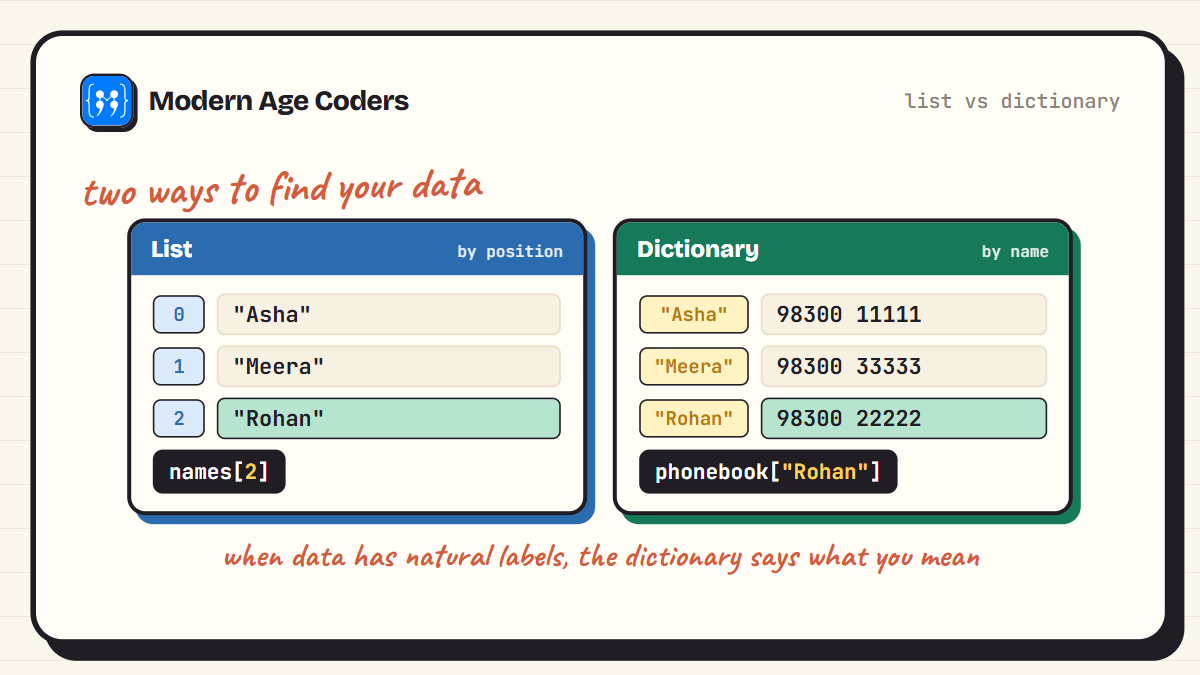
The idea is simple. A list finds things by position: give me item number 2. A dictionary finds things by name: give me Rohan's phone number. The moment your data has natural labels, a dictionary says what your code means far better than a list ever could.
This guide walks through 20 examples, from creating your first dictionary to a small working contact book. Every example was run before being pasted here, and the output under each snippet is the real output. If Python itself is brand new to you, start with Python for beginners and come back.
What a Dictionary Actually Is
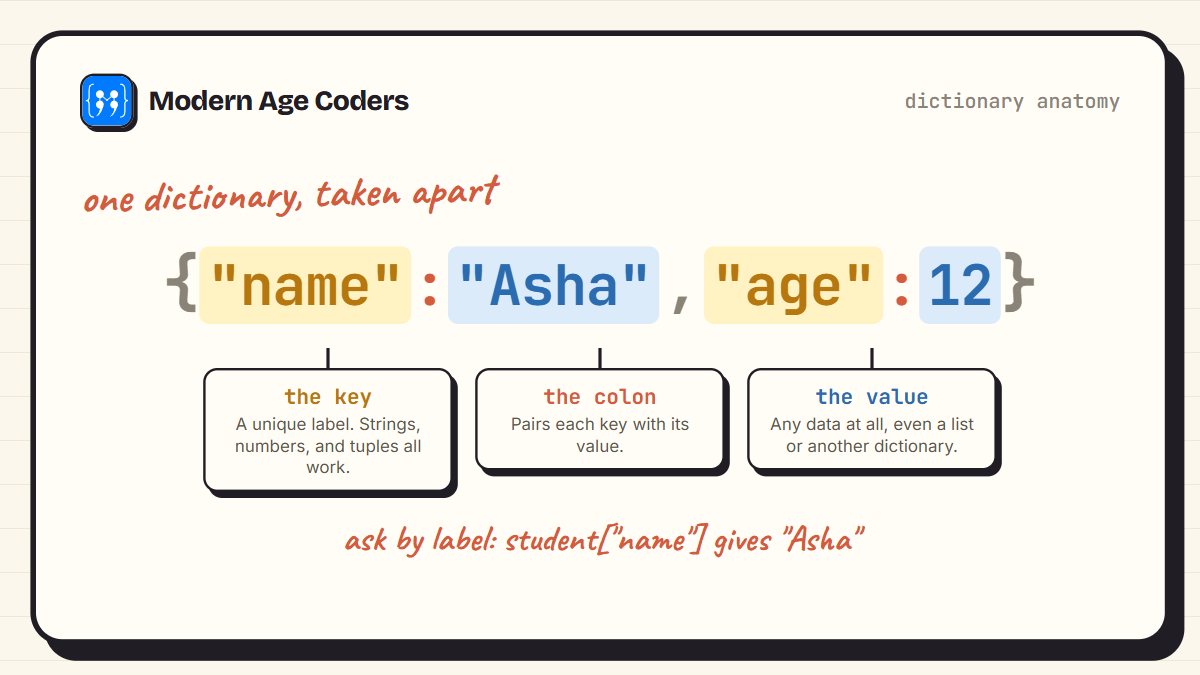
A dictionary is a collection of key and value pairs inside curly braces. Each key acts like a label stuck onto its value. Keys must be unique and unchangeable, which is why strings and numbers make good keys and lists do not. Values can be anything at all: numbers, strings, lists, even other dictionaries.
Since Python 3.7, dictionaries also remember the order you added things in, and lookups stay fast no matter how big the dictionary grows. Asking a dictionary of ten entries and a dictionary of ten million for a key both answer almost instantly, which is the quiet superpower behind everything below.
First Steps With a Dictionary
Six moves cover most of what you will ever do: create, read, add, remove, check, and loop. Get comfortable here and the rest of the guide is easy.
1. Create a dictionary and read a value
Curly braces, keys on the left, values on the right. You read a value by asking for its key in square brackets.
student = {"name": "Asha", "age": 12, "grade": 7}

print(student["name"])
print(student["age"])
Asha
122. Add a new pair and update an old one
The same square-bracket assignment does both jobs. If the key is new, Python adds it. If it already exists, Python overwrites the value.
student = {"name": "Asha", "age": 12}

student["city"] = "Kolkata"   # new key, so this adds
student["age"] = 13           # existing key, so this updates

print(student)
{'name': 'Asha', 'age': 13, 'city': 'Kolkata'}3. Remove pairs with pop() and del
pop() removes a key and hands you back its value, which is handy when you still need it. del just deletes.
student = {"name": "Asha", "age": 13, "city": "Kolkata"}

removed = student.pop("city")
del student["age"]

print(removed)
print(student)
Kolkata
{'name': 'Asha'}4. Read safely with get()
Square brackets crash with a KeyError if the key is missing. get() returns None instead, or any default you choose. This one method prevents most beginner dictionary crashes.
marks = {"maths": 92, "science": 88}

print(marks.get("maths"))
print(marks.get("english"))
print(marks.get("english", 0))
92
None
05. Check whether a key exists
The in keyword asks about keys, not values. Test before you touch and you never crash.
marks = {"maths": 92, "science": 88}

print("maths" in marks)
print("english" in marks)
True
False6. Loop through a dictionary
items() hands you each pair as key and value together, which reads far better than looking everything up inside the loop.
marks = {"maths": 92, "science": 88, "english": 75}

for subject, score in marks.items():
    print(subject, "->", score)
maths -> 92
science -> 88
english -> 75Dictionaries Doing Real Work
This is where dictionaries earn their keep. Counting, looking things up by name, and nesting records are the jobs you will meet in real programs, school projects, and interviews alike.
7. Count word frequency
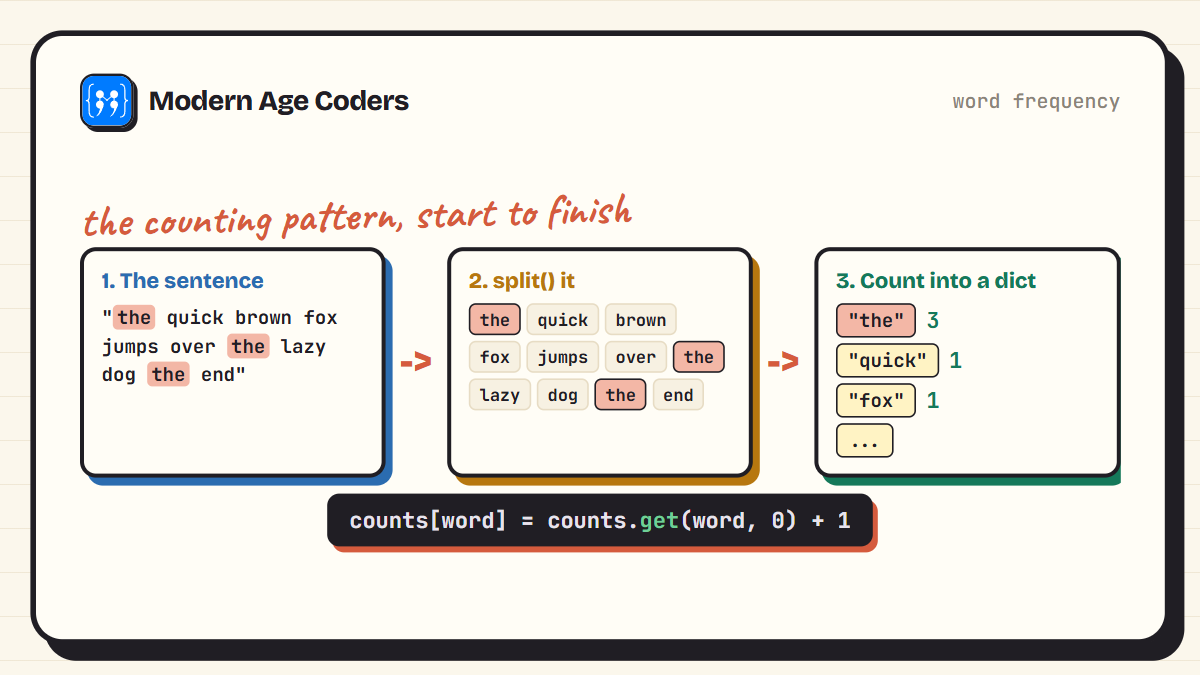
The classic dictionary job, and a question interviewers never retire. get() with a default of 0 means the very first time a word appears, it starts counting from zero.
sentence = "the quick brown fox jumps over the lazy dog the end"

counts = {}
for word in sentence.split():
    counts[word] = counts.get(word, 0) + 1

print(counts["the"])
print(counts)
3
{'the': 3, 'quick': 1, 'brown': 1, 'fox': 1, 'jumps': 1, 'over': 1, 'lazy': 1, 'dog': 1, 'end': 1}8. Build a phone book
Names to numbers is exactly what dictionaries were invented for. Check membership first and the lookup can never crash.
phonebook = {
    "Asha": "98300 11111",
    "Rohan": "98300 22222",
    "Meera": "98300 33333"
}

name = "Rohan"
if name in phonebook:
    print(name, ":", phonebook[name])
else:
    print(name, "is not saved")
Rohan : 98300 222229. Nest dictionaries inside a dictionary
A dictionary value can be another dictionary. Chain the square brackets to walk inward, one level at a time.
students = {
    "roll_1": {"name": "Asha", "marks": 92},
    "roll_2": {"name": "Rohan", "marks": 85}
}

print(students["roll_2"]["name"])
print(students["roll_1"]["marks"])
Rohan
9210. Keep lists as values
One key, many values: store a list under the key and append to it like any other list.
homework = {"monday": ["maths", "reading"], "tuesday": ["science"]}

homework["tuesday"].append("coding")

print(homework["tuesday"])
['science', 'coding']11. Merge two dictionaries
The | operator builds a merged copy. When both sides share a key, the right side wins, which makes it perfect for defaults plus overrides.
defaults = {"theme": "light", "font": "Inter", "size": 14}
custom = {"theme": "dark"}

settings = defaults | custom

print(settings)
{'theme': 'dark', 'font': 'Inter', 'size': 14}12. Flip keys and values
Sometimes you need to look up in the other direction. A one-line comprehension swaps every pair.
codes = {"IN": "India", "JP": "Japan", "BR": "Brazil"}

names = {value: key for key, value in codes.items()}

print(names["Japan"])JPThe Methods Worth Knowing
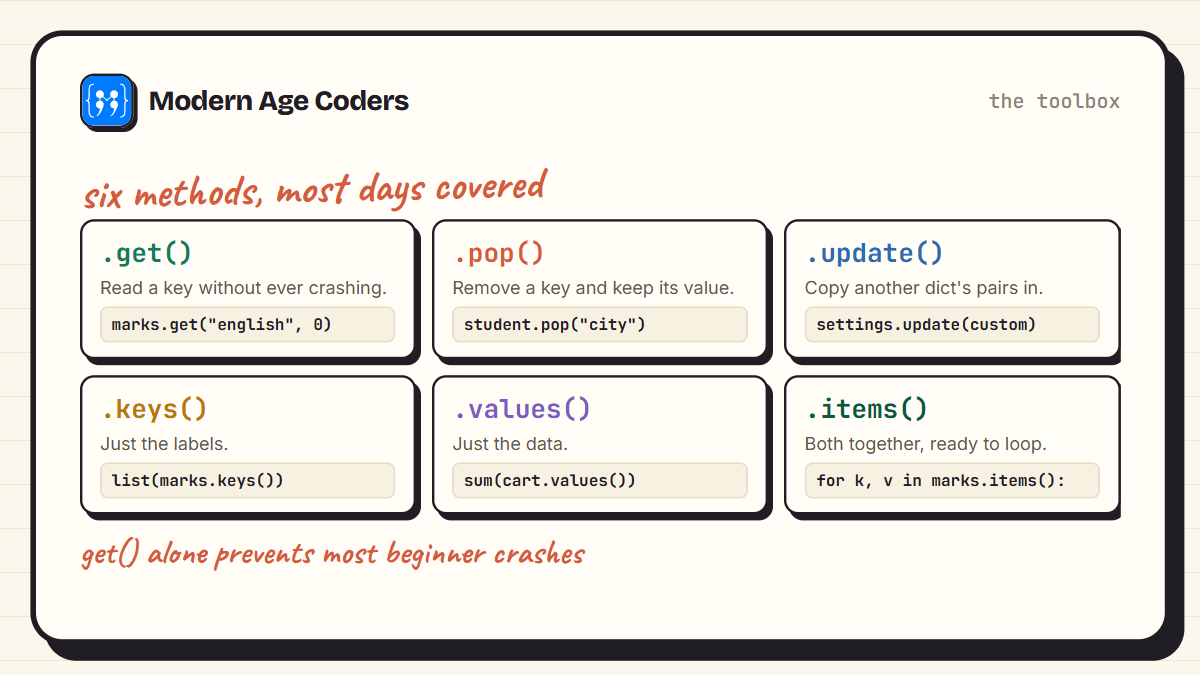
Python dictionaries carry a toolbox of methods. You do not need all of them, but these four solve problems that would otherwise take clumsy loops.
13. See all keys, values, and pairs
Three views of the same dictionary. Wrap them in list() when you want a plain list you can index or slice.
marks = {"maths": 92, "science": 88}

print(list(marks.keys()))
print(list(marks.values()))
print(list(marks.items()))
['maths', 'science']
[92, 88]
[('maths', 92), ('science', 88)]14. Group items with setdefault()
setdefault() fetches a key, but if the key is missing it first stores the default you give. That turns grouping into a two-line loop.
pairs = [("Asha", "red"), ("Rohan", "blue"), ("Meera", "red")]

groups = {}
for name, house in pairs:
    groups.setdefault(house, []).append(name)

print(groups)
{'red': ['Asha', 'Meera'], 'blue': ['Rohan']}15. Start a scoreboard with fromkeys()
fromkeys() builds a dictionary from a list of keys, all sharing one starting value. Ideal for attendance registers and score counters.
attendance = dict.fromkeys(["Asha", "Rohan", "Meera"], 0)

attendance["Asha"] += 1

print(attendance)
{'Asha': 1, 'Rohan': 0, 'Meera': 0}16. Sort a dictionary by its values
Dictionaries keep insertion order, so sort the pairs first and rebuild. The key function picks pair[1], the value, as the thing to sort by.
marks = {"maths": 92, "english": 75, "science": 88}

ranked = dict(sorted(marks.items(), key=lambda pair: pair[1], reverse=True))

print(ranked)
{'maths': 92, 'science': 88, 'english': 75}Comprehensions and Mini Programs
The finishing school. Dict comprehensions compress build-and-filter loops into one readable line, and the closing example stitches the whole guide into a working program.
17. Build a dictionary in one line
A dict comprehension is a loop folded into the braces. Here every number from 1 to 5 becomes a key, with its square as the value.
squares = {n: n * n for n in range(1, 6)}

print(squares)
{1: 1, 2: 4, 3: 9, 4: 16, 5: 25}18. Filter a dictionary
Add an if to the comprehension and only the pairs that pass survive.
marks = {"maths": 92, "english": 75, "science": 88, "history": 64}

passed = {sub: m for sub, m in marks.items() if m >= 80}

print(passed)
{'maths': 92, 'science': 88}19. Total up a shopping cart
values() gives you just the prices, and sum() adds them. Ten lines of receipt in four lines of code.
cart = {"notebook": 60, "pen": 15, "geometry box": 120}

for item, price in cart.items():
    print(item, ":", price)

print("Total:", sum(cart.values()))
notebook : 60
pen : 15
geometry box : 120
Total: 19520. A tiny contact book with functions
Everything from this guide in one small program: a dictionary as storage, get() for safe lookups, and functions wrapped around both.
contacts = {}

def save(name, number):
    contacts[name] = number

def find(name):
    return contacts.get(name, "not found")

save("Asha", "98300 11111")
save("Rohan", "98300 22222")

print(find("Asha"))
print(find("Zoya"))
98300 11111
not foundThe Mistakes Everyone Makes Once
- KeyError on a missing key: marks["english"] crashes if english is not there. Use marks.get("english") or test with in first.
- Using a list as a key: keys must be values that cannot change, so lists are out. Use a tuple instead: locations[(22.57, 88.36)] works.
- Changing a dictionary while looping over it: adding or deleting keys mid-loop raises a RuntimeError. Loop over list(marks.keys()) if you must delete.
- Expecting in to check values: "Asha" in phonebook checks keys. For values, write "Asha" in phonebook.values().
- Copying with =: b = a does not copy, it points both names at the same dictionary. Use b = a.copy() for a real copy.
One habit that pays forever
Whenever you write a square-bracket lookup, pause and ask: can this key ever be missing? If yes, switch to get() or an in check on the spot. That single habit removes the most common crash in beginner Python.
Frequently Asked Questions
A list stores items in a numbered sequence and you fetch them by position, like items[2]. A dictionary stores key and value pairs and you fetch by key, like marks["maths"]. Use a list when order and position matter, and a dictionary when your data has natural labels.
get() reads a value by key, but never crashes. If the key is missing it returns None, or a default you supply as the second argument, like marks.get("english", 0). Square brackets on a missing key raise a KeyError instead.
Yes. Since Python 3.7, a dictionary remembers the order in which keys were inserted, and looping over it visits them in that order. Before 3.7 the order was not guaranteed, which is why older tutorials say otherwise.
Any value that cannot change: strings, numbers, and tuples all work. Lists and other dictionaries cannot be keys because they are mutable. Values, on the other hand, can be absolutely anything.
Sort the pairs and rebuild: dict(sorted(marks.items(), key=lambda pair: pair[1], reverse=True)). The lambda picks the value out of each pair as the sorting key, and reverse=True puts the biggest first.
On Python 3.9 and newer, use the pipe operator: merged = a | b. Where both share a key, b wins. On older versions, use merged = {**a, **b} or a.update(b), which changes a in place.
A dictionary whose values are themselves dictionaries, like a record of students where each roll number maps to a smaller dictionary of name and marks. You reach inside by chaining keys: students["roll_1"]["name"].
A one-line way to build a dictionary from a loop, written inside braces: {n: n * n for n in range(1, 6)}. Add an if at the end to filter while you build. It does exactly what the longer loop does, in less space.
Where Dictionaries Take You Next
Once dictionaries click, a surprising amount of programming suddenly makes sense: JSON files are dictionaries, API responses are dictionaries, pandas rows behave like dictionaries, and the counters and caches inside real applications are dictionaries too. That is why they are worth learning properly rather than in passing. For more practice at this level, try reversing strings five ways or our 30 pattern programs next.
A satisfying way to put nested dictionaries to work is a game. In how to make a text adventure game in Python, the whole world, every room, exit and item, is a single dictionary, and the game loop just reads it.
And when you are ready to use dictionaries on real data and real projects, the path from here runs through our Python, AI and ML track, with live courses for learners aged 6 to 67 and a teacher who reads every line you write.