Table of Contents
There is a moment in every Python learner's life when a four-line loop collapses into one clean line, and the code suddenly reads like a sentence. That is list comprehension, and it is less magic than it looks: a loop, folded into the brackets of the list it builds.
Comprehensions matter for two reasons. They are everywhere in real Python code, so you have to read them fluently even if you never write one. And when used well they are genuinely clearer than the loops they replace, because the whole intent sits on a single line.
This guide builds the idea from zero and then works through 15 examples, each one executed before it was pasted here. You only need loops and lists to follow along; if those are still new, start with Python for beginners and come back.
The Pattern Behind Every Comprehension
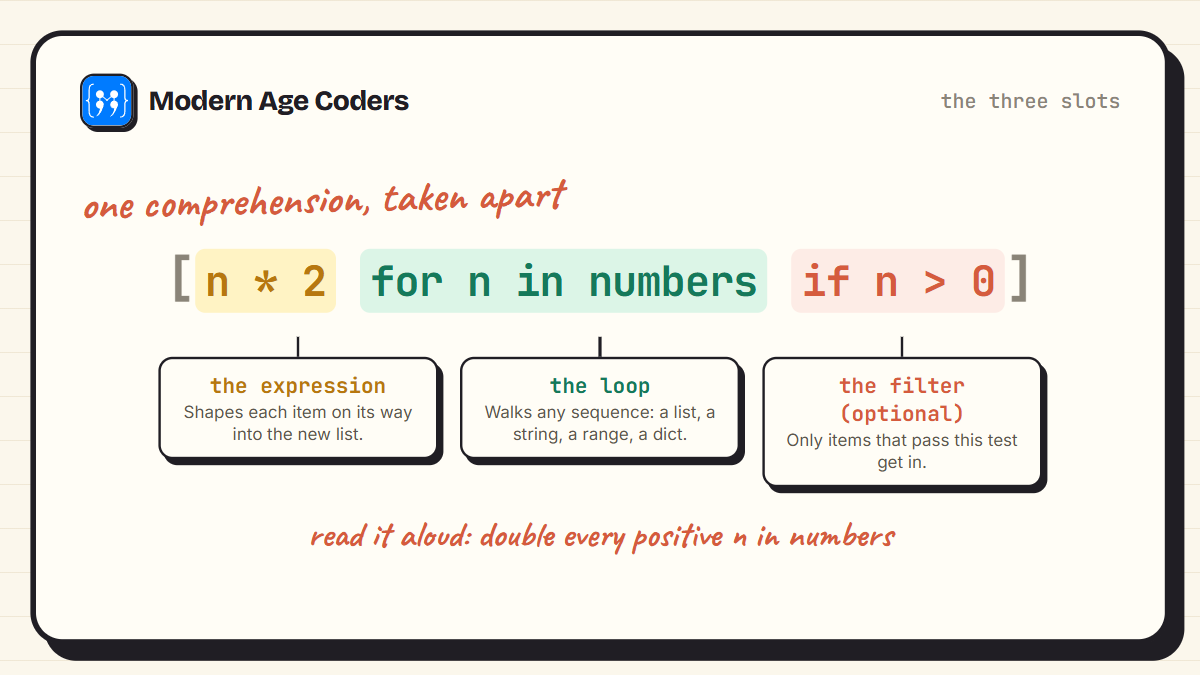
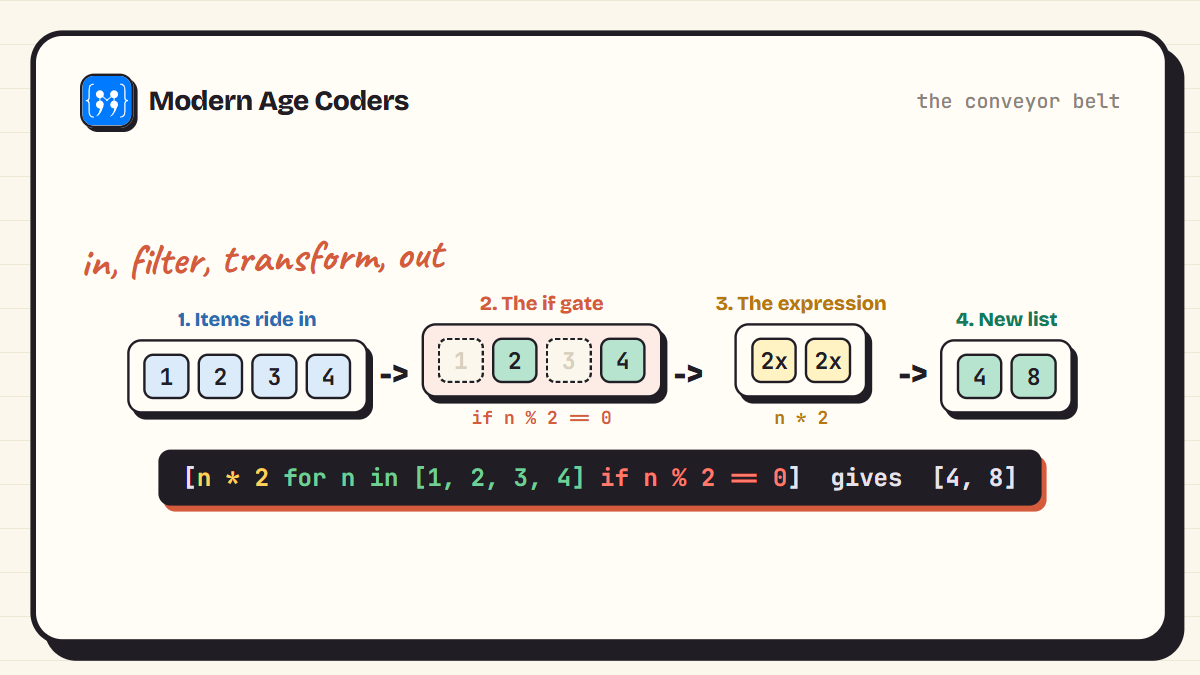
Every list comprehension has the same three slots: an expression that shapes each item, a for clause that walks a sequence, and an optional if that filters. Once you can spot the three slots, you can read any comprehension ever written.
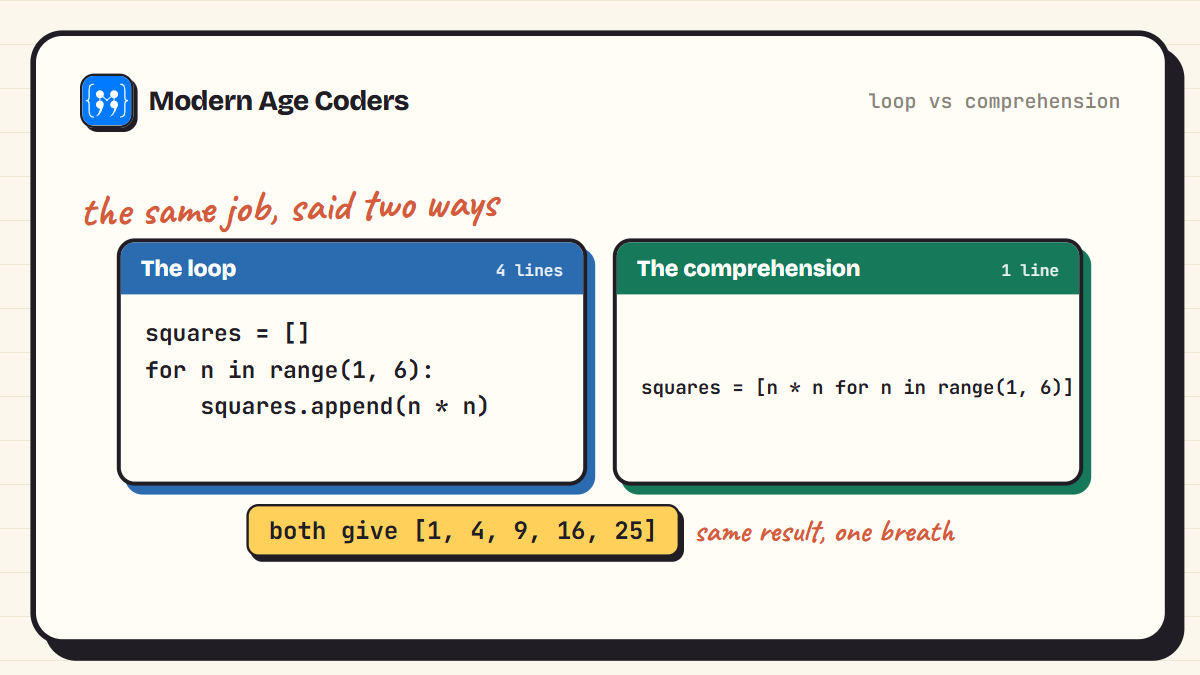
Here is the same job done both ways. The loop appends item by item. The comprehension says the whole thing at once.
A good way to hold the idea: a comprehension is a conveyor belt. Items ride in from the sequence, the if gate drops the ones that do not qualify, the expression reshapes the ones that pass, and the finished items land in a new list. The original list is never touched.
The Basics, One Idea at a Time
Five examples, each adding one small twist: transform, filter, and the fact that any sequence can feed a comprehension. Read every one aloud before running it.
1. Squares from a range
The hello world of comprehensions. Read it right to left: for every n from 1 to 5, keep n times n.
squares = [n * n for n in range(1, 6)]

print(squares)
[1, 4, 9, 16, 25]2. Transform every item
Any expression works at the front. Here each name passes through upper() on its way into the new list.
names = ["asha", "rohan", "meera"]

shouty = [name.upper() for name in names]

print(shouty)
['ASHA', 'ROHAN', 'MEERA']3. Filter with an if at the end
Add an if after the loop and only the items that pass get in. Nothing is transformed here, just selected.
numbers = [4, 7, 10, 13, 16, 19]

evens = [n for n in numbers if n % 2 == 0]

print(evens)
[4, 10, 16]4. Pull characters from a string
Strings are sequences too, so a comprehension can walk one letter at a time.
word = "programming"

vowels = [ch for ch in word if ch in "aeiou"]

print(vowels)
['o', 'a', 'i']5. Convert a whole list of types
Input usually arrives as text. One line turns a list of digit strings into real numbers you can add.
raw = ["10", "25", "7"]

nums = [int(s) for s in raw]

print(nums)
print(sum(nums))
[10, 25, 7]
42Everyday Jobs
The examples you will actually reuse: labelling data, cleaning text, and flattening the awkward nested lists that real programs keep handing you.
6. Label items with if-else
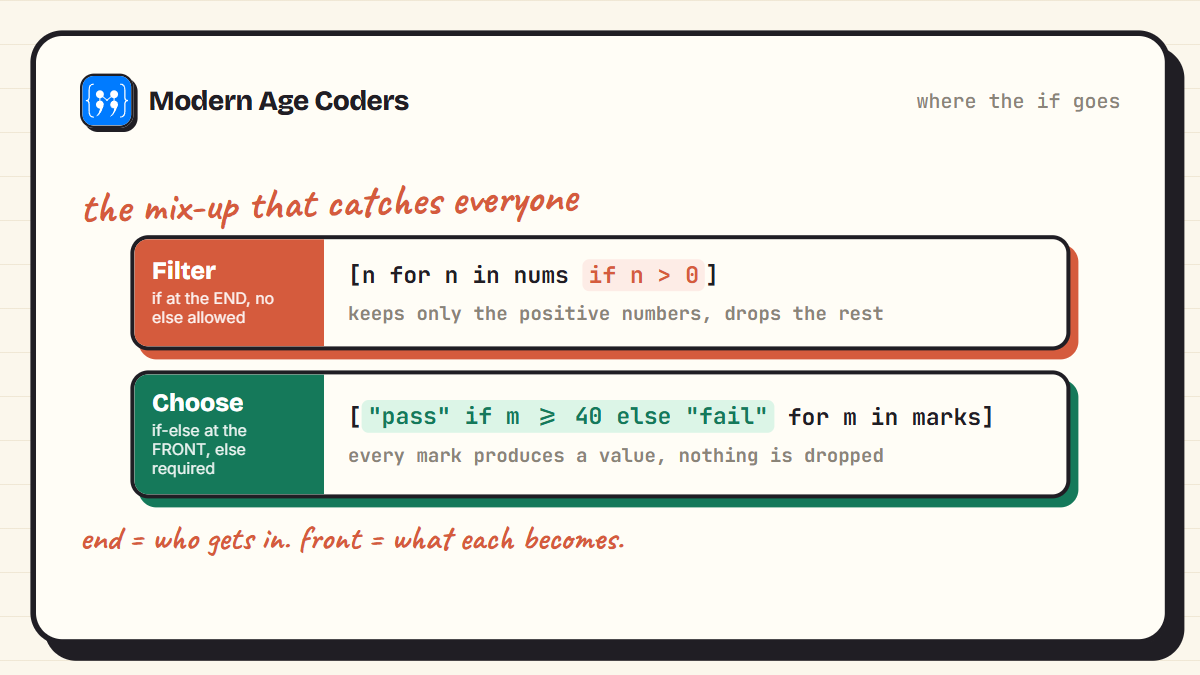
When every item must produce something, the if-else moves to the front, before the for. It is an expression now, not a filter.
marks = [35, 72, 48, 91, 28]

results = ["pass" if m >= 40 else "fail" for m in marks]

print(results)
['fail', 'pass', 'pass', 'pass', 'fail']7. Clean up messy text
Real data arrives with stray spaces and random capitals. Chain the string methods inside the expression and the whole list comes out washed.
raw = ["  Asha ", "ROHAN", " meera  "]

clean = [s.strip().lower() for s in raw]

print(clean)
['asha', 'rohan', 'meera']8. Measure every word
A comprehension can hand its result straight to another function, like max() hunting for the longest word.
words = ["code", "python", "loop", "comprehension"]

lengths = [len(w) for w in words]

print(lengths)
print(max(lengths))
[4, 6, 4, 13]
139. Flatten a nested list
Two fors run left to right, exactly in the order you would write them as normal loops: first each row, then each item inside it.
nested = [[1, 2], [3, 4], [5, 6]]

flat = [x for row in nested for x in row]

print(flat)
[1, 2, 3, 4, 5, 6]10. Build every pair
Two independent loops give you every combination, the same way a times table is built.
pairs = [(x, y) for x in [1, 2, 3] for y in ["a", "b"]]

print(pairs)
[(1, 'a'), (1, 'b'), (2, 'a'), (2, 'b'), (3, 'a'), (3, 'b')]Sharper Tools
The last five push further: matrices, dictionaries, and the set, dict, and generator cousins that share the same shape.
11. Grab one column from a matrix
A matrix is a list of rows. Picking index 1 from every row slices out the middle column.
matrix = [
    [1, 2, 3],
    [4, 5, 6],
    [7, 8, 9]
]

column = [row[1] for row in matrix]

print(column)
[2, 5, 8]12. Filter a dictionary into a list
Comprehensions read from anything you can loop over, including dictionary items. Here only the passing students keep their names on the list.
results = {"Asha": 92, "Rohan": 35, "Meera": 78, "Zoya": 38}

passed = [name for name, m in results.items() if m >= 40]

print(passed)
['Asha', 'Meera']13. Keep only the digits
Combine a filter with join() and you have a one-line text cleaner.
messy = "a1b2c3d4"

digits = "".join([ch for ch in messy if ch.isdigit()])

print(digits)123414. Meet the cousins: set and dict comprehensions
Swap the square brackets for braces and the same pattern builds sets and dictionaries. One idea, three containers.
words = ["code", "loop", "python", "trees"]

unique_lengths = {len(w) for w in words}
word_length = {w: len(w) for w in words}

print(unique_lengths)
print(word_length)
{4, 5, 6}
{'code': 4, 'loop': 4, 'python': 6, 'trees': 5}15. Drop the brackets and feed sum() directly
Without brackets this becomes a generator expression: it never builds the list in memory, it just streams values into sum(). For big ranges this is the version to use.
total = sum(n * n for n in range(1, 101))

print(total)338350When a Plain Loop Is the Better Choice
Comprehensions are for building lists, not for doing things. If the body of your loop prints, saves to a file, or updates other variables, keep it as a loop. And if your comprehension needs more than one if and one or two fors to say what it means, it has outgrown one line. The test is simple: can you read it aloud in one breath? If not, write the loop. Nobody was ever failed in a code review for being too clear.
Read it aloud
Every comprehension can be spoken as a sentence. [n * n for n in range(1, 6)] reads as: the square of every n from 1 to 5. If you cannot phrase yours as a sentence, that is the sign to break it back into a loop.
Mistakes That Catch Everyone Once
- Putting a filtering if before the for: [n for n if n > 0 in nums] is a syntax error. A filter goes after the loop: [n for n in nums if n > 0].
- Forgetting the else in a front if: ["pass" if m >= 40 for m in marks] fails. An if before the for is an expression and must carry an else.
- Using a comprehension for side effects: [print(x) for x in items] builds a useless list of None. Just write the loop.
- Nesting until unreadable: two fors is the practical ceiling. Three or more belongs in a loop with real names.
- Shadowing names: [x for x in x] runs but hurts. Give the loop variable its own name.
Frequently Asked Questions
A compact way to build a new list by transforming and filtering an existing sequence in one expression: [n * n for n in range(1, 6)] builds the squares of 1 to 5. It does the same work as a for loop with append, folded into a single readable line.
Usually a little faster, because the looping happens in Python's internals rather than through repeated append calls. But the honest reason to use one is readability, not speed. For heavy number crunching, libraries like NumPy matter far more than loop style.
A filtering if goes at the end, after the for: [n for n in nums if n > 0]. An if-else that chooses a value goes at the front, before the for: ["pass" if m >= 40 else "fail" for m in marks]. The two are different tools and the position is what separates them.
Yes, but only in the front position as part of a conditional expression: value_if_true if condition else value_if_false. A trailing filter if cannot take an else, which is the error most beginners hit first.
Multiple fors read left to right in the same order as stacked loops. [x for row in nested for x in row] means: for each row in nested, for each x in that row, keep x. That flattens a list of lists.
Brackets build the whole list in memory at once. Parentheses, or no brackets inside a function call like sum(n * n for n in range(1000000)), create a generator that produces one value at a time. For large data, the generator saves memory.
Yes. Braces build a set: {len(w) for w in words}. Braces with a colon build a dictionary: {w: len(w) for w in words}. The reading pattern is identical, only the container changes.
One Pattern, a Lifetime of Use
Fifteen examples, but really one pattern: shape it, walk it, filter it. From here, comprehensions turn up everywhere, filtering rows of data, cleaning text, and feeding results straight into sum(), max(), and friends. Keep practising with our dictionary guide, which pairs naturally with this one, or flex the basics with 30 pattern programs.
If you want this level of Python to become second nature, our Python from the ground up course builds it brick by brick, and our live coding courses teach learners aged 6 to 67 with a real teacher reading every line.