Table of Contents
- Understanding Generative AI in Software Development
- Core Responsibilities of Developers Using Generative AI
- Ethical Responsibilities in AI-Assisted Development
- Legal and Compliance Responsibilities while using generative ai
- Best Practices for Responsible AI Use
- Industry-Specific Responsibilities for generative ai
- Common Mistakes Developers Make with Generative AI
- Building a Responsible AI Development Culture
- The Future of Developer Responsibility
- Conclusion
Picture this: A developer sits at their desk, stuck on a tricky bug. They open ChatGPT, paste in their code, get a solution in seconds, copy it into their project, and push it to production. Problem solved, right?
Not quite. What if that AI-generated code has a security vulnerability? What if it violates someone's copyright? What if it contains hidden biases that affect users unfairly? Who's responsible when things go wrong?
As we navigate through 2026, generative AI tools have become standard equipment in every developer's toolkit. GitHub Copilot suggests code as you type. ChatGPT debugs errors and explains complex concepts. These tools are incredible: they make us faster, help us learn, and solve problems we couldn't tackle alone.
But here's the truth: with this power comes serious responsibility. This guide breaks down exactly what it means to be a responsible developer using generative AI. Let's dive in.
Understanding Generative AI in Software Development
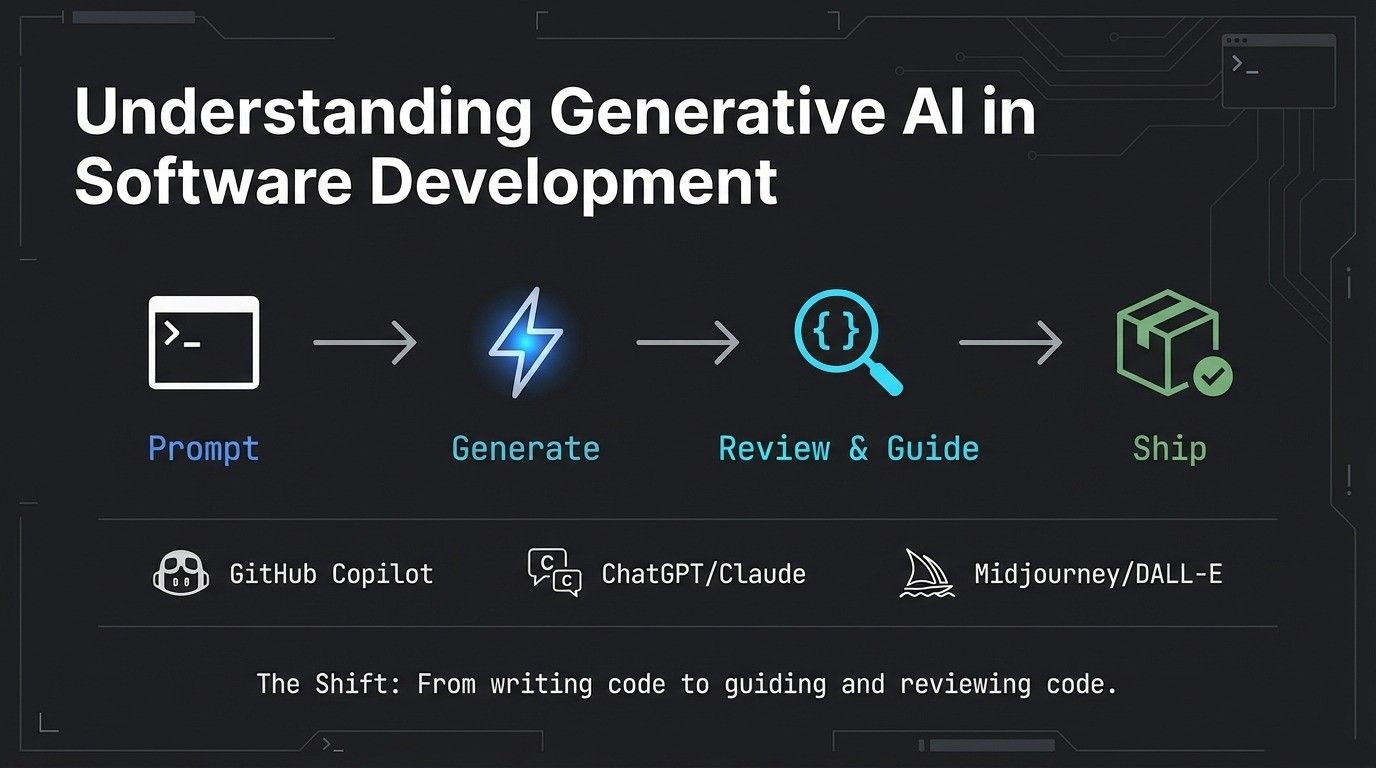
First, let's get clear on what we're talking about. Generative AI refers to artificial intelligence that creates new content: code, text, images, and more. It's the technology behind tools that feel like they're thinking alongside you.
Developers in 2026 commonly use:
GitHub Copilot suggests entire functions as you code, learning from your patterns and billions of lines of public code. It's like having a pair programming partner who never gets tired.
ChatGPT and Claude help with problem-solving, debugging, explaining complex concepts, and even writing documentation. They're the go-to for "How do I..." questions.
Midjourney and DALL-E generate design assets, UI mockups, and visual content without needing a designer for every iteration.
Documentation generators turn your code into readable docs automatically, saving hours of tedious writing.
These tools have fundamentally changed how developers work. Instead of writing every line of code from scratch, many developers now spend more time reviewing, guiding, and validating AI-generated solutions. According to GitHub's research on developer productivity, developers using AI assistants complete tasks significantly faster, but speed alone isn't the goal.
The shift is profound: we've moved from "I write all my code" to "I guide and review code that AI helps create." This isn't going away. As AI becomes more capable, understanding how to use it responsibly becomes more critical, not less.
Core Responsibilities of Developers Using Generative AI
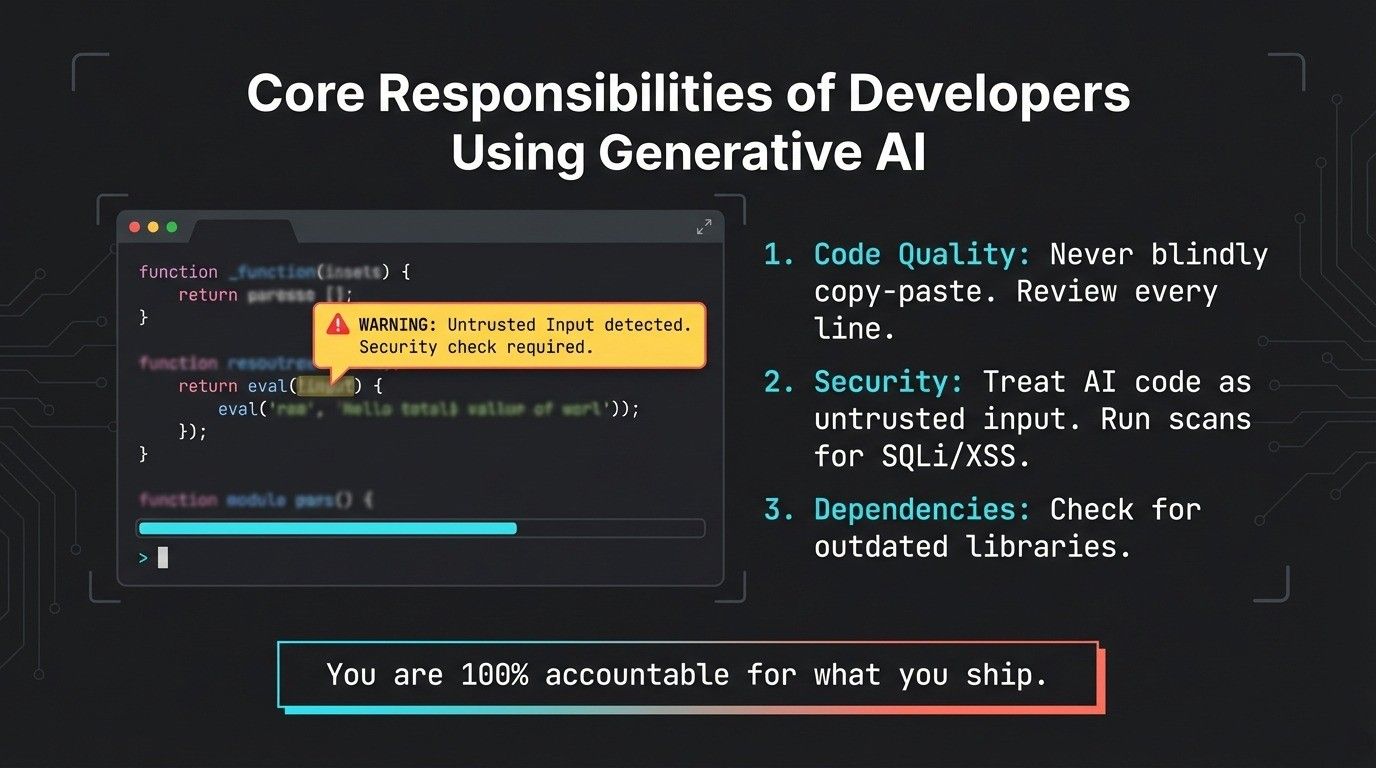
Let's cut to the chase: if you use AI to help build software, you're still 100% accountable for what you ship. The AI is your tool, not your excuse. Here's what that means in practice.
Code Quality and Review
Never, ever blindly copy-paste AI-generated code into production. Just because it looks right doesn't mean it is right.
Your responsibility: Review every line. Understand what it does. Ask yourself: Is this the best approach? Are there edge cases this doesn't handle? Does this follow our team's coding standards? Would I be comfortable explaining this code to a colleague?
Testing becomes even more critical. AI can generate code that works for common cases but fails spectacularly on edge cases. Your tests need to be comprehensive. Don't let AI suggestions make you lazy about quality.
Document when you use AI assistance. Your future self (or your teammates) will thank you when they need to understand why certain decisions were made.
Security and Vulnerability Prevention
Here's a scary fact: AI models are trained on public code repositories, which contain plenty of insecure patterns. When you ask an AI for a quick solution, it might give you code that "works" but opens security holes.
Your responsibility: Treat all AI-generated code as untrusted input. Run security scans. Check for common vulnerabilities like SQL injection, XSS attacks, or insecure authentication. Use security linters specific to your language.
Keep dependencies updated. AI might suggest using a convenient library without mentioning that it has known security issues. Cross-reference suggestions with current security advisories.
Never assume the AI knows about the latest vulnerabilities or best practices. It was trained on historical data, which means it might suggest outdated or insecure approaches that were common when the data was collected.
Data Privacy and Compliance
Before you paste anything into an AI tool, stop and think: What data am I sharing?
Many AI tools send your prompts to external servers for processing. That means anything you type (customer data, proprietary algorithms, API keys, passwords) could potentially be seen by others or used to train future models.
Your responsibility: Read the terms of service. Understand what data the AI provider stores, how long they keep it, and whether they use it for training. Some tools offer enterprise versions with stronger privacy guarantees.
Be aware of regulations like GDPR in Europe, CCPA in California, HIPAA for healthcare, and others specific to your industry. If you're building software that handles personal information, you need to ensure your AI tool usage complies with these laws.
Strip out sensitive information before using AI assistance. Use placeholder values. Anonymize data. Never expose real customer information just to get help debugging.
Intellectual Property Awareness
AI models are trained on vast amounts of code, much of it open source with various licenses. When AI generates code, where does it come from? Could it be similar to copyrighted work?
Your responsibility: Understand that AI-generated code can sometimes closely resemble training data. If it does, you might be inadvertently violating someone's copyright or open-source license.
Check generated code against your company's IP policies. Many organizations have specific rules about what code can be included in their products. Some prohibit GPL-licensed code, for example, because of its viral nature.
Document sources and attributions where appropriate. If you're using AI to help implement a known algorithm, cite the original source, not just the AI tool.
Be transparent about AI usage in your development process, especially when working with clients or on projects where IP ownership matters.
Ethical Responsibilities in AI-Assisted Development
Beyond the technical and legal aspects, developers have ethical obligations that matter just as much. As Python becomes increasingly powerful in AI development, developers need to think critically about how they use these tools ethically.
Transparency and Disclosure
Honesty matters. If you're using AI tools to complete work, be transparent about it, especially in professional settings.
Your responsibility: Don't claim AI-generated work as entirely your own creative effort. If a client asks how you built something, mentioning AI assistance isn't admitting weakness; it's being honest about your process.
Set realistic expectations. AI makes some things faster, but it doesn't make you instantly expert in areas where you lack knowledge. Don't take on projects beyond your capabilities just because AI can "help."
When teaching or mentoring others, disclose when examples or explanations come from AI versus your own experience. This helps learners understand the tool's role and limitations.
Bias Prevention and Fairness
AI models learn from human-created data, which means they absorb human biases. Code generated by AI might inadvertently discriminate based on race, gender, age, or other protected characteristics.
Your responsibility: Test your AI-assisted applications with diverse scenarios and user perspectives. Does your recommendation algorithm favor certain demographics? Does your hiring tool filter out qualified candidates unfairly? Does your pricing model disadvantage certain groups?
Testing across groups matters because overall accuracy can hide large gaps. Our post on why machine learning models make mistakes measures exactly this, alongside overfitting and the accuracy paradox.
Question AI suggestions that seem to make assumptions about users. For example, if AI generates form validation that assumes everyone has a middle name, or that all phone numbers follow US formatting, push back and make it more inclusive.
Seek diverse perspectives when testing. Your experience isn't universal. What seems neutral to you might be problematic to others.
Environmental Considerations
Every AI query consumes electricity and contributes to carbon emissions. Large language models require massive computational resources to run.
Your responsibility: Use AI tools thoughtfully, not wastefully. Don't run dozens of queries trying slight variations when you could think through the problem first. Batch similar questions together. Use AI for tasks where it adds real value, not just because it's convenient.
Support companies working on more efficient AI models. Choose tools from providers who are transparent about their environmental impact and working to reduce it.
Human Oversight and Decision-Making
AI is a tool, not a replacement for your judgment. The most critical responsibility is maintaining human oversight. Understanding AI agent terminology helps developers recognize that even sophisticated AI systems require human guidance and accountability.
Your responsibility: When AI suggests something, ask "why?" Don't just accept it because the AI seems confident. AI can be confidently wrong, what researchers call "hallucinations."
Know when to ignore AI recommendations. If something seems off, trust your instincts. If you don't understand how the generated code works, don't use it until you do.
Keep humans in the loop for important decisions. AI can help analyze options, but humans should make the final call, especially for decisions that affect users' safety, privacy, or rights.
Accuracy and Truthfulness
AI confidently provides wrong information all the time. It might reference documentation that doesn't exist, cite functions with incorrect parameters, or explain concepts incorrectly.
Your responsibility: Verify everything. Cross-check generated code against official documentation. Test suggested solutions thoroughly. Don't assume accuracy just because the explanation sounds plausible.
When AI cites sources, look them up. Sometimes the sources don't exist or don't say what the AI claims they say. This is especially important when learning new technologies or frameworks.
If you discover AI gave you incorrect information, learn from it. Understand why it was wrong and what the correct approach should be. Don't just fix it and move on; use it as a learning opportunity.
Legal and Compliance Responsibilities while using generative ai
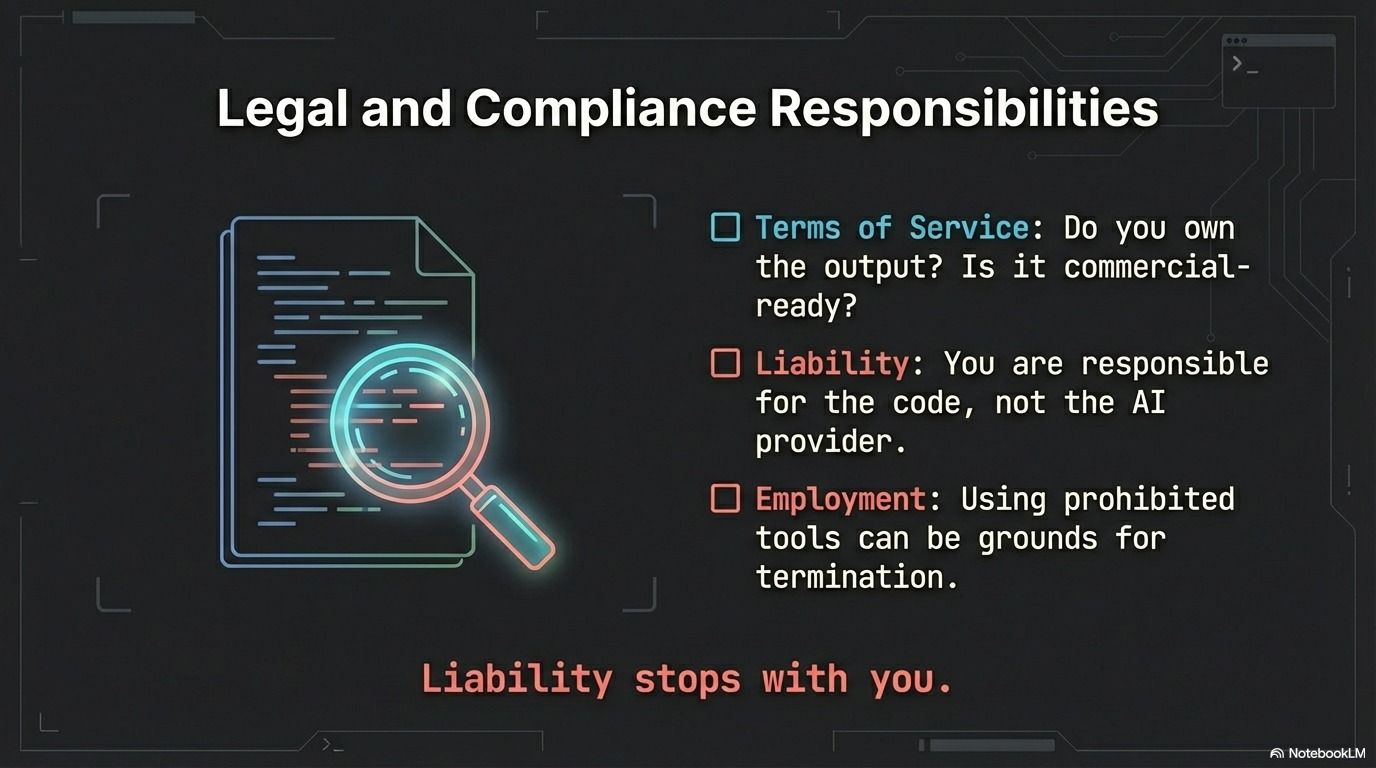
The legal landscape around AI is evolving rapidly in 2026, with new regulations and interpretations emerging regularly.
Understanding Terms of Service
Most AI tools have detailed terms of service that few people read. But as a professional developer, you need to know what you're agreeing to.
Your responsibility: Actually read the ToS before using a tool professionally. Pay attention to:
- Can you use this for commercial projects?
- What happens to the data you input?
- Does the provider claim any rights over what you create?
- Are there usage limits or restrictions?
- What happens if the service changes or shuts down?
Some tools have different terms for personal versus commercial use. Make sure you're using the right tier for your work.
Regulatory Compliance
Different industries have different rules, and AI use must comply with them all.
Your responsibility: If you're building healthcare software, ensure AI-assisted development still meets HIPAA requirements. For financial software, comply with SOX and other financial regulations. For children's apps, follow COPPA rules strictly.
Stay informed about AI-specific regulations. The European Commission's AI Act and similar laws worldwide are establishing new requirements for AI systems, including those used in development.
Liability and Accountability
When AI-generated code causes problems, who's liable? As of 2026, the answer is usually: you, the developer.
Your responsibility: Understand that using AI doesn't transfer liability to the AI provider. You're responsible for the code that ships under your name or your company's name.
Document your decision-making process. If something goes wrong, being able to show you followed best practices, tested thoroughly, and exercised good judgment matters for liability purposes.
Consider how your organization handles liability. Some companies require specific insurance for AI-assisted development. Know your company's policies and your employment contract's terms.
Contract and Employment Obligations
Your employment contract or client agreements might have specific terms about AI tool usage.
Your responsibility: Check whether your company allows AI tool usage. Some organizations restrict it for security or IP reasons. Using prohibited tools, even if they help you work faster, could be grounds for termination.
Understand confidentiality obligations. If your contract says you won't share proprietary code with third parties, using an AI tool that sends code to external servers might violate that agreement.
For freelancers and contractors, client contracts often specify who owns the IP you create. Make sure AI tool usage doesn't complicate IP ownership.
Best Practices for Responsible AI Use
Theory is nice, but let's get practical. Here's how to actually use AI tools responsibly in your daily work.
Prompt Engineering and Tool Selection
How you ask matters as much as what you ask. Good prompts get better results and reduce the chances of problematic output.
Your responsibility: Be specific in your requests. Instead of "write a login function," try "write a secure login function in Python using bcrypt for password hashing, with rate limiting to prevent brute force attacks, following best practices."
Choose appropriate tools for each task. GitHub Copilot excels at completing code you've started. ChatGPT is better for explaining concepts or debugging. Use the right tool for the job.
Understand each tool's limitations. Some are better for certain programming languages or domains than others. Know what your tools are good at and where they struggle.
Version Control and Documentation
Your Git history should tell the truth about how code was created.
Your responsibility: Write honest commit messages. If AI suggested a solution, it's okay to note that in the commit. Something like "Implement caching layer (AI-assisted)" is transparent and useful for future debugging.
Maintain clear documentation about which parts of your codebase used AI assistance significantly. This helps teammates understand the code's origins and approach maintenance with appropriate caution.
Use branches and pull requests even for personal projects. This creates natural review points where you can evaluate AI-generated code before it enters your main codebase.
Continuous Learning and Skill Development
Here's a crucial point: don't let AI make you a worse developer. The best developers in 2026 use AI to amplify their skills, not replace them. This is especially important for those learning fundamental programming languages that form the foundation of software development.
Your responsibility: Keep learning fundamentals. Understand data structures, algorithms, design patterns, and system architecture. AI can help implement these concepts, but you need to know when to apply which pattern.
Challenge yourself to solve problems without AI sometimes. It's like a musician practicing scales: doing the basics keeps your skills sharp.
Read and understand the code AI generates. Don't just use it; learn from it. Ask "why did it choose this approach?" and "what are the trade-offs?"
Stay current on best practices. AI training data lags behind the cutting edge, so you need to know current standards even if AI suggests older approaches.
Testing and Validation Standards
AI makes writing code faster. That means you need to make testing even more thorough.
Your responsibility: Write comprehensive test suites. Include unit tests, integration tests, and end-to-end tests. AI-generated code should have the same test coverage as hand-written code or more.
Test edge cases aggressively. AI often handles the happy path well but misses unusual scenarios. What happens with empty inputs? Null values? Extremely large datasets? Concurrent access?
Include security testing as standard practice. Run SAST (Static Application Security Testing) and DAST (Dynamic Application Security Testing) tools on all code, especially AI-generated portions.
Get real users involved in testing. Automated tests catch bugs, but human testers find usability issues and unintended consequences that automated tests miss.
Collaboration and Team Guidelines
Responsible AI use isn't just individual; it's a team sport.
Your responsibility: Work with your team to establish clear guidelines for AI usage. What's allowed? What's prohibited? When should you disclose AI assistance? How much review is required?
Make code review processes account for AI. Reviewers should know which code was AI-assisted and apply appropriate scrutiny. Some teams mark AI-generated code with comments for visibility.
Share knowledge about effective AI practices. When you discover a particularly good prompt or workflow, share it with teammates. When AI leads you astray, share that too so others can avoid the same pitfall.
Create safe spaces to discuss challenges. Developers should feel comfortable admitting when they don't understand AI-generated code or asking for help reviewing it.
Industry-Specific Responsibilities for generative ai
Different fields have different stakes. Here's how responsibility plays out in critical industries.
Healthcare and Medical Software
When code affects human health, the bar for responsibility is extremely high.
Your responsibility: Apply extra scrutiny to all AI-generated medical software code. Lives may literally depend on your software working correctly.
Follow FDA regulations for medical devices. AI-assisted development doesn't exempt you from validation requirements.
Never sacrifice patient safety for development speed. The convenience of AI is never worth risking harm.
Maintain detailed documentation of testing, validation, and decision-making processes. Medical software audits are thorough, and you need to show your work.
Financial Services
Money has its own regulatory framework, and AI usage must comply.
Your responsibility: Ensure accuracy in all financial calculations. Rounding errors, precision issues, or logic bugs in AI-generated code can have serious financial and legal consequences.
Maintain comprehensive audit trails. Financial regulators want to know exactly how systems make decisions. AI's "black box" nature can complicate this; your job is to maintain clarity.
Protect sensitive financial data with extra care. Financial information is a prime target for cybercriminals, so security cannot be an afterthought.
Comply with consumer protection laws. Your AI-assisted systems must treat customers fairly and transparently.
Education Technology
When building tools for learning, especially for children, responsibility takes on extra dimensions.
Your responsibility: Comply with COPPA and other child protection laws strictly. Children's data requires special handling, and mistakes here carry severe penalties.
Ensure content is age-appropriate and accurate. AI can generate plausible-sounding but wrong information, which is extra dangerous in educational contexts where students trust the material.
Build accessibility into everything. Educational software should work for students with disabilities. Test with screen readers, keyboard navigation, and other assistive technologies.
Protect student privacy zealously. Educational data is sensitive, and breaches can affect children for years.
Government and Defense
Public sector work carries unique responsibilities around security and transparency.
Your responsibility: Meet security clearance requirements for any classified or sensitive work. Some AI tools may be prohibited in secure environments.
Follow strict data classification and handling procedures. Even unclassified government data has handling requirements that commercial AI tools might not support.
Consider supply chain security carefully. Government work often requires knowing exactly where software components come from; AI-generated code complicates this.
Be prepared for higher levels of scrutiny. Government projects undergo audits and reviews that require detailed documentation of development processes.
Common Mistakes Developers Make with Generative AI
Let's learn from common errors so you can avoid them.
Mistake 1: Over-trusting AI output. The biggest mistake is assuming AI is always right. It's not. It's often confidently wrong. Always verify, always test, always question.
Mistake 2: Using AI for tasks beyond your skill level. AI can help you learn, but it shouldn't let you skip learning entirely. If you use AI to build something you fundamentally don't understand, you can't maintain or debug it effectively.
Mistake 3: Ignoring security warnings. When your security scanner flags AI-generated code, don't just dismiss it. Investigate. Understand the issue. Fix it properly.
Mistake 4: Not reading generated code. If you don't read and understand the code before using it, how can you maintain it? How can you explain it to colleagues? How can you be sure it's correct?
Mistake 5: Violating company policies unknowingly. Assuming AI tools are allowed without checking can get you in trouble. Ask first, use later.
Mistake 6: Exposing confidential information. Pasting proprietary code or customer data into AI tools without thinking about where that data goes is a serious breach.
Mistake 7: Copying code that violates licenses. AI might generate code similar to GPL-licensed projects. Using it without understanding the license implications can create legal problems.
Mistake 8: Removing humans from critical decisions. Letting AI make important architectural or security decisions without human review is abdicating responsibility.
The good news? All these mistakes are avoidable with awareness and discipline.
Building a Responsible AI Development Culture
Individual responsibility matters, but organizational culture makes it sustainable.
Leadership plays a crucial role in setting standards. If managers pressure developers to ship fast without proper review, responsible AI use suffers. Leaders need to make space for thoughtful development.
Create clear company policies about AI tool usage. What's allowed? What requires approval? What's prohibited? Make these policies accessible and update them as the landscape evolves.
Invest in training and education. Help developers understand both how to use AI tools effectively and how to use them responsibly. This isn't a one-time thing; ongoing education matters as tools and practices evolve.
Foster open communication channels. Developers should feel comfortable asking questions, reporting concerns, or admitting when they don't understand something.
Implement incident reporting without blame. When something goes wrong with AI-assisted code, focus on learning and improving processes, not punishing individuals.
Review policies regularly. The AI landscape changes fast. What worked last year might not work now. Schedule regular reviews of AI usage policies.
Learn from mistakes collectively. When errors occur, share lessons across the organization so everyone benefits from the experience.
Celebrate responsible practices. Recognize developers who find and fix security issues in AI-generated code, who mentor others in responsible AI use, or who improve team processes.
The Future of Developer Responsibility
As we move deeper into 2026 and beyond, developer responsibilities around AI will only grow more complex and important.
We'll see more regulations emerge globally. The European Union's AI Act is just the beginning. Other jurisdictions will create their own frameworks, and developers will need to navigate an increasingly complex regulatory landscape.
Professional certifications for AI-assisted development will likely emerge, similar to how security certifications exist today. Demonstrating competence in responsible AI use may become a career differentiator.
Industry self-regulation will mature. Professional organizations like the ACM and IEEE will refine ethical guidelines specifically for AI-assisted development.
As AI becomes more capable (potentially approaching artificial general intelligence), the responsibilities will shift. Developers may need to ensure AI systems remain aligned with human values at a more fundamental level.
But one thing won't change: the need for human judgment, ethics, and accountability in software development.
Conclusion
Using generative AI to build software is powerful and increasingly standard, but it doesn't reduce your responsibility as a developer; it increases it. You're still the decision-maker, still accountable for what you ship. AI is your tool, not your replacement.
Responsible AI use means reviewing code, prioritizing security, testing thoroughly, being transparent, maintaining your skills, and keeping humans in critical decisions. This isn't a burden; it's professionalism.
Start today with one area to improve. The future of software development depends on the choices developers make right now. Choose responsibility. Choose ethics. Choose excellence.