---
title: "25 JavaScript Project Ideas for Beginners (Logic Tested)"
description: "25 JavaScript project ideas for beginners, intermediate and portfolio, with the core logic for 12 run in Node.js and real output shown."
slug: javascript-project-ideas-for-beginners
canonical: https://learn.modernagecoders.com/blog/javascript-project-ideas-for-beginners/
date: 2026-11-15
dateModified: 2026-11-15
category: "JavaScript"
tags: ["JavaScript", "Projects", "Beginners", "Portfolio"]
keywords: ["javascript project ideas for beginners", "javascript projects for beginners", "javascript project ideas intermediate", "javascript portfolio projects", "javascript projects with source code", "simple javascript projects", "javascript mini projects"]
readTime: "19 min read"
author: "Modern Age Coders Team"
---
# 25 JavaScript Project Ideas for Beginners, With Tested Logic
> Beginner, intermediate and portfolio ideas. For 12 of them we wrote the logic as plain functions and ran it in Node, so you can see it works before you build the page.
*By Modern Age Coders Team · 2026-11-15 · 19 min read*
**Quick answer:** Beginner JavaScript projects include a tip splitter, live word counter, palindrome checker, rock paper scissors, age calculator and typing speed test. Intermediate projects include a Wordle clone, Markdown previewer, habit tracker and debounced search; portfolio projects include 2048, Minesweeper, Snake, visualisers, a chat app and a browser extension. For 12 of the 25 ideas, the core logic is written as plain functions and run in Node.js with real output, with honest notes on the browser parts that were not run.
Good JavaScript project ideas for beginners are small apps where the logic is simple but real: a tip splitter, a live word counter, a palindrome checker, rock paper scissors, an age calculator and a typing speed test. Intermediate projects add state and data, such as a Wordle clone, a Markdown previewer and a habit tracker, and portfolio projects are full games and tools such as 2048, Minesweeper or a real-time chat. Below are **25 JavaScript project ideas** in those three levels, and for 12 of them we wrote the core logic and ran it in Node.js, with the real output pasted.
This page takes a different angle from our [20 HTML, CSS and JavaScript project ideas](/blog/html-css-javascript-project-ideas), which focuses on building the page: layouts, forms and the DOM. Here the focus is the **logic**, the part that decides what the app actually does. Every tested project is written as plain functions with no `document` in them, so they run in Node, can be tested, and then need only a few lines to connect to a web page. We say clearly which parts need a browser and were not run.
> **How these were tested**
> Each logic file was run with `node` (version 22) and its output pasted exactly. Anything that touches the page (buttons, text boxes, canvas) cannot run in Node, so it is described in an "In the browser" note rather than shown as tested code. Where we do show a browser snippet, we only checked that it parses with `node --check`, and we say so.
## All 25 JavaScript project ideas at a glance
| No. | Project | Level | Core JavaScript skill | Logic tested in Node |
| --- | --- | --- | --- | --- |
| 1 | Tip and bill splitter | Beginner | numbers, rounding, Array.from | Yes |
| 2 | Live word counter | Beginner | regex, objects as counters | Yes |
| 3 | Palindrome checker | Beginner | strings, two pointers | Yes |
| 4 | Rock paper scissors lizard Spock | Beginner | rules as data | Yes |
| 5 | Exact age calculator | Beginner | Date objects | Yes |
| 6 | Random name picker | Beginner | Math.random, arrays | Idea |
| 7 | Unit converter | Beginner | functions, input events | Idea |
| 8 | Dice roller with history | Beginner | arrays, DOM lists | Idea |
| 9 | Pomodoro timer | Beginner | setInterval, state | Idea |
| 10 | Typing speed test | Beginner | string comparison, timing | Yes |
| 11 | Wordle clone | Intermediate | counting letters, two passes | Yes |
| 12 | Markdown previewer | Intermediate | regex replace, escaping HTML | Yes |
| 13 | Habit tracker with streaks | Intermediate | dates, Set, sorting | Yes |
| 14 | Search as you type | Intermediate | debounce, timers, closures | Yes |
| 15 | GitHub profile finder | Intermediate | fetch, async/await, JSON | Idea |
| 16 | Flashcards with spaced repetition | Intermediate | localStorage, scheduling | Idea |
| 17 | Budget planner with charts | Intermediate | reduce, a chart library | Idea |
| 18 | Hangman with on-screen keyboard | Intermediate | event delegation | Idea |
| 19 | 2048 game | Portfolio | array transforms, game state | Yes |
| 20 | Minesweeper | Portfolio | 2D arrays, recursion | Yes |
| 21 | Snake on a canvas | Portfolio | canvas, requestAnimationFrame | Idea |
| 22 | Sorting algorithm visualiser | Portfolio | generators, animation | Idea |
| 23 | Pathfinding visualiser | Portfolio | BFS and A*, grids | Idea |
| 24 | Real-time chat app | Portfolio | Node.js, WebSockets | Idea |
| 25 | Browser extension | Portfolio | extension APIs, storage | Idea |
## The habit that makes JavaScript projects easier: logic first, page second
Beginners often start a project by writing `document.querySelector` and an event listener, then cram all the thinking into the click handler. When something breaks, they cannot tell whether the bug is in the maths or in the page. The fix is a simple split:
- **Logic:** pure functions that take values and return values. `splitBill(100, 15, 3)` returns `[38.34, 38.33, 38.33]` every time. No page needed, so you can run and test it in Node or the browser console.
- **Wiring:** a few lines that read inputs from the page, call the logic, and write the result back.
- **Think in examples first:** before writing a function, write three inputs and the outputs you expect, including an awkward one (zero people, an empty string, a repeated letter). The awkward case is where the real thinking is, and it is how you check AI-suggested code too.
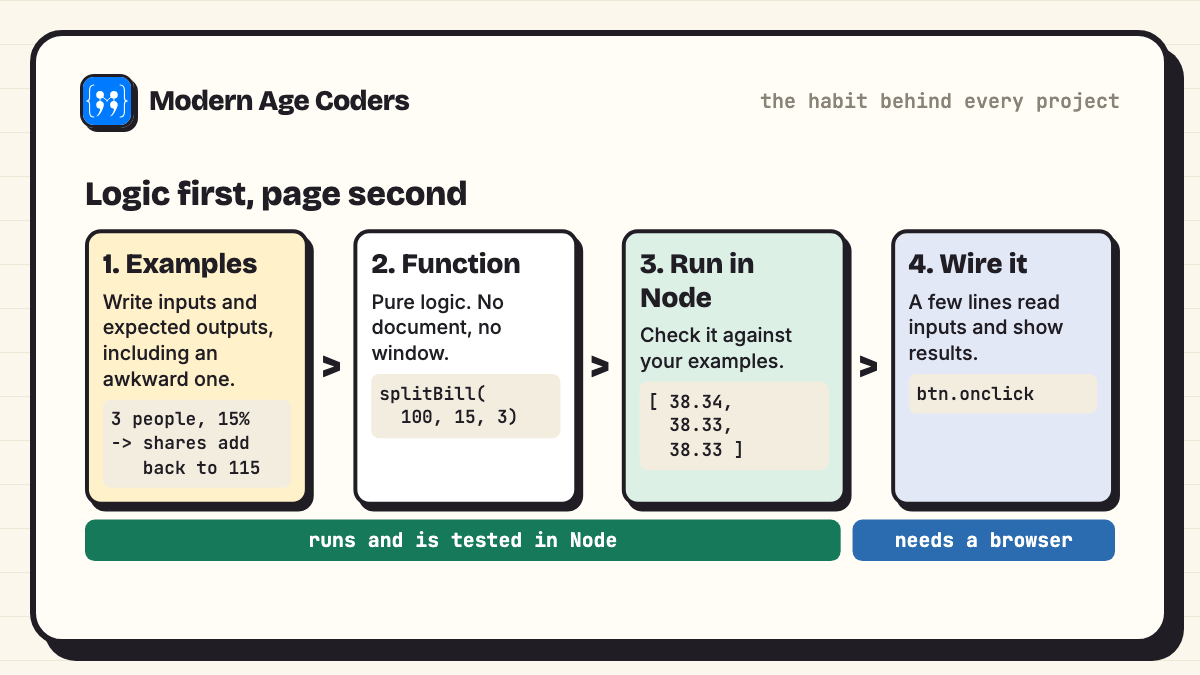
*Test the thinking where it is easy to test, then connect it to the page.*
## JavaScript project ideas for beginners
### 1. Tip and bill splitter
The beginner trap here is money and decimals: 115 split three ways is 38.333..., and if everyone pays 38.33 a cent goes missing. This version works in whole cents and gives the leftover cents to the first people, so the shares always add back up.
```javascript
// Split a bill with a tip, so the shares add back up exactly (no lost paise or cents).
function splitBill(total, tipPercent, people) {
const totalCents = Math.round(total * 100 * (1 + tipPercent / 100));
const base = Math.floor(totalCents / people);
const extra = totalCents % people; // the first `extra` people pay one cent more
return Array.from({ length: people }, (_, i) => (base + (i < extra ? 1 : 0)) / 100);
}
const shares = splitBill(100, 15, 3);
console.log(shares);
console.log("adds up to", shares.reduce((a, b) => a + b, 0).toFixed(2));
console.log(splitBill(45.5, 10, 4));
```
**Output (logic run in Node.js 22)**
```text
$ node 01-bill-splitter.js
[ 38.34, 38.33, 38.33 ]
adds up to 115.00
[ 12.52, 12.51, 12.51, 12.51 ]
```
**In the browser:** three number inputs and a button; show each share in a list.
**Stretch goal:** let each person add a different tip, or split by what each person ordered.
### 2. Live word counter
Counts words, characters with and without spaces, reading time at 200 words a minute, and the most used word. The empty-string run checks the awkward case: no crash, and reading time never drops below one minute.
```javascript
// Live word counter: words, characters, reading time and the most used word.
function stats(text) {
const words = text.toLowerCase().match(/[a-z']+/g) || [];
const freq = {};
for (const w of words) freq[w] = (freq[w] || 0) + 1;
const [top = "", topCount = 0] = Object.entries(freq).sort((a, b) => b[1] - a[1])[0] || [];
return {
words: words.length,
characters: text.length,
charactersNoSpaces: text.replace(/\s/g, "").length,
readingMinutes: Math.max(1, Math.ceil(words.length / 200)),
topWord: `${top} (${topCount})`,
};
}
console.log(stats("To be, or not to be, that is the question."));
console.log(stats(""));
```
**Output (logic run in Node.js 22)**
```text
$ node 02-word-counter.js
{
words: 10,
characters: 42,
charactersNoSpaces: 33,
readingMinutes: 1,
topWord: 'to (2)'
}
{
words: 0,
characters: 0,
charactersNoSpaces: 0,
readingMinutes: 1,
topWord: ' (0)'
}
```
**Browser wiring (not run in Node; parse-checked only)**
```javascript
// Browser only: connects stats() from 02-word-counter.js to the page.
//
const box = document.querySelector("#box");
const result = document.querySelector("#result");
box.addEventListener("input", () => {
const s = stats(box.value);
result.textContent = `${s.words} words, ${s.characters} characters, about ${s.readingMinutes} min to read. Top word: ${s.topWord}`;
});
```
**In the browser:** the wiring snippet above connects it to a text box. We checked that it parses with `node --check`; it needs a page to run.
**Stretch goal:** highlight words used more than three times, a handy tool for essay writing.
### 3. Palindrome checker
Cleans the text, then walks two pointers inward from both ends. That is less memory than reversing the string, and a pattern you will meet again in interview questions. The last example checks that text with no letters is not called a palindrome.
```javascript
// Palindrome checker that ignores case, spaces and punctuation.
function isPalindrome(text) {
const clean = text.toLowerCase().replace(/[^a-z0-9]/g, "");
let left = 0, right = clean.length - 1;
while (left < right) {
if (clean[left] !== clean[right]) return false;
left++; right--;
}
return clean.length > 0;
}
for (const t of ["racecar", "A man, a plan, a canal: Panama", "JavaScript", "No lemon, no melon", "!!!"]) {
console.log(JSON.stringify(t), "->", isPalindrome(t));
}
```
**Output (logic run in Node.js 22)**
```text
$ node 03-palindrome.js
"racecar" -> true
"A man, a plan, a canal: Panama" -> true
"JavaScript" -> false
"No lemon, no melon" -> true
"!!!" -> false
```
**In the browser:** a text box that turns green or red as you type.
**Stretch goal:** find the longest palindrome hidden inside a sentence.
### 4. Rock paper scissors lizard Spock
The rules live in an object, not in a chain of `if` statements. Adding two new moves was two lines of data, and `decide()` did not change at all.
```javascript
// Rock paper scissors: the rules as data, so adding "lizard" and "spock" is one line each.
const BEATS = {
rock: ["scissors", "lizard"],
paper: ["rock", "spock"],
scissors: ["paper", "lizard"],
lizard: ["spock", "paper"],
spock: ["scissors", "rock"],
};
function decide(a, b) {
if (a === b) return "draw";
return BEATS[a].includes(b) ? "player 1" : "player 2";
}
const rounds = [["rock", "scissors"], ["paper", "scissors"], ["spock", "rock"], ["lizard", "lizard"]];
for (const [a, b] of rounds) console.log(`${a} vs ${b}: ${decide(a, b)}`);
```
**Output (logic run in Node.js 22)**
```text
$ node 04-rock-paper-scissors.js
rock vs scissors: player 1
paper vs scissors: player 2
spock vs rock: player 1
lizard vs lizard: draw
```
**In the browser:** five buttons, a computer move from `Math.random()`, and a running score.
**Stretch goal:** make the computer learn: pick the move that beats what the player chooses most often.
### 5. Exact age calculator
Years, months and days between two dates, borrowing days from the previous month when needed, so it copes with short months and 29 February. JavaScript months count from 0, which catches out almost everyone once; the comment says so.
```javascript
// Exact age in years, months and days between two dates (handles month lengths and leap years).
function age(birth, today) {
let years = today.getFullYear() - birth.getFullYear();
let months = today.getMonth() - birth.getMonth();
let days = today.getDate() - birth.getDate();
if (days < 0) {
months--;
// days in the month before `today`'s month
days += new Date(today.getFullYear(), today.getMonth(), 0).getDate();
}
if (months < 0) { years--; months += 12; }
return { years, months, days };
}
const today = new Date(2026, 10, 15); // months count from 0: 10 is November
console.log(age(new Date(2012, 4, 20), today));
console.log(age(new Date(2008, 1, 29), today)); // born on 29 February
console.log(age(new Date(2026, 9, 31), today));
```
**Output (logic run in Node.js 22)**
```text
$ node 05-age-calculator.js
{ years: 14, months: 5, days: 26 }
{ years: 18, months: 8, days: 17 }
{ years: 0, months: 0, days: 15 }
```
**In the browser:** a date input; show the age and the number of days until the next birthday.
**Stretch goal:** show the day of the week the person was born.
### 6 to 9. More beginner ideas
- **Random name picker:** paste a list of names, pick one with `Math.random()`, and remove it so nobody is picked twice.
- **Unit converter:** convert as you type with the `input` event; keep each formula in its own function.
- **Dice roller with history:** roll, show the dice faces, and keep the last ten rolls in a list on the page.
- **Pomodoro timer:** 25 minutes work, 5 rest, with `setInterval`. Store the end time, not a counter, so the timer stays accurate when the tab is in the background.
### 10. Typing speed test
Standard typing-test maths: five characters count as one word, net speed subtracts errors per minute, and accuracy is correct characters over typed characters. The third run shows a real weakness: one missing letter shifts every later character, so accuracy falls to 29% for what is really a single mistake.
```javascript
// Typing speed test maths: words per minute (5 characters = 1 word) and accuracy.
function score(target, typed, seconds) {
let correct = 0;
for (let i = 0; i < typed.length; i++) if (typed[i] === target[i]) correct++;
const minutes = seconds / 60;
const grossWpm = typed.length / 5 / minutes;
const errors = typed.length - correct;
return {
grossWpm: Math.round(grossWpm),
netWpm: Math.max(0, Math.round(grossWpm - errors / minutes)),
accuracy: typed.length ? `${Math.round((correct / typed.length) * 100)}%` : "0%",
};
}
const target = "the quick brown fox jumps over the lazy dog";
console.log(score(target, "the quick brown fox jumps over the lazy dog", 12));
console.log(score(target, "the quick brown fax jumps ovar the lazy dig", 12)); // 3 wrong letters
console.log(score(target, "the quick brwn fox jumps over the lazy dog", 12)); // 1 missing letter
```
**Output (logic run in Node.js 22)**
```text
$ node 06-typing-test.js
{ grossWpm: 43, netWpm: 43, accuracy: '100%' }
{ grossWpm: 43, netWpm: 28, accuracy: '93%' }
{ grossWpm: 42, netWpm: 0, accuracy: '29%' }
```
**In the browser:** show the sentence, start the clock on the first key press, and stop it when the text matches.
**Stretch goal:** compare word by word instead of character by character, so one dropped letter costs one word, not the whole line.
## Intermediate JavaScript project ideas
These keep state, handle edge cases and often talk to the internet. They are where JavaScript starts to feel like real software.
### 11. Wordle clone
Scoring a guess looks easy until a letter repeats. The answer *apple* has two p's and so does the guess *paper*: one p is green, and the other may be yellow only because a second p is still unused. In *robot* against *otter*, the answer has one t, so only the first t in the guess turns yellow and the second stays grey. The fix is two passes: mark greens first and count the leftover letters, then hand out yellows only while letters remain.
```javascript
// Wordle scoring, including the tricky case of repeated letters.
// G = right letter, right place. Y = in the word, wrong place. . = not in the word (or already used up).
function scoreGuess(answer, guess) {
const result = Array(5).fill(".");
const left = {};
for (let i = 0; i < 5; i++) {
if (guess[i] === answer[i]) result[i] = "G";
else left[answer[i]] = (left[answer[i]] || 0) + 1; // letters still available for Y
}
for (let i = 0; i < 5; i++) {
if (result[i] !== "G" && left[guess[i]] > 0) {
result[i] = "Y";
left[guess[i]]--;
}
}
return result.join("");
}
for (const [answer, guess] of [["crane", "trace"], ["apple", "paper"], ["abbey", "babes"], ["robot", "otter"], ["light", "light"]]) {
console.log(`${answer} / ${guess} -> ${scoreGuess(answer, guess)}`);
}
```
**Output (logic run in Node.js 22)**
```text
$ node 07-wordle-scoring.js
crane / trace -> .GGYG
apple / paper -> YYGY.
abbey / babes -> YYGG.
robot / otter -> YY..Y
light / light -> GGGGG
```
**In the browser:** a 6 by 5 grid of tiles and an on-screen keyboard that colours each key.
**Stretch goal:** add a hard mode that forces you to reuse letters you have already found.
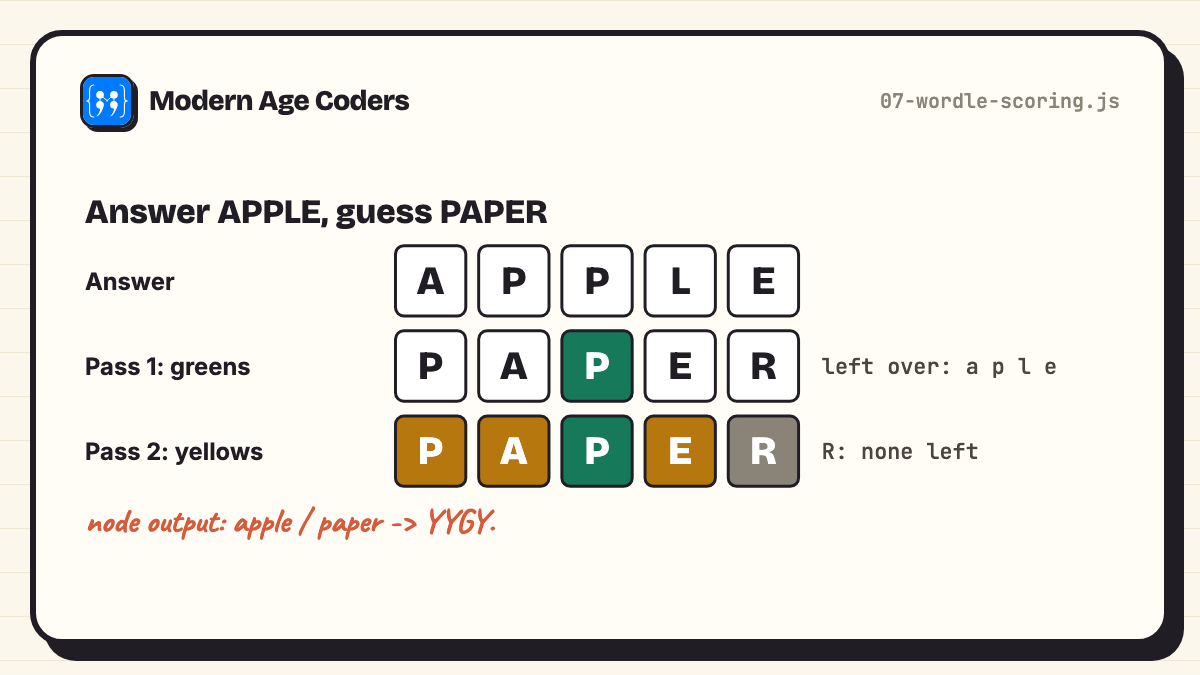
*Greens first, then yellows only while letters are left over.*
### 12. Markdown previewer
Turns headings, bold, italic, inline code, links and lists into HTML. Notice the last line: it escapes `<` and `>` *before* adding any tags, so a user cannot sneak a script into the page. Skipping that step is one of the most common security mistakes in beginner projects.
```javascript
// A tiny Markdown previewer: headings, bold, italic, inline code, links and lists.
function escapeHtml(s) {
return s.replace(/&/g, "&").replace(//g, ">");
}
function inline(s) {
return escapeHtml(s)
.replace(/`([^`]+)`/g, "$1")
.replace(/\*\*([^*]+)\*\*/g, "$1")
.replace(/\*([^*]+)\*/g, "$1")
.replace(/\[([^\]]+)\]\(([^)]+)\)/g, '$1');
}
function markdown(src) {
const out = [];
let inList = false;
for (const line of src.split("\n")) {
const heading = line.match(/^(#{1,3}) (.*)/);
const item = line.match(/^- (.*)/);
if (item && !inList) { out.push(""); inList = true; }
if (!item && inList) { out.push("
"); inList = false; }
if (heading) out.push(`${inline(heading[2])}`);
else if (item) out.push(` ${inline(item[1])}`);
else if (line.trim()) out.push(`${inline(line)}
`);
}
if (inList) out.push("");
return out.join("\n");
}
console.log(markdown(`# My notes
Learn **one** thing a day, *slowly*.
- Use \`const\` by default
- Read [MDN](https://developer.mozilla.org)
Never trust